Reviews

WD Passport Portable Hard Drive: a new kind of sexy

These new Western Digital portable hard drives have me drooling. They’re reasonably priced, and they come in various sizes: 60 GB, 80 GB, 120 GB and 160 GB. They’re powered solely by the USB port, and they’re bundled with encryption software and a bunch of Google software (probably the Google Toolbar and the Google Desktop.) Not that I give a hoot about that — the design is much too cool for me to care about anything else. Wowza!

If you don’t like the prices on the WD site, PC Mall is running a sale on these and other WD drives.

Standard
Reviews

Dictionary of Information Security by Robert Slade

Dictionary of Information SecurityHave you ever wondered just what the jargon of information security specialists really means? What are all those arcane words they throw around to scare us into submission as they lock down our computers even tighter? “What do you mean, we can’t even install a screensaver now?! Can I at least use the bathroom without your permission?”

Unfortunately, there are a lot of dumb Information System Security Officers (ISSOs) at corporations and organizations. I’ve known a few myself. These are the folks that barely know what they’re talking about, and go by the latest article they read. Their reaction to a new piece of software is to lock down the system and disallow it even before they research it properly. Case in point: was Skype shut down at your place of business or at a friend’s workplace? That was a dumb ISSO in action. They also know so little that they simply throw words around, and anyone with a little knowledge of computers can tell when they mess up. “No, ROM is not RAM, and no, it’s not a 300 Gigabit hard drive, it’s a 300 Gigabyte hard drive.”

That’s why books like this Dictionary of Information Security really help. We can educate ourselves, and know when they’re wrong. We can tell when they’re BS-ing, and when they’re telling the truth. My experience has been that they BS for 80 percent of the time, and don’t know what they’re talking about for the other 20 percent. “No, RSS doesn’t stand for Really Scary Stuff, it stands for Really Simple Syndication. And yes, it’s okay for us to subscribe to RSS feeds. Really.” Or, “No, this is a perfectly harmless screensaver. It’s not a RAT (Remote Access Trojan). You’re a rat, for all I care.” I could go on and on…

I love this book. Robert Slade did a great job putting it together, and the terms are explained in language that anyone possessing a cursory knowledge of computers can understand. I’m amused by the forewords, acknowledgments and preface. They’re abnormally long for a book this small, but that’s to be expected. This is, after all, the first Dictionary of Information Security, and a precedent has to be established, so to speak. But once you get down to the terms, you forget about all of the beginning sections, because if knowledge is power, this book packs a wallop.

Get it, and read it. I know it’s hard to believe, after all, who’d read a dictionary, but I’d read this one. And keep it around for reference. And when your ISSO gets on your nerves, start encrypting all your emails with PGP if he doesn’t stop scanning them. Or, if he doesn’t stop blocking access to your webmail account, set up a VPN connection to your home network and do all your web surfing through that. That’ll knock his SOCKS off! Let the fun begin!

Standard
Reviews

Zoom Search Engine: a powerful and inexpensive search engine for your website

Zoom Search EngineI’ve been using the Zoom Search Engine for over a year, and I’ve been very happy with it. But today I realized I hadn’t told many people about it, so I had to fix that.

So what’s the Zoom Search Engine? It’s a beautiful piece of software written by WrenSoft, an Australian web software company. Here’s what I think is amazing about it:

  • It’s inexpensive: the Standard edition is $49, and the Professional edition is $99. (I have the Pro edition.) There’s also a free edition for smaller sites. A side-by-side comparison of the different editions is available on the WrenSoft website.
  • It’s small in size, but feature-packed. The executable is 1.65 MB. Bloatware this is NOT. It is small and it packs a powerful punch. If you don’t believe me, install it, then run through the various options. There are a LOT of them!
  • It does the job — no crashing, no malfunctions. In over a year of serious use, with it running daily to index a lot of files for most of that time, it didn’t crash once. It just did its job.
  • Tech support is great, and included in the price of the software. I needed to contact them twice to ask them about some advanced configs for the app, and they responded within 12 hours. What’s more, they actually solved my problem. There were no excuses and no passing the buck.
  • It’s a scalable piece of software. Not only will it index small, simple sites, but its indexing engine can use ASP, PHP, JavaScript or CGI. The CGI engine can be used for enterprise sites – we’re talking hundreds of thousands of pages here! Not only will it index sites hosted on web servers, but it will also let you put a search engine on a site that runs off a CD or DVD.
  • It spiders and indexes most document file types with the aid of free plugins that work with the paid editions of the software. They’ve got plugins for Word, WordPerfect, Excel, PowerPoint, PDF, Flash and FlashPaper, and Rich Text formats. Having used all of these plugins over the last year, I can tell you they work a treat. They certainly do the job, and there’s no false advertising involved.
  • It’s a customizable and flexible piece of software. You possess the search index. You have access to the actual files used by the search engine, and you can tweak the engine and the index as you please. You can adjust everything. I can’t think of any other solution on the market that will let you do that. When it comes to this, it beats Atom and Google and any other solution, hands-down. Google’s search appliances are a black box. You can play with the options, but you don’t have access to the search technology. You can’t pop the hood and have a look at what makes their searches tick.

So how exactly have I been using the Zoom Search Engine? It’s been powering the site searches on Exprimare and the Road Management Catalog, among a few others. While Exprimare is a fairly small site (it’s my consulting/portfolio site), the Road Management Catalog is a big site in terms of the content, file types and number of pages. It belongs to the World Bank, and vendors of various road construction, measuring and testing equipment have accounts where they submit company information and upload brochures in various file formats. The Zoom Search Engine’s job on that site is to index all of the uploaded files, all of the various companies’ info, the regular site pages, and to make them all available in the search index. It’s been doing a wonderful job over the past year, and I love it. I’ve scheduled it to run every day, and to index all of the files. When it’s time for it to start, it does so automatically. It spiders the site, builds the index, uploads it to the site through FTP, then closes automatically. I don’t have to do anything other than adjust search parameters here and there as the need arises.

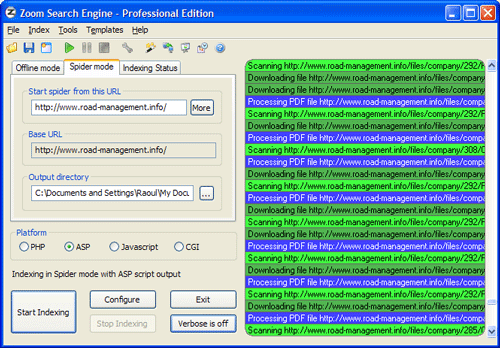
Here is a screenshot of the main app window, just as it’s indexing the Road Management Catalog. Once it’s configured, it spiders the site (you can set it to start multiple threads so the indexing goes faster) and then it goes about its business.

Zoom Search Engine

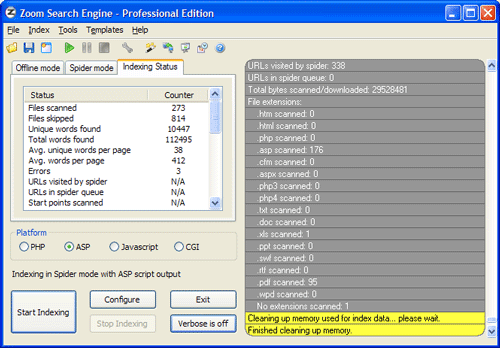
When it’s done, it gives you an index status report, to let you know what it found. It also outlines in red any indexing errors, such as files or pages it couldn’t download or index.

Zoom Search Engine

If I had to talk about the many configuration tabs, I’d have to reproduce their user manual. Instead, let me just show you a screenshot of one of them, the Indexing options. How cool is this! I get to decide what gets indexed, what gets boosted, and how words get joined. And this is just a small sample of what the app can do.

Zoom Search Engine

A lot more screenshots are available on the WrenSoft site. Their support section is extensive, a forum is also available, and their tech support is only an email away.

The Zoom Search Engine is an amazing product, and well worth its price. As a matter of fact, I’d call it underpriced. It’s a tremendous value given its functionality. So if you own a site and have been looking around for a suitable search engine, don’t settle for something that’s overpriced or inflexible. Get something that’s been tried and tested, something that’ll work, something you can use on a daily basis and tweak until you get just what you want.

Standard
How To

If you can't see the photos on this site

Just had a friend tell me he can’t see the photos in my posts, so I called him and we figured out the problem. There are two things to check, and this solution applies to all blogs out there that might have this problem.

  1. Are you at work? If you are, there’s a good chance that your network admins might have blocked photo sharing sites like Flickr. Therefore, all blogs using those sites to host their images will have problems displaying their photos. While the blog might very well come up, the images won’t, and if you don’t know what’s going on, you’ll be wondering if the blog’s owner is in a right state of mind, talking about pictures that aren’t there… But really, everything’s on the up and up, except for your lousy network admins and cheesy IT policies.
  2. Are you using Firefox? If so, have you gone to Tools >> Options >> Content >> Load Images and checked the box next to “For originating site only”? If you did this, no images of any kind (GIF, JPG, PNG, etc.) will show up unless hosted directly on the blog. Uncheck that option, and a whole new world will open up to you. Here’s a screenshot of that Options tab in Firefox.

Load images option in Firefox

Hope this fixes it for you!

Standard
Places

Camping in the Shenandoah National Park

This past weekend, close friends of ours and Ligia and I went camping in the Shenandoah National Park. It was a surreal experience. We left a little later than we’d planned, and caught the rush hour traffic heading west on Route 66. We rued our day as we slowly crawled through miles of clogged up highway, but when we got out of the Manassas area, the traffic improved.

At any rate, we’d been slowed down enough that we arrived on Skyline Drive after dark. Then, it started raining as we approached the park. As if that wasn’t enough, fog set in and we could barely see ahead of us. But after all, we were traveling on mountain tops, and it was the start of fall, so the weather can be pretty unpredictable and wet. After trudging around in the dark, we got to the camp, and found one of the few remaining spots for the night. We were shocked to find out that they were booked solid and there was a waiting list. Our friends, who wanted to stay for two nights, couldn’t.

We bought some firewood and headed to our camp site, dreading the experience that would follow: pitching our tents in the dark, in rain, and in strong wind. Fun isn’t the word to describe it. We turned on our headlights and kept them on as we unpacked the tents and raised them. I’ll spare you the muddy details, but you’d be amazed what four pairs of helping hands, working in unison, can accomplish when under pressure.

We got the tents up, then tried to eat. What to eat? We wanted to heat up the food, but we needed a fire. Have you ever tried to start a fire while it’s raining and windy? No copious amounts of lighter fluid and paper will help. It kept dying down, even though the wood was dry. Finally, I gave up and called in the reserves: our friends. They both tried it, persevered, and finally succeeded. We gave up warming the food and ate some cold sandwiches instead, as we sat and warmed ourselves by the fire.

Fireside chats? Not that night! After we got done eating, we went directly to bed, where another surprise awaited us. Our tents were summer tents, and while they held up very nicely in the wind and rain, they were, shall we say, constructed more for the purpose of aeration than insulation. Luckily, we’d brought plenty of covers, but our friends didn’t. Even though they didn’t admit it, methinks they froze their butts off during the night. And what a night! A gale wind blew the whole time, and waves of rain beat down on our tents. It was noisy and lousy, and cold. It took me a while to fall asleep, but thankfully, I stayed asleep till morning after that. We woke up early, with the wind still blowing outside. The rain had stopped, and I managed to get a fire going without help.

We ate our breakfast and had tea, then had two wonderful surprises. One was the Monarch butterflies, in various stages of development, attached to the exterior walls of the bathrooms. Why they picked the bathrooms I don’t know, but that’s where I found them.

Monarch butterfly larva

Monarch butterfly cocoon

Monarch butterfly cocoon

I found the gold lining on their cocoons truly amazing. That’s actually what drew me to them in the first place. If I hadn’t seen the gold spots and crown lining, I’d have passed by them like many of the other people using the bathrooms. It’s no wonder they’re called Monarch butterflies. They sure look regal with those spots of gold, don’t they?

Then Ligia had the second surprise. She found a wild apple tree, and picked a few apples. (They were delicious, by the way.) What do you think she found on one of them? An Eyed Hawk Moth larva, of all things! What was it doing in the Appalachian mountains? It normally lives in Europe. I don’t know, but it was a beautiful thing to behold.

Eyed hawk moth larva

After our breakfast — and this time we could chat around the fire — we took off and went hiking on the Rose River Trail. Our goal: Rose River Falls. The trail was easy and beautiful. Here are a few photos from the hike:

A nonconformist tree

Tree on a rock

Rose River turned out to be a brook in the forest — quite the optimistic name for a brook, isn’t it? 🙂

Rose River

Forest art on display

Rose River Waterfall

After the hike, we had a wonderful late lunch at the Skyland Lounge, then headed out on Skyland Drive, and stopped along the way at overlooks to take photos of the gorgeous vistas. Here are a few of them:

Wide vista

Set against the sunset sky

Mountain tops

Hazy outlines

Fall colors

Was it a wonderful trip? You bet your britches it was, and I’d do it again in a heartbeat, even with all the nightmarish traffic and surreal weather.

Standard