Places

The Seven Foot Knoll Lighthouse

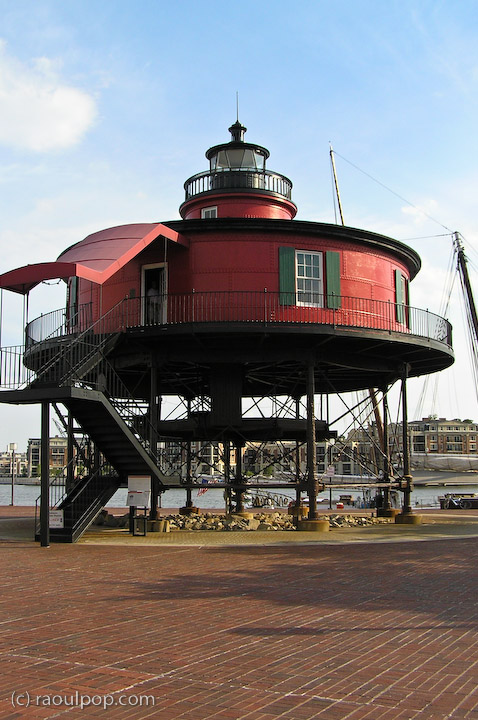
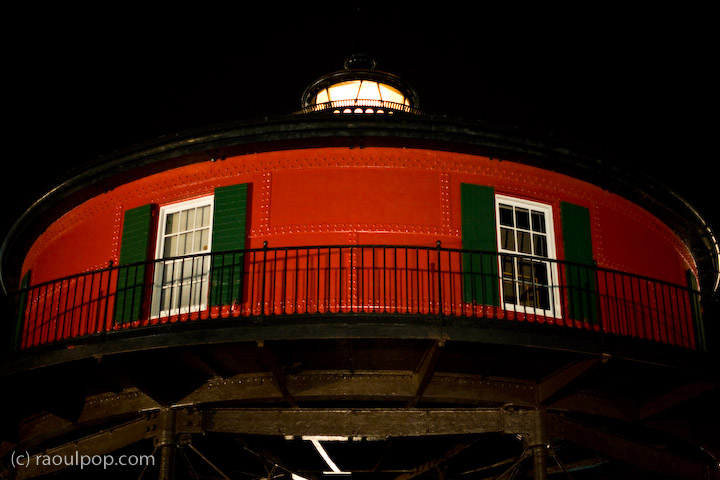
The Seven Foot Knoll Lighthouse is the oldest surviving screw-pile lighthouse on the Chesapeake Bay. It was built in 1856 (before the Civil War), and installed at the mouth of the Patapsco River, where it marked the shoal known as Seven Foot Knoll for 133 years. We visited it during our recent trip to Baltimore.

The lighthouse used an innovative design called the screw-pile, which looks like a large-scale, big-head drill bit. The screw-pile is also described as a “system of cast-iron pilings with corkscrew-like bases”. It eliminated the need for underwater masonry foundations, which were (and still are) hard to build on muddy bottoms. The screw-piles could be screwed into the sea-bottom, and a construction developed on top of them.

The Seven Foot Knoll Lighthouse was the second screw-pile lighthouse on Chesapeake Bay, and was used from 1856 until 1987, although keepers lived in it only until 1949, when it was automated. By the second half of the 1960s, the lighthouse started to show serious signs of aging, and it was thankfully moved to the Inner Harbor in 1988.

From 1856 until 1919, keepers lived in the lighthouse along with their families, but life was very hard in the lighthouse, particularly in the winter, when ice sheets threatened to topple it. Over the years, various pilings and rock barriers were put up to protect the lighthouse from the ice and from ships in distress who might bump into it, but it was the ice that posed the biggest problem, which was never quite solved. Every single winter, families lived in immediate peril there, and even had to be evacuated a few times as the lighthouse bent precariously in the face of advancing ice sheets. From 1919 until 1948, the Coast Guard recognized the hazardous nature of the lighthouse work, and allowed keepers to work in pairs, with each receiving 8 days of shore leave per month.

There’s a courageous event recorded on August 21, 1933, when Keeper Thomas J. Steinhise risked his life to rescue the crew of a sinking tugboat named Point Breeze. There was a terrible storm that night, with fifteen-foot seas and 90-mph winds, and yet Thomas Steinhise fired up his small motor boat and navigated in the direction of distress whistles to save the lives of five crewmen. He was awarded the Silver Lifesaving Medal for his heroic deed.

After the lighthouse was moved to the Inner Harbor in 1988, the Coast Guard donated it to Baltimore City, and in 1990, a lighthouse restoration project, completed with grants and the aid of volunteers, was completed. In 1997, the lighthouse became part of the Baltimore Maritime Museum.

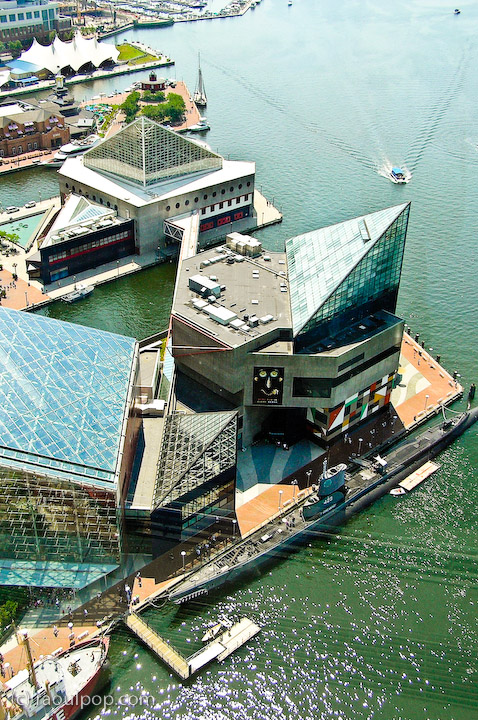
The lighthouse’s current location is more clearly seen in these two photos taken from the top of the World Trade Center in Baltimore. I’m sorry for the poor quality of the photos, but I had to shoot through the thick (and dirty) glass of the visitor center at the top.

Standard
Reviews

A look at noise cancelling headphones

I’ve recently had the chance to try out three noise-canceling headphones:

I looked at these criteria as I used the headphones:

  • Effectiveness of noise-canceling technology
  • Quality of sound
  • Fit and comfort
  • Price

What may or may not surprise you is that all noise-canceling headphones block only low sounds, like the rumble of jet airplane engines. They do not block all sounds. They also rely on passive noise reduction, due to their around-ear design with thick cushions. In other words, don’t expect them to block all sounds, or you’ll be disappointed.

I only looked at around-ear designs, because I cannot stand on-ear designs. They make my ears numb after a half hour or so of wearing them. I need something that fits around my ears and doesn’t press down on them in order to get the comfort I need for prolonged wear.

One thing to keep in mind with around-ear headphones is that some will make your ears hot after a while. If care isn’t taken with the materials used in their construction, the heat that emanates from your ears will build up inside the headphone chamber and raise the temperature, making you uncomfortable. Heat and lack of air circulation are two things that will caused increased bacterial growth in your ears. Yes, this isn’t appetizing, but keep it in mind as you look at headphones and your own headphone-wearing habits.

All three of these headphones come with carrying cases, adaptors (2-pin and 6.3mm) and cables, so don’t let that be a differentiating factor. While I’m on this subject, keep in mind the Bose and Philips headphones only use one AAA battery while the Creative headphones use two AAA batteries. That is a differentiating factor.
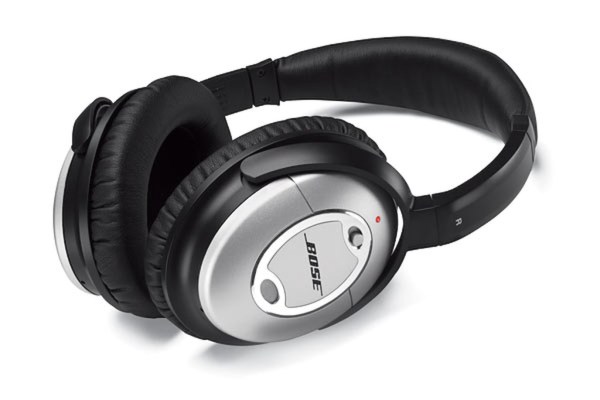
Bose Quiet Comfort 2

The Bose Quiet Comfort 2 is priced at $299 and is the pricier of the three. There are more expensive noise-canceling headphones on the market (Sennheiser has a couple of more expensive models), but the Bose headphones are the most well-known of them all.

Its noise canceling capability was decent, but for the market leader, nothing special. It reduced the sound of jet aircraft, but all voices around me remained clearly audible, though just a little muted. I suppose I could describe the technology as elegant, since it allows one to carry on a conversation with someone while wearing the headphones, but I’m sorry, at $300 you ought to be able to adjust the level of noise-canceling in order to block as much or as little of the ambient noise as you want. They didn’t have that capability and disappointed me.

The quality of the sound was tinny. The noise-canceling technology did a number on the lower sounds coming out of the headphones as well, so everything sounded a bit like a tin-can telephone.

I could find nothing wrong with the fit. It was great. It didn’t press down on my ears, it didn’t press down on the top of my head, and the cushioning was just right.
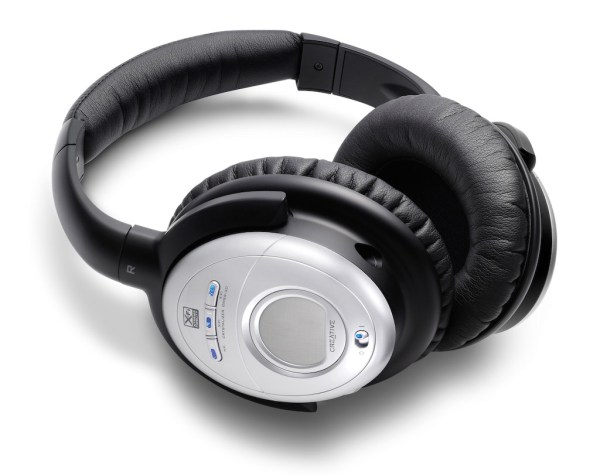
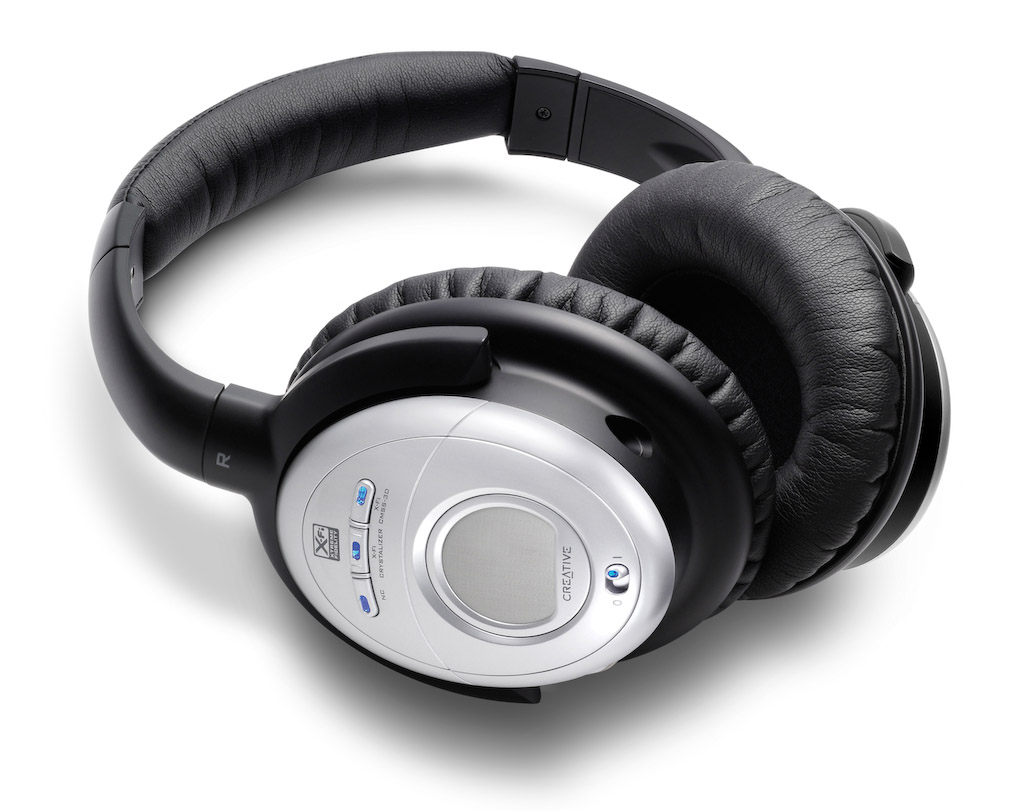
Creative Aurvana X-Fi

These headphones retail at $249 currently, but beware, they’re still listed at $299 at Apple Stores. I have to say I was doubtful of Creative’s ability to offer great headphones, and also suspicious of their price point (frankly, they haven’t earned the right to charge $300 for headphones), and I was proven right on both counts.

The noise-canceling technology was very similar to the Bose QC2 headphones. Same comments apply, and the quality of the sound was just as annoying. I found that the noise-canceling button distorted the sounds significantly, much more so than the Bose headphones.

Creative added two buttons to the headphones, one called X-Fi Crystalizer, which is supposed to give detail and vibrancy, and X-Fi CMSS-3D, which adds spatial characteristics to the sounds. I sat at home for an entire evening, playing with the buttons, turning them on and off, trying to see what and how much the affected the sounds that the headphones produced. I found them to be gimmicky. They did nothing for me. Oh sure, they changed sounds slightly, but not enough to warrant their fancy names and the price of the headphones.

What really annoyed me was their fit and comfort. They pressed slightly on my ears, but their real crime was the quality of the materials used in their build. Within 5 minutes of wear, my ears got hot. Didn’t Creative do any real testing before releasing these? Who did they test them on? Any real person would have noticed that their ears got hot while wearing them, and would have said something.
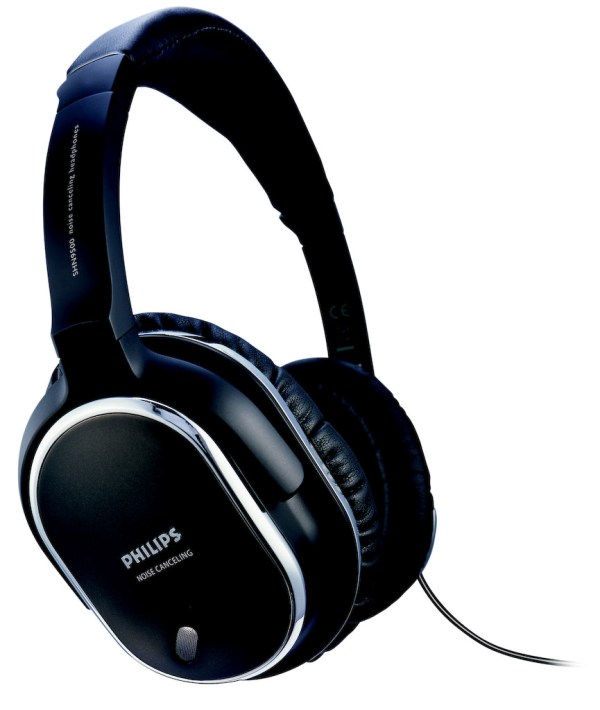
Philips SHN9500

These headphones offer an equivalent level of noise-canceling technology. Having already explained how I feel about it, there’s no need to go over it again. I found the quality of the sound to be better than with the other two headphones. Quite acceptable, as a matter of fact, and it wasn’t severely affected when noise-canceling was turned on.

What I also liked was the presence of a Mute button on the headphones, which will turn off any sound coming through them, and also turn off noise-canceling. This allows you to hear someone better while you have the headphones on, without needing to remove them. You might say, well, why not just turn off noise-canceling? Because that’s a slider button, while the Mute button is a push-button with a very light action. Quite thoughtful on their part.

The fit and comfort of the headphones was another surprise. They fit nicely, and they’re made of quality materials. My ears do not get hot while wearing these, even for extended periods of time.

The biggest revelation for me was the price: $70 at Costco when I got them less than a couple of weeks ago. Now I see they’re $90 — they must be popular.

All in all, the Philips SHN9500 headphones have the right combination of features, comfort and price to make me happy. These are the headphones I would recommend to you.

More information

Photos used courtesy of Bose, Creative and Philips companies.

Standard
Thoughts

Removing photos from my main feed

At least for now, I’m removing my Flickr feed from my main feed. If you are a feed subscriber, you’ve been able to see my Flickr photos appear as separate feed items in my main feed, thanks to a feature at FeedBurner that allows me to splice my site feed with my Flickr photos feed.

But I think the implementation of the feature isn’t well suited to my main site feed, because a separate feed item is created for each photo. Considering that I may publish 3-4 text articles per week but up to 25 photos, this means you’ll see 3-4 feed items for my articles, and up to 25 feed items for my photos, which skews the proportion of my content in a direction unacceptable (to me) for my main site feed.

I contacted FeedBurner to ask if at some point they might put through an enhancement that would allow users to select a “digest” option for the Flickr feed. It would work the same as the “digest” or summary option on their Link Splicer features, which publishes a single feed item with all of that day’s bookmarks. It’s been a while, I haven’t yet received a reply, and I’m not waiting any longer.

So, at least for now, the photos are out of the main site feed. You can still find them in my photography feed (they’ve been there all along), so if you’re interested in getting them along with my photography posts, please subscribe to that feed as well.

Do let me know if you really want to see them here in the main feed. If I get enough responses, I may put them back, but I didn’t want to distract or deter folks who are interested in reading my usual content.

Thanks for reading my stuff!

Standard
Thoughts

Dumping on the Poor: see the video

I wrote about the problem with e-waste and pollution in China back in April, but this topic is worth harping on every chance I get. It’s very serious, and it will affect us as well, in the very near future. The Earth is smaller than we think, and its ecosystem is fragile enough already.

Please watch the video entitled “E-Waste: Dumping on the Poor” (4 min 35 sec). It’s available on YouTube, and it was put together by a journalist called Michael Zhao, who took a trip to China and filmed what’s going on there. I found out about the video from an article in Time Magazine, entitled “Your Laptop’s Dirty Little Secret“. Michael has a website as well, called eDump. The full documentary he made is available here (20 min).

Standard
Thoughts

What's on my desk?

The idea for this post has been sitting among my drafts for a long time. I always thought it’d be a good idea to share how I work and what equipment I use, for the benefit of those of you that want to put together a similar setup. Let me make it clear that I’m not doing this to brag. I realize my equipment is fairly expensive and out of reach for some. Believe me, I’m keenly aware of its cost, and have made certain sacrifices in order to acquire it.

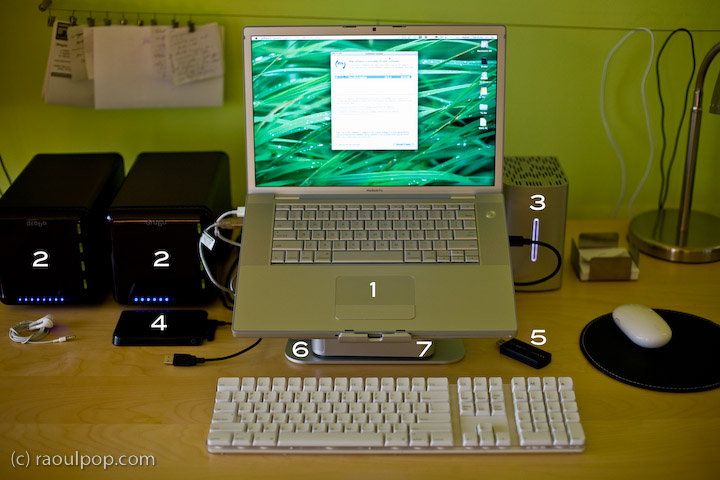
The hardware I have now is the best hardware I’ve had so far, and it allows me to easily develop for my clients, write for my sites, process my photographs and edit my videos and movies. See the photo enclosed below. Each important piece of equipment is marked with a number, and each number is explained in detail.

Here’s what you see above:

  1. 15″ Apple MacBook Pro: I love its dedicated 512 MB video card, and its design and speed. It allows me to focus on my work, not twiddle my thumbs while the computer plays catchup to my commands.
  2. Drobo: I have two of them. I store backups of my photos on one, and my videos on the other. Both of them are shared over my home network, so that my other Mac, a 20″ iMac G5, can access the videos and play them in Front Row.
  3. 2TB WD My Book Studio Edition II drive, running in RAID 0 (striped) mode: WD was kind enough to give me this drive as a gift of sorts, considering the significant problems I had with my 1TB WD MyBook Pro Edition II drive. I think they got tired of my complaining, and sent it to me to shut me up. Well, it worked. This drive has done great so far, and I have no complaints. I plan to write a review for it soon. I’ve been putting it through its paces so far, and it’s held up nicely. I connect it to my MBP through the Firewire 800 port, and I love the transfer speeds.
  4. 250GB WD Passport drive: I bought this last year, and it has been very useful. It’s small, stylish, and it’s powered solely by the USB port. I use it a LOT to transfer big files between computers.
  5. Turbo.264: a nifty little gadget built by the folks at Elgato, it speeds up H.264 conversions significantly. I’ve been putting this through its paces as well, and plan to write a review soon.
  6. mStand laptop stand: I love this stand, and reviewed it recently. It’s the best-designed stand for the MBP.
  7. newerTech miniStack v1: This is the first version of the popular miniStack drive enclosure. It uses PATA drives, and it has built-in FireWire and USB hubs (3 ports each). I use it as a USB hub, and it sits underneath my laptop stand — that’s why it’s not clearly visible in the photo. Both my Drobos are connected into it, and I have a spare USB port that I can use for my CF card reader, etc. If you want to have a better look at this enclosure, you can see it better in my Drobo review, where it appears in both the photos and the video.

As you can see, I aimed for simplicity in my setup. I wanted the most amount of processing power and hard disk space, in the smallest amount of physical space. You’re looking at about 5TB of storage in the photo.

Most of the heavy lifting (in terms of data crunching) happens on the WD Studio drive. I use it as a staging area for video processing, and transfer the finished, edited ones to one of the Drobos. I also use it to store and work with my Lightroom photo libraries. Working with photos in Lightroom from a Drobo is too slow for me, and the WD Studio Drive offers a visible advantage as I process each photo. I then back up my laptop and the WD Studio Drive to the Drobo through Time Machine.

You may recall I initially moved my photo libraries to one of the Drobos because I kept experiencing Lightroom library corruption and thought the WD Studio drive was at fault. As it turns out, Lightroom itself is to blame. Once your photo library reaches tens of thousands of photos (I have over 40,000 photos in one of my libraries), Lightroom will experience library corruption on a fairly regular basis. It’s just an unstable piece of software, and I hope that the next version will be better.

Just a quick note for those of you that noticed it. There’s a wire that runs behind the laptop, along the wall. The photo isn’t crooked, the wire is. I use it to hang small wires or notes to myself on it, and being loaded down with a few toward the center (which is only partially shown in the photo), it appears slanted. Sorry about that. It bothered me, but I wasn’t going to spend an hour or so in Photoshop cloning it out.

Hope this helped give you some ideas! If you have any questions, let me know.

Standard