
Websites that resize my browser’s window or maximize it are completely annoying. When someone does that to me, no matter how interesting their content may be, I go somewhere else instantly. Fortunately, there’s a way to block anyone from messing with my browser windows or tabs in Firefox. Here’s how to do it:
First, go to Tools >> Options, then click on the Content icon in that dialog box. It should look like this:
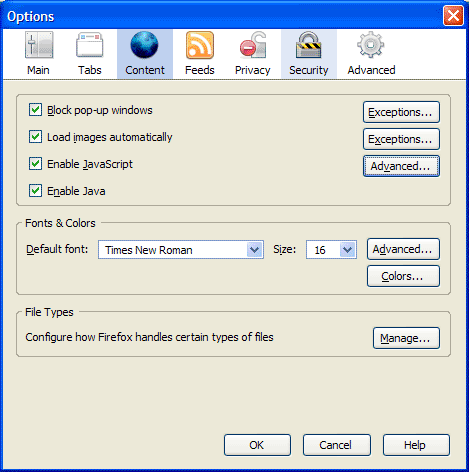
Now click on the Advanced button next to the “Enable JavaScript” checkbox. You’ll get the following dialog box:

Make sure to uncheck the following options:
- Move or resize existing windows
- Raise or lower windows
Click on the OK button twice to save the changes, and then you’re done. This will disallow any website to adjust the size of your browser window. It’s a great way to make sure your browsing experience stays yours.
Discover more from Raoul Pop
Subscribe to get the latest posts sent to your email.
 Raoul Pop
Isn’t it just awesome by the way, how firefox doesn’t let me scroll on this webpage, while I have the settings window open. So I have to memorize the whole procedure before trying to do it (or use another browser).
LikeLike
It is completely beyond my understanding why the browser developers allow this to happen at all.
It’s absolutely ridiculous. It’s one thing that website developers are stupid enough to think that they should resize my browser, but why do pretty much all browser by default settings allow this?
Also why do they allow pop up windows, without buttons and address bar?
It is a huge security risk, and even a very obvious security risk, when you let websites be able to generate what looks like genuine windows applications or dialog boxes, tricking people into thinking it’s an actual virus alert, and preventing them from even getting away from such webpage, without clicking ok to some dialog, where you don’t know what actually happens if you click ok.
There is not one single good reason for any browser to allow such behaviour. We could immediately get rid of a big part of the malware infections people get, by not having retarded browsers like this.
I can only theorize that browser developers are either complete idiots, or are getting paid off by malware/spam producers and advertisers to allow this. The is no legit website that has any valid reason for needing it.
So the solution is simple. The default settings on any browser should be that it does not allow any resizing or moving of the browser AT ALL. It should allow pop-ups at whatever size it wants, BUT it should ALWAYS have the adress bar, buttons, etc., so it’s always obvious that it’s a browser window, and nothing else.
This is so obvious, that there really is no other explanation, than the developers either being retarded, or being paid off.
Of course, to me and other computer literate people, there is not much security risk. To us it’s just really really annoying, but we know how to get out of it. But the majority of people do not know how to deal with this, and standard settings should be in favor of those people.
LikeLike