Thoughts

Moved my ideas to ComeAcross

Until now, I housed the various ideas I published online at my personal site. I decided to move them here to my blog, and I did just that today. I could not have done it without the Import/Export functionality in WordPress, and even more importantly, without the Redirection plugin from Urban Giraffe. That plugin is one amazing piece of work! I just love it.

I imported my posts, assigned them to a new user so I could easily find them, and then I simply entered the corresponding URLs on each site into the Redirection plugin settings page, as seen below. Then I deleted the original posts at RaoulPop.com. Now every time someone tries to access the page for an idea at RaoulPop.com, they’ll get a 301 redirection to that same page here at ComeAcross. It couldn’t have been easier!

The Redirection plugin for WordPress

I got a chance to look at my ideas once more, and it was interesting to see that some of them have already come true. I’ll let you have a look at them as well. Can you tell which ones are already out there?

The thing to keep in mind as you go through these ideas is that I tried to match the publish time of each one with the exact time (to the minute, anyway), when I got the idea. So you’ll see publish times going back to 2005 or so for most of them. The gravitational propulsion-levitation idea doesn’t have an exact time. I do know that I started thinking about it back in 1997, and although it seems outlandish, I’m pretty confident that it can be done. We just don’t have all of the pieces of the that jigsaw puzzle yet.

This page will give you the background information on why I decided to publish my ideas on the web. I call it my great experiment in ethics. We’ll see how it turns out.

Standard
How To

Proper disposal of old electronic equipment

Frank Gruber of SomewhatFrank.com posted a neat video made by GOOD Magazine to his blog. The video’s enclosed below, and you can also view it directly on YouTube. It documents first hand just how electronic waste is “recycled” in countries like China or India. Besides unmitigated pollution to the air, ground and water, the workers themselves are exposed to serious damage from working at those places.

Please don’t contribute to the problem. Do the right thing. Recycle your electronic waste (old computers, stereos, iPods, printers, etc.) the right way by sending them to companies that will do it right here in the US, in environmentally-safe ways. The major computer manufacturers will either recycle them for free nowadays, or allow you to pre-purchase a shipping label so you can send the computer back to them at the end of its useful lifespan. The average cost to recycle a computer in the US is $30. That’s a small price to pay to ensure that you’re not causing even more damage to the environment that feeds you and keeps you alive.

Standard
Thoughts

ISPs to become IT providers for home users?

Bruce Schneier makes a solid point in his recent post entitled “Home Users: A Public Health Problem?”, where he states that computers and computer security are much too complicated for the regular home user. That’s most certainly true. No matter how much you “educate” the average user, they’re still going to mess up. Even if they’re working in IT, that’s no guarantee of know-how. There are so many things you can do in IT these days that an IT guy might not even know what a hard drive or a RAM module looks like. You really have to like working with computers to get the way they work and to be willing to put in the time to learn how to protect and operate them the right way.

But then Schneier says ISPs should become IT providers for the home user. In other words, provide real Help Desk support for software installations, router and firewall settings, anti-spyware and anti-virus software, etc. This sounds good at first until you realize there’s a very small step between that and choosing to mitigate damage to the network by controlling what software users can install and use on their computers. What’s to stop ISPs from requiring that users register their computers on their domain (or doing it automatically as users run their software CDs), then pushing down group policies that enforce their rules?

What’s the alternative? Make computers easier to use! Operating systems and the gadgets that go along with them have to become really easy to use. A certain number of security options have to be enabled by default, and those settings have to able to propagate from the OS down to the gadgets (firewalls, routers, printers, network drives, WiFi devices, etc.) automatically and where applicable. You set it once and it gets set everywhere else. I talked about this in another post of mine, entitled “It’s got to be automated“. Have a look at that as well.

The starting point should be OS X. It’s not the best OS it could be, but it’s a lot easier to use for most everyday tasks than other systems, but even it is hard to figure out for a normal user when it comes to security and special protocols like site hosting, file sharing or FTP, and privileges between users in places like the Shared folder.

We need to do away with arcane file names for user groups in operating systems. Privileges should be much easier to set for files, folders and entire drives. Systems ought to be smart enough to know when we’re trying to share something with the firewall up, and pop up an on-screen wizard to assist us. They should anticipate certain things and guide us through.

I say we need to make all network devices manageable directly through the computer, instead of having to log onto them separately. This goes especially for routers. The computer should know there’s a router on the network, and allow us to manage its settings from the control panel, as we would manage a printer, but make it even easier. It should auto-configure it with medium-level security by default and only ask us to choose a password and be done with it.

The solution lies in making better software and hardware.

Standard
Reviews

Stuart Little and Stuart Little 2 (1999, 2002)

Ligia and I really loved the first two Stuart Little movies. They both combined live action with 3D computer animation, and back in 1999, this was an achievement. By today’s standards, we can tell the animation’s a bit dated, but still, the overachieving, little white mouse is a lovable character and you soon gloss over the flaws in the animation that couldn’t be helped back when it was made.

The first movie deals with Stuart’s adoption by the Little family, and his adventures while fitting in with both the Little’s only child, George, and the family cat, Snowbell, voiced by Nathan Lane. We find Stuart befriending a little canary named Margalo and gaining a little independence from his overly protective mother in the second movie.

I must admit that I was bothered a bit by Stuart’s introduction to the audience in the first movie. Yes, this is a children’s story, and we’re supposed to suspend disbelief, and I’m more than willing to do that, but still, for such a pivotal plot point, the screenwriters might have done a better job explaining why the Littles would adopt a mouse instead of a child, and why it didn’t seem odd to them that a mouse spoke and read, or was treated as one of the children at the orphanage.

My impression was that Stuart dominated the first movie as a character, but Snowbell blew everyone else away in the sequel. Nathan Lane’s whiny voice was the perfect complement for the lazy, spoiled Snowbell, who comes through in a big way for both Stuart and Margalo. I would also be remiss if I wouldn’t recognize Michael J. Fox’s contribution to the two movies. His voice was the right choice for Stuart.

I would not recommend the third installment in the series, made in 2003. It was a complete departure from the first two movies. While still featuring the voices of the original actors, it was completely (and poorly) animated in 2D, thus losing that winning combination of live action and 3D animation that really made the first two movies. The Stuart Little in that third movie looks so unfamiliar, and the animation is so choppy and un-lifelike, that it’s really nearly impossible to bond with the characters. Only children unfamiliar with the first two movies might enjoy it.

More information:

Standard
Reviews

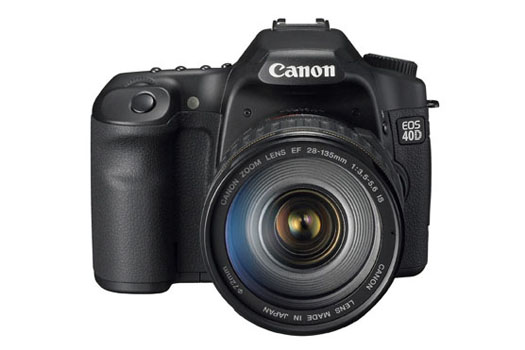
Camera preview: Canon EOS 40D DSLR

On August 20, just three days ago, Canon announced the new EOS 40D DSLR, the successor to the very good EOS 30D camera. The camera will begin selling in September, and Amazon has already started taking pre-orders. After reviewing the specs and photos, I am impressed. Canon has made the 40D better than the 30D exactly where it mattered, and more.

Canon EOS 40D (front)

The 40D is a bargain considering its features. Let me run through the important ones:

  • 10.1 megapixel CMOS imaging sensor, capable of up to 3200 ISO natively
  • DIGIC III image processor
  • Redesigned AF
  • 6.5 fps continuous shooting capability up to 75 large/fine JPEG or 17 RAW files
  • 3-inch LCD with a higher brightness level and broader color gamut than the 30D
  • Upgraded viewfinder: 0.95x magnification, 264 degrees viewing angle and 22mm eye point)
  • Magnesium-alloy body with dust and weather resistant construction, unlike the 30D
  • Live View (yes, this isn’t a typo)
  • Integrated sensor cleaning

Although the sensor has the same resolution as the Rebel XTi, it is not the same sensor. The 40D’s sensor has microlenses over each pixel to enable increased sensitivity up to 3200 ISO. More importantly, the sensor can recognize four times the number of colors recognized by the 30D, due to its 14-bit color depth (wow!). In addition to this, the 40D also features Highlight Tone Priority and High ISO Noise Reduction functions as the 1D Mark III professional DSLR.

The amazing frame-rate, which is more than the 5 fps rate of the 30D, is achieved through the new DIGIC III processor, DDR SDRAM memory buffering, four-channel per line sensor readout, and two separate motors for shutter and mirror operation.

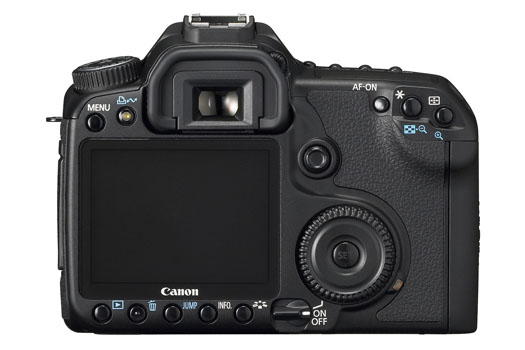
The on-screen menu now has the same tabbed format as the 1D Mark III DSLR. The viewing angle had to be decreased from 170 to 140 degrees, in order to make the screen more viewable during bright daylight — this is in addition to the improvements cited for the LCD in the bullet points above.

Canon EOS 40D (back)

AF has been re-designed to produce greater precision at all focal points, up to f/5.6, and increased precision for center AF on lenses at or faster than f/2.8. AF calculations are 30% faster on the 40D than the 30D. Photographers can also opt for two focusing screens: a grid-type screen that makes it easy to compose the shots, or a matte screen re-designed for AF precision.

Not many other reviewers have spotted this, but the 40D offers Live View! Yes, indeed, you can now compose your shots using either the viewfinder or the LCD screen. A quick aside: Olympus was the first company to use Live View on their prosumer DSLRs.

Usually, there’s increased shutter lag with Live View, since the mirror has to swing back down to block out the light, then back up to allow for the proper exposure. The shutter lag with the 40D is said to be minimal because the mirror stays up and only the shutter opens when you click the shutter button. This also helps reduce noise and vibration. Oh, did I mention that you can zoom in on the LCD screen to make sure your focusing is tack sharp during Live View?

The Live View function also works with the EOS Utility software, which means you can see just what the camera sees on your computer’s monitor, and control it remotely for studio sessions.

The EOS Integrated Cleaning System shakes off dust from the low-pass plate installed in front of the sensor with ultrasonic vibrations when the camera is turned on or off. A special adhesive collar installed around the sensor collects the dust and holds it there.

There’s a redesigned vertical grip/battery holder, with weather and dust resistance built-in, and a new Wireless File Transmitter (WFT-E3A) has also been introduced. The battery life’s been improved over the 30D, and my guess is you’ll be able to get about 1,500 shots/battery/charge. That means about 3,000 shots altogether with the vertical grip in place.

You can buy the 40D by itself, or with the new EF-S 18-55mm f/3.5-5.6 IS Standard Zoom (available in October), or the EF 28-135mm f/3.5-5.6 IS USM Zoom (as pictured below).

Canon EOS 40D (side)

More information:

Standard