How To, Reviews

How to watch Netflix from abroad

At the start of 2009, when I left the US to spend most of the year abroad, I was an avid Netflix subscriber, and I looked forward to being one even as I lived abroad. There was a loophole in the Netflix protocols which allowed my wife and I to watch movies from outside the US (see this post), but they plugged it very quickly — within three days after I wrote about it.

I was, needless to say, very disappointed. Here I was, a US citizen, with a US mailing address, a US bank account and a US credit card, wanting to watch movies legally instead of downloading them from torrent websites, not able to do it, just because my IP address happened to be from another country. This was not fair. I cancelled my subscription. In hindsight, my anger was unnecessary. The situation is probably a result of certain stipulations in their contracts with the movie studios.

Still, there’s obviously a need for a legal way to watch movies online, right? And until Netflix (or another company) decides to open up their servers to paying customers from all over the world (which I hear might happen), here’s how to watch Netflix from abroad, right now.

You’ll need:

  1. A US credit card and a US mailing address. If you’re from the US but you happen to be abroad, great, you’re in luck, because you probably still have both of these. If you’re not from the US, see if you can make some arrangements with friends in the US.
  2. A VPN connection that will give you a US IP address, or a DNS Proxy Service subscription which will make Netflix and other US streaming sites think you’re based in the US. 
  3. A computer that’s compatible with Netflix Streaming. At this time, I believe only Mac and Windows computers can do it. The last time I tried it, a Linux machine wasn’t compatible. You could get a Netflix-compatible device or media appliance but if you want to keep things simple, stick with a computer.

That’s all you’ll need.

The DNS Proxy Service is a fairly new offering and is, in my opinion, the easiest way to configure your device to watch Netflix from abroad, without installing any additional software or configuring a custom VPN connection. You simply change the DNS servers for your network card (see these instructions).

Now let me talk a bit about the VPN service. In the two years I’ve spent abroad, I’ve used two services: AceVPN and HideMyNet. I’m currently using HideMyNet for my VPN service, and I’ve been using them for the past four months. Both cost about the same, but from my experience, HideMyNet has faster, more reliable service.

I started out with AceVPN but after several months, I started getting a lot of buffering messages when watching Netflix (you know, where you wait for it to load up the movie). It would take minutes, sometimes 5-10 minutes to load up a movie, and toward the end of my subscription with them, the movie would stop playing multiple times as we watched it, and we had to wait for it to rebuffer. It was annoying, particularly when the movie stopped playing during a gripping scene. Who knows, perhaps they were experiencing growing pains or temporary issues with their servers…

Out of the blue, the folks from HideMyNet contacted me to see if I wanted to try their service and write about it. Disclaimer: they offered me a 1-year subscription to give an honest opinion about their service. I told them I would, but that I’d need to try out their service thoroughly before I spoke about it, and if I found anything negative, I was going to reveal that as well. That was back in April of this year. It’s now August, four months later, and after all this time, I can definitely recommend them.

I do have a few pieces of advice for you:

  • If you’re not sure how to set up a VPN connection as L2TP or PPTP on your Mac, go with OpenVPN and Tunnelblick. Check out their setup instructions for the details. If you’re on Windows, setting up an L2TP connection is super easy and takes only a few minutes.
  • Make sure to ask their Tech Support which of their servers would be faster for you. Here’s some general advice I got from them on this issue: “Generally you want to connect to whichever server is closest to you [geographically]. If you’re in the EU you should try our DC and NYC servers. If you’re in Asia you should try the Seattle or LA servers. If you’re in South America you should try the Dallas and LA servers.” 
  • They currently have a limit of two simultaneously connected devices, so keep that in mind. I believe Netflix has the same limit, but if you were, for example, watching Netflix on one computer and browsing the internet on another, both through their VPN service, you wouldn’t be able to, for example, connect a third device (computer or phone) through the VPN service until you disconnected one of other two.

So there you have it. That’s how you can watch Netflix from abroad. It’s simple, it’s easy and it’s legal.

On a side note, I can’t understand why movie studios prefer to hang on to costly and outdated ways of distributing content, and thus encourage piracy, instead of promoting lower-cost, easily available methods of renting or purchasing their content, for any customer, anywhere. There are many people who would rather pay than use torrents, but the cost is either too high, or there’s no way to pay even if they wanted to. Thank goodness for VPN technology, otherwise I’d start thinking about using the torrents as well.

Standard
Reviews

Initial thoughts after installing OS X Lion

I thought I’d jot down a few thoughts about OS X Lion, having just installed it on my MacBook Pro. I looked forward to getting it for months, and as luck would have it, I happened to be out of town with little internet access when it was released on the 20th.

  • The upgrade was painless. I bought it from the App Store, it began to download, and when it was done, it ran and finished without any bugs.
  • Without a media disc of some sort, or at least an image file, I am somewhat concerned about a re-install of the OS, should I need to do a fresh install. I hear there’s going to be a Lion Flash Drive available for sale in a month or so, but short of paying for that as well, is there some way for me to burn Lion on a DVD or make a bootable flash drive?
  • Overall, I like it. The design is more refined. It feels like a more mature OS.
  • I like the full-screen functionality of the apps.
  • The login screen is interesting. It’s a departure from what we’ve seen thus far. I like it, but I’m not sure what to think about the round thumbnails for the accounts yet. I’m used to square thumbnails. Photos are rectangular. Square photos? They used to be en vogue in the late 1800s. But who knows, maybe those round thumbnails will grow on me.
  • I do wish iCloud were launched at the same time as OS X Lion. For example, I don’t know if I did something to cause this, but every time I start up Safari, it wants to log me into MobileMe, where I don’t have an account. (I only have a .Mac email address.) If iCloud had been available right now, this glitch wouldn’t have occurred, because .Mac and MobileMe would have been unified already. And I think more people are going to run into it as they poke around in the new OS.
  • The hidden scrollbars are great, but they’ve changed the direction of the scrolling, haven’t they? It’s counter-intuitive… and yet it’s not. You now push up with two fingers on the trackpad to scroll down, and pull down to scroll up. If you think about it, it makes sense, but it’s been the other way around until now, so it’ll take a while to get used to it.
  • I like Launchpad. I think it’s a visually appealing way to present a list of all the Apps on my Mac, and to allow me to easily choose which one I want to run.

A couple of pieces of advice before you upgrade:

  • Run Software Update to make sure you’ve got the very latest version of Snow Leopard and whatever other updates you need.
  • Run Time Machine to make sure all your stuff’s backed up, just in case something goes wrong.

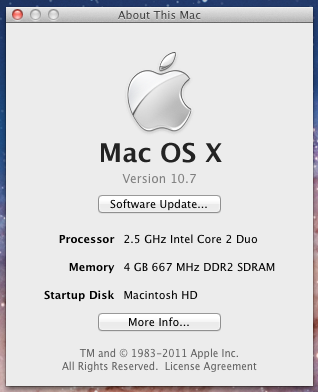
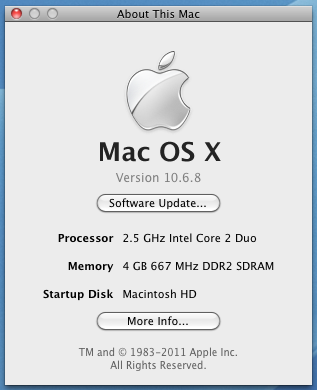
For those who like this sort of thing (I do), I’ve included a couple of before and after screenshots of my “About This Mac” window.

Before the upgrade to OS X Lion

After the upgrade to OS X Lion

That’s it for now.

Standard
Reviews

Google+ gets social networking right

On June 28 at 10:17 PM UTC, I got an invite to Google+ from Brian Rose (a Googler). I was in for a treat! 🙂

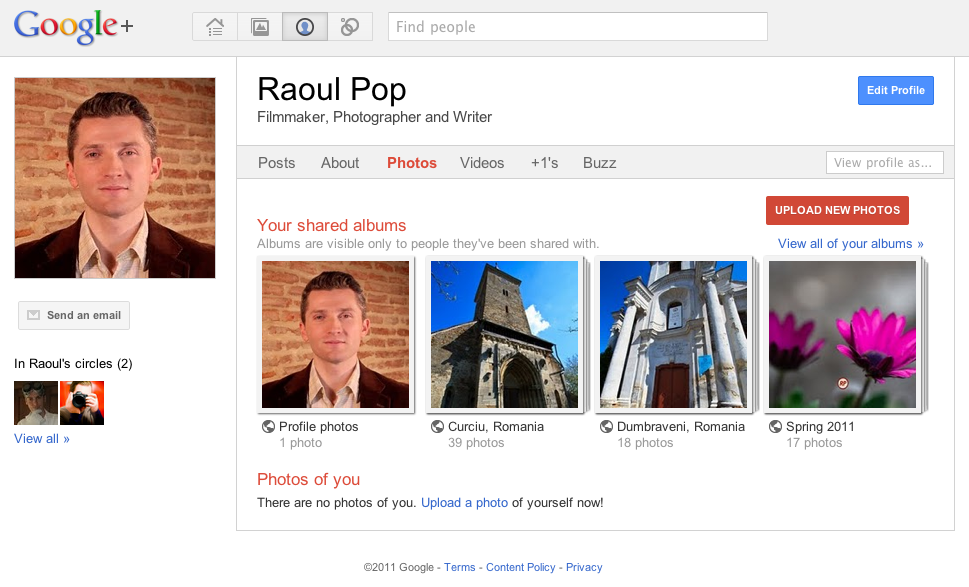
Here’s what the home screen looks like:

After multiple previous tries, I think Google’s finally got it with Google+. I’ve used both Wave and Buzz, and while they were interesting and innovative in their own ways, I just wasn’t drawn to them to the point where I wanted to use them multiple times a day, like I do with Facebook.

With Google+, I’m naturally drawn to the platform, because of its capabilities, and because of its design. I think Google finally bested Facebook.

Selective sharing and contact grouping

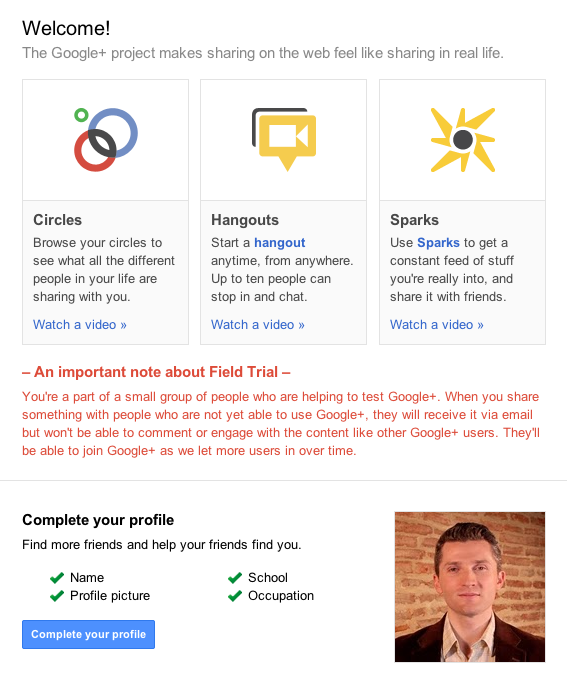
The feature I consider most important is Circles. The equivalent feature on Facebook is Lists, but there, it’s almost impossible to manage and use. On Google+, the platform was designed from the ground up around Circles, and this offers me the capabilities I’ve always wanted on a social networking platform:

  1. To share stuff selectively and privately, if I so desire, and do it effortlessly and safely. Facebook doesn’t do this. When you post an update, it goes out to everyone, and by that I mean all your contacts on that service.
  2. To easily group my contacts into categories. Again, Facebook doesn’t do this. There, you’re forced to Friend someone regardless of their relationship with you (online contact/person you barely know/acquaintance/actual friend/vip/business contact, etc.).

Here are a couple of screenshots from Google+ that demonstrate this.

I can’t emphasize enough how important selective sharing truly is on the web, and how refreshing it is to see it working so beautifully on Google+. The service even includes safeguards against accidental re-sharing of posts outside their intended group, with a feature that disables resharing. (I know you can still copy and paste or take a screenshot, but with this feature, you can indicate clearly to your contacts that you want that post to stay private. What they choose to do with it depends on their respect for you and your wishes.)

Gorgeous design

I’m floored by Google+’ gorgeous design. I love the whitespace, the clean color scheme, the layout and the button styles. I love that this same design now extends to my Google Profile, and to the photos posted to my PicasaWeb account. (Incidentally, isn’t it about time to change the name of PicasaWeb to Google Photos?)

All this design beauty makes me wonder where Google will stick the ads that will pay for Google+? I do hope they’ll use the same design philosophy for the ad boxes.

Instant video chat and topic-based web filtering

The other two important features of Google+ are Hangout and Sparks. Hangout is a super-easy group video chat, and Sparks gives you the chance to subscribe to topics of your choice, which then Google uses to filter the web and to present you with articles for your perusal.

Hangout is another fantastic (and sticky) feature for Google+. It builds on the power of Google Voice and Video Chat, which has been a feature of Gmail for years, and expands it to the point where you can chat with up to 10 people, live. This is going to be incredibly useful for families and (perhaps more importantly) for businesses. They’ll be able to hold web meetings instantly and easily now.

Sparks is a neat feature, but it still needs a bit of work. I’m not sure how the articles it presents are curated. And I get that you simply type in the topic you want, then click Add, but some (or most) people won’t get that. Perhaps a directory-like interface, where more choice and sub-choices are presented to people, will make it easier for them to use Sparks.

Areas of improvement

Right now, when I upload a video to Google+, it gets stored in a new album named after that day, in PicasaWeb. Same deal for new photos uploaded to the service.

This is the same approach used for Blogger. It’s a headache-free approach to handling media storage, but for those of us who have YouTube accounts, I’d rather have a choice of storing the video at YouTube instead of PicasaWeb. I want to manage all of my videos in one place instead of mixing them with my photos, particularly since I’m a YouTube Partner.

I’d also like to have the choice of storing uploaded photos in a gallery of my own choosing, or in a new gallery that I name myself. I think Google engineers will readily see the advantages of this without further explanation.

Where’s the integration with Google Docs? It’d be great if Google+ allowed easy sharing of documents from that service.

I like that you can’t auto-publish feeds to Google+, because it makes it harder for spammers to pollute the service. All of the input is manual, which means you have to physically be there and type it in. It does mean a bit of extra work after you’re written a blog post and want to share it. Perhaps some middle ground will be reached in the future, where blog posts, photos and videos will be automatically brought in.

That’s it for now. If I have further feedback, I’ll write another post. If you’d like to add me on Google+, here’s my profile.

Thank you Google, for the service and for the early invite! 

Standard
Reviews

CFR still doesn’t get it

I last wrote about CFR (Caile Ferate Romane) — the government-run railroad company — in 2006, and — in spite of the repeated government bailouts and consulting firms who have been called in to help them re-structure, and the IMF directives for their improvement — things have gotten no better.

Ligia and I rode on an InterCity train today, from Cluj to Medias, in what was supposed to be 1st class. In my last article on the matter, I concluded that at least 1st class on the InterCity still meant something. It did, back in 2006. Now it no longer does.

This is how the 1st class wagon looked back then.

1st class no longer looks like this

Now they’ve done away with the glass dividers, and with most of the tables between the chairs. They’ve also faced most of the chairs forward, so they could fit more of them into the wagon. It looks like you’re riding in a bus. They’ve killed 1st class.

Another thing which I dislike is a cheap populist move on the part of Romanian politicians, whereby they granted old folks the privilege of riding 1st class for free. So what you end up with is paying 1st class prices for the questionable privilege of being stuck in the same wagon with a bunch of rude, loud (and smelly) old people from all walks of life, who love to complain (loudly) about everything during the trip.

I can understand the need to make travel more affordable for older folks who live on a limited income, but when you also kill 1st class in the process, which is the place where you make your better profit margins, that’s just not smart, nor is it in any way polite or respectful to the people who pay their own way for 1st class and expect to get clean, deodorized wagons and a little peace and quiet during their travels.

Things have gotten so bad with the CFR that 1st class is no longer a luxury — it’s almost a necessity. Riding in 2nd class or 3rd class on most trains means putting up with ungodly stenches, filthy chairs, smelly people and bathrooms you’d rather burn than use. Any way you split this hair, the people in charge of the CFR end up looking like a right bunch of ninnies.

To top things off, 1st class seems to also be the place for the conductors to take their uniforms off and relax after making their rounds — and talk loudly while they’re at it, with no regard for the passengers — as was the case today. Because obviously what the tired business passenger wants while they’re trying to sleep is to hear a conductor’s country bumpkin accent, complaining about cellphone rates. That’s the CFR way…

It seems to me the CFR management has had tons of time to turn the company around. They’ve been offered countless opportunities to mend their ways. But the more time and opportunities they get, it seems the more determined they are to run the company into the ground. It’s a painful realization for me, because I like train travel, and I have had wonderful experiences traveling by train as a child — you know, back when 1st class was actually a luxury, 2nd class was clean, and 3rd class was presentable.

Standard
Reviews

An introduction to the Water Ionizer

I put together a short video demonstration of our water ionizer, as a quick introduction to the idea of ionized water and its main benefits. A few months ago, I laughed at the idea of ionized water. I thought it was a foolish concept. After all, the acid-base chemistry of our body would cancel any ionized water. I thought it wouldn’t have any effect, and who knows, it might even be harmful. But my mother had bought a machine, and she went on and on about its benefits. She said we should get one as well, and once Ligia and I tried it and saw its effects on our body, we’d be sold.

Well, I am sold on ionized water now. We drink alkaline water daily, and wash our faces with acid water. Our bodies went through a process of detoxification, and from time to time, we still feel the effects of eliminating toxins (headaches and slight nausea). Most of the time though, we feel great, much better than we did before. Our complexion has improved as well. My face is much smoother. Ligia says the same about hers, and I agree, although she’s always had great skin.

An Introduction to Ionized Water
Released 5/23/11
With English and Romanian subtitles

If you’re a skeptic, I understand, having been one myself. The only thing that will convince you is to try drinking alkaline water for yourself and see the difference on your own body. You don’t have to buy a machine. See if there’s a health store in your area that has a water ionizer and is willing to sell it to you, and drink it for a few weeks. Keep a daily journal of what’s going on with you, and make up your mind afterward.

A lot of people prefer to get bottled water, thinking it’s pure. There’s been plenty of research on this, so you don’t have to take my word for it — purity is a foreign concept to bottled water, which contains more impurities than tap water. Given the way it’s kept in plastic bottles, whose chemicals leech into the water over time, and the harsh conditions in which it’s kept (cold or hot, depending on the weather), it’s also possible that it’s harmful to the body, its chemical make-up having been altered. Water isn’t just water. Simple as its chemical formula is, it just isn’t as simple as H2O. Water is basic to all of the chemical reactions in our bodies, so it’s a reactive substance. Water also needs to have minerals in it, in order to be properly absorbed by our body, and to benefit it. Do you think that a reactive substance like water does well when kept in toxic plastic containers over long periods of time, and subjected to cold or hot conditions — temperatures which facilitate various chemical reactions?

Ionized water isn’t a recent discovery. It’s been around since the 50s, and it’s regularly consumed in countries like Korea and Japan. If it’s been around that long, surely that in itself lends it a bit of credibility. A hoax usually doesn’t stick around for 60 years or more.

You can, of course, remain a skeptic. You’ll be in good company, since the folks at Wikipedia have done so. You can also be skeptical of the skeptics, like this man. Or you can choose to believe the testimonials of those who’ve tried the water, folks like me or like the ones in this video (with whom I am not affiliated in any way, shape or form):

The thing is, even if you choose not to believe anything about ionized water, surely you can use logic to reason the following out: alkaline cancels out acid, right? Then it stands to reason that at the very least, alkaline water should help in those situations where the stomach is overly acidic (ulcers, acid reflux, upset stomach, etc.) So if you’ve got one of those conditions, the logical thing to do is to drink alkaline water instead of taking antacid tablets, and see how you feel. You may just discover that it will make a bunch of other pre-existing conditions go away, and that’s not a bad deal, is it?

Here are a few photos of the particular model we have, the Chanson VS-70. I’m not saying it’s superior to other models and that you should get it above others. It’s a good model from a good brand, which we liked because it’s an under-the-counter unit, and it has seven electrolysis plates, coated with platinum. Other models are counter-top units and have fewer plates. Price-wise, the Chanson brand is also less expensive than other brands on the market, so they’re a good deal.

Standard