Reviews

Camera review: Olympus EVOLT E-510 DSLR

Back in August 1st, Olympus PR invited me to attend the Legg Mason Tennis Classic here in DC and shoot with their new DSLR, the EVOLT E-510. I enjoyed myself thoroughly at that event, and my thanks go out to Michael Bourne from Mullen, the agency that handles the PR for Olympus.

When I arrived there, I was given a review kit for the E-510, containing the camera, the FL-36 speedlite, and the two-lens kit (14-42mm and 40-150mm). For my review, I did what I usually do: I used the review unit as my primary camera for a month, taking note of the experience. What you’ll get now are my impressions of the camera, after taking thousands of photographs with it in various light and weather conditions, indoors and outdoors. You can choose to watch it below or here, and to download it as well. My full written review is enclosed below as well.

The E-510 is a prosumer camera made to be portable, affordable and easy to use. The E-510, a 10-megapixel DSLR, is smaller and lighter than its predecessor, the E-500, which I reviewed this past January. Even though it’s smaller, the grip was designed so well that I could hold the camera comfortably, without missing the heft of the E-500 or that of my personal camera, the Canon 5D. (I like my cameras a little chunky, they’re easier to stabilize that way.) The E-510 was even lighter than I thought with a lens mounted on it. The two-lens kit includes two premium lenses designed for travel and portability. They’re incredibly light given their focal range. I expected the 14-42mm lens to be light, but I was blown away by how small and light the 40-150mm lens was. Olympus really did an amazing job with the lenses and the camera when it came to portability. The whole kit (camera, lenses, speedlite and charger) was so light I could carry it anywhere very easily. I could run with it and barely felt its weight — as a matter of fact, I did just that on a couple of hikes through the forest.

The thing to remember when looking at focal lengths with any Olympus DSLR is that they’ve got a 2x crop factor. It’s because they use the 4:3 standard, which specifies a sensor size of approximately half the dimensions of a full frame sensor (17.3 mm vs. 36 mm and 13 mm vs. 24 mm). This means the surface area of the sensor is 1/4th that of a full frame sensor. It also means you need to multiply the focal length listed on each lens by two in order to get the effective focal length. If the math is a bit confusing, just keep remember the crop factor and you’ll do fine.

To illustrate this, let’s look at the two kit lenses. The wide angle zoom, 14-42mm, yielded an effective focal range of 28-84mm. The tele zoom, with a 40-150mm range, yielded an effective focal range of 80-300mm. Now do you understand why I was amazed by how light and small the lenses were? Try finding an 80-300mm zoom lens from another DSLR manufacturer, and I guarantee you that it won’t be this small and light. Olympus can accomplish this because of their sensor’s form factor. It’s a small sensor, 1/4th the surface area of a full frame sensor. That means they need less glass in the lenses, because there’s less sensor to cover with the glass. Because there’s less glass, the lenses are easier to make. You get the same optical quality, but the lenses are cheaper, lighter and smaller.

As long as I’m talking about the sensor, I should mention that it’s a Live MOS, which gives it the ability to do Live View (it lets you compose photos on the LCD instead of the viewfinder). There is a slight delay between the time that you press the shutter button and the photo is taken when using Live View. The advantage is that you can zoom into the photo up to 10x, on screen, and make sure your focus is tack sharp. This is particularly useful for macro photography.

If you’re graduating to the E-510 from a point and shoot, you may say “Big deal, I’ve composed photos on the LCD screen all along. What’s the difference?” Well, the difference is huge. Until Olympus introduced Live View, no other prosumer DSLRs on the market offered it. The mechanisms were much too complicated. Because CCD sensors were in use on most DSLRs until recently, separate CMOS sensors would have needed to be installed in the camera, and light diverted to them with additional mirrors. As a matter of fact, Olympus’ first Live View DSLR, the E-330, functions through that mechanism. Things there are complicated, and the potential for breakdown is increased. But with the introduction of the E-410 and E-510, Olympus switched to CMOS sensors altogether. This allowed them to use the same sensor for both photographs and Live View, dramatically simplifying the mechanism involved. Other camera manufacturers soon followed suit, and now we have both Canon and Nikon DSLRs with the same capabilities. Nikon also switched from CCD to CMOS sensors in their recent DSLRs, the D300 and D3.

To get back to Point and Shoot cameras, they use CCD sensors. That means they have little rinky-dink CMOS sensors hidden away next to the CCD sensor, and they use those to let you compose on screen and record movies. But those tiny sensors have pathetic imaging capabilities, and understandably so. By and large, Point and Shoot cameras are small and inexpensive. Manufacturers can’t afford to cram expensive components in there. Not so in the E-510 and other DSLRs that have Live View or its equivalent. They use the same large, expensive sensor for everything. While they won’t let you record movies, they will allow you to see very accurately what your camera sees, directly through the lens, and will automatically compensate for aperture, shutter speed, ISO and white balance settings so you can see how a photo will look before you press the shutter button.

The camera also features Olympus’ SSWF (Super Sonic Wave Filter) technology, which shakes dust off the sensor. Olympus was the first company to introduce this feature, and other DSLR manufacturers only recently introduced similar technology on their cameras. The SSWF light is located next to the shutter button on top of the camera, and it flashes blue when it’s active. I can tell you that it does work. I did not have to sit there with the Heal tool, removing dust spots from the photos taken with my E-510, whereas I have to do that on a regular basis when I take photos with other DSLRs.

Another important feature built right into the camera is the sensor-shift image stabilization. It stabilizes the image by shifting the sensor on both the X and Y axis (horizontally and vertically). You can hear it working on longer exposures. It works pretty well. But don’t forget to switch it off when you mount the camera on a tripod, otherwise you’ll get blurry photos. This is a pretty common bug with image stabilization technologies, and it doesn’t matter when they’re built into the camera or the lenses. When the camera is kept very stable, they go nuts trying to stabilize what doesn’t need to be stabilized. The end result is a blurry photo. So switch off the IS.

The advantage of in-camera stabilization versus in-lens stabilization is that it’s cheaper over the long term. You can use any sort of compatible lens (older or newer) with that camera, and you’ll be able to take advantage of the image stabilization with every single lens. That’s not the case with in-lens stabilization, which, as its name implies, is located in the lens. That means each of those lenses will cost more, and their cost adds up as you buy more of them. To be fair, it seems that in-lens stabilization works over a greater range of f-stops in real-life use than in-camera stabilization. But you can’t argue with the price difference, and the results are pretty good, too.

The photo you see here was taken at a shutter speed of 1/13th of a second, as I was bent over a brook, looking at a crayfish. If you take photographs yourself, then you know that you can’t keep your body very stable when you’re bent over, unless you’ve stabilized yourself somehow, which was not the case here. Yet that photo came out clear and sharp, even at 100%. The water even managed to look a little oily, which only happens with longer exposures.

Other useful features of the camera are the many scene modes, and the ability to write to CF, Microdive and xD cards. To find two-card slots on other DSLR brands, you have to look to the professional models (over $4,000). Yet Olympus includes that option on the very affordable, prosumer-oriented E-510. That’s a really nice touch.

The E-510 uses the new TruePic III image processor, which gives better colors and more accurate skin tones. I found that to be true as I used the camera. Where I found this image processor similar to the TruePic II (used in the E-500) was in the auto white-balance, which tended to err on the side of colder color temperatures. Thankfully, I shot in RAW, so I was able to adjust the WB in post-processing, but those shooting in JPG mode may want to be aware of this and adjust the White Balance accordingly before using the camera. Personally, I prefer cameras that err on the side of warmer color temperatures (but not too warm, because that can get pretty ugly). My Canon 5D does a great job with the auto white balance. But I expect that from it. It cost three times as much as the E-510.

The autofocus still uses only three focus points, and yes, that makes a difference. I found it to be slower than autofocus on cameras that use more focus points. It tended to hunt sometimes, even in broad daylight. But overall, it worked pretty well, and the focusing delay wasn’t significant.

Battery life is advertised at 650 shots per charge. In practice, I found that I got about 800 shots per charge. Maybe that’s just me. I always seem to get more shots per charge than the specs.

I use Adobe Lightroom to post-process all my photos, regardless of what camera I use. I noticed that RAW files created by Olympus cameras (both the E-500 and E-510 are subject to this), take longer to load fully in Lightroom than RAW files created by Canon cameras. I’m not sure why this is, and whether it occurs with other workflow-oriented applications, like Aperture, but I thought it worth mentioning. Just in case you’re wondering, I did upgrade to the latest version of Lightroom as of this date, which is version 1.2.

Sensitivity to low light was a point of contention in my review of the E-500, where I noted the CCD sensor was prone to lots of chroma noise at higher ISO. Presumably, the Live MOS sensor of the E-510 has better low light performance and generates less noise. In terms of ISO speeds, it goes from 100-1600, like the E-500. I did find less chroma noise when I used it. Luminance noise was about the same, perhaps a little more, but that has to do with CMOS sensors in general.

Basically, I can’t give you a definitive opinion on the camera’s low light performance. The two kit lenses that shipped with my review unit were too slow to properly judge how this camera does in low light situations. The 14-42mm lens was f/3.5-5.6 and the 40-150mm lens was f/4.5-5.6. To judge a camera’s performance in low light, you’d need faster lenses, ones that can open up to at least f/2.0. Ideally, the lenses should open up to f/1.8, f/1.4 or f/1.2. I asked Olympus to send me such a faster lens, but they weren’t able to do that within the review period. As I told them, I’d be glad to test the camera with a fast lens if they can arrange it at some point in the future, and report on my findings.

It wouldn’t be fair if I didn’t also show you some more photos taken with the camera. They’re enclosed in the photo gallery above. You can also view all of my published photos from the Legg Mason Tennis Classic, which were all taken with the E-510.

The E-510 is a great all-around DSLR. It’s light, affordable, packed with features and options, and it will help you get great photos. I would definitely recommend it to someone who’s looking to purchase a DSLR and lens kit for well under $1,000.

More information:

Standard
Reviews

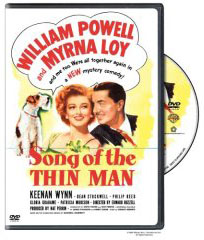
Song of the Thin Man (1947)

“Song of the Thin Man” (1947) is the sixth and final installment in the Thin Man series, starring Bill Powell and Myrna Loy. The series started in 1934 with “The Thin Man”. In the midst of the depression, that first movie struck a chord with people and was instantly popular. More movies followed, in 1936, 1939 and 1941. One was even made during WWII, in 1944.

This final movie made in 1947, at the end of WWII, was a turning point. From that point on, movies changed. Americans who came home from abroad, from war and travel, had a different perspective in life. Social hierarchy changed. American prosperity came into its own and people’s expectations changed (not necessarily for the better). You’ll see hints of all those things in this movie.

I may be wrong on this, but it’s possible that Bill Powell was made to wear a wig for this movie. He had a receding hair line as early as 1931, and it was visible in his other Thin Man movies. In this one, however, you’ll see a clear, determined hair line, much closer to his forehead than in earlier movies. It bothered me a bit. I wanted to see the Bill Powell I knew, with his own hair.

The plotline for this movie is similar to the others in the series. Someone gets murdered, there are lots of suspects and motives, the likely suspects turn out to be false, and the criminal is someone close to the action but an unlikely choice. Although we know how things are going to unroll, it’s the action, the dialogue, and above all, the actors that keep us interested in this movie, and in the others as well.

Bill Powell and Myrna Loy are two of my favorite actors, and they’re amazing when they’re together on screen. It’s a delight to watch them. Every time I see a movie that stars only one of them, I miss the other. They’re just not the same if they’re not together.

More information:

Standard
Reviews

Camera preview: Nikon D3 and D300 DSLRs

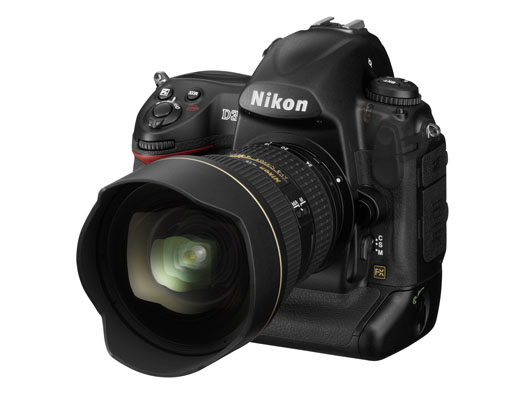
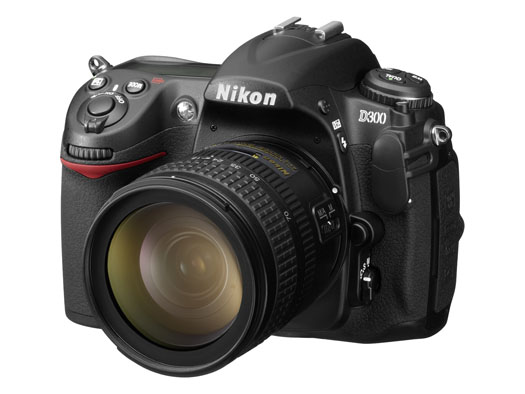
On August 23, 2007, Nikon introduced two new DSLRs to the market: the full frame D3, and the D300, an upgrade to the D200. I’m late with this bit of news — I meant to publish the post sooner, but I was out of the country and I had less access to the internet that I’d hoped. Still, since I went to the trouble of getting nice studio pics for the two cameras, I thought I’d write about it anyway, late or not.

First, a few photos. There’s the D3 below, and the D300 is right after it.

These two cameras have gotten plenty of coverage already. What else is there to be said? Well, remember the big CCD vs. CMOS arguments that went on and on for years? Hmm, let’s see, who was it that argued for CCD? Why, it was Nikon, of course. What have they just done? They’ve switched to CMOS entirely for their new DSLRs.

There was another argument thrown around, also by Nikon and its supporters. Um, yes, I remember now, it had something to do with full-frame vs. cropped sensors. I’m paraphrasing here, but Nikon people were saying something along the lines of “full-frame isn’t needed for digital, it’s useless — we can accomplish everything we want with a cropped sensor.” So, what just happened? Nikon put out a full-frame DSLR.

Short of holding my brother’s D70s in my hand, changing the lens, cleaning its sensor and taking a few photos, I don’t have a lot of hands-on experience with Nikon cameras. I considered buying the D200 this past spring, but opted for the Canon 5D instead. I can tell you what my brother says about his D70s — and believe me, it’s not flattering… It turns out there was a ridiculously high rate of factory defects with that camera, particularly when it came to autofocus. His camera can’t autofocus to save its life. He’s had to use manual focus ever since he bought the camera. He’s finally going to pay to repair it, after more than one and a half years of use. He’d have sent it to Nikon for repair while the warranty was still good, but there are no official Nikon reps in Romania, which is where he lives and works.

We sat there comparing on-screen menus between his D70s and my Canon 5D. He couldn’t believe how easy it was to navigate the menus on my 5D, and to get the settings that he wanted, the first time, right away. He kept mumbling under his breath about how pathetic the D70s was, and how he could never find stuff when he was pressed for time. Heck, I tried to help him find the sensor cleaning mode and gave up after several minutes. We just couldn’t find it. We ended up putting the camera in mirror lock-up mode, pressing the shutter and cleaning the sensor that way. That’s pretty pathetic from a UI (User Interface) point of view.

On the other hand, I’ve heard some people praise Nikon’s controls. I don’t get it. Perhaps if you’ve been a Nikon guy for years, the stuff is just easier to find, but they sure don’t make it easy for someone who picks up the camera and wants to use it. Canon does make it easy, and that’s one of the reasons I like them.

There’s another thing I can say for Nikon in general. Their PR people gave me the run-around when I tried to get a D200 for review. On the other hand, Olympus and Canon were responsive and willing to send me review units. I’ve also heard of really bad customer support experiences from Nikon users.

Take these experiences for what they’re worth. They may have been isolated incidents — or not. I’m certainly willing to forget my bad experience with Nikon PR if they are interested in sending me a D300 or D3 for review. I’ll do what I usually do, which is to use it as my primary camera for one month, then write an honest, detailed review of the experience.

From a design point of view, these two new cameras look really nice. I can’t tell you how they feel in my hand, since I haven’t had the chance to hold them (yet).

I do want to point out that Nikon has more high-res photos for its cameras than Canon. That’s nice. It gives people a chance to get a closer look at them, and it’s an added convenience. You can see the rest of the photos below.

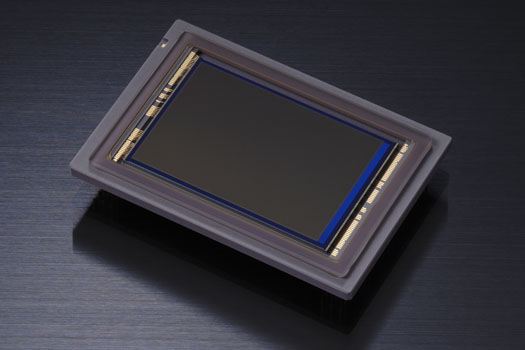
Here’s that troublesome CMOS that Nikon people used to badmouth in the past. It’s the sensor that does what a CCD cannot, which is to enable Nikon to go all the way to 6400 ISO natively on the D3 and 3200 ISO on the D300 (and even all the way up to 12,800 and 25,600 ISO in expanded mode on the D3).

Yes, ISO-wise, Nikon one-upped Canon, but they haven’t managed to get the same amount of resolution from the full-frame sensor that Canon can get. My 5D has roughly the same resolution as the D3 (12.8 vs. 12.1), while the Canon 1Ds Mark III has 21.1 megapixels — but only goes up to 1600 ISO natively. So there’s a certain give and take here that has to do with the physical limitations (at least to date) of the medium.

If you squeeze more pixels out of the same surface area, the pixel pitch decreases and you end up more prone to noise. If you keep the pixel pitch large, you can get more low-light sensitivity, but you don’t have the resolution. Nikon chose to go for low-light sensitivity with their two newest cameras, which I think is an interesting choice. Perhaps they did it to silence the Nikon critics who kept harping on their noise-prone CCD sensors. Whatever the reason, I’d love to see just how one of these two cameras does in low light with a nice fast lens like a 50mm f/1.4 or f/1.2.

Till then, I’ll leave you with more information:

Standard
Reviews

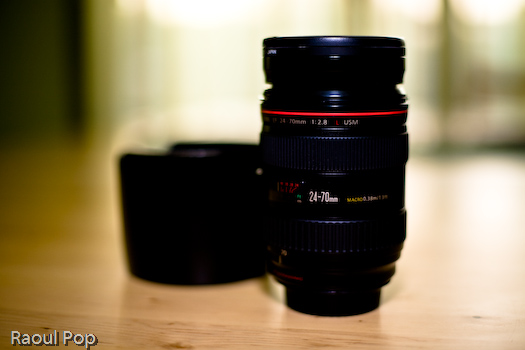
Lens review: Canon EF 24-70mm f/2.8L USM Zoom Lens

The EF 24-70mm f/2.8L USM lens is the professional standard zoom from Canon, and so far the golden standard for sharpness, contrast and bokeh in a zoom lens. Photographers drool over it and swear by it. Its focal range on a full frame sensor makes it very appealing for event photography. It goes from a wide 24mm to an almost portrait-length 70mm to allow for close-ups. It’s also plenty fast for a zoom — f/2.8 — just about the fastest a zoom lens can get these days. (I’d like to see an f/2.0 standard zoom, but I don’t know when that’ll happen, and the cost will probably be fairly high.)

I’m going to talk exclusively about the 24-70mm lens in this review, but if you’re interested, I also wrote a comparison of this lens and the 24-105mm f/4L zoom. You may want to read that as well, in order to get a better idea of how this lens performs.

As you know if you’re a regular reader, I write about how products feel and the results they give me. My reviews aren’t spec-heavy. I give you my honest opinion about a product, and tell you what results I got with it.

With that in mind, the 24-70mm zoom is a good lens. It’s plenty sharp, has plenty of contrast, and the bokeh is great. I liked it. But it’s heavy — really heavy. When you hold it in your hand, it doesn’t feel that heavy, but when it goes on your camera, your wrist really takes a beating, and it feels as if the camera’s body is going to give. This lens is incredibly front-heavy. That means there’s no chance of holding the camera with one hand for long when you use it. On my 5D, it’s really hard to use the lens without a vertical grip, which gives me more finger room. Without the grip, you have to support the lens itself when you take the shots, and then you have to be careful that you don’t grip the focus ring and impede the auto focus from rotating when you press the shutter button. I use a keyboard and mouse all day long, so I realize I may not be the strongest guy around, but I lift weights once or twice a week. Still, I tell you, this lens really took its toll on my wrist joint and finger muscles. It was a real workout. I didn’t expect this kind of weight from a standard zoom. I did expect it from the EF 70-200mm f/2.8L IS USM zoom. If you’re so results-oriented that you’re willing to overlook the weight, great, get it, you’ll love the results.

I mentioned the useful focal range above. Let me illustrate it with a few examples below. At the wide end, you can capture beautiful landscapes… or nice wide angle shots of buildings. At medium range (30-60mm), you can get photos like these. The lens also has a very useful close-focusing range (0.38m), which allows you to get close-ups like you see below.

Let’s talk about low light. This lens has no image stabilization (like the 24-105mm zoom) and that means the maximum aperture of f/2.8 starts to show signs of strain in low light. It means we have to bump up the ISO and make sure the shutter speed stays at or above the focal length, stabilize the camera, and/or use a flash. Like I said in the opening paragraph, this isn’t a fault of the lens — f/2.8 is the fastest aperture for a zoom lens on the market, so that’s just how things are.

I enclosed a few photos taken in low light above. The first was taken inside a piano store, and although there was plenty of fluorescent lighting, I found that it wasn’t quite enough to shoot freely, like I would have done with a faster prime lens. I can’t argue with the sharpness and bokeh though. It’s beautiful.

There’s a second interior photo, where I had to use a speedlite. I used the 580EX II, also from Canon, and bounced it off the white ceiling. The lens does fine with a good speedlite, so that’s no problem.

The last two low light photos were taken in downtown Bethesda at night. For the first, I stabilized the camera with both hands on a balustrade in order to take it. The second photo of a VW Bug was taken handheld from a lower angle.

A lot of photographers use this lens for portraits, so I thought I’d show you a portrait I took with it as well. It’s on my wife’s website, Fun Piano Lessons. The tele end of the focal range is just right for portraits, and the sharpness, contrast and bokeh are great, especially with a wider aperture like the f/4 used in that photo.

All in all, this is a lens that does not disappoint. I expected professional results when I used it, and got them, without a doubt. The only two things that I minded were the weight — in particular its front-heavy distribution — and the lack of image stabilization. But if you were to get this lens and the EF 70-200 mm zoom, you’ll have covered most of the useful focal range you’ll need with just two very versatile lenses. Some food for thought there.

More information:

Standard
Reviews

Stuart Little and Stuart Little 2 (1999, 2002)

Ligia and I really loved the first two Stuart Little movies. They both combined live action with 3D computer animation, and back in 1999, this was an achievement. By today’s standards, we can tell the animation’s a bit dated, but still, the overachieving, little white mouse is a lovable character and you soon gloss over the flaws in the animation that couldn’t be helped back when it was made.

The first movie deals with Stuart’s adoption by the Little family, and his adventures while fitting in with both the Little’s only child, George, and the family cat, Snowbell, voiced by Nathan Lane. We find Stuart befriending a little canary named Margalo and gaining a little independence from his overly protective mother in the second movie.

I must admit that I was bothered a bit by Stuart’s introduction to the audience in the first movie. Yes, this is a children’s story, and we’re supposed to suspend disbelief, and I’m more than willing to do that, but still, for such a pivotal plot point, the screenwriters might have done a better job explaining why the Littles would adopt a mouse instead of a child, and why it didn’t seem odd to them that a mouse spoke and read, or was treated as one of the children at the orphanage.

My impression was that Stuart dominated the first movie as a character, but Snowbell blew everyone else away in the sequel. Nathan Lane’s whiny voice was the perfect complement for the lazy, spoiled Snowbell, who comes through in a big way for both Stuart and Margalo. I would also be remiss if I wouldn’t recognize Michael J. Fox’s contribution to the two movies. His voice was the right choice for Stuart.

I would not recommend the third installment in the series, made in 2003. It was a complete departure from the first two movies. While still featuring the voices of the original actors, it was completely (and poorly) animated in 2D, thus losing that winning combination of live action and 3D animation that really made the first two movies. The Stuart Little in that third movie looks so unfamiliar, and the animation is so choppy and un-lifelike, that it’s really nearly impossible to bond with the characters. Only children unfamiliar with the first two movies might enjoy it.

More information:

Standard