Reviews

Some interesting documentaries

Here are seven interesting documentary-type videos found on YouTube:

You’ve probably heard that Geek Squad technicians snoop around on customers’ hard drives and copy photos and other files for their own use. But have you also heard that they overcharge ridiculously for simple little repairs? Have a look below:

The metro bridge over the river Tyne at Newcastle, UK, was recently outfitted with LED lights that are programmed to never shine in the same sequence. The result is a mesmerizing light show that goes on and on:

Bill Crosby did a documentary in 1968 called “A Boy Like Me”, where he pointed out racial inequalities between black and white children. But he did it in such a poignant way that it’s really, really hard to miss the point. Watch this segment in its entirety, it’s only 3:28 minutes long.

The Falkirk Wheel is an advanced bridge for boats. It connects two bodies of water that are separated by a great height in a very interesting way:

Whether you may or may not agree with this first part of the documentary entitled “The Great Global Warming Swindle” (the other parts can be found on YouTube as well), I think you’ll realize it raises some interesting and valid points. I watched the entire documentary, and if you’ve got the time, I would encourage you to do the same.

The next video is pretty geeky in its approach, but it was made to demonstrate how IT security works for non-techies, and it does a great job of it. It’s entertaining, so you won’t get bored, either.

This last video is controversial, and I don’t know what to make of it. It’s actual news footage aired immediately after the crash of United Flight 93. It shows the crash site and surrounding areas, but the strange thing is that the place looks very much unlike a plane crash site. There are no large pieces of fuselage, no bodies, nothing — just a small hole in the ground, and that’s what makes it unusual. It just doesn’t look like a plane crashed there at all.

Standard
Reviews

Camera preview: Olympus Stylus 770 SW

At the same Olympus PR event I attended last week, Michael Bourne from Mullen demonstrated the new Olympus Stylus 770 SW (Shock and Waterproof camera). It’s a very sturdy camera, enclosed in an all-metal housing that can not only withstand drops from up to 5 feet and water pressure up to 33 feet, but can also take up to 220 lbs. of physical/mechanical pressure. Ligia and I have been looking for a new point-and-shoot, and this looks like it might be the camera we want.

While were were talking, Michael casually raised and dropped the camera right onto a concrete ledge, leaving me with a case of drop-jaw. Then he picked it up as if nothing happened, and took some photos with it. Wow! Then, to drive the point home, he dropped it to the ground again, and stood on it with one foot, putting his entire body weight on top of the camera. Again, he picked it up and it was just fine! Here’s a triptych showing that little sequence of events:

Standing on an Olympus Stylus 770 SW

I got to use it a bit as well, and it’s got just the right weight for its size. It doesn’t feel flimsy at all. When you grip it, you know you’re gripping something well-made. The all-metal housing looks really nice, and the shutter lag isn’t bad considering that it’s a point-and-shoot. I got to handle it inside a dimly lit store as well, and when I bumped up the ISO to 1600, the photos still looked decent on screen, even when zoomed in. It’s certainly a whole lot better than our current point-and-shoot camera, the Kodak EasyShare v610, which was all the rage in July of last year (2006) due to its dual lenses and in-camera photo stitching capabilities.

Here are a few more photos of the camera (these ones are courtesy of Olympus USA). Notice the sleek lines. If you read my blog regularly, you know I’m a sucker for good design, and I think Olympus did a great job here.

Olympus Stylus 770 SW -- Front

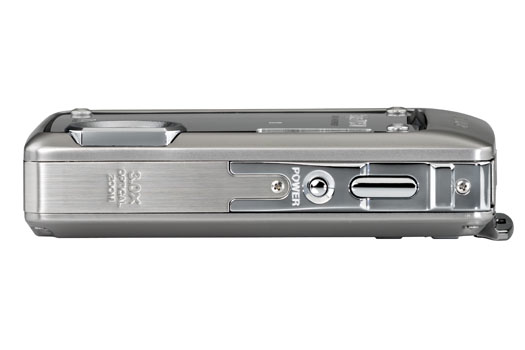
Olympus Stylus 770 SW -- Top

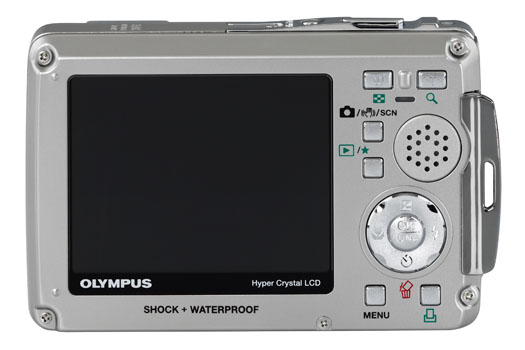
Notice how nicely laid out the buttons are. There’s no confusion about their function, like on some cameras (Samsung, I’m talking about you here). The on-screen menus are also easy to navigate. I had no problem finding my way around the menus as soon as I went in.

Olympus Stylus 770 SW -- Back

All in all, this little camera’s one hot contender in the point-and-shoot market, and a virtual shoe-in for our next ultra-portable digital camera.

More information:

Standard
Reviews

James and the Giant Peach (1996)

James and the Giant Peach (1996)Last night was the first time Ligia and I saw this delightful movie (IMDB). I regret not seeing it earlier. I remember the ads on TV back when it came out. I hadn’t read the book by Roald Dahl, nor did I know the story was written by him until I watched the featurette included in the special features on the DVD. I might have known it though.

All his stories weave scary elements into whimsical storytelling with wonderful plotlines and happy endings that remain with you. It makes for such vivid characters and happenings! I still treasure “The BFG” (1989, IMDB), more than 15 years after seeing it. I taped it when it ran on TV, and I still have the tape somewhere — although it’s probably so demagnetized by now that I wouldn’t be able to watch it.

Boy, those aunts of James’ were sure scary! If I were still a child, I might have had nightmares about them. The sets were great. You could tell right away they were sets, but that didn’t detract from their atmosphere at all — in fact, it added to it. I wondered why, and then I saw Tim Burton’s name as Co-Producer. I might have known that as well. The sets had the same feel as “Nightmare Before Christmas” (1993, IMDB) and “Charlie and the Chocolate Factory” (2005, IMDB).

Parents have already picked up on what makes the movie wonderful for children, so I’m only going to mention it in passing: it’s the uplifting message it carries, of course, picked up from the book. James, a child mistreated by his aunts to the point of abuse, hangs on to his imagination and the kindness that his parents instill in him, and proves to be a hero loved by the insects he saves, and by his adopted city, New York. It’s the sort of story that you’ll want to read to your children over and over, and the sort of story they’ll want to listen to over and over and over.

I thought the movie was very well done and highly watchable. I always have a healthy amount of respect for the people that work on these stop-motion animation movies. It takes years to get them done. It took three years for this movie. There are 24 frames per second, which means that each scene had to be rearranged for each frame, 24 times per second and 1,440 times for a full minute of action. That’s a herculean effort, and one has to respect that. When you add in the fact that the finished product looks great, it’s really a wonderful achievement.

Loved it!

Standard
Reviews

The value of microblogging services (part two)

This is Part Two of a mini-series on microblogging services such as Twitter, Jaiku and Pownce. You can read Part One here.

I promised you yesterday that I’d continue to discuss microblogging services in today’s post, and in particular, to show you how I use them to promote my own content and that of other bloggers.

First, let me tell you how I’m not doing it: I’m not typing my updates manually at both Twitter and Jaiku. That would be much too much work. It would almost be a full time job. Instead, what I do is to let the functionality of Web 2.0 do the work for me. I harness the power of feeds to do the foot work, while I go on about my regular day.

When it comes to my own content, I have my blog feed, my photos feed, and my videos feed. And when it comes to promoting the content I find on other blogs or websites, I use my Google Reader Share Items feed, and my del.icio.us feed. If it’s a blog post or a website that offers a feed, I’ll share it from Google Reader, and if it’s another website or web resources, I’ll tag it with del.icio.us. Between all of my feeds, I pretty much capture all of the interesting content that I or or other people create (well, at least the stuff I find interesting), and get to share it easily with others.

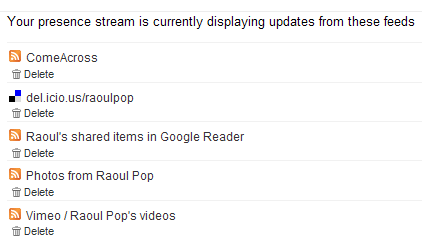
Jaiku itself offers a nice feed aggregation service, where I can point it to the feeds I want, and it’ll display the feed items on my Jaiku page. There’s no limit (to my knowledge) on the number of feeds displayed. I like the fact that this service is part of Jaiku’s feature set. There are some things I don’t like about it, and I’ll get to that in a bit. Here’s what my Jaiku feeds page looks like:

My Jaiku feeds

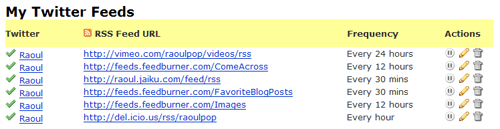
When it comes to Twitter, it has no feed aggregation service. As a matter of fact, the only way to get things in there is to type them in manually, but that’s not a lot of fun if you want to share a lot of stuff. (Remember to put that statement in the context of the differences between content creators and content consumers.) But what Twitter does have is a very nice and open API, and that means other people can build great functionality on top of the standard feature set. Wouldn’t you know it, someone went and did just that? I discovered a great service called Twitterfeed, which lets me aggregate my feeds just like Jaiku. Here’s a screenshot from my Twitterfeed page:

My Twitter feeds

As you can see, I’ve set up all of my relevant feeds to feed into my Twitter page, where they get posted very nicely every time my feeds get polled. If you look at my Jaiku and Twitter feeds closely, you’ll see that I have one more feed set up for Twitter — it’s my Jaiku feed. It’s because I use Jaiku primarily these days, and when I do type in a manual update, I don’t want to type it twice, at both Jaiku and Twitter. I publish it once at Jaiku and let Twitter pick it up through Twitterfeed. Works great!

I mentioned a bit back that there are some things I don’t like about Jaiku’s feed aggregation. Here’s the rub: I have no control over how often my feeds get polled, and my feed items get summarized in a single Jaiku instead of being displayed properly as individual items. This means a lot of the content gets lost, because there’s no way to click on each individual items. You can only click on the last item polled from a particular feed. Have a look at the following screenshot from Jaiku to see what I mean:

Jaiku items

As you can see from the screenshot, there were 19 new items in my Google Reader Share Items feed, yet only one got displayed. Where did the other 19 items go? They’re somewhere in virtual feed land, but they sure aren’t on my Jaiku page… It’s the same with my del.icio.us bookmarks feed. There were two new items, yet only one got displayed. Twitterfeed’s a lot better in this regard, because I can choose how often my feeds get polled, and because it converts each individual feed item into an individual Twitter. But it’s also got its limitations, because it can only display the last 5 items from a particular feed. So if I have more than 5 items, like I usually do in my Google Reader feed or my Images feed, they don’t all get displayed.

You might think that doesn’t happen very often, but I can read and share a lot of articles in the span of a half hour. Those 19 feed items you see in the screenshot above were shared in the span of 10 minutes, after reading through about 40 blog posts and articles. Plus, when I publish photos, I usually have more than 5. Yet the extra ones don’t show up on either Jaiku or Twitter. So yeah, this happens quite often for me.

At any rate, I can’t complain too much. The functionality offered by Jaiku, Twitter and Twitterfeed is fantastic for my needs. I can keep my various web presences up to date with my activities quite easily, and I can share a lot of interesting content in the process. Whether it’s mine or that of others, doesn’t matter that much to me. The important thing is that useful content gets promoted much faster and easier through feed syndication and the power of microblogging services like Jaiku and Twitter.

I hope you found this useful!

Standard
Reviews

The value of microblogging services (part one)

Twitter Jaiku

When Twitter came on the scene, no one knew quite what to make of it. “What’s the point?” was the most frequently asked question. When Jaiku got started about the same time, people again asked that same question. When Pownce got started recently, I was the one asking that question. As a matter of fact, I still am, and I’m not going to join Pownce until I can see what value it’ll bring me in addition to Twitter or Jaiku.

The thing is, that very pertinent question still hasn’t been answered. People are still trying to figure out what to do with them. Here are their current uses, from my observations:

  1. Publish simple activity updates
  2. Chat with friends asynchronously
  3. Self-promotion: point your contacts to something you’ve written or you’re working on
  4. Link sharing: point out interesting articles, videos or sites
  5. Marketing: fake/generic profiles are set up to talk up various products or events, and thousands of people get added as “friends” to that profile in the hope that some buzz gets created

I’ve been using both Twitter and Jaiku to do the first four activities listed above. After a while, #1 gets fairly old. Unless something highly unusual is happening, I’m simply not likely to visit the site and type in an update. I’ve got more important things to do. Plus, if I’ve got something interesting to say, I’d rather hold on to it and craft it into a nice blog post on my own blog than to share it on someone else’s website, where it brings me no added value.

Sure, others might say it’s fun to receive updates on your phone and participate through SMS. I say phooey to that. First, data plans for SMS are more expensive. Plus, I like my phone quiet. I don’t want it to buzz every minute with an update from a contact. And I’m not going to sit there thumbing on that keypad just so I too, can join the legions that say “I’m eating lunch” or “About to drop off my clothes at the cleaners.” Yes, this might be fun if I decided to get a fancy phone with a keypad, either a Windows Mobile device or an iPhone. But I think Windows Mobile devices are ugly, the iPhone is still a build or two away from the featureset I want, and both are too expensive. I don’t see the value in a fancier phone, even if I can surf the web on it, or do email. If I want to surf the web, I’ll grab my laptop and see it on a nice, big screen. So I have both Twitter and Jaiku set to web-only updates. I check both sites a few times a day, and that’s how I keep up with the various conversations.

Numbers 2, 3 and 4 is where the action is. If you are a content creator (refer to this post of mine for the details on that term) self-promotion can be valuable. If done in a non-sleazy way, it can make your contacts aware of something interesting that you’ve either just published or are about to publish, and can potentially extend the reach of your work. I publish links to my blog posts, my photos and my videos on both Twitter and Jaiku.

Link sharing is a very valuable feature of the microblogging services. I use it a lot to point others to various web resources or articles that I find interesting. For example, I read a lot of articles and blogs every day. I share all of the ones I find interesting on both Twitter and Jaiku. I’ll write in more detail tomorrow about just how I do that, and how I promote my own content.

As an aside, the only added benefit I see in using Pownce is for the file sharing feature. But where it could prove to be a value-added service for its founders, Kevin Rose being one of them, is in tight integration with Digg on link sharing. If a particular link is getting passed around between Powncers, that would be a pretty good indication that it could be Dugg as well, so having a section on Digg for popular Pownce links/articles would be a great way to capitalize on that, and to allow Digg users to do their thing with those articles, videos or whatever that link may be.

Last but not least, asynchronous chatting is an efficient way to conduct a conversation if you’re pressed for time or if your contacts are in different time zones. Instead of dedicating a slot of your schedule to a particular conversation, you simply tune in between your more important activities and share your thoughts. Your contacts do the same. Although it takes longer to get answers, I find it very useful for non-urgent matters. Jaiku is a lot better at this particular task than Twitter, because it has threaded conversations, while Twitter doesn’t.

The value of microblogging services lies in the fact that they’re another web presence for you. They’re another way to relate to your contacts and friends. Somehow, it’s easier for someone to Twitter or Jaiku me than to write a comment on my blog. Not sure why, because they get through both ways and I answer them just the same, but the immediacy of these services makes it easier to relate to me, and I assume, to others.

To sum up, these web presences can be used for asynchronous chats and for sharing your own content and other valuable articles, posts and resources with your contacts. I should point out that, just like a blog, if you’ll approach microblogging services with an entirely self-serving attitude, to engage in either shameless self-promotion or sleazy PR techniques, your little experiment’s going to fail. It’s important to maintain authenticity, and to have a good mix of interesting content, otherwise you push away people.

This is why I don’t add contacts left and right on either service, like some people do… I don’t see the point of adding complete strangers just for the sake of bloating my profile with fake friends, or just so I can shamelessly self-promote to a bigger audience. If I know someone, I’ll add them, or if someone adds me and I see from their update history that they have interesting things to say, I’ll add them.

Come back tomorrow because I’ll show you just how I use both Twitter and Jaiku for uses 3 and 4 from the list above.

One more thing. Here are the links to my profiles at Jaiku and Twitter:

[Updated 7/25/07: Part Two of this mini-series is now available. Read it here!]

Standard