Thoughts

The iMac: not so great long, long after

I received an email from Apple a couple of days ago, advertising the new iMac. The title of the ad was: “Amazing right out of the box. And long, long after.”

imac-ad

I disagree with that characterization. Perhaps it’s true of the new iMac, but it’s not true of our iMac. First, let me get something out of the way. I’m a Mac guy. I love Macs, I use a Mac all day long, I love their design and performance, and I love OS X. Unfortunately, my long-term experience with the Mac hardware, particularly when it comes to our iMac, isn’t so positive.

You see, we purchased an iMac G5 in late 2006, with an Apple Care plan. Thank goodness we did that, because we had problems with it from the get-go. A year after owning it, I wrote a post where I detailed the problems I’d been having. At the advice of some of the readers, I took it into an Apple Store to have it checked out. They replaced the motherboard and did a couple of other things. The repair experience was problematic in itself. Then, a short while afterward, the computer died again. This time we took it into a different store, where they replaced the motherboard again and did some other repairs.

Although that second repair experience was more positive, I had to take it into the store once more in 2008, for related issues. I can’t find the repair receipt at the moment, so I don’t know the date and I don’t know what they fixed, but yeah, that was the third time I had related repairs done to it, very likely for the same problems.

Then, inconveniently, about two months after the Apple Care plan expired in September 2009, our iMac died, just as it had died a couple of times before. It refused to boot up altogether. When I’d plug it in and press the power button on the back, nothing would happen. But, if I was extremely lucky, every once in a while, some noises would be heard in the back of the machine, as the cooling fans and hard drive started rotating, only to die a second or so later.

When this last hardware failure occurred, we were packing for an extended stay in Romania. I took the iMac along, since we had data on its hard drive that we needed. Once here, I was able to open it and retrieve the data from the hard disk. Unfortunately, the computer itself is still dead. What’s worse, I’m nowhere near an Apple Store. There are no official Apple stores in Romania. None at all. Where do I take it for service? And will I have to pay for the repair? A logic board replacement on an iMac G5 is somewhere around $900, and that’s only for the parts. It hardly seems fair to pay for a lemon repair, because that’s basically what I have — a lemon. Our iMac G5 has had repeated hardware failures of the same parts (at least three failures) while the Apple Care contract was still valid. The right thing for Apple to do would have been to replace it with an equivalent model, or to offer me a significant rebate on a newer model, allowing me to upgrade as painlessly as possible to more stable hardware. But none of that happened, and now I’m stuck with dead hardware.

So yeah, I don’t think the iMac is so great, long, long after. I’m sorry I spent our money on it, actually, and sorry it never worked as it should have, from the get-go.


Standard
Reviews

WordPress.com gets more expensive

Ever since I learned about WordPress, I thought it was the coolest blogging platform, and the more I found out about the WordPress.com network, the more I liked the options they offered their users. To this day, I regret not having started to publish directly on WordPress.com instead of doing it on my own with a self-install of WordPress, but each path has its pros and cons. Incidentally, I discussed them (the pros and cons) at length with WordPress staff recently, and may put together a guide to switching from WP.com to WP.org and vice-versa, at some point.

One of the things I really liked about WordPress.com was the 5GB space upgrade, which, among other things allowed me to upload videos that would be transcoded and played directly inside the blog. For $20/year, it was a great deal. I never got to use it on my own blogs, which were and still are self-hosted, but I recommended it to clients and friends. I liked it because the video player was and still is integrated into the blogging platform. This saves the user the hassle of uploading it to a different video sharing site, then putting the right embed code into the blog post.

Now, sadly, that option is gone. I received an email from WordPress today which announced the arrival of a formal video upgrade option, called VideoPress, at a cost of $60/year. Like other video upgrades on the market (such as Vimeo’s own Plus program), VideoPress allows the upload and streaming of SD and HD video. The price is also the same.

wordpress-upgrades

I can understand this change though. According to WordPress, allowing people to upload videos under the regular 5GB space upgrade was a testing ground which allowed them to figure out what they needed to charge long-term. After all, HD video eats up a lot of space and requires a lot of processing power to compress, not to mention the bandwidth needed to stream it. Here’s what Matt Mullenweg, WP’s founder, says in a response to a question about the price tag:

“We try to run every part of our business in a way that’s sustainable and supportable for the long-term. By charging a fair amount for a superior service we can continue to invest in expanding the feature to be a great option for high-end video, just like WordPress is a fantastic option for high-end blogging. (And you wouldn’t believe how expensive it is to host and stream video, which is part of the reason we’ve waited to launch this until now, we’ve been working at getting the costs down.” [source]

Now when you realize that both WordPress and Vimeo charge $60/year for HD video uploads, think about YouTube, and the astronomical expenses it has to eat up every year because it doesn’t charge its users anything to upload gobs and gobs of video.

I looked at the specs for the video sizes of the new WordPress Video Player, and there are three of them: 400px (SD), 640px (DVD) and 1280px (HD). That’s plenty for live streaming. I do wish there was an option that would let the video authors allow downloads of the original video files, like Vimeo does it.

The upper limit on a single video file is 1GB, although it’s not hard-capped like at Vimeo. WordPress will let you upload 1.5-2GB files, although they say results may vary and uploads may die out if your connection is slow.

One thing I’m not clear on is the space allowed for the uploaded videos. Is there a weekly cap, like Vimeo’s 5GB/week limit, or can we upload as many videos as we want? And if so, what’s the total space limit allotted to us when we purchase the upgrade? Is there a special cap, separate from the standard space of 3 GB per blog? Or does each video count against the total space allotted to the blog? Because if that’s the case, that would mean VideoPress is going to be more expensive than Vimeo Plus, since users will need to purchase space upgrades for their videos in addition to VideoPress.

For example, a user would shell out $60 for VideoPress, then soon find out they’ve filled up their 3GB quota, and need to purchase a space upgrade. It’s not hard to imagine one would need about 15GB or more per year with HD video, and that would mean an additional $50 on top of the initial $60, bringing the price tag to $110. This point definitely needs clarification, because it just wouldn’t be fun to get taxed twice for it.

I do like the nice gesture on WordPress’ part, where they gave existing users of the space upgrade and the video player a free VideoPress upgrade for a year. Had they not done that, the transition would have been too jarring for them, so kudos to WordPress for putting money aside and thinking about the user experience.

Standard
Thoughts

This is Dominic the two-legged dog. Amaz…

This is Dominic the two-legged dog. Amazingly inspirational stuff. He is happy and well-adjusted in spite of his handicap.

Standard
Reviews

CableJive SoundDock and iStubz cables

Back in 2008, I bought a SoundDock cable from CableJive, which allowed me to connect my 1st gen Bose SoundDock to my Mac. Since we bought our SoundDock, Bose has come out with a 2nd gen SoundDock, which has a built-in auxiliary input, making the cable unnecessary. Still, we weren’t about to buy a new SoundDock when ours was working perfectly well, and with the addition of a cable, we could make it work with our Mac, allowing us to have nice, premium sound.

cablejive-sounddock-cable1

I remember looking around for months for a cable that could do the trick. I knew it was technically possible, but no company I knew of made such a cable. Finally, I discovered CableJive. Back then, they were just going into business, judging by their website and lack of customer service. After placing my order, I got no confirmation whatsoever. I had no idea whether they received my order or not. The phone number they listed on the website wasn’t working, and nobody answered my emails. Thankfully, the cable arrived in the mail a few days later, and has been working ever since.

The build quality of the SoundDock cable leaves something to be desired though. The sleeve that fits around the cable at the end that has the thick, iPod-style adaptor is loose, and the plastic that contains the circuits that make the connection with the Bose SoundDock isn’t anchored well into the sides of the adaptor, making it flop around in there. Overall, I’d call the cable flimsy, and considering the price we paid for it at the time ($48), overpriced.

I can only hope their build quality has improved since then, and I’m glad to see that at least they’ve lowered the price to $40. It’s still a hefty price to pay for a flimsy little cable, but like I said, no one else makes them, and if you’ve got to have it, you’ll pay the price or go without.

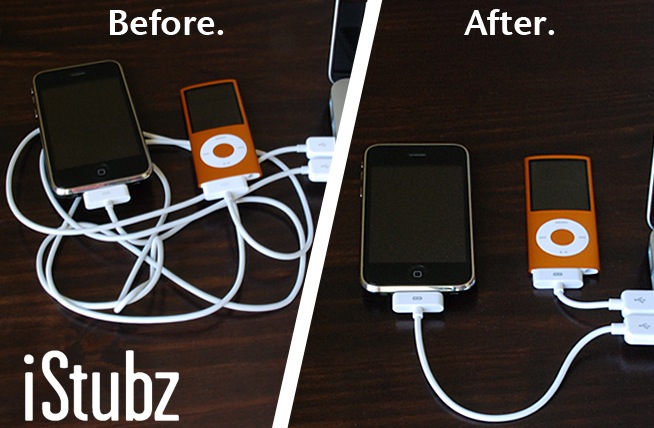
Now I see they make these iStubz cables, which are basically short sync cables for the iPod and iPhone. The ones that ship with the phone are too long for most people’s needs, cluttering up one’s desk. I like the idea, and I also like the price ($8).

cablejive_istubz2

cablejive_istubz

Now here’s my question: why is the iStubz cable, which is more complicated to make (I assume) than the Bose SoundDock cable, only $8, and the SoundDock cable $40?

Images used courtesy of CableJive.

Standard
Lists

Condensed Knowledge – May 10, 2009

This is a summary of articles I read and found interesting during this past week. The list is shared from among my feed subscriptions:

Standard