

Some of you know that I’ve been writing here on my website since 2000, so I’ve put a lot of words on paper and screen. But I’ve always wanted to write a book, to put that English major of mine to some good use 🙂. Life intervened and other priorities demanded my time. Good old fear also stuck its nose in those dreams and for quite some time, I found myself busy with a lot of other things. The funny thing is, my wife and I have taken on so many things where I should have been afraid going in and sticking it out, but I wasn’t. We’ve accomplished so much together. And yet, something that should have been easy for me, like doing a bit of writing, editing it and publishing it, something that I’ve been doing since my college days — became this obstacle that seemed to get bigger with time.
Earlier this year, I made a promise to myself that I was going to publish a photo book that had been sitting on my computer for several years. It’s a book about a place near and dear to our hearts, the Potomac River and the C&O Canal, which we’d visit often while we lived in the Washington, DC area. I miss those places. I miss driving out there to various spots along the river and canal, and walking or biking for hours on clean, safe, maintained trails, in the beautiful countryside and forests of Maryland and Virginia. Of course I’d take my camera with me and Ligia would allow me to indulge my photographic obsession. So that’s one book I’m happy to say I finished and published.
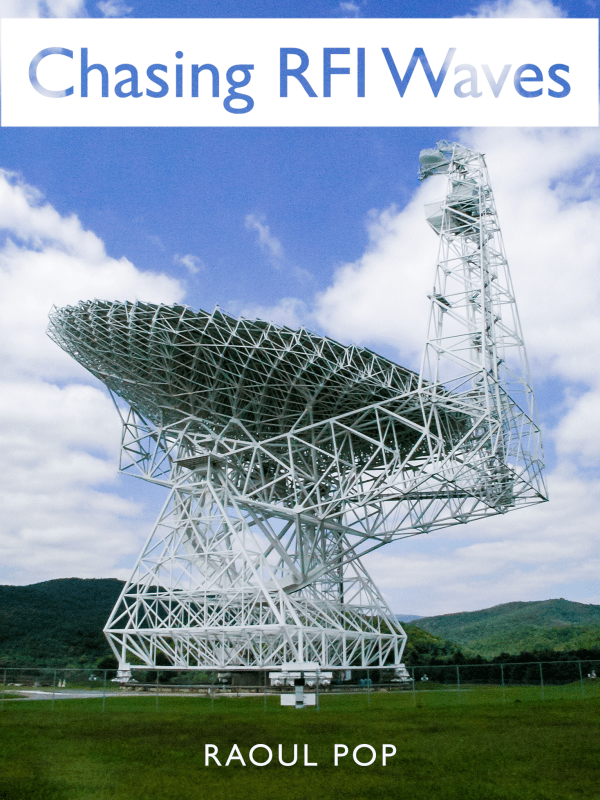
I’d started another book years earlier, back in 2005, about an interesting place doing interesting work in West Virginia. I’d found out about it by chance, as we were visiting parks in the area and I looked for a place with WiFi, but found none. When I asked why, that’s when when things got interesting. It turned out we were in something called the NRQZ, the National Radio Quiet Zone, where no radio transmissions were allowed, because of the research being done at a place called NRAO (that had nothing to do with the NRA). Its initials stand for the National Radio Astronomy Observatory, and it was listening to radio transmissions from space with very sensitive and very big parabolic antennae they call radio telescopes. Any sort of local radio transmission would create huge interference issues for them, so the American government decided to designate a large area around them as a Radio Quiet Zone. I ended up visiting the NRAO site at Green Bank in West Virginia and I became so interested in the stories about their equipment and the RFI (radio frequency interference) that created problems in their work, that I started putting together a book through site visits and interviews with the “Keeper of the Quiet”, the man responsible for chasing down RFI in the NRQZ, Wes Sizemore. I almost finished writing that book but life intervened, as it always does, and I couldn’t make the follow-up visits that I needed in order to close the story arc and put the finishing touches on the book.
It sat on my computer for about seven years, till in 2012, I decided enough was enough, I was going to re-edit what I had and publish it as it was, here on my website, and that’s what I did. You can read it in seven instalments, starting here. This year, as I was working on my other book, I started thinking, why not take all the materials I’d put together for my posts, re-organize them, re-edit them where I felt they needed it, and put them all in book format? Instead of publishing just one book, I’d publish two. So that’s what I did. This book is now as finished as it’s going to get and it’s also published.
You can see more details about each of the books on their dedicated pages here on my website:
They are currently available in the Apple Books (iBooks) format on the Apple Book Store. I’ve already been asked if they’re going to be available in other formats and other stores. I can’t promise you anything at the moment.
I work on an iMac in macOS and I have iOS devices (iPhones and iPads), so when I put these books together, I did it in an app called iBooks Author, which creates e-books in a native format for macOS and iOS. This format works for multi-touch displays and the text reflows and adjusts for various display sizes.
Were I to want to list my books in the Amazon Book Store, I would need to lay them out once more, page by page, in their own application, which is called Kindle Create. I’d want and need to do that in order to create a native e-book experience for the Amazon Kindle readers, an experience that works properly with those e-book controls and where the text reflows and adjusts for various display sizes. This means redoing most everything I did in iBooks Author, but on Kindle Create. I’m not looking forward to doubling my workload.
I am well aware that I can simply export to PDF from iBooks Author and publish the books as PDFs, but the reading experience just wouldn’t be the same. Mobile book readers simply don’t handle PDFs the same way they handle native e-books, and you’d have to constantly zoom in and out, drag the page up and down to see it all… it just isn’t a good reading experience as far as I’m concerned.
I’m also aware that had I started to work on my books in Apple Pages, I could have exported directly to the Apple Book Store from that app, and I could have also exported the books to a format compatible with Kindle Create (MS Word), that could have circumvented a lot of the work I now need to do. I didn’t know this at the time. 🤷♂️
I’ve also looked into publishing the books on the Google Play Book Store, but they’ve restricted applications for new authors for some reason. I applied and I’m waiting to see how that pans out. And I’ll have to find out what native e-book format is used for Android devices, and what I’ll need to do to ensure a good reading experience for them.
So, if you have macOS or iOS devices, you’re in luck. My books are available for purchase and you’re good to go. Please check them out and buy them if they spark your interest. 🙂
Cheers!
Raoul












































































































 Raoul Pop