Reviews

Drobo Dashboard 1.1.1 released

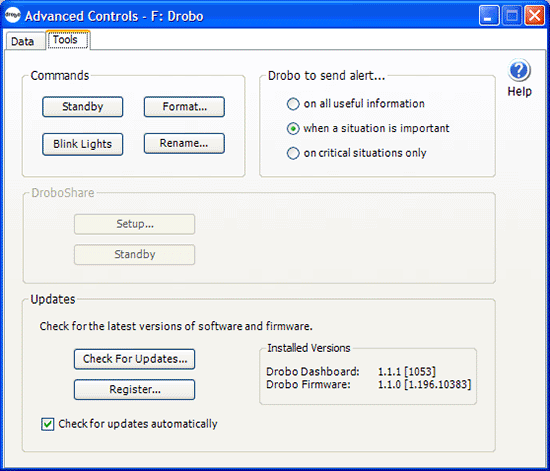
Data Robotics has released version 1.1.1 of the Drobo Dashboard, for both Macs and PCs. If you already have a Drobo, chances are you’ve been prompted to upgrade. Details are a little sparse about what bugs it squashed or what new features it introduced. At any rate, it’s an easy upgrade and it went off without a hitch.

Drobo Dashboard Advanced Controls

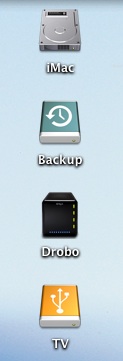
One cool thing that I noticed about it is that it introduced a glossy new icon for the Drobo on the Mac. It looks really nice, and it helps differentiate the Drobo from the other external drives connected to the computer.

Our iMac and its external drives, including the Drobo

I wish the cool icon would show up in Windows as well, but that’s not the case, at least not with this upgrade.

Standard
Thoughts

Ways in which companies waste money and energy

I want to focus in on a few specific ways in which companies waste money and energy. I see the following things happen daily in the workplace. They’re not specific to any company. Chances are that if you visit any American company, they’re probably doing at least one of these things.

Lights are left on regardless of time or day, and whether or not there are people present in the room

Many people will turn on their lights during the day, even if they have an office window that lets in plenty of light. That makes no sense. Want to know what else doesn’t make sense? Walk around at night in a big city. Look at how many businesses have left their lights on. Now look through the windows (it’s easy to do with skyscrapers) and see if you can see any people in there. Chances are you won’t. Those big offices are empty, and the lights are fully lit. What for? Don’t tell me it’s to discourage theft, because it doesn’t work. Having the lights turned off and making the thief use some sort of light to see his way around is a much better way to discourage theft.

Utility bills are doubled and tripled by leaving lights on at night, and yet that sort of expense is just shrugged off as a given. Well, it shouldn’t be that way. It’s wrong. And no, using CFLs doesn’t really count. They reduce electricity consumption dramatically, yes, but that doesn’t excuse you from turning lights off when you leave the office.

Computers are left on at night and when not being used

This one bothers me a lot. As a past IT director, I know computers consume a lot of electricity, and I also know that most people don’t need to leave their computers on when they leave their office. Short of server rooms, which need to stay on all the time, and selected desktops (used mostly in IT departments) that need to stay on because they’re being accessed remotely, most computers can be safely turned off or put into standby or hibernation at the end of the day. Do people do it? No.

Each desktop system consumes anywhere from 200-500 Watts of power (or more) while turned on, not counting the displays, which vary from 50-200 Watts (or more). IT departments should institute group policies (it’s doable in Windows) that automatically put computers into standby or hibernation if they’re idle and not used. Just think of the energy savings that could be obtained! By the way, Macs come pre-programmed to do just that, so they will give you energy savings right out of the box.

No recycling program in place

Most businesses will have a document shredding services, but they’ll have no recycling containers on site for aluminum, glass or plastic products. They’ll trash them and pollute the landfills, when they could be easily recycled and re-used. What’s more, they miss an important opportunity to set a good example for their employees.

No equipment recycling policies

Related to the overall recycling program, companies usually do not have any arrangements in place to recycle their used computer equipment. When computers and other equipment reach the end of their usable lifespan, they most likely get trashed, not properly recycled through businesses that specialize in this sort of thing. Some companies donate their computers to non-profit organizations that re-use them, which is laudable, but those are few and far between.

Do we really want old circuit boards which contain toxic chemicals polluting landfills everywhere and seeping into our water supply?

Not enough telecommuters

It’s true that a lot of jobs can’t be done via telecommuting. But many of them can be done that way. Programming, web development and design, project management, accounting, etc. are only some of the jobs that can be done from home, if things are planned out correctly. There are many benefits to be reaped by both companies and employees when telecommuting policies are worked out. One of them is cost reductions, for both parties, and another is less pollution on the environment.

Read this article I wrote on telecommuting for the details. Here are just a few of the benefits that can be observed right away:

  • Reduced office space
  • Reduced utility costs
  • Less crowded roads
  • Less stress
  • Higher job satisfaction
  • Less expenses for employees
  • More family time

I’m sure there are more items for this list. If you know of any, please let me know in the comments.

Standard
Reviews

Lots to like about new MacBook Pro

On 2/26, Apple updated their entire MacBook line of laptops with better and faster hardware. I expected that announcement some time this month. I think they surprised most people by making it in February.

I’ve been waiting to purchase a MacBook Pro for some time, and with these latest updates to the hardware, Apple has made their laptops irresistible. Not only have they gotten faster processors, bigger hard drives and more video memory, but they also inherited the multi-touch trackpad from the MacBook Air, which should make it easier for me to work with my photos.

I wrote recently about my frustration with Apple’s less than transparent specs for its hardware. One of my points of contention was the display of the MacBook Pro. Well, I’m willing to forgo that point in view of the MBP’s plentiful other advantages. I need a fast laptop, desperately so, and my only choice if I want to run Mac OS X (which I very much want to do) is to get the MacBook Pro. (The regular MacBook doesn’t have the dedicated video card I need, and its display is too small for my eyes.)

I also know about Hackintoshes, but I’d rather stay on the legal side of things. I hope that at some point, Apple will decide to make OS X available on non-Apple hardware that meets stringent hardware compatibility tests, but for now, I can only get OS X on Apple computers.

15? MacBook Pro Laptop (2008)

I’m looking at the 15″ MBP, and it’s quite possibly the best laptop on the market in that size, barring a few issues that I’ll outline below. First, here’s the configuration that I plan to get. I’m very pleased with Apple’s new pricing. I can get this configuration for about $300 less than a comparable high-end config (2.4GHz/2GB RAM/200GB drive) on the previous 15″ MBP.

  • 2.5GHz Intel Core 2 Duo
  • 2GB 667MHz DDR2 SDRAM – 2x1GB (I plan to upgrade this to 4GB RAM with modules from OWC)
  • 250GB Serial ATA Drive @ 5400 rpm (I wish I could get a 300GB drive, but that’s only available on the 17″ MBP)
  • SuperDrive 8X (DVD±R DL/DVD±RW/CD-RW)
  • MacBook Pro 15-inch Glossy Widescreen Display
  • Apple Remote
  • iWork ’08 Preinstalled
  • Backlit Keyboard/Mac OS – U.S. English
  • AppleCare Protection Plan for MacBook Pro

Now here are the things that bug me.

No HDMI port

I don’t know why Apple still insists on DVI connections when HDMI ports are much smaller and carry both video and audio. The MBP would be perfect with an HDMI port, and I would be able to hook it directly to an HDTV and play movies with full digital video and audio directly from the laptop, without needing to connect both a bulky DVI cable and a separate audio cable. This sort of thing just doesn’t go with Apple’s design philosophy. An HDMI connection means less clutter and it’s simpler to use than DVI. Why not go to it?

Top lid is flimsy

Here’s a test for you. If you already have an MBP, press down on the center of the top lid (Apple logo or its immediate area) and see how much it caves in. That’s just not strong enough. The aluminum enclosure is too thin, and it’s not bolstered by cushioning underneath. It needs some support under there. It’ll easily dent and possibly damage the LCD if pressed or bumped lightly against something. I had an aluminum 17″ G4 PowerBook a couple of years back, and I remember its top lid being sturdier than the MBP’s.

Another problem caused by the flimsy top lid is that the keyboard ends up scratching the LCD when the MBP is transported. The simple act of holding the laptop under your arm or in your hand, or putting it in a case and hauling it around will put pressure on the lid and rub the LCD against the keyboard. Over time, the keys will leave scratches on the LCD. That’s not right. I’d rather not carry around a felt cloth and put it between the screen and the keyboard, like I’ve seen some people do. The lid should be made sturdier, and either the display or the keyboard should be sunk lower in the laptop frame, so there’s less likelihood of them rubbing together.

LCD is 6-bit color with dithering

It looks like most, if not all laptops, have 6-bit displays, with varying qualities of dithering engines and color capabilities. So while it’s unfortunate that Apple can’t pull away from the pack on this one and offer 8-bit color in its laptop displays, at least the MacBook Pro display is great to look at for extended periods of time and does a decent job of displaying colors properly, which is more than I can say about most laptop displays.

17? MacBook Pro Laptop (2008)

Bottom line

Other than the few things described above, I can’t find any faults with the new MBP laptops, and look forward (eagerly) to getting my very own soon.

[Photos courtesy of Apple]

Standard
How To

How to backup and restore your Mac and PC

I had a conversation yesterday about this very topic that made me realize it’d make a great article. So here’s how to backup — and if needed, restore — both your Mac and PC in a pretty much foolproof sort of way.

Before I start, let me clarify three things.

First, using backup software does not necessarily mean you can restore your entire computer in case it crashes, gets infected with a virus, or the hard drive dies. Keep that in mind! Backing up your files means just that: you’re backing up your files and can restore them, not your computer. The question you need to ask yourselves is: “Does my backup software let me restore my entire computer (operating system + my files) or just my files?”

Second, you’ll need a good backup device. It won’t do to have both your computer and your backup device fail at about the same time, or you’ll be nowhere. So make sure to get a good external drive with plenty of space (I use these) or to use a device that’s built to secure your data against hardware failures (like a Drobo, which I also use). Apple has just released a wireless backup drive called Time Capsule, which should work nicely with Macs.

Third, I’d rather not get into arguments about how some piece of software is better than that piece of software. The point is to make things easy for those of you that are confused by all the pieces of software out there. In the end, you use whatever software works for you, but remember that this is what I recommend. I don’t want to bog people down with doing their virus checks with Whodalala and their spyware checks with Whodalulu, and… I think you get my point. An all-in-one solution works best, especially something that you install and then runs automatically. I believe strongly in automating these sorts of tasks and making it easy for the average person to use the software, and I’ve written about this in the past as well.

How to backup and restore a Mac

Mac OS X Leopard’s Time MachineThis one’s really easy. Get Mac OS X Leopard and use Time Machine. It’ll do both file-level restores and full restores. It backs up your computer automatically every hour, and the first time you run it, it’ll do a full backup of everything on your computer. It’s great, I use it too, it works. In case your Mac should go kaput, you can restore it in its entirety after it gets fixed by booting up to the Leopard DVD and choosing “Restore System from Time Machine” from the Utilities menu. Should you only need to restore files, you’ve probably already seen the cool demo video and you know all about that.

Carbon Copy ClonerDon’t have Leopard? Still on Mac OS X Tiger? It’s okay. Use Carbon Copy Cloner. It’s wonderful, it’s free (you should donate if you find it useful though), and it can do full and incremental backups and restores. (Incremental means it’ll only backup or restore the files that have changed since the last backup or restore.) It works with both Tiger and Leopard, so you’re fully covered.

How to backup and restore a PC

This one’s a little trickier, but you just have to remember two names: OneCare Live and Norton Ghost.

Microsoft OneCare LiveOneCare Live is made by Microsoft and will do most everything PCs need: defragmentation, virus checks, spyware checks, firewall, and backups. What’s more, the software will remind you if you haven’t backed up or ran scans lately. It’s an all-in-one piece of software that I’ve used for over a year, and I like it.

A nice thing about its pricing is that it lets you use one license on up to three computers and manage the OneCare settings from a single machine. This means you can install it on your children’s PC and your wife’s PC and manage their security settings from your own machine. You can even schedule all three to back up to a central location like a network drive or a Windows Home Server.

The thing to keep in mind about it is that it does NOT do full backups and restores. It will only look for your files (documents, spreadsheets, movies, photos, etc.) and back those up to an external device. That means that unless you want to be stuck re-installing the operating system and applications every time your computer crashes, you’d better have something else to work alongside OneCare.

That certain something else is Norton Ghost. I’ve used it as well, and it sure works as advertised. Many system admins swear by it, because it makes their jobs a lot easier. The way to use it is to get your computer all set up and ready to go (with the OS, apps and latest patches and updates all installed), and BEFORE you start using it, ghost it. You can either boot up from the Ghost CD and clone your entire hard drive to an external device like a USB drive or to DVDs, or you can run the Ghost application right from the operating system, with your computer functioning normally while it’s getting cloned.

Once you’ve ghosted your machine, keep that ghost image safely somewhere and do regular backups with OneCare Live. If your PC should ever crash, you can boot up with the Ghost CD and restore it from its ghost image, then do file-level restores with the OneCare application.

Just remember, it’s important to ghost your PC at that critical point after you’ve gotten everything you need installed, but BEFORE you get it infected with something or installed stuff you’ll want to uninstall later, otherwise the ghost image will understandably be pretty useless to you.

Hope this helps!

Standard
Reviews

Awakenings (1990)

Awakenings (1990)

We watched Awakenings (1990) tonight, and I was left with a newly found appreciation for life. This movie drives home the following point very well: you don’t know what you have till you’ve lost it.

Imagine watching your life, as you know it, become unavailable to you, which is what happens to people who suffer from neurological diseases. Imagine sitting there, trying to fight it, but knowing there really isn’t anything that can be done, while you slowly lose your coordination, balance, speech, senses, and become a catatonic mass, a vegetable, a ghost of what you once were. Through it all (and this point is debatable) you are aware of what happens around you, of what others are trying to communicate to you, but you cannot respond in any way. As one character in the movie puts it, it is “unthinkable”.

As I sat there, taking it all in, a photo of Ligia and I stood by the screen, and my eyes kept jumping to it. What we have is so precious. Much more precious than anything else out there. We not only have life, but we have love. We have so much. So much more than many others. And even if I didn’t have her, I’d still have my life and my health. These are both amazingly precious, and I always fail to realize it until either of them is in danger. Only then do I begin to see all of the things I take for granted.

I can’t put this into words properly. Every once in a while, I get a glimpse of my life from an outside perspective, and then it hits me: I’m a fortunate person. I should stop worrying about the little things. I should be happy. All the time. I have so much. The other things: gadgets, technology, computers, income — these are all insignificant without love, life and health.

Let’s face it, computers may have made our lives a little better, but they’ve also made them more miserable, busier, and more complicated. Gadgets are cool, but we don’t really need them. Technology is nice, but without human interaction and common sense, it only makes things worse. Income is nothing more than an enabler, something that lets you have a place to live and buy food and other things. When you start seeing it as something else, you’ve got problems.

What really matters is life — experiencing it to the fullest, gaining the realization of the gift that it is and being thankful for being alive. It’s so easy to get caught in the busy-ness of life that we lose our self-consciousness, that child-like sense of wonder at the things around us. I know I do that, and I shouldn’t. Every time I get caught up in pointless things, I waste precious time, which adds up. Life is so short… too short.

There was a scene in the movie which was telling for me. It was at the end. Dr. Sayer was typing an article, and the nurse, Eleanor, got ready to head home for the night, but lingered, hoping he might ask her out. He continued working, so she left, quietly. As soon as she closed the door to his office, he fidgeted nervously, knowing what he should have done. Then he jumped up, opened the window, called out to her, and ran out to invite her for coffee. But this wasn’t what struck me. After all, this was what we, as an audience, expected him to do. No, what I found interesting was the way he saved his work. He simply stopped typing, got up and left…

Think about that for a moment.

More information

Standard