How To

Finally, an update for Apple's Bluetooth problems

Updated 8/26/09: It turns out the firmware update didn’t fix the Bluetooth issues. But OS X 10.5.8, which also came out recently, seems to have mostly fixed the problems. I still get the occasional Bluetooth connection error, but it’s nowhere near as often as before.

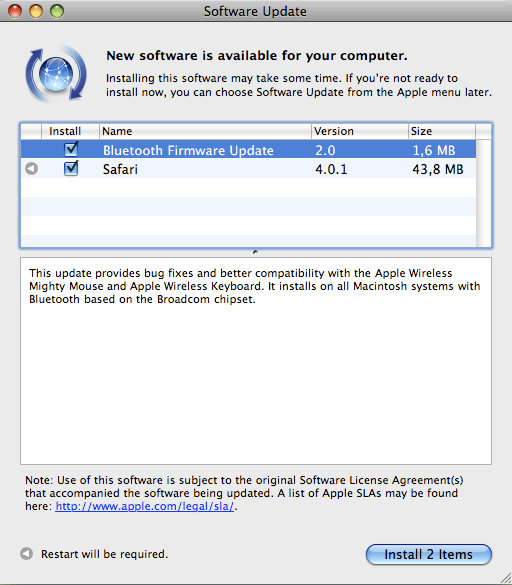
A software update noticed popped up on my MBP today, telling me Bluetooth Firmware Update 2.0 was available for download and install.
bluetooth-update-1

The update explanation says the following:

“This update provides bug fixes and better compatibility with the Apple Wireless Mighty Mouse and Apple Wireless Keyboard. It installs on all Macintosh systems with Bluetooth based on the Broadcom chipset.”

Finally! If you’re unfamiliar with the Bluetooth crashing problems on Mac computers, then you’re one of the few lucky ones. But the rest of us with late generation laptops like the MacBook Pro have had this issue for at least a few months now. This, for example, is just one of the many threads in the Apple Forums dealing with this persistent Bluetooth issue. On June 9, I’d had enough and vented on FriendFeed about it.

Basically, Bluetooth communications stopped working after a Mac was woken up from sleep mode, necessitating either a turn off/on cycle of the Bluetooth hardware, or another quick sleep/wake cycle. I for one didn’t have too many problems with the keyboard and mouse not working, but I did have a serious issue maintaining connectivity with my Nokia N95 via Bluetooth. My MBP kept refusing to connect to it, and I can’t remember how many times I removed and re-added it from my preferred Bluetooth devices. I even thought my N95 was to blame, until I tried turning Bluetooth off/on and realized my MBP could connect to it just fine after that.

From the looks of things, Apple’s been at work on a fix for the problem, and it’s now available for general install. So, by all means, download away and see if it helps you. I for one will be on the lookout for any more Bluetooth issues, to see if this firmware update has truly fixed the bug.

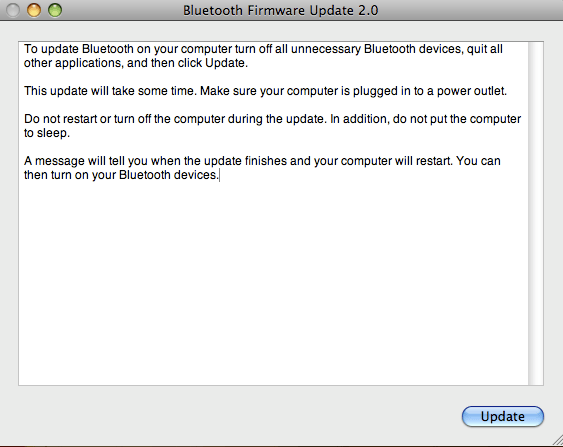
Before I close, I’d like to point out that even though a restart is not announced for the firmware update, you will most certainly need to restart your Mac. Once the Safari update installs, and your Mac restarts, the following dialog box pops up on the screen, informing you that the Bluetooth update will now begin, and your machine will restart once it’s finished. Just FYI.
bluetooth-update-2

Standard
How To

Connect two Drobo units to your computer at the same time?

Updated 1/14/19: I have revised my opinion of Drobo devices. After experiencing multiple, serious data loss events on multiple Drobo models, even recent ones, I no longer consider them safe for my data.

One of my readers asked me a little more than a month ago if I could post some screenshots of the Drobo Dashboard with two Drobos connected at the same time. Sure, no problem. It’s easily doable, and the Dashboard software automatically differentiates between each of them and displays the proper stats for each, even if they’re name the same. I haven’t tried it yet, but you could probably connect three Drobos at the same time if you wanted to.

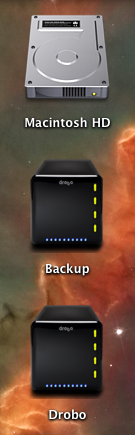
Here’s what the drive icons look like on my MBP’s desktop.

mbp-drive-icons

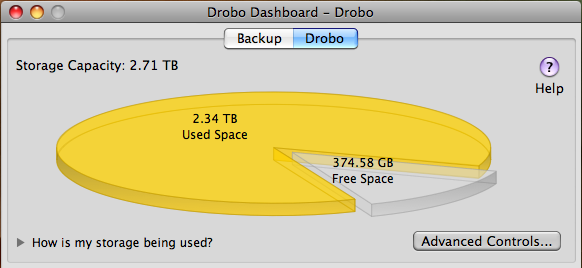
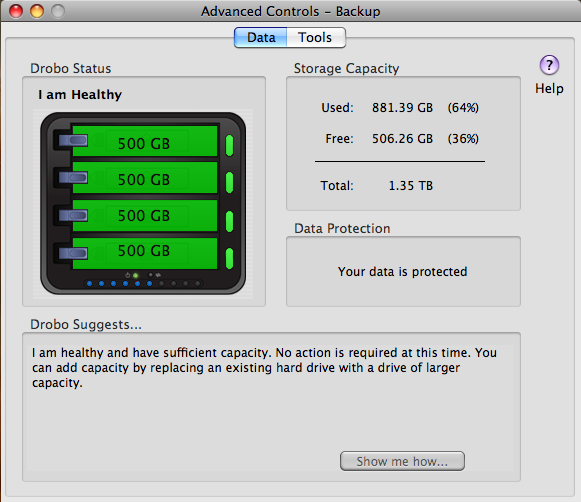
The main screen inside the Drobo Dashboard software will display buttons for each connected Drobo, allowing you to switch between them as needed.

drobo-dashboard-drobo

drobo-dashboard-backup

As you can see, I need to either free up some space on my main Drobo or get some new drives. Using the Drobolator, it turns out I’d need to get two new drives (either 1.5TB or 2TB each) in order to see any increase in the available space.

The Advanced Controls screens inside the Drobo Dashboard show the drive layouts inside each Drobo.

advanced-controls-drobo

advanced-controls-backup

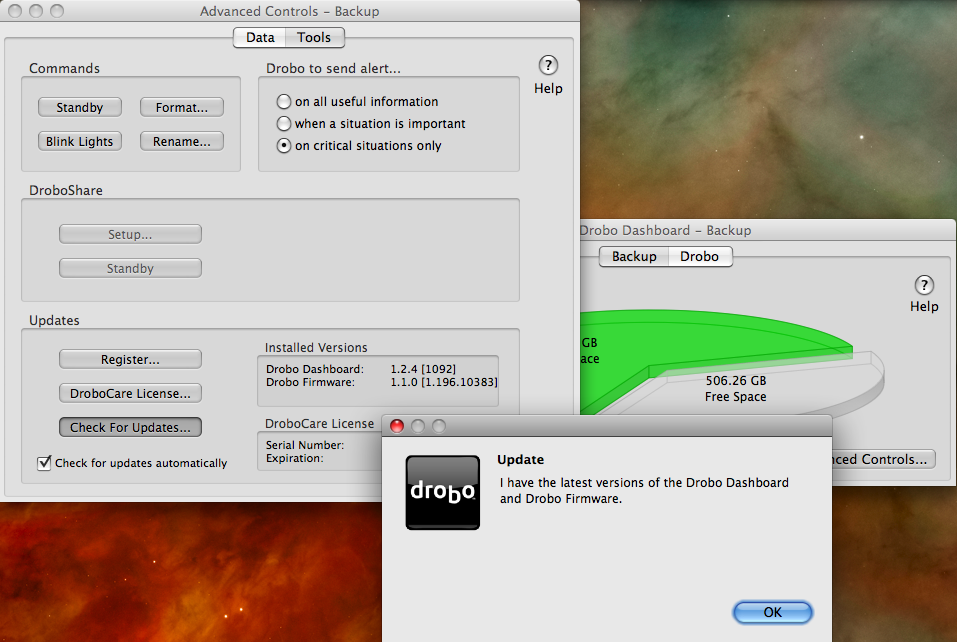
I’d like to point out a possible bug in the Drobo Dashboard software while I’m at this. As you can see on the following screenshot, when I click on the Check for Updates button to see if there’s a firmware upgrade for my Backup Drobo, which is a USB-only unit, I get a message which tells me both the Dashboard and the firmware are up to date, when I know that the firmware is out of date, as you can see from the firmware version itself. I’ve often had to perform manual firmware upgrades to my Drobos, because I keep getting this message in error. I hope this bug can be resolved at some point.

drobo-dashboard-check-for-updates-error

Other than that, the Drobo Dashboard software works as expected, and can work with multiple Drobo units as well. No problems there.

Update: After doing a manual upgrade to firmware version 1.2.4, the automatic check for updates from within the Drobo Dashboard worked, and when my Drobo rebooted, I was prompted to upgrade to 1.3.0. After an initial unsuccesful attempt, I was able to upgrade just fine. One less item on my to-do list. Good.

drobo-dashboard-new-firmware-notice

Standard
Thoughts

The iMac: not so great long, long after

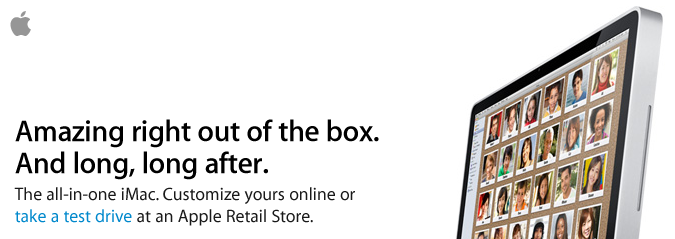
I received an email from Apple a couple of days ago, advertising the new iMac. The title of the ad was: “Amazing right out of the box. And long, long after.”

imac-ad

I disagree with that characterization. Perhaps it’s true of the new iMac, but it’s not true of our iMac. First, let me get something out of the way. I’m a Mac guy. I love Macs, I use a Mac all day long, I love their design and performance, and I love OS X. Unfortunately, my long-term experience with the Mac hardware, particularly when it comes to our iMac, isn’t so positive.

You see, we purchased an iMac G5 in late 2006, with an Apple Care plan. Thank goodness we did that, because we had problems with it from the get-go. A year after owning it, I wrote a post where I detailed the problems I’d been having. At the advice of some of the readers, I took it into an Apple Store to have it checked out. They replaced the motherboard and did a couple of other things. The repair experience was problematic in itself. Then, a short while afterward, the computer died again. This time we took it into a different store, where they replaced the motherboard again and did some other repairs.

Although that second repair experience was more positive, I had to take it into the store once more in 2008, for related issues. I can’t find the repair receipt at the moment, so I don’t know the date and I don’t know what they fixed, but yeah, that was the third time I had related repairs done to it, very likely for the same problems.

Then, inconveniently, about two months after the Apple Care plan expired in September 2009, our iMac died, just as it had died a couple of times before. It refused to boot up altogether. When I’d plug it in and press the power button on the back, nothing would happen. But, if I was extremely lucky, every once in a while, some noises would be heard in the back of the machine, as the cooling fans and hard drive started rotating, only to die a second or so later.

When this last hardware failure occurred, we were packing for an extended stay in Romania. I took the iMac along, since we had data on its hard drive that we needed. Once here, I was able to open it and retrieve the data from the hard disk. Unfortunately, the computer itself is still dead. What’s worse, I’m nowhere near an Apple Store. There are no official Apple stores in Romania. None at all. Where do I take it for service? And will I have to pay for the repair? A logic board replacement on an iMac G5 is somewhere around $900, and that’s only for the parts. It hardly seems fair to pay for a lemon repair, because that’s basically what I have — a lemon. Our iMac G5 has had repeated hardware failures of the same parts (at least three failures) while the Apple Care contract was still valid. The right thing for Apple to do would have been to replace it with an equivalent model, or to offer me a significant rebate on a newer model, allowing me to upgrade as painlessly as possible to more stable hardware. But none of that happened, and now I’m stuck with dead hardware.

So yeah, I don’t think the iMac is so great, long, long after. I’m sorry I spent our money on it, actually, and sorry it never worked as it should have, from the get-go.

Standard
Thoughts

You simply can't depend on computers

Take it from someone with 15 years of experience in Information Technology — me. You cannot depend on computers.

Every single time in my life when I’ve had to depend on a computer to help me do something under a tight deadline, some glitch intervened. Something inevitably went wrong. Something didn’t work. I wasn’t able to get things done.

Generally speaking, it’s Windows computers that are more problematic, particularly when it comes to peripherals like printers or drives or USB sticks or webcams or whatever. Apple computers are slightly less unreliable, but I’d still say the same rule applies: you cannot depend on any computer for anything critical.

Need to print something in a hurry? The printer will inevitably not work, or the computer will slow up all of a sudden, or it won’t recognize the printer, or it’ll clam up, or the editing software will start acting up. Need to get to a document on a USB stick? Somehow, the stick will become unreadable. Or maybe it’ll work, but all of the apps on your machine will become so slow that you won’t be able to make the changes in time for the deadline. Need to edit something online? Your Internet connection will go down; if you’re on WiFi, that’ll go down or start cutting out. Or the remote servers will become unavailable even though other websites work just fine. Need to install an app in a hurry? Something will go wrong. Either you won’t have the right version for your OS, or the installer will freeze mid-install, or the site where you need to get the installer will stop working. Have to do a video chat? Guess what, if it’s an emergency, your webcam won’t work, or the chat will cut out mid-speech, or the sound will become garbled. Something will go wrong. It’s a given.

I don’t care if your computer is squeaky clean. I keep my machines that way, and yet I still have problems. There are no viruses, no spyware, no bloatware on my machines, and yet something always goes wrong when there’s a tight deadline involved.

The only way you can circumvent this rule is to have entire server rooms with IT staff standing by at your disposal. Even then, you can be sure that the weakest link in that chain will give, and right at crunch time, something will go wrong.

Take my word for it. I’ve worked in all levels of IT, from help desk up to the director position, and have put together computers and servers and server rooms. It pains me to say this, but after so many years in IT, I have to face the facts. You cannot depend on computers when you’re in an emergency. Don’t count on it. Computers are for entertainment purposes. They’re nice and they wow you when you’re playing around or doing normal stuff. But when it comes time for them to deliver under pressure, somehow they fail. It’s just the way things are. When they fail, and they will fail, deal with it. Try not to get a headache like the one I have right now. Go outside. Take a walk. Breathe deeply. Remember, it will pass.

Standard
Reviews

A look at the Samsung T260HD HDTV widescreen monitor

I tried, unsuccessfully, to use an HDTV as my main computer display in the past. Although the specs of that Sony HDTV were superb, its brightness and contrast levels were made for a TV, not a computer display, and it gave me headaches when I stood close to it, as I would when I’d work at my computer. Things have a way of working out though. One of the commenters on my HDTV post, Adam Juntunen, pointed me to something that might just work for my needs.

Samsung has come up with a product that is made to work as both a display and an HDTV. It’s the first such product that I’ve heard of: the T260HD, a 26″ widescreen computer display and HDTV. The T260HD is part of a line-up of four monitors which includes the T200HD (20″), T220HD (22″) and the T240HD (24″).

What sets the T260HD apart for me is the fact that it was made to fulfill both functions from the factory. Although I haven’t used it (yet), my hope is that the Samsung engineers accounted for the difference in display characteristics that is needed when one uses it as a computer display vs. a TV. What is heartening for me is that it’s listed among the computer displays, not the HDTVs, on the Samsung website, which means it’s really more of a computer display than an HDTV, which is just what I need.

The design makes this display stand out. The enclosure is made of glossy black plastic, and it looks as if there’s a clear panel of glass set over the front of the display, which should make it easy to clean. A hint of maroon color marks the bottom of the enclosure, right below the logo, giving it a distinctive look. I do hope though that the glossy black plastic doesn’t scuff easily. Other Samsung TVs do scuff over time, which means that as you dust them, small hair-width scratches appear on the plastic, marring its glow.

Promotional: Don’t spend too much on flat screen TVs; there are flat panel TV deals you can take advantage of. LCD TV deals are available for consumers to buy at discounted prices.

The specs listed on the Samsung website are thin on the details, and I can’t make out whether its color depth is 8-bit, 10-bit or 12-bit. My guess, given its price, is that it’s 8-bit or 10-bit — probably the former, not the latter. Color depth in a display is a very important specification, because if you work with photos, like I do, and your DSLR captures 12-bit or 14-bit color images, you won’t be able to edit them competently on a display whose color depth capabilities are much lower. A 6-bit display, for example, like many laptops have, would be fairly useless to you, because it just won’t reproduce the color tones faithfully.

Let’s have a look at some of the salient features of this display:

  • Full HDTV monitor: that’s good, and also to be expected since it’s a computer display as well, and its resolution is 1900 x 1200 pixels.
  • Dolby Digital Surround sound: it has invisible speakers built in, and they’re rated at 3 W each; I’ve heard these types of speakers on other Samsung products, and they’re pretty good — certainly a lot better than most monitor speakers.
  • Dual HDMI, DVI and VGA inputs: that’s impressive for a 26″ display. I see that Samsung didn’t skimp and even included a SCART connector for the European countries. I love that.
  • Low power consumption: one spec says it uses 0.3W in Standby mode, yet another says it uses < 2W in that same mode. At any rate, it only uses 70 W max, and that’s great for a 26″ display.
  • 10,000:1 dynamic contrast ratio: I think this spec is trumped up, as I see it on a lot of other, cheaper displays and TVs. I have no idea what it means. Supposedly, the increased contrast between light and dark helps you see things better. I’ll be the judge of that when I try it in person. I see that the Apple Cinema Displays are listed at a 700:1 contrast ratio, which I think is a much more reasonable figure.
  • 5 ms response time: this is a little sluggish given that most displays in that size are at 3 ms. Still, it’s better than the Apple Cinema Displays, which are still listed at 14 ms. I think 5 ms is sufficient for most movies and video games, but then I’m not into the violent, fast-paced video games.
  • 300 cd/m² brightness: this isn’t as bright as other displays in the same sizes, which are at 400-700 cd/m², but you know what, I’d rather not have headaches caused by too much brightness, so this should be fine for me.

What I’ve seen so far of this monitor has certainly whet my appetite, and I’d love to try it out for myself. If and when I do, I’ll let you know how it works out.

The Samsung T260HD is available from Amazon and B&H Photo.

Photos used courtesy of Samsung.

Standard