Reviews

Hardware preview: Drobo S

Drobo_S_Right_Hi

➡ Updated 1/14/19: I have revised my opinion of Drobo devices. After experiencing multiple, serious data loss events on multiple Drobo models, even recent ones, I no longer consider them safe for my data.

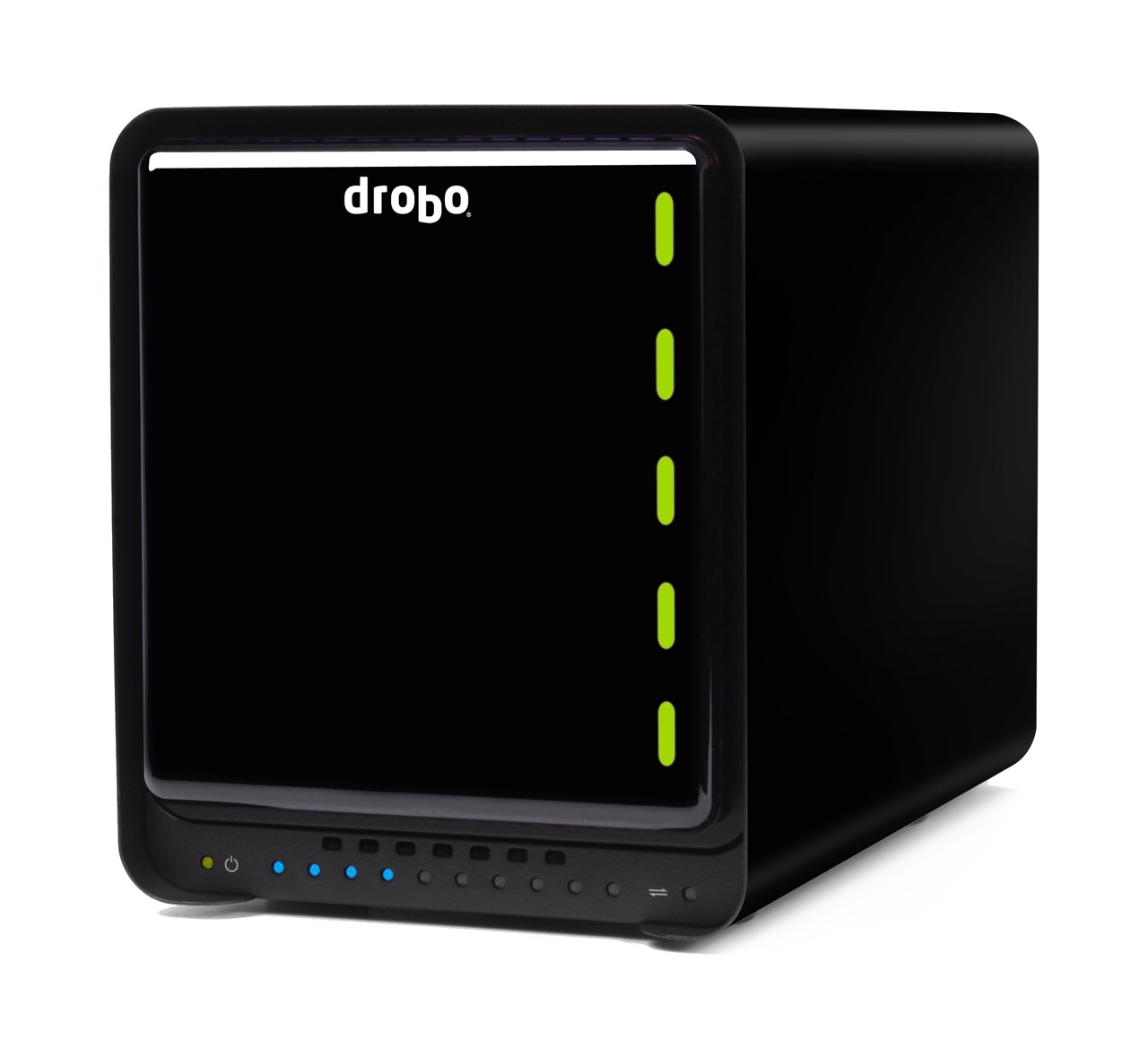
Today, November 23, 2009, the new Drobo S says hello to the world. It’s a supercharged, triple interface version of the 2nd-generation (FW800) Drobo, with eSATA, FW800, USB 2.0, a faster processor, 5 drive bays and dual drive redundancy. It combines the best of both worlds — the smaller form factor of the regular Drobo with the larger capacity, speed and data protection of the DroboPro. Data Robotics summarizes this as “more capacity, more protection and more performance”.

Excuse my little pat on the back here, but when I first heard that Data Robotics was getting ready for a new product launch, an eSATA interface was the first thing that came to my mind. I’m glad to see I was right.

Background

Data Robotics launched the original Drobo in mid-2007, then upgraded that to what we call the Firewire Drobo toward the end of 2008, introduced the DroboPro in April 2009, and now they’re launching the Drobo S, which you can see here, and the DroboElite, addressed in a separate post, also published today.
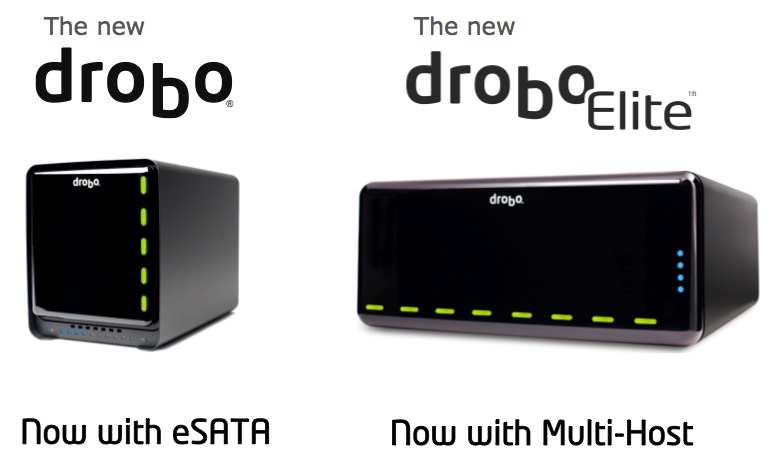
drobo-s-and-droboelite

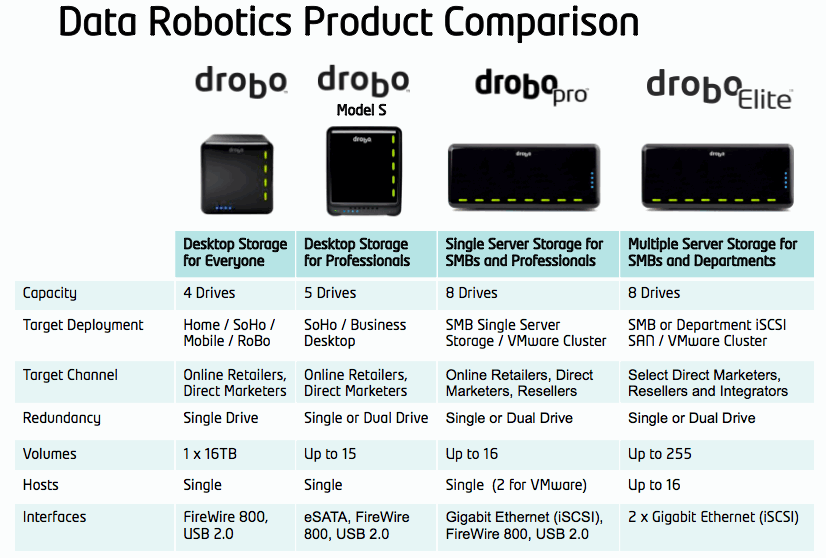
This means the company now has four pieces of hardware in their product line, geared toward different groups of consumers, starting with the desktop storage needs of the media-heavy consumer and going all the way to companies’ server rooms:

  1. Drobo,
  2. Drobo S,
  3. DroboPro and
  4. DroboElite

data-robotics-product-comparison

Design

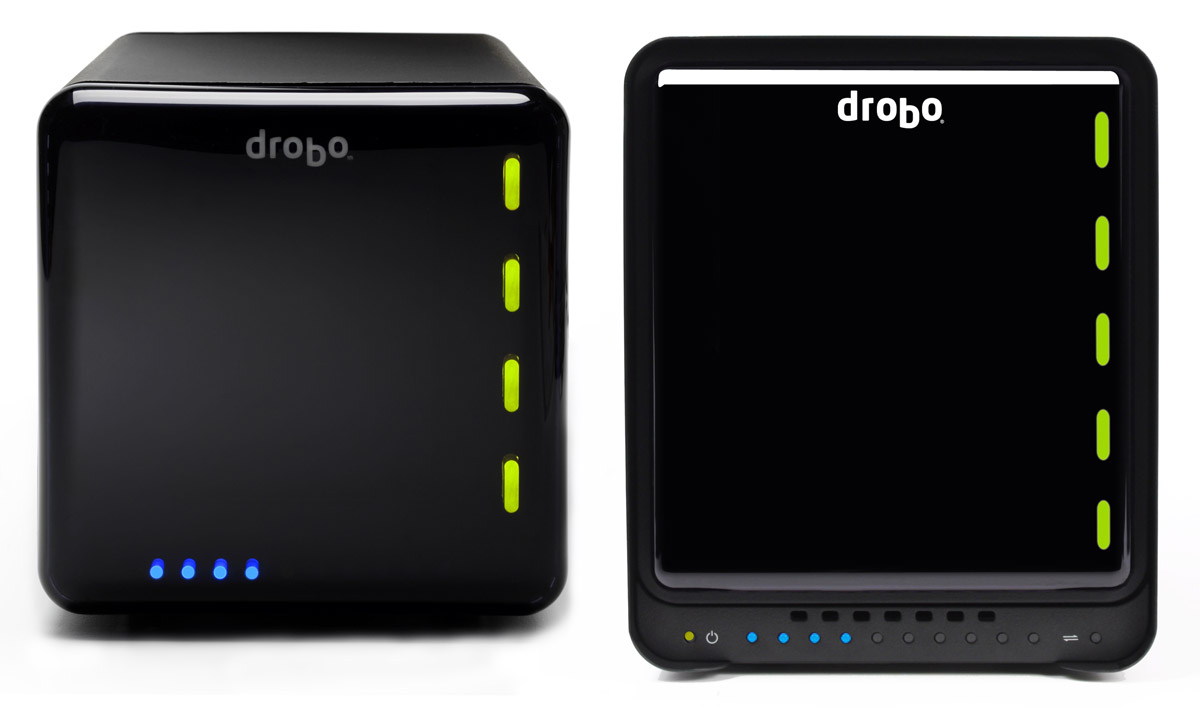
Let’s first look at the exterior of the new Drobo S, to see what’s changed there. On its front side, you’ll notice the bezel is different. Whereas the trademark magnetic cover was flush with the metal bezel of the enclosure, now it’s recessed and no longer covers the entire front surface. The capacity meter was kept at the bottom of the enclosure, but it’s no longer underneath the plastic cover, which was kept square rather than made rectangular, to fit the now-taller Drobo. The power and transfer lights were also made visible and placed inline with the capacity meter. A row of vents was added above the capacity meter, to pull in cool air for the drive bays.
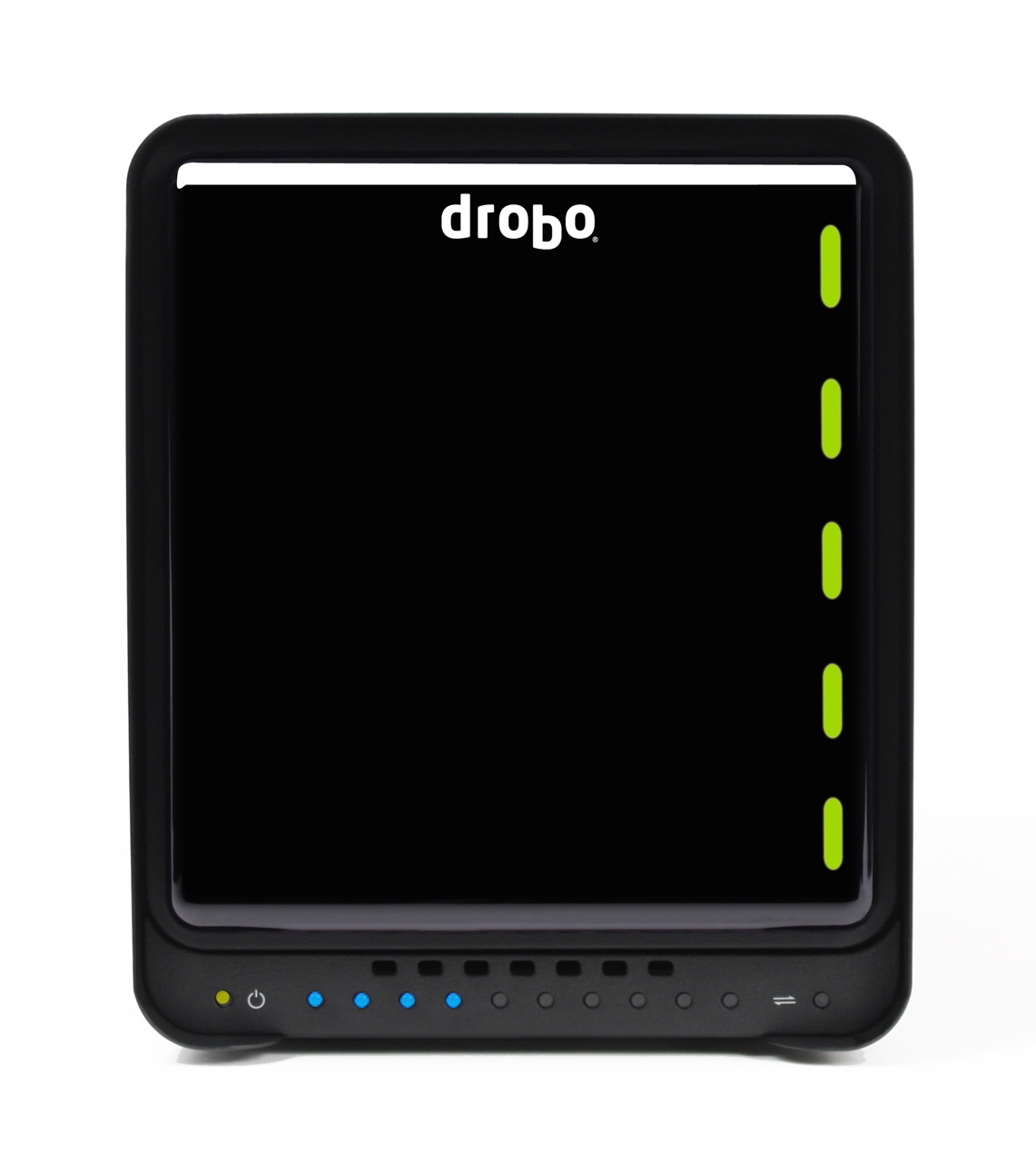
The new dimensions are 5.9″ wide x 7.3″ tall x 10.3″ long, as compared to the regular Drobo’s 6.3″ wide x 6.3″ tall x 10.7″ long. This makes the new Drobo S thinner and shorter than the regular Drobo, in spite of its 5 drive bays and the new eSATA interface. It is taller, though only by a single inch (2.54 cm). That’s an achievement in my book, and I’m sure the Drobo engineers spent quite a bit of time planning out the hardware layout. Kudos to them. The differences are made readily apparent when we look at the regular Drobo and the Drobo S side-by-side. Keep in mind the scale may be a bit off in real life, since I took two separate images and put them together in Photoshop for this article. This image isn’t an official one from Data Robotics, though the individual images are.
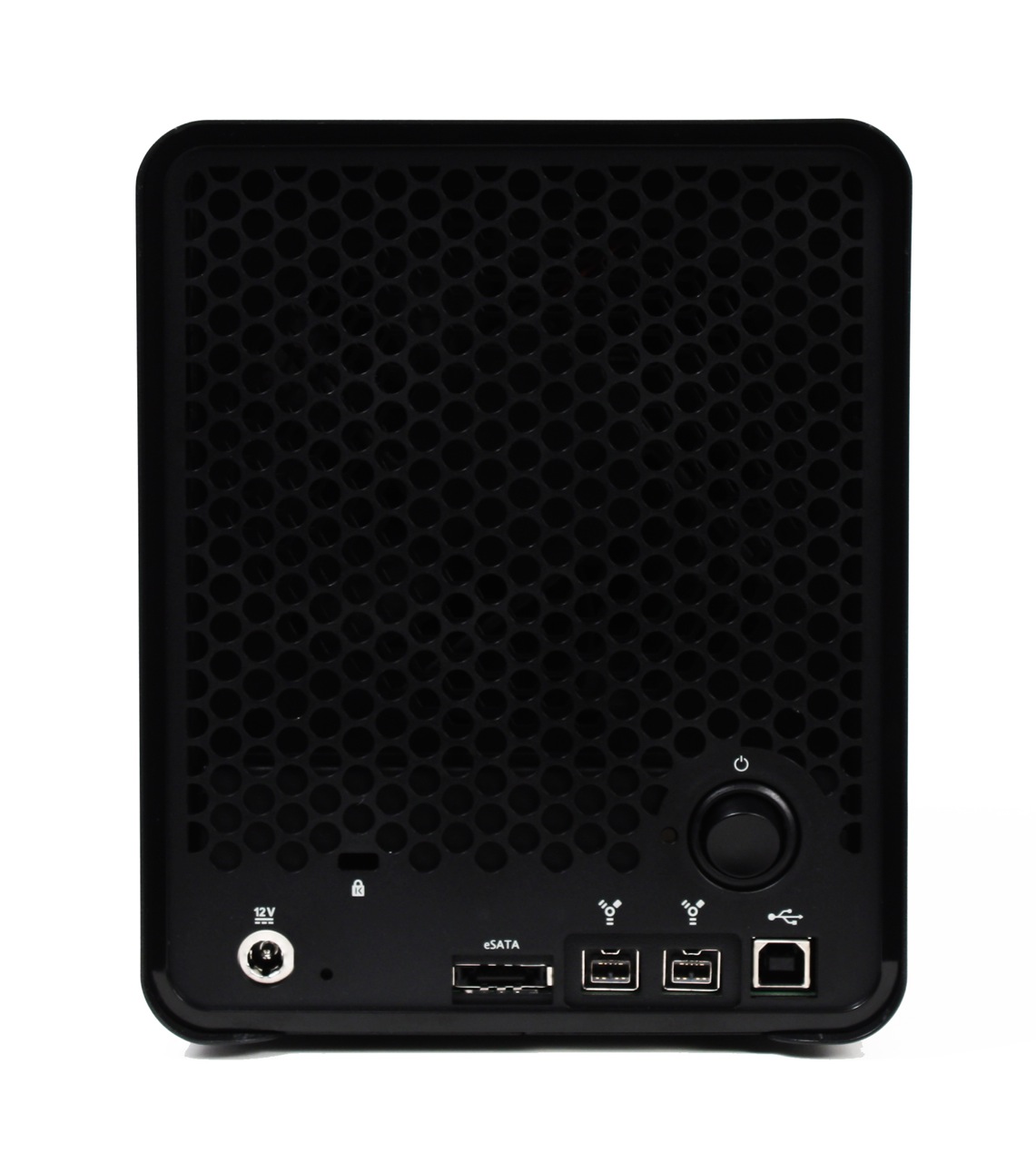
On the back of the new Drobo, we can see a much larger cooling grille, which makes sense given what we’ve discussed above. We also see something new, something which I’ve only seen on the DroboPro so far: a power switch. Then we see the rest of the stuff we expected, like the power connection (which is now marked by a shiny metal circle), the reset switch, the cable lock slot, and, of course, the triple interfaces: eSATA, Firewire 800 and USB 2.0.
Let’s look at a side-by-side comparison of the backs of the Drobo S and the regular Drobo, so we can see the differences in the design.
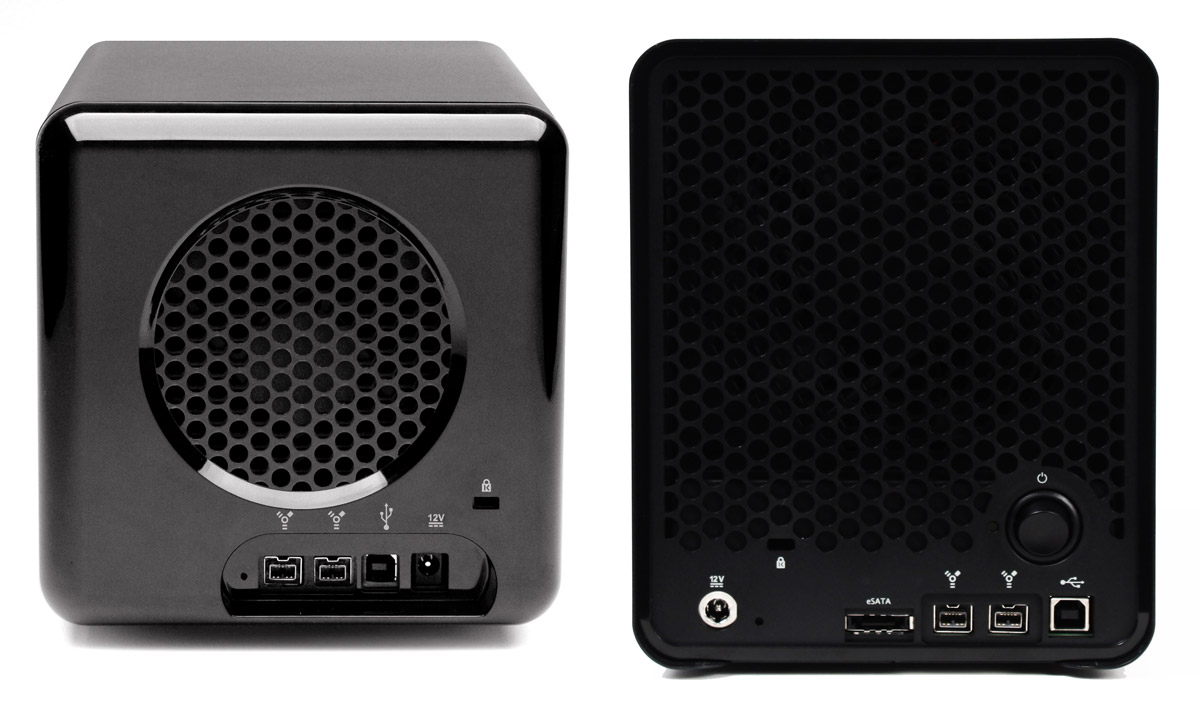
drobo-and-drobo-s-back

When I look at the Drobo S from all these angles, I’d say its design is much sleeker and more streamlined than that of the regular Drobo. There’s no doubt about it, I love it. I felt from the start that Drobo made storage sexy. There are very few storage enclosures on the market that look really good, and Drobo has looked great from the start. When you combine those looks with its amazing capabilities, the result is well worth my money.

You know what else? I think a future iteration of the regular Drobo’s enclosure will include the design elements of the Drobo S. I also believe at some point this same, newer design philosophy will be carried forward to the DroboPro and the new DroboElite.

Let’s look behind the front cover, to see how things look over there.

Drobo_S_Open_Hi

The five drive bays are clearly visible here, as well as the five action indicator lights, as Data Robotics calls them. On the Drobo S, the indicator lights give more status messages than on the regular Drobo, because each light is capable of displaying two colors at the same time. You can see what I mean by looking at this indicator scheme.
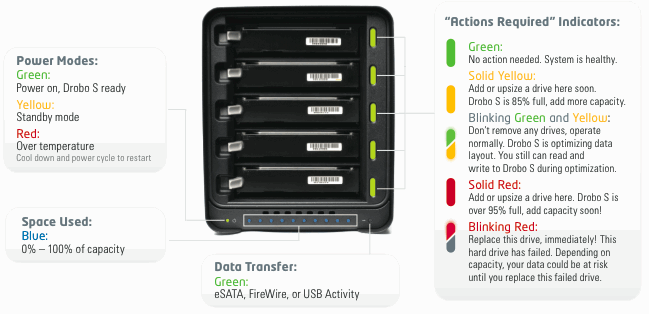
drobo-s-lights

Performance

Now let’s talk about performance. Clearly, with an eSATA port, the new Drobo S must also have the capability to stomach all that data that comes at it. It must be able to process all of it and write it to the drives fast enough to make the new interface worth getting. I haven’t tested the Drobo S in person (yet?) but Data Robotics says the new eSATA interface is “up to 50% faster than FireWire 800“. On the Drobo S, the FireWire 800 interface is also faster than on previous hardware, “up to 25% faster“. All these speeds are due to a new, faster processor that can crunch all of those data bits just as quickly as they get to it, writing each of them across the five drive bays.

In my phone conference with Mark Fuccio from Data Robotics, I asked him why Data Robotics hadn’t included a Gigabit Ethernet interface so that Drobo S could also be a NAS device. He explained that the direct-attach market is 4x bigger than the NAS market, so DRI will always go for that market first, and second, the eSATA interface on the Drobo S is faster than is possible going through file sharing protocols like Windows SMB or Apple’s AFP. The Drobo S has “performance ranges between 70-90 MB/sec or approximately 80-90% of the performance of the DroboPro’s iSCSI connection”.

I also asked him what he thought about Light Peak, and if we might see that in the Drobo as another interface next year. He didn’t say no, but he also didn’t promise anything, which was expected. He said it’s likely that DR will build it into the Drobo when and if Intel finalizes the specs and starts to make it available to companies.

It’s important to mention two features of the Drobo S which are just plain wonderful. One is the dual-drive redundancy, which is a feature borrowed from the DroboPro and is so important for those of us who absolutely must protect our data, or else. You can switch back and forth between single-drive and dual-drive redundancy at any time, but keep in mind there’s a capacity trade-off in dual-drive redundancy mode — that is, you get less available free space since the Drobo must now make sure your data is protected against two drive failures.

Dual drive redundancy is something Data Robotics was able to offer because it included five drive bays on the Drobo S. It would have been overkill on a four-drive unit, because it would have meant even less available space. Another effect of this dual drive redundancy is more capacity, up to 10 TB, as a matter of fact, given current hard drive specs. With five 2 TB drives in the Drobo S, you would indeed have 10 TB of space, but only 7.3 TB would be available for your data; the rest would be kept for data redundancy. Consult the handy chart below to see approximate capacities given typical drive combinations.
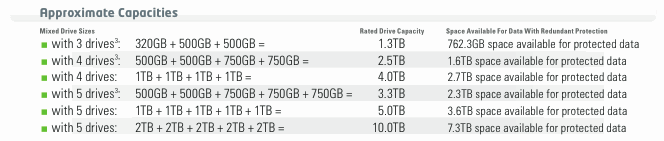
drobo-s-capacity

The second feature worth mentioning is the self-healing technology included with the Drobo S (also available in the DroboPro and DroboElite), which works as follows:

Even when sitting idle, Drobo S will continually examine the blocks and sectors on every drive, flagging questionable areas. This preemptive “scrubbing” helps ensure your data is being written only to the healthy areas of your drives, and that your data is always safe. Even if a drive fails, Drobo S keeps your data in the safest state possible, utilizing the available space on the remaining healthy drives.

I’d like to know if you get that with any other storage device on the market today. Compare it with RAID 0, where even if your drives don’t fail, any hardware or processor mistake in writing the correct bit sequences to the stripes will cause data corruption, leading to data loss.

Drobo_S_Left_Hi

Pricing and Availability

I was told the Drobo S will be available right away, as of today. It’s possible that initial supplies will be sold out, but more units will become available later. Suggested retail price is $799 for the Drobo S itself, or $1,799 for the Drobo S loaded with 5×2 TB drives. Although the price may seem high, keep in mind that at 10 TB capacity, it’s only 18 cents per GB for the Drobo S and the drives, together.

The Drobo S is available for purchase from Amazon or from B&H Photo.

Images used courtesy of Data Robotics. Side-by-side comparison shots were created by me, using press images from Data Robotics, so please obtain my permission if you’d like to use them elsewhere.

Standard
Reviews

Amazon Kindle now comes with international wireless coverage

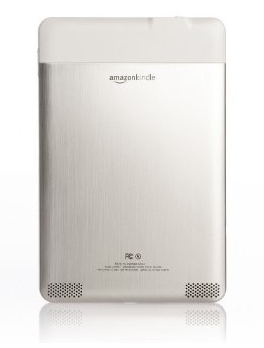
amazon-kindle-3

The newly redesigned Kindle from Amazon now comes with both US and International wireless coverage built right in. This means you can use it as you travel in most of the civilized world and not have to worry about internet access. It’ll automatically find a wireless network it can use, you won’t pay anything extra, and it’ll let you browse and get books from Amazon, or deliver your daily newspaper and blog updates to you.

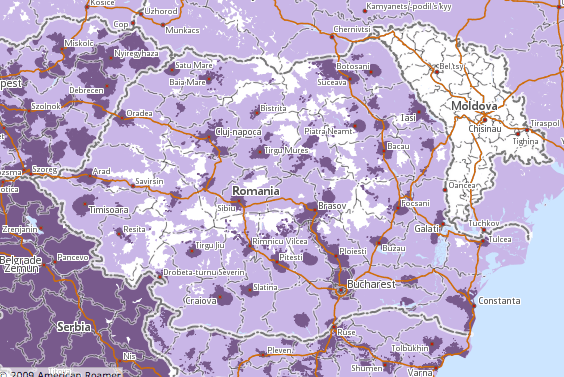
I checked to see if there was coverage in Romania, where I am at the moment, and sure enough, there is. Pretty cool.

kindle-coverage-romania

Having seen how clunky the 1st generation Kindle looked, I’m glad to see Amazon took the time to re-design it and to build in extra features like this one. Sure, it helps them too, since they get to sell more stuff to you, but I know just how annoying it can be to travel internationally and have to deal with different cellular plans. They put in the work needed to make sure the Kindle would just work wherever there was a serious wireless company available to provide coverage, and that’s definitely not something that happens overnight.

amazon-kindle-1

amazon-kindle-2

Standard
Reviews

Camera preview: Canon EOS-1D Mark IV DSLR

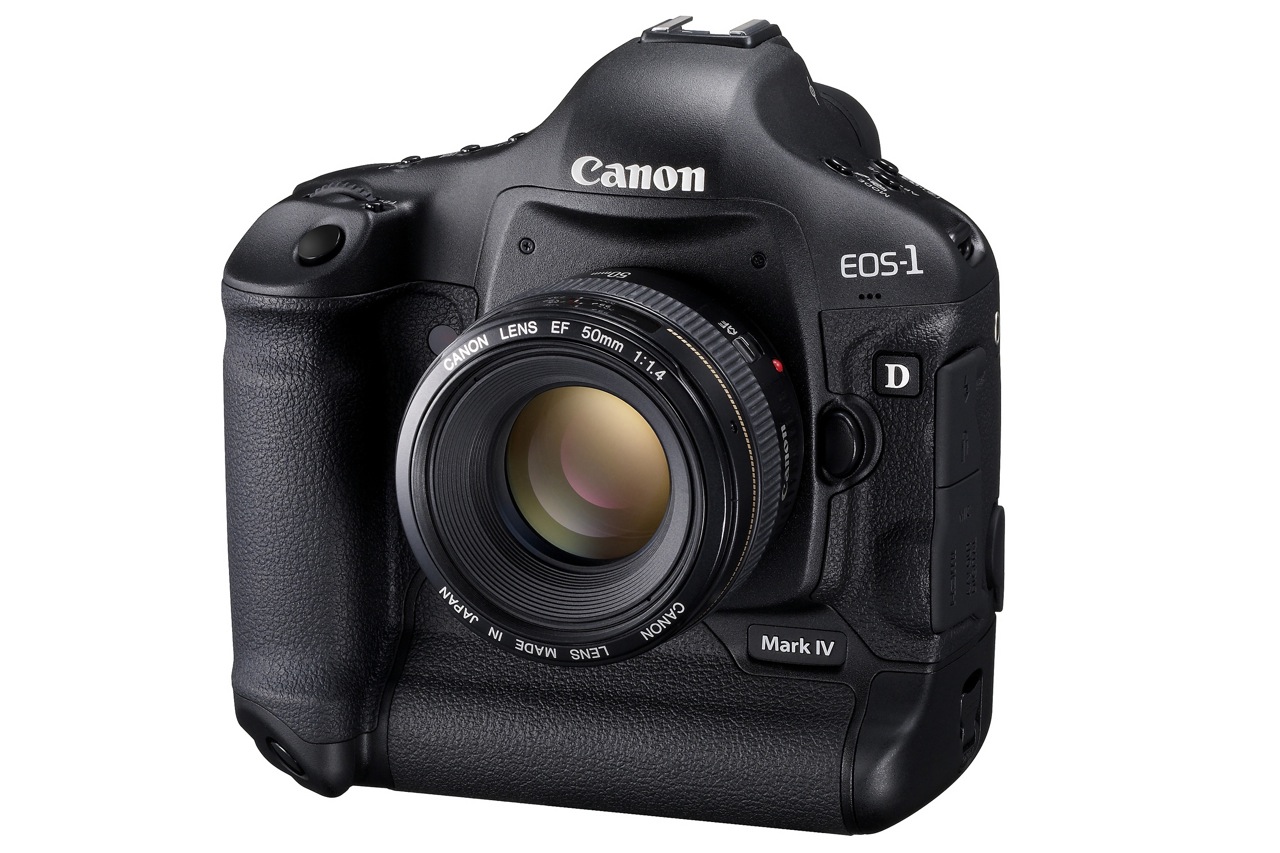
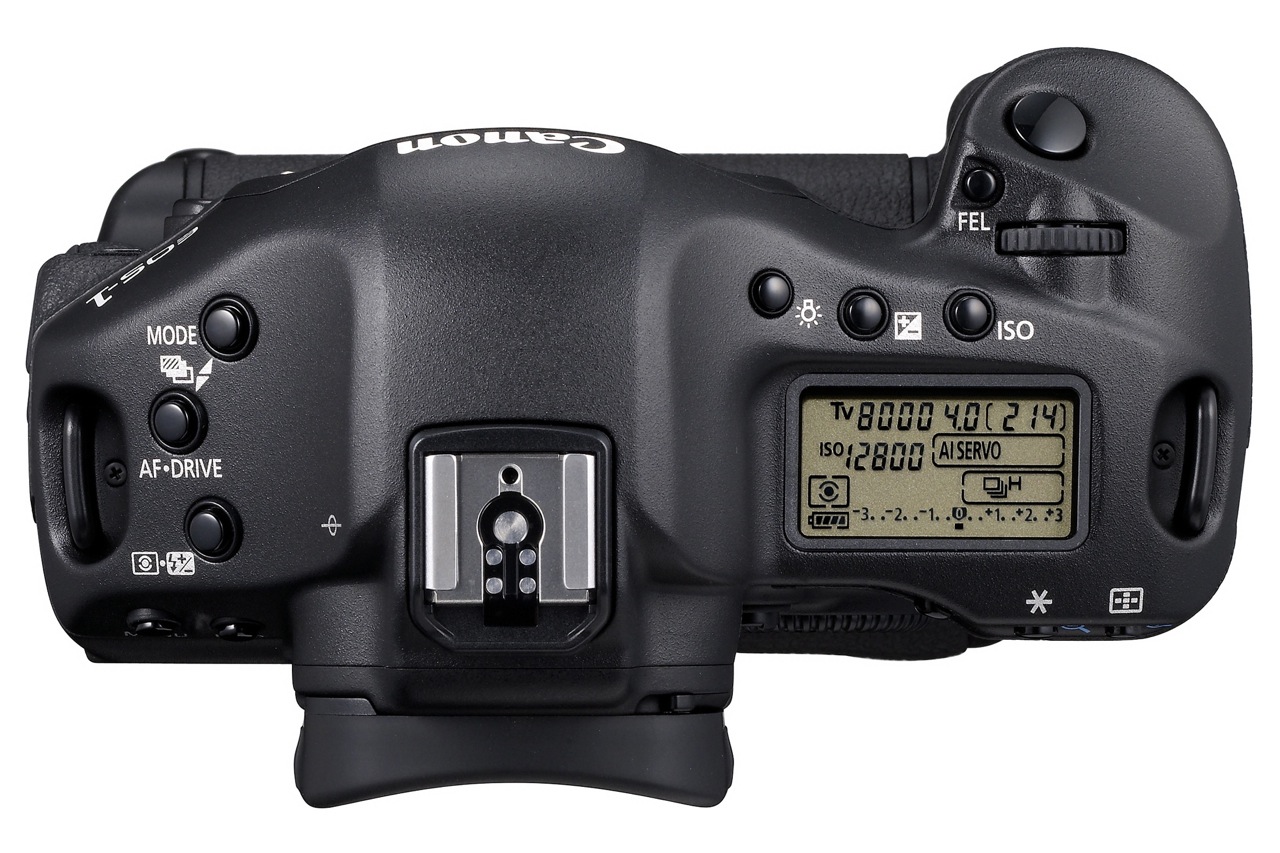
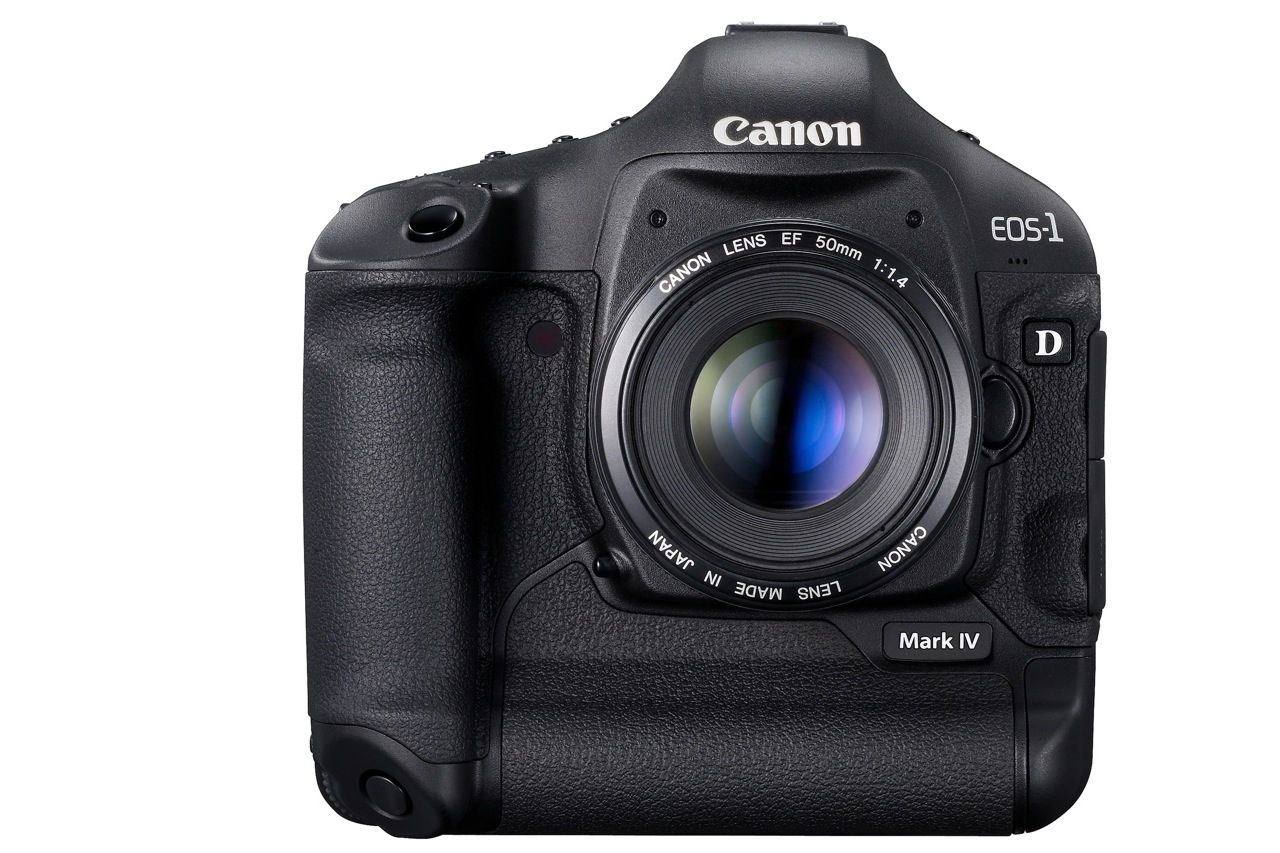
Canon EOS-1D Mark IV - 1

The Canon EOS-1D Mark IV pro DSLR was officially announced by Canon today, October 20, 2009. The specs are really good and they show Canon’s been hard at work on a solid response to Nikon’s latest DSLRs.

Many photographers were disappointed with Canon because of their 2008-2009 DSLR product releases, which didn’t seem to keep up with the competition and fell short in many areas of common interest, such as auto-focus, high ISO performance and image quality. I’m glad to see Canon listened to their customers’ concerns and put out a camera that offers what people want to see.

Let’s have a look at what sets this camera apart. The EOS-1D Mark IV has:

  • A 16-megapixel Canon CMOS sensor
  • Dual DIGIC 4 Imaging Processors
  • 14-bit A/D data conversion
  • 10 frames-per-second (fps)
  • The widest ISO range Canon has produced to date (50 to 102,400)
  • 1080p Full High-Definition video capture at selectable frame rates
  • A new 45-point auto-focus system with 39 high-precision cross-type focusing points

Canon EOS-1D Mark IV - 4

New autofocus system

Given the auto-focus problems with the 5D Mark II and other high-end cameras like the 1D Mark III and 1D-s Mark III, I for one am very glad Canon put out a new AF system. The newly redesigned AF system…

  • Can track fast moving subjects, such as athletes or wildlife accurately, even when shooting at full 10 fps bursts
  • Can detect subjects much better than the previous AF system
  • Can focus accurately with the new AI Servo II AF predictive focusing algorithm
  • Has twice as many cross-type focusing points as the EOS-1D Mark III
  • New AF sensor construction that improves performance in low light and with low contrast subjects

Not having used the camera yet, I can’t vouch for the accuracy and speed of the new AF system, but it shouldn’t be long before those who’ve had the chance to use the camera in real-world scenarios chime in with the results.

New 16.1 M CMOS sensor

I like Canon’s new 16.1-Megapixel CMOS sensor. I’m glad to see they focused on image quality and low light performance, not megapixels. Don’t get me wrong, extra resolution is always good, but gratuitous resolution is useless unless the resulting images prove their quality when viewed 1:1.

The sensor has improved photodiode construction to enhance dynamic range, and gapless microlenses that are positioned closer to the photodiodes for improved light gathering efficiency. The transmissive quality of the color filter array has been enhanced to improve sensitivity. Canon has also upgraded the sensor circuitry to improve noise reduction before the image data is exported from the CMOS sensor to the rest of the image processing chain.

In order to process all the extra raw data from the sensor at up to 10 fps, Canon put two Dual DIGIC 4 Image Processors inside. The 1D Mark IV has approximately six times the processing power of DIGIC III, for full 14-bit A/D conversion at 10 fps.

Full HD video capture

I’m also glad to see that Canon has put 1080p HD video on this camera, which means that for them, HD video is here to stay on all their DSLRs. It really is a new era for HD video when it becomes a standard feature on professional DSLRs; wonderful things are in store for those interested in blending photography with videography.

The 1D Mark IV has full HD capture and full manual exposure control, plus selectable frame rates. Its new APS-H image sensor is similar in size to a Super 35mm motion picture film frame. The camera allows for three video recording resolutions…

  • 1080p Full HD, 16:9
  • 720p HD, 16:9
  • 640×480 SD, 4:3

… and multiple selectable frame rates…

  • Full HD at 1920 x 1080 in selectable frame rates of 24p (23.976), 25p, or 30p (29.97)
  • 720p HD or SD video recording at either 50p or 60p (59.94)

SD video can be recorded in either NTSC or PAL standards. Sound is recorded either through the internal monaural microphone or via optional external microphones connected to the stereo microphone input.

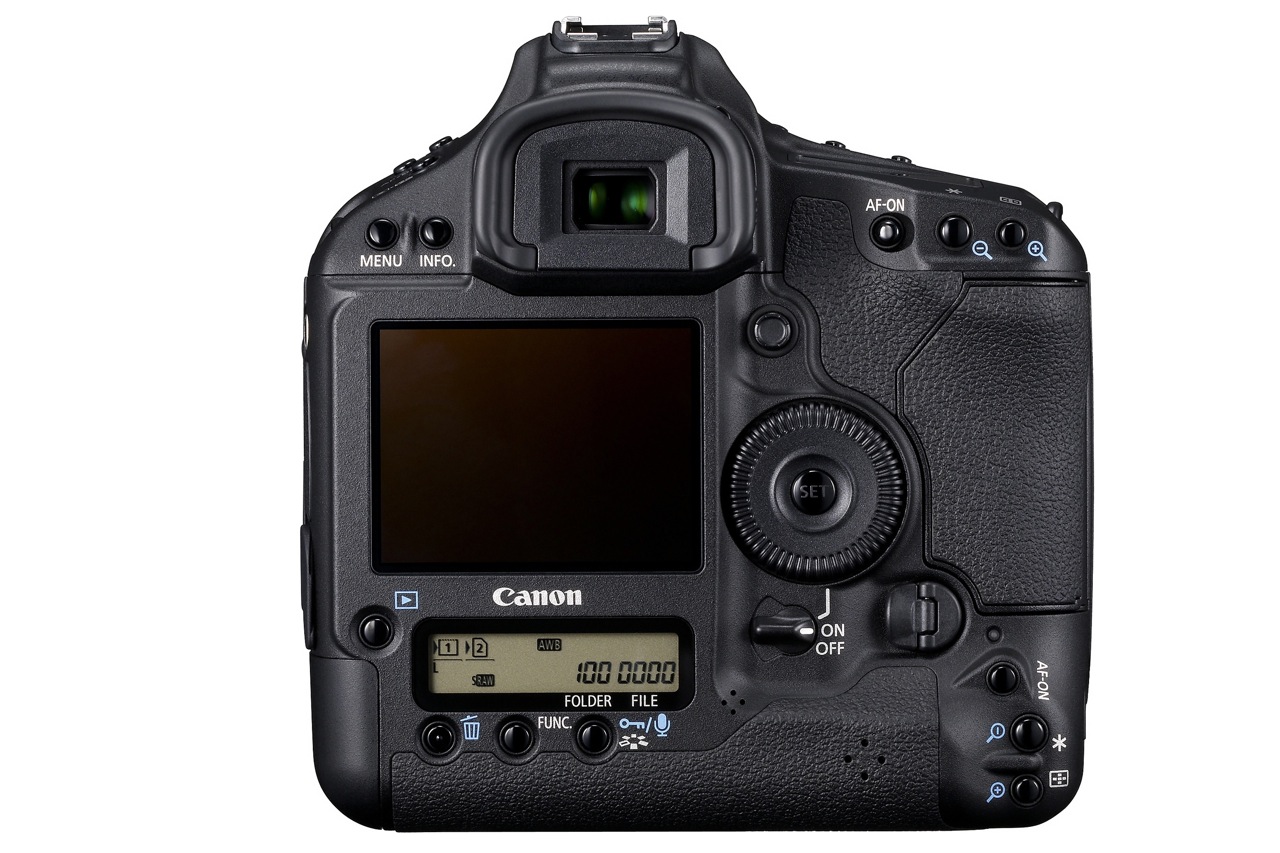
Canon EOS-1D Mark IV - 3

Other good features are:

  • Auto Lighting Optimizer (ALO) system. When enabled, Canon’s ALO automatically adjusts the image for optimal brightness and contrast on the fly during in-camera image processing, reducing clipped highlights while keeping shadowed areas as clear and detailed as they actually appear. Canon says that “demanding professional photographers who tested ALO clearly stated that this one feature will reduce their post-production image optimization process by more than 75 percent”. It’ll be interesting to see what others will say about this.
  • Highlight Tone Priority, which takes maximum advantage of the camera’s extensive dynamic range to preserve detail in highlight areas of the image.
  • Improved white balance algorithm making colors more accurate when shooting under low color temperature light sources such as household tungsten lamps.
  • Peripheral Illumination Correction function, which corrects darkening that can occur in the corners of images with most lenses when used at their largest apertures. When activated, it is automatically applied to JPEG images and video clips as they are shot. For RAW images, it can be applied in DPP software. Personally, I like the vignetting effect that occurs with some lenses, so I don’t really plan on using this very much.
  • A large, 3-inch Clear View II LCD screen with 920,000 dot/VGA resolution (finally) with a wide 160-degree viewing angle for enhanced clarity and more precise color when reviewing images and shooting video.
  • In-camera copyright information feature (hooray) helps professionals secure control over images by setting copyright data directly into the camera and appending that information to each image file in the Exif metadata.
  • A fluorine coating on the Low Pass Filter to further repel dust and enhance the EOS Integrated Cleaning System (less dust spots is always a good thing).

Finally, the 1D Mark IV’s body, chassis and lens mount are completely weather-resistant and 76 gaskets and seals surround all buttons and seams. The body covers and internal chassis, including the mirror box, are constructed with magnesium-alloy, and the lens mount is constructed with stainless steel. When used with Canon’s Speedlite 580EX II and/or most current L-series lenses, the entire camera system remains fully weather resistant.

Comparing this camera with the Nikon D3s, which has similar specs but retails for about $100 more, I have to ask, what makes the Nikon DSLR better? Other than niceties like better exposure compensation control (±5 EV vs. ±3 EV) and more physical buttons for manipulating the settings, this Canon matches or bests the Nikon on all major specs, like fps (10 vs. 9), ISO (same), resolution (16 vs. 12) and HD video (1080p vs. 720p).

The new WFT-E2 II A wireless file transmitter, available exclusively for the EOS-1D Mark IV Digital SLR camera, is quite interesting in its capabilities. It offers connectivity through IEEE802.11a/b/g and Ethernet. The new Camera Linking feature allows a single photographer to simultaneously fire up to 10 cameras remotely. The updated WFT Server mode lets you remotely use Live View, control settings, and fire the EOS-1D Mark IV over the internet from anywhere in the world using a standard Web browser or many Web-enabled smart phones. Additionally, geotagging is now possible via Bluetooth, using compatible GPS devices to append coordinate data to the images. Given that the previous wireless transmitter, WFT-E2A, costs $1,200, you can be sure this new one will cost a bundle, but for those who need it and can afford it, I’m pretty sure it’ll do a good job.

Canon EOS-1D Mark IV - 2

The Canon EOS-1D Mark IV Digital SLR camera is scheduled to be delivered to U.S. dealers in late December, and will be sold in a body-only configuration at an estimated retail price of $4,999. Final pricing and availability for the Canon WFT-E2 II A wireless file transmitter will be available later this year.

Full specs for the camera are available here. Demo videos produced by Canon specifically for this camera are available here. There’s a section on the camera, with more information, at the Canon Digital Learning Center.

You can buy the Canon EOS-1D Mark IV from Amazon or B&H Photo.

Images used courtesy of Canon.

Standard
Thoughts

Turning trash into usable products

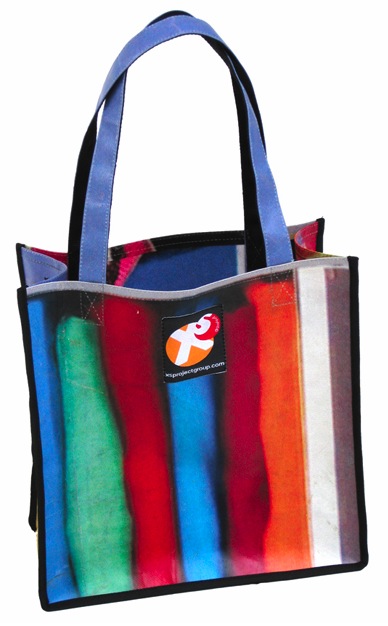
Ann Wizer from XSProject Foundation (as in “excess”) is making custom-designed bags and other products from non-recyclable plastic waste found in Indonesia and the Philippines. She buys the raw materials from trash pickers, whom she pays at above-market rates, and, using trained artisans, creates beautiful products from trash that would be clogging landfills, streets and waterways in those countries.

Through its work, the Foundation is protecting the environment, reducing poverty, and teaching locals how to sustain themselves through the work of their own hands. The end results are beautiful, as you can from the photos and the embedded video below. The cause is noble, the work is noble, the means are innovative, sustainable and ennobling, and so I think Ms. Wizer and her XSProject Foundation deserve our applause for the wonderful work they’re doing.

Embedded video from CNN
Turning trash into usable products (CNN)

xsproject-bag-1

xsproject-bag-2

xsproject-bag-3

* I would have linked to their online catalog of products, but at the time of writing this, it seems to be down.

Images used courtesy of XSProject Foundation.

Standard
Thoughts

Why can't I use AirTunes from my iPod or iPhone?

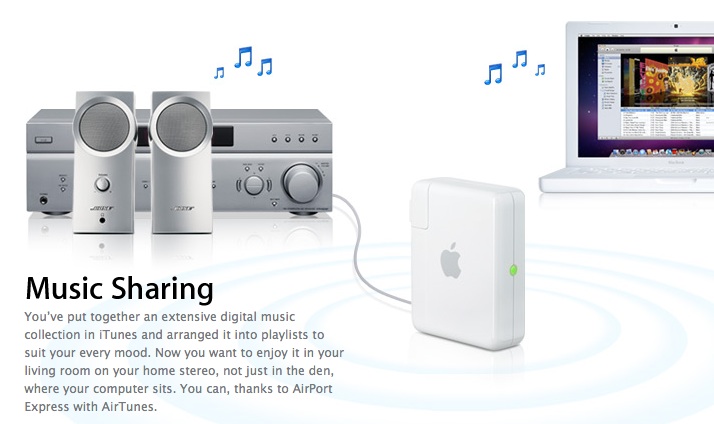
For those of us with an AirPort Express, this question comes up at some point: why can’t I play directly to it from my iPod touch or iPhone, using the same AirTunes technology that is available through iTunes?

apple-air-tunes

After all, an iPod touch or iPhone has WiFi, and AirTunes works through WiFi. If I can do it from my Mac, it stands to reason that I should be able to do it from my iPhone, doesn’t it?

Apple iPhone 3G

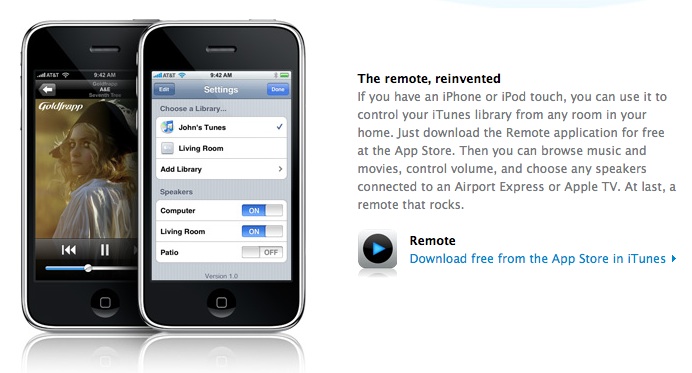
Instead, we get a hamstrung app like Remote, which is neat, but somewhat pointless. Think about it: you’re using a device which already has your music library stored on it (iPod touch) to play and control the same music, stored on your computer. Why the middleman? Why not go direct?

apple-remote-app

Sure, the Remote app is useful in the living room, if you also have a music library stored on your Apple TV. You can then control the playback of that music or videos without using the Apple Remote, which has a much longer battery life, is smaller, and much easier to use… eh, wait a minute, that doesn’t sound like it’s better, does it?

Given Apple’s commitment to the environment, I have to wonder why they insist on using the laptop or desktop machine when it’s not necessary.

apple-environment

I realize using AirTunes to play music directly from the iPod touch or iPhone will drain the battery much faster than playing the music through headphones or through a dock connected to a speaker, but hey, we should at least have that choice, right?

Standard