
 A few months ago, I was interested in offsite backup, and thought I’d give Mozy a try. Their Home Backup plan intrigued me. It was only $4.95, and was billed as unlimited. Could it actually work as advertised?
Short answer is no, not by a long shot. Sure, it only costs $4.95/month. That much is accurate. The unlimited part is where Mozy starts to stretch the truth. The problem lies with bandwidth, and I’ll give them this much: uplink speeds on US broadband connections, particularly on DSL lines, are horribly inadequate in order to perform any sort of decent backups.
But Mozy also does something I dislike, something that isn’t readily advertised on their site when users sign up: they cap the bandwidth for Home users at 1 Mbps. Even if you should be blessed with faster uplink speeds (like a fiber connection), you won’t be able to take advantage of it with Mozy. You’ll still only upload to the Mozy servers at 1 Mbps or less (usually around 600-800 kbps from my experience).
I had around 150GB of data I wanted to back up on my laptop at the time. It would have taken me several weeks (I think up to 13 weeks) to back up that data from my home DSL connection (860 kbps uplink). I had to reduce that amount to about 96GB, took my laptop into work, where the uplink pipe was much fatter, and still, it would have taken over 12 days to get that data backed up, because they were capping the uplink speed.

I then reduced my backup set even more, down to 59 GB (see below), hoping this would speed things up. It would have still taken a ridiculous amount of time to back up my data, and I only ended up getting frustrated with Mozy’s software in general, because of its poor design. Every time I wanted to configure the backup set, I needed to wait for the software to finish calculating the aggregate size for all file types, and that could take half an hour or more every time I opened that panel. Couldn’t they have cached this data when the operation was performed the first time?
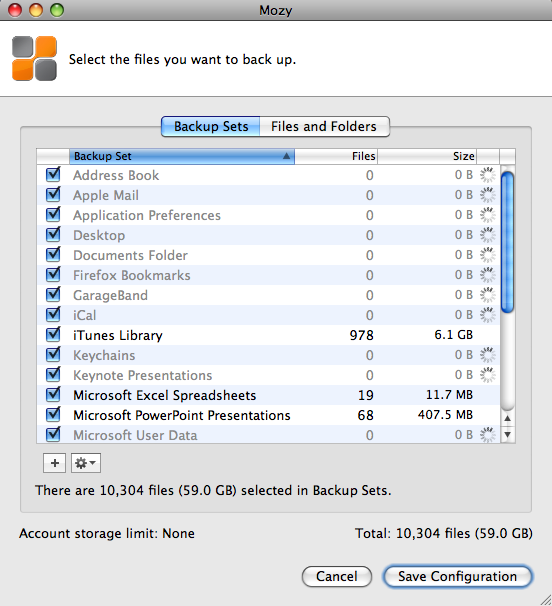
Isn’t it ironic how they say the “Account storage limit” is “None”, yet you can never really quite test that None unless you leave your computer on and connected to the Internet for a month or more, which is clearly not feasible in the case of a laptop? Let’s not even consider the possibility that your Internet connection might go down, in which case the backup job would fail, and you’d need to start over…
In the end, in order to get any sort of progress with the Mozy backups, I reduced my backup set to 1GB. That’s right, 1GB, which allowed me to back up my Address Book, iCal, and Application Preferences, plus some documents. Then, and only then, did Mozy manage to complete the backup jobs in time.
I’m sorry, but I’m not going to pay $5/month so I can back up my contacts, calendar, and a few docs. That’s not acceptable to me. I canceled the service.
I did write to them to complain about this, and that’s how I found out about the 1 Mbps cap on uplink bandwidth. They also offered to give me a free month, but what good would that have been? I’d have only ended up more frustrated.
Some might say I should have tried the Mozy Business plan, which doesn’t cap uplink speeds and offers more options. For one thing, I don’t care for those extra options. For another, it would have cost me roughly $80/month ($3.95 for the license and $75 for the storage at $0.50 per 150GB). That’s not counting what it’d have cost me to back up my photos offline, which is what I really wanted to do. I have roughly 500 GB of photos, and according to Mozy’s pricing, that would be $250/month in addition to the $80/month I’d already be paying to back up my laptop.

Clearly, at those prices, Mozy is no longer the cheap, easy to use $4.95/month service that they advertise so widely, and instead of paying $330/month to them, I’d rather pay it to buy hard drives, copy my data, and ship them to my parents once every few months. It’d cost me a lot less.
I suppose they’re not entirely to blame. For some reason, $4.95 has become the price point for online home backup plans. Carbonite offers a similar plan for the same amount and other competitors are crowding around the same amount, although with different offerings. The thing is, you can’t really give people unlimited backup for $4.95 a month. Your costs as a business are higher. So what do you do? You fudge. You get truthy. Well, I don’t like it. I’d much rather see them offer a $15/month Home plan where they don’t cap the bandwidth but cap the amount I can back up — say, up to 75GB or something like that. I’ll let them work out the numbers, but the point is, I appreciate honesty a lot more than some cheesy pricing gimmick.
Updated 7/2/09: A reader (M.J. from Denmark) wrote to say the upload bandwidth cap at Mozy has been raised from 1 Mbps to 5 Mbps. It’s an interesting move on Mozy’s part, but I still have questions about their customer service and the ability to properly restore customers’ data, as other people have indicated in the comments below.
 Raoul Pop