Thoughts

Say hello to my photography catalog

I’ve been working to keep my promise of sharing my photos in HD, and have been slowly but surely uploading photos to my photography website ever since. I also re-designed my photography catalog in a way that should make it easier to navigate and browse the content there.

I’ve even put feeds in place that will make it easy for you to keep up with every update to the catalog and to download whichever photos you like for personal use — just visit the catalog and scroll down to the bottom of the page, where you’ll find the list of feeds.

In the grander scheme of things

For the benefit of some of you who aren’t aware of this, I put together a short screencast that demonstrates how easy it is to set one of the photos from the catalog as your desktop background.

http://blip.tv/file/3130154
See this video on blip.tv

As I wrote before, one of the main reasons of uploading my photos in full HD (1920px on the wide side) was to allow my readers to use them as backgrounds on their computers without experiencing any loss in quality as the photos filled their screens. I am therefore carefully cropping each of my photos at an aspect ratio of 16×10, which will allow them to fit perfectly onto most widescreen displays, be they laptops or standalone monitors.

I will soon make it easier to order prints and arrange for the licensing of my photos as well. Stay tuned for that.
Standard
How To

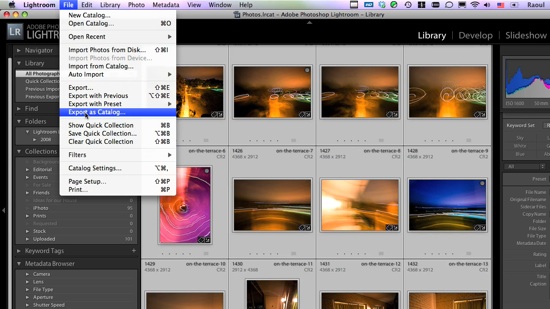
How to transfer photos between Lightroom catalogs

This screencast will show you how to transfer photos between different Lightroom catalogs, and it will go beyond that by also demonstrating how the whole process could be made a LOT easier if Adobe wanted to.

In the screencast, I refer to an article I wrote a while back, entitled “The next stage for Lightroom“, where I put forth a proposal for improving the way Lightroom stores photos, with an eye on catalog portability (laptops, for example). If you have the time, please read through that article after you see the video.

The video is about 10 1/2 minutes long, file size is 78MB, and it’s 720p HD, MOV. You can view it online by clicking on the screenshot below, or download it.

Standard
Reviews

Problems with meta-data entry in Lightroom

I’ve been having problems with meta-data entry in Lightroom, particularly the location meta-data. It’s not my computer that’s to blame. The problems exist on both the PC and Mac versions of Lightroom, although they’re more apparent on the Mac version.

When I first mentioned this on Twitter and Friendfeed (see here, here and here) I promised I’d put together a video if I found a good screencasting application. Ken Verburg pointed me to iShowU, which I used to make a short screencast demonstrating the problems. Thanks Ken!

I uploaded the video to my Vimeo account last night, but don’t try to view it there. The compression is terrible and you won’t be able to see what I’m doing. Instead, go there and scroll down till you see the download link. Click on that and view it locally on your computer (you’ll need Quicktime or iTunes). Another option is to download the video directly from my site. The original video has no loss in quality and you’ll be able to see everything properly.

The video will do a good job of conveying my frustration with the user interface in Lightroom. I really do hope the final version of Lightroom 2 will address these issues, because entering location metadata in Lightroom right now is terribly frustrating.

Standard