
On a PC
Hold down the Ctrl key and move the scroll wheel on your mouse up or down to decrease or increase font size, respectively. Works in IE and Firefox on PCs.
On a Mac
Use Command and + or Command and – to increase or decrease the font size.
Hold down the Ctrl key and move the scroll wheel on your mouse up or down to decrease or increase font size, respectively. Works in IE and Firefox on PCs.
Use Command and + or Command and – to increase or decrease the font size.
If you’re reading this, first, I thank you, and, I kindly invite you to say hi. Write a comment on this post, and tell me what’s up, who you are, and if you want, when you started reading it. Do you like the site? Do you like the posts? Are there some things you’d like to see? If you don’t feel comfortable writing comments, write me an email. C’mon, let me know who I’m writing for. Thanks!
I’m struck by the amount of consolidation that’s taking place these days. Companies are gobbling up other companies in order to scale up, expand horizontally or simply eliminate competition. We in the web development industry have so far been spared this fate, simply because of the amount of incredible innovation and changes that always take place in what we do. Let’s face it, a company needs a solid product that can be sold, and so far, it’s really hard to pin down “products” in web development. Plus, the very nature of our work, which can be done anytime, anywhere, rewards individuals, especially those willing to stretch the boundaries of what’s thought possible and come out with something cleaner, something nicer, something slicker, something cooler.
But, even with all of these road bumps in the way of web development consolidation, it’ll still happen. Don’t think I’m enjoying myself as I write this. I don’t want it to happen! You know what’s going to act as the catalyst? The same thing that’s driven manufacturing companies out of the States: price. Look at some of the free products that are out there, that let you create websites with no cost at all: Google Pages, MSN Spaces, Yahoo (whatever it’s called), etc. They’re not full-featured, but they work to get people started. And they’re really easy to use, to the extent that even a “moron in a hurry” (aka the Apple courtroom test) would know how to use them. I’m not implying that most people are morons, but most people don’t need fancy sites that do lots of cool things and manipulate databases, etc.
If you don’t believe me, look at MySpace. It’s there that you’ll see the tastes of most people: that site is full of tasteless decoration, crowded, nasty-looking things that can’t even be called web pages. And that’s only the content. I’m not even talking about the MySpace-imposed page layout and horribly big, screaming ads. The whole site is gross. But, that’s the idea of a “nice” web page to most people. They don’t understand what goes on behind the scenes when it comes to web development. They don’t understand how to design a site. They have no idea about the stress and hard work that goes on when coding/designing a real site. And they shouldn’t be expected to know this. After all, that’s what web designers and developers are paid to do. But the point is, the masses don’t crave and don’t care about good design, they want the free stuff, and most don’t care if that free stuff is ugly.
As free products like the ones I mentioned get more full-featured, and more complicated systems like WordPress or Drupal get even easier to use and customize (not that WordPress isn’t easy to install and use, it is, but you still need to know how to code and design when customizing it) the needs of more and more people will be met. And as that happens, the market for web developers shrinks more and more. And here we get back to my opening comments: solidification of product offerings leads to consolidation. Once a market develops for a clear-cut product, competition will increase, the main differentiating factor will become the price, and the biggest company will be able to offer the lowest price — hence the catalyst for consolidation. Besides, who can beat FREE stuff? How do you beat that? Who can beat offshore web development, where people can live on dollars a day and can afford to develop a complicated site for a few hundred dollars? It’s really, really sad to see web designers and web developers who aren’t able to make a living in the States anymore. I can understand why it happens, but it’s still very troublesome.
What recourse is left to us, as web developers? I would hope we can find some solution that would allow us to keep our independence while also allowing us to make a living without competing purely on price with Ivan in Russia or Mihai in Romania or Jose in Argentina, because living in the States, we’d lose the price battle very quickly.
I realize the outlook as portrayed in this post is a bit depressing, but I plan to write a counter-post to this in the next few days. I do think there’s light at the end of the tunnel, and there’s hope for those of us willing and able to seize certain opportunities.
After Google launched the new Reader, I couldn’t help thinking they might just give Groups a re-design as well. My hunch was correct. Brett Lider announced a couple of days ago on the Official Google Blog that a new version of Groups is currently in Beta. It looks a little nicer, but beyond that, no extra functionality was included. Oh yes, there was. There’s now a drop-down menu at the top (Ajaxified) which displays the groups I’m subscribed to without needing to visit a separate page.
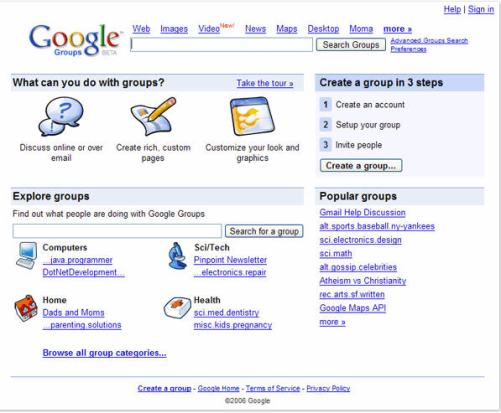
Beyond that, I think the old version of Groups made better use of the space on the page. When I log into the Groups Beta, my groups get grouped in a right-hand column, and since I’m subscribed to more than 10, the page ends up stretching down with lots of white space in the main column and the groups squished in the right column. It just doesn’t look good.
Overall, I think they’re going in the right direction with the new version of Groups, but it still needs work, particularly in the page layout. I just don’t think enough time was devoted to thinking through the functional areas of the Groups, and how they need to be arranged on the page.
 I’ve been using the Zoom Search Engine for over a year, and I’ve been very happy with it. But today I realized I hadn’t told many people about it, so I had to fix that.
So what’s the Zoom Search Engine? It’s a beautiful piece of software written by WrenSoft, an Australian web software company. Here’s what I think is amazing about it:
So how exactly have I been using the Zoom Search Engine? It’s been powering the site searches on Exprimare and the Road Management Catalog, among a few others. While Exprimare is a fairly small site (it’s my consulting/portfolio site), the Road Management Catalog is a big site in terms of the content, file types and number of pages. It belongs to the World Bank, and vendors of various road construction, measuring and testing equipment have accounts where they submit company information and upload brochures in various file formats. The Zoom Search Engine’s job on that site is to index all of the uploaded files, all of the various companies’ info, the regular site pages, and to make them all available in the search index. It’s been doing a wonderful job over the past year, and I love it. I’ve scheduled it to run every day, and to index all of the files. When it’s time for it to start, it does so automatically. It spiders the site, builds the index, uploads it to the site through FTP, then closes automatically. I don’t have to do anything other than adjust search parameters here and there as the need arises.
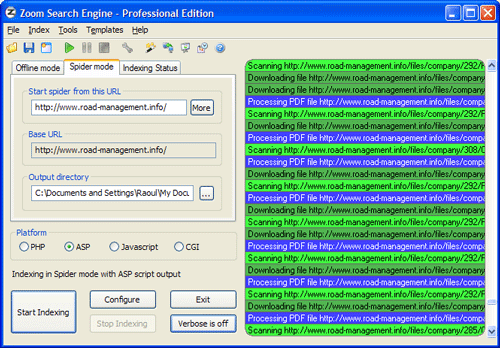
Here is a screenshot of the main app window, just as it’s indexing the Road Management Catalog. Once it’s configured, it spiders the site (you can set it to start multiple threads so the indexing goes faster) and then it goes about its business.
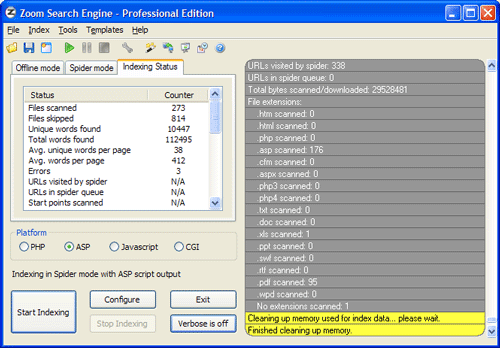
When it’s done, it gives you an index status report, to let you know what it found. It also outlines in red any indexing errors, such as files or pages it couldn’t download or index.
If I had to talk about the many configuration tabs, I’d have to reproduce their user manual. Instead, let me just show you a screenshot of one of them, the Indexing options. How cool is this! I get to decide what gets indexed, what gets boosted, and how words get joined. And this is just a small sample of what the app can do.

A lot more screenshots are available on the WrenSoft site. Their support section is extensive, a forum is also available, and their tech support is only an email away.
The Zoom Search Engine is an amazing product, and well worth its price. As a matter of fact, I’d call it underpriced. It’s a tremendous value given its functionality. So if you own a site and have been looking around for a suitable search engine, don’t settle for something that’s overpriced or inflexible. Get something that’s been tried and tested, something that’ll work, something you can use on a daily basis and tweak until you get just what you want.
 Raoul Pop