Reviews

Camera preview: Canon PowerShot SD780 IS

I had the chance to look at the Canon PowerShot SD780 IS Digital Elph camera recently, and was impressed by the beauty of its design, its diminutive size, and its features. This camera is truly small. Being used to holding DSLRs, holding this camera in my hand was an unusual experience for me. It’s so small, I thought I might drop it or break its buttons when I pressed them. But that’s just an initial illusion. It works fine, it’s sturdy, and its matte, non-slip finish means you won’t easily drop, unless you’re Mr. Butterfingers.

I’ve always liked Canon’s Elph line. I owned their 1st gen Elph camera, which recorded images to APS film, and I still have it, though I don’t use it any more. What I like about this camera is how the Elph legacy, combined with modern technology and design cues, all comes together to create a truly wonderful little camera. This camera is a stunner. The logo, the lettering, the buttons, the lens and all of its other building blocks form a beautiful whole where everything falls into place.

And how could I not be impressed by its features as well?

  • 12.1 Megapixel Resolution
  • 3x Optical Zoom Lens
  • Optical Image Stabilizer Technology
  • DIGIC 4 Processor with iSAPS scene-recognition technology
  • Face Detection Technology
  • Face Self-Timer
  • Advanced Red-eye Correction
  • Intelligent Contrast Correction
  • High ISO Sensitivity (up to 3200 ISO)
  • HD Video Recording (1280 x 720 @ 30 fps) with HD output through mini-HDMI connector
  • 20 Shooting Modes and My Colors Photo Effects
  • Smart Auto Mode
  • High-Resolution 2.5″ PureColor II LCD

The only things that bothered me somewhat were the 3x Zoom and the maximum f/3.3 aperture. While the 3x zoom has been standard on the Elph cameras from the start, I’d like to see a 5x zoom already. It would be a helpful feature for many situations. The aperture could also be f/2.8 or who knows, maybe even f/2.2 or f/2.0. I realize the physics of it might get tricky given the camera’s diminutive size, but I’d like to challenge the Canon engineers to do it. It would help greatly in low light conditions, and would add extra bokeh to portraits and macro photographs.

I’d have loved to test out the camera’s HD video feature, as I’ve been looking for a small HD camera, but I didn’t get the chance. At any rate, I was very impressed to see a camera of that size offer HD video. That in itself is an achievement, given that it’s already got a ton of other circuitry crammed in that very limited space. Ideally, one hopes the quality of the HD video is good, without banding or compression artifacts, like that of the HD video from other digital cameras. If anyone’s used this feature on the SD780, please do let me know how good it is.

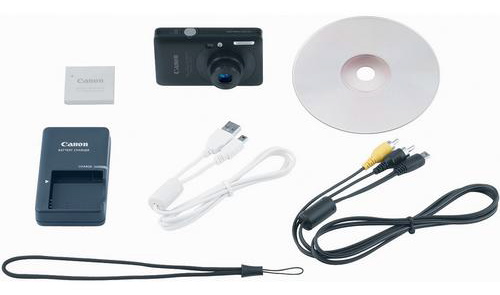
The SD780 IS comes with all the accessories you see above. You can get a good idea of how small this camera really is by having a look at the charger for its battery, which is a good deal longer and thicker than the camera itself.

The Canon PowerShot SD780 IS is available for purchase from B&H Photo and Amazon. (Amazon is currently selling it for $199, which is a pretty good deal.)

Photos used courtesy of Canon.

Standard
Reviews

The Ferrari FXX

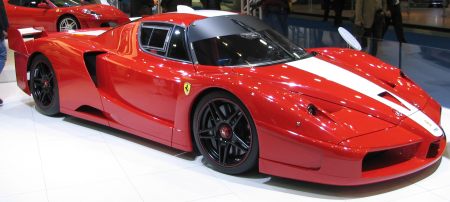
Today was the first time I saw and heard the Ferrari FXX. While I’m not wild about its looks, the sound of its engine is amazing. It floored me. It’s pure adrenaline. I’ve heard the sound of plenty of sports cars in my time, but I don’t know, there’s something that sets the FXX apart for me. Perhaps it’s just the way the sound was mastered for the videos, who knows, but it blows me away.

Here it is in a video where Michael Schumacher drives it around a race track with French football star Zinedine Zidane in the passenger seat.

And here it is being driven by Ferrari test driver Dario Benuzzi for a Top Gear show.

Only 30 of these monsters were made by Ferrari from 2005-2007, and it’s essentially a souped-up Ferrari Enzo with an 800 bhp engine. Here are the detailed specs:

  • Engine: Longitudinal, rear-mounted, 75 degree, naturally-aspirated aluminium V12
  • Valvetrain: DOHC, 4 valves per cylinder with continuously variable timing
  • Fuel system: Bosch Motronic ME7 Sequential Electronic Injection
  • Horsepower Max: 800 hp (597 kW) at 8500 RPM
  • Specific Output: 127.75 PS (93.96 kW; 126.00 hp) per litre
  • Drive system: RWD w/TCS
  • Construction: Carbon fibre body over carbon fibre tub with rear alloy subframe
  • Front brakes: Brembo CCM (carbon-ceramic) discs w/6-piston calipers, power assist ABS
  • Rear brakes: Brembo CCM (carbon-ceramic) discs w/4-piston calipers, power assist ABS
  • Front wheels: 483 mm (19.0 in) x 229 mm (9.0 in)
  • Rear wheels: 483 mm (19.0 in) x 330 mm (13 in)
  • Steering: Rack and pinion with power assistance
  • Suspension: triple wishbones with push-rod actuated coil-shock units, adaptive dampers, electronic shock absorbers, anti-roll bar
  • Wheelbase: 2,650 mm (104 in)
  • Front track: 1,660 mm (65 in)
  • Rear track: 1,650 mm (65 in)
  • Rear view is provided by a roof mounted video camera displayed on a small inboard screen.
  • Top Speed: 217 mph (349 km/h)

There’s more info about it on Wikipedia or on the Ferrari website.

Standard
Reviews

Lens comparison: EF 50mm f/1.4 Prime vs EF 50mm f/1.8 Prime

This is a short, side-by-side video comparison of the two affordable EF 50mm lenses from Canon: the 50mm f/1.4 and f/1.8 lenses. I had them both, set them on a table, and compared them to each other, looking at their weight, size, lenses, and handling. You might find this interesting if you’re into photography. My conclusion was that both are great, but if you haven’t got the money for the f/1.4 lens (and I’m not even going to mention the f/1.2 lens, because that’s out of my budget), then get the f/1.8 lens, it’s a great bargain for the price.

You can see the video on blip.tv or on YouTube. Believe it or not, I shot this review back in November of 2007 and only got around to posting it now. I’ve got quite a backlog in terms of processing and editing some of my media…

I used the 50mm f/1.4 lens extensively. I have almost 11,000 photos in my library taken with it. I used it to take landscapes while in the Austrian Alps, and even though I complained about it afterward, it’s still my go-to lens for lots of tasks such as portraits, still life, night shots and more. Here are just a few photos taken with it.

Windows

These two 50mm lenses are available for purchase from Amazon or B&H Photo:

Standard
Reviews

Hardware preview: DroboElite

Drobo Pro side

Updated 1/14/19: I have revised my opinion of Drobo devices. After experiencing multiple, serious data loss events on multiple Drobo models, even recent ones, I no longer consider them safe for my data.

Today, November 23, 2009, the new DroboElite becomes available from Data Robotics. It’s the top of the ladder when it comes to their product line: it’s the fastest, biggest, most configurable SAN they’ve got, and it eats terabytes for breakfast. It’s got multi-host support, dual Gigabit Ethernet ports, and it can have up to 255 Smart Volumes.

Background

Data Robotics launched the original Drobo in mid-2007, then upgraded that to what we call the Firewire Drobo toward the end of 2008, introduced the DroboPro in April 2009, and now they’re launching the DroboElite, which you can see here, and the Drobo S, addressed in a separate post, also published today.

drobo-s-and-droboelite

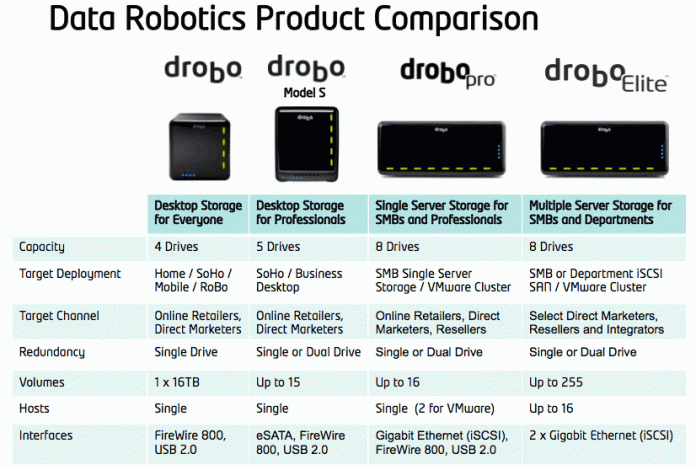
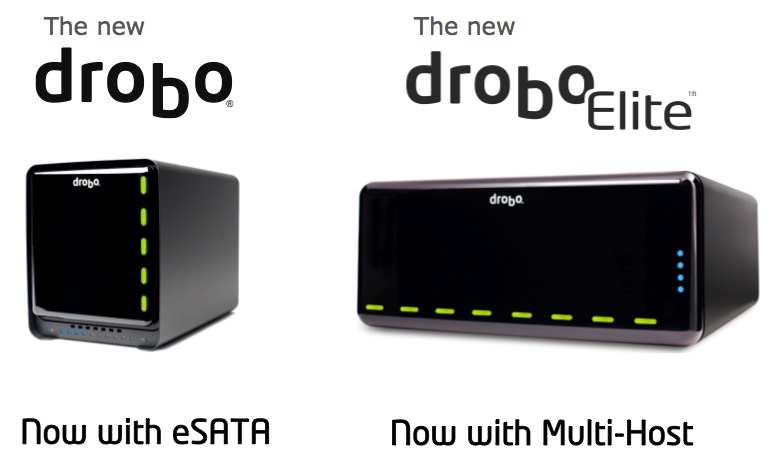
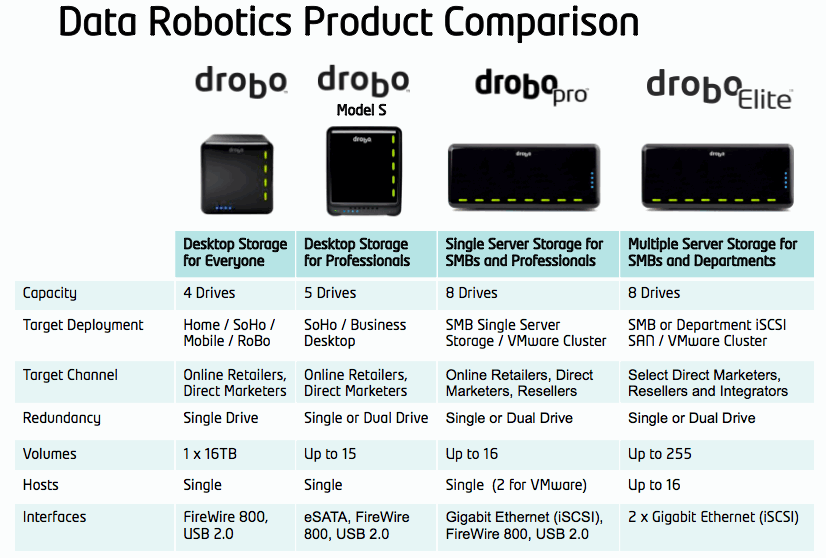
This means the company now has four great pieces of hardware in their product line, geared toward different groups of consumers, starting with the desktop storage needs of the media-heavy consumer and going all the way to companies’ server rooms:

  1. Drobo,
  2. Drobo S,
  3. DroboPro and
  4. DroboElite

Design

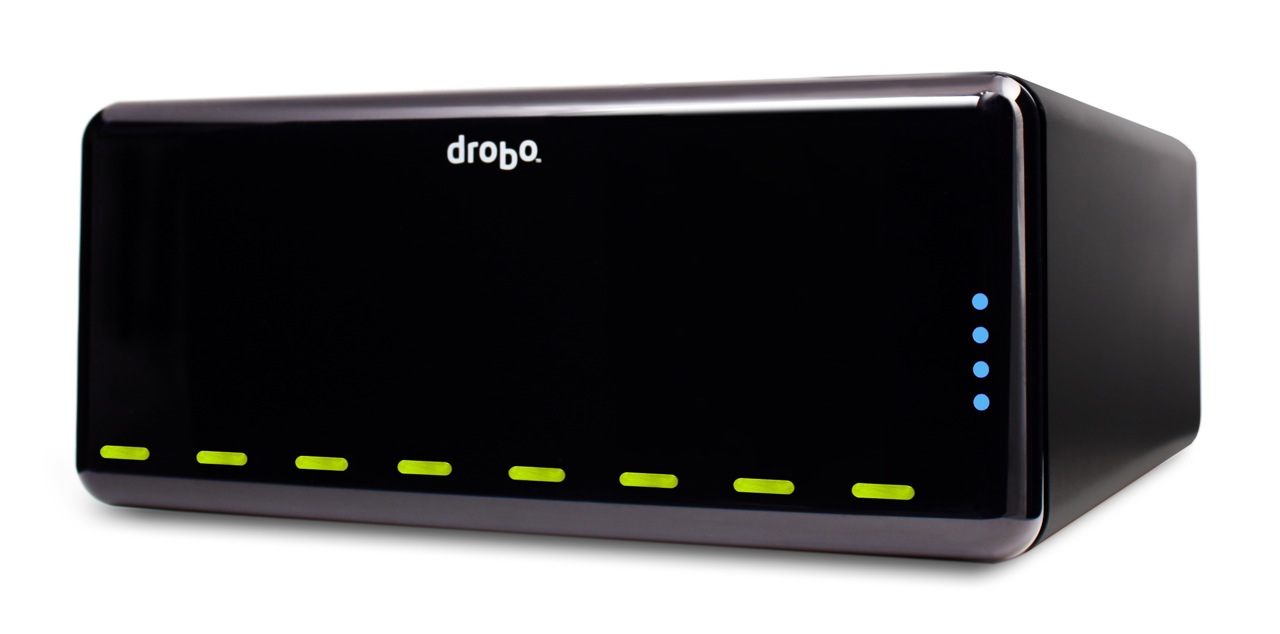
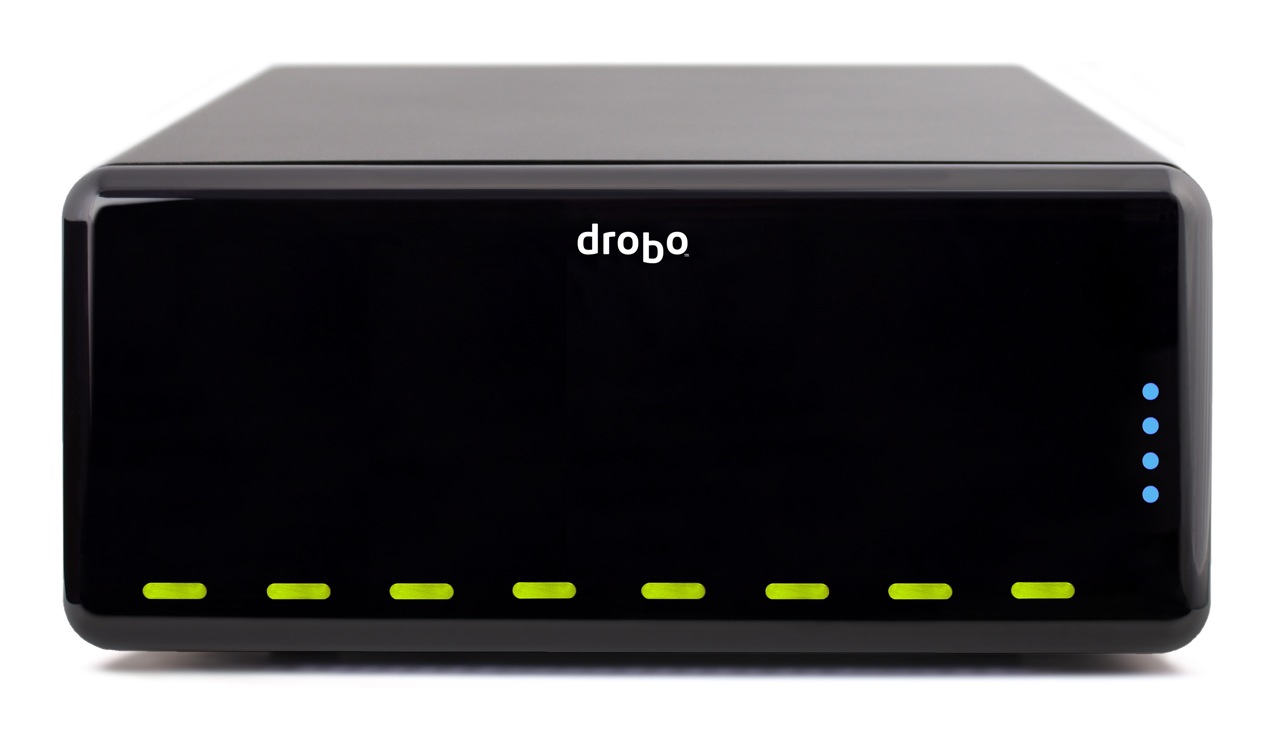
The front of the DroboElite is identical to that of the DroboPro. The dimensions are the same — and they’d have to be, since it needs to fit into a 3U rack space and take the same rack mounting kit as the DroboPro. The weight is also the same: 16 lbs. 3 oz.

Drobo Pro top

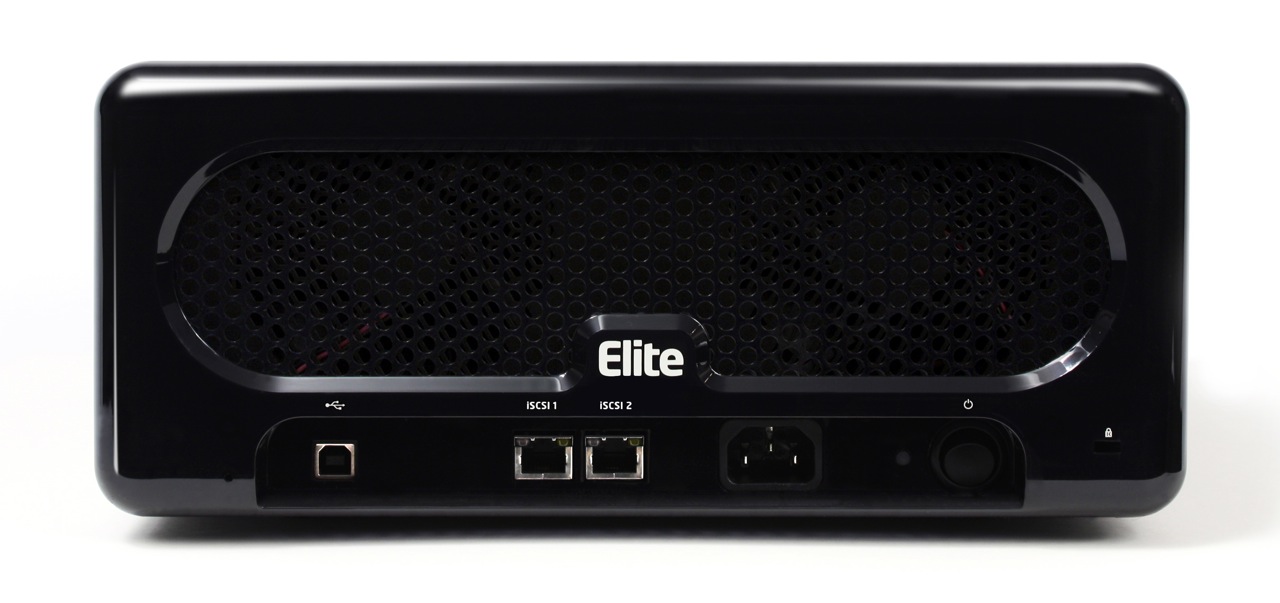
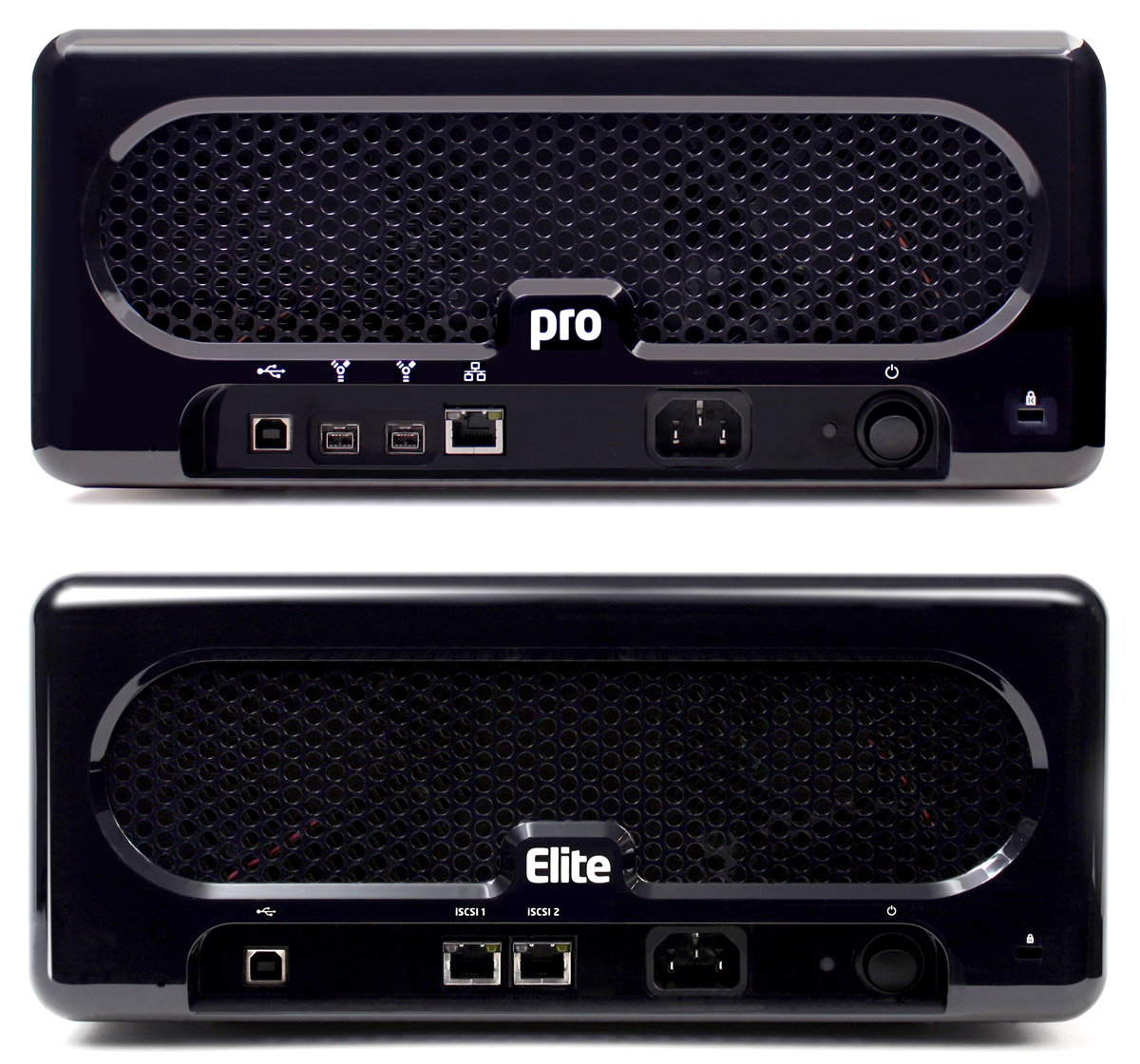
Things are different in the back though. What you’ll see there is a lack of Firewire and the addition of a second Gigabit Ethernet port. The USB port has also been downgraded to the role of diagnostics. As you’ll see in a bit, there’s a reason for this change.

A side-by-side comparison of the backs of the DroboPro and the DroboElite makes the changes even clearer.

drobo-pro-and-drobo-elite

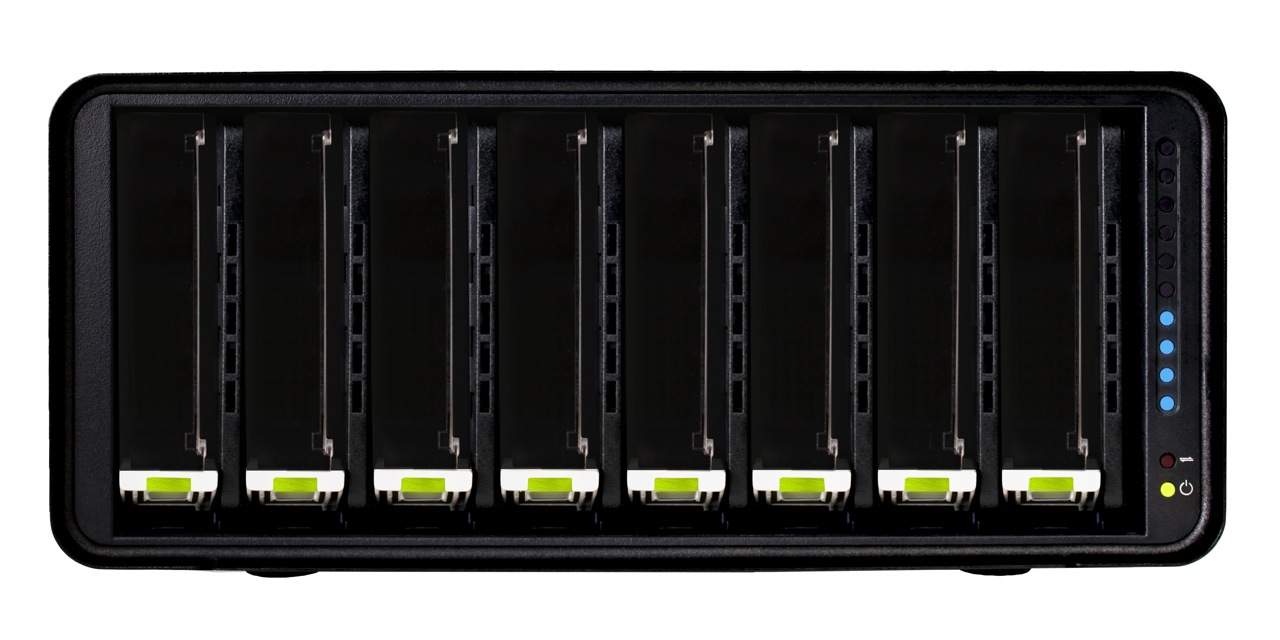
The inside of the DroboElite is once again identical to that of the DroboPro. There are eight drive slots, arranged vertically, plus the usual power, activity and action indicator lights.

Drobo Pro cover off

Performance

The DroboElite, like the DroboPro, is aimed toward SMBs, who are facing increasing data storage and virtualization needs, increasingly complex systems and limited budges. Also like the DroboPro, the DroboElite aims to make reliable storage dead simple. The eight-drive array in these two devices is self-managing and self-healing, and can be configured in single or dual-drive redundancy. It’s scalable, and with Smart Volumes, incredibly flexible. There’s no need for partitioning or file system expansion — a serious problem with traditional SANs.

droboelite-thin-provisioning

Having dealt with the problem of rigid LUN configurations, which lead to frequent and cumbersome free space issues, the Drobo’s ability to use a common drive pool for its Smart Volumes, and to reclaim deleted data blocks without any intervention from system admins is a Godsend.

For those of us familiar with the Drobo, it’s easy to overlook its amazingly easy upgrade path, where SATA drives of any capacity and brand can be added at any time, resulting in lower costs and no time and effort lost for needless data migrations.

If you’ve looked at the DroboPro, and now you wonder what the DroboElite brings to the table, there are three significant advantages to the latter:

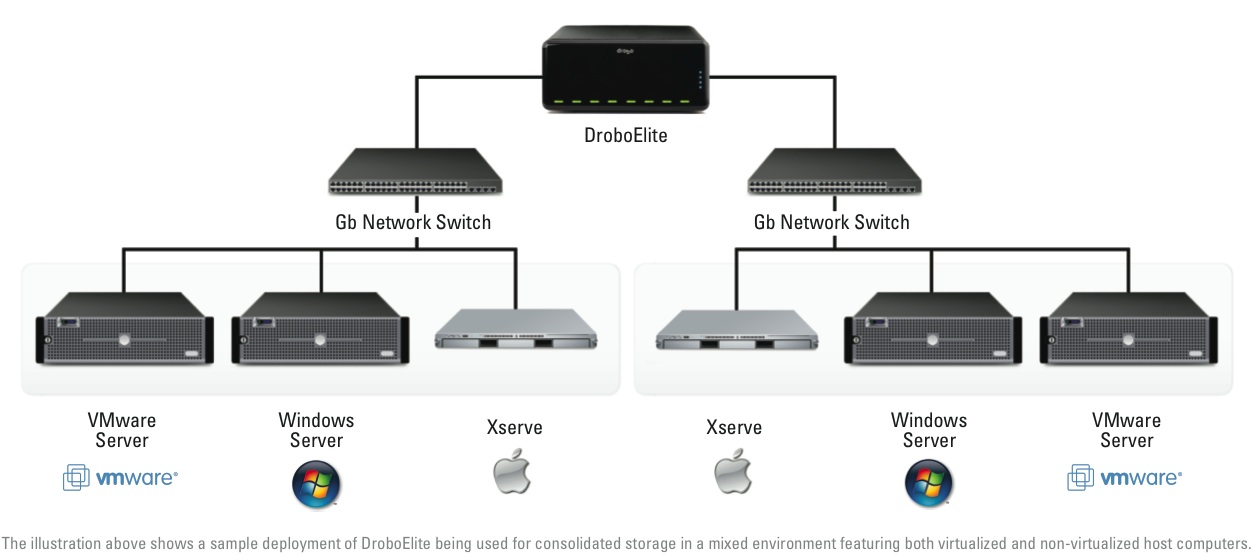
  1. Multi-host connectivity: whereas the DroboPro could only be connected to a single host (two if using VMware), the DroboElite can connect to 16 different hosts.
  2. Higher performance: thanks to its dual Gigabit Ethernet ports, a host of advanced capabilities were put in for the express purpose of speeding up its bandwidth. The DroboElite offers up to 50% faster throughput than the DroboPro. That’s also the reason the FireWire interface was dropped, and the USB interface was downgraded to diagnostics-only. This machine was built to run on a fast Gigabit network and to give you the most speed possible through it, up to 200 MB/sec, as a matter of fact, which trumps any other sort of current interface, by far.
  3. More Smart Volumes: the Drobo Pro can only accommodate up to 16 SVs, but the DroboElite will let you configure up to 255 SVs, all of them using a common drive pool and automatically reclaiming deleted disk space.

droboelite-consolidated-storage

If we look toward the future and other possible improvements to the DroboElite, perhaps Light Peak might play a role in that (see my Drobo S review for more on Light Peak and the Drobo). Still, since this is a network device, and networks are still Gigabit at best, even if direct DroboElite-to-host connections are made with Light Peak, there’s still the Ethernet bottleneck. It’ll be interesting to see how this gets resolved over time, and I’m sure plenty of people are already at work on this problem already.

Pricing and Availability

The DroboElite has a suggested price of $3,499 by itself, or $5,899 with an 8×2 TB drive bundle, for a total capacity of 16 TB. Because it’s a more specialized product, it will only be sold through select direct marketers, resellers and integrators such as Synnex, Bell Micro and Ingram Micro. It is available for purchase immediately, provided initial stocks aren’t sold out.

The DroboElite is also available with a rackmount kit, just like the DroboPro. The whole assembly will take up 3Us in a standard 19″ server rack.

Drobo Pro rackmount kit

drobo-pricing-and-availability

The DroboElite is available for purchase from Amazon or B&H Photo and other retailers.

Images used courtesy of Data Robotics. Side-by-side comparison shots were created by me, using press images from Data Robotics, so please obtain my permission if you’d like to use them elsewhere.

Standard
Reviews

Hardware preview: Drobo S

Drobo_S_Right_Hi

Updated 1/14/19: I have revised my opinion of Drobo devices. After experiencing multiple, serious data loss events on multiple Drobo models, even recent ones, I no longer consider them safe for my data.

Today, November 23, 2009, the new Drobo S says hello to the world. It’s a supercharged, triple interface version of the 2nd-generation (FW800) Drobo, with eSATA, FW800, USB 2.0, a faster processor, 5 drive bays and dual drive redundancy. It combines the best of both worlds — the smaller form factor of the regular Drobo with the larger capacity, speed and data protection of the DroboPro. Data Robotics summarizes this as “more capacity, more protection and more performance”.

Excuse my little pat on the back here, but when I first heard that Data Robotics was getting ready for a new product launch, an eSATA interface was the first thing that came to my mind. I’m glad to see I was right.

Background

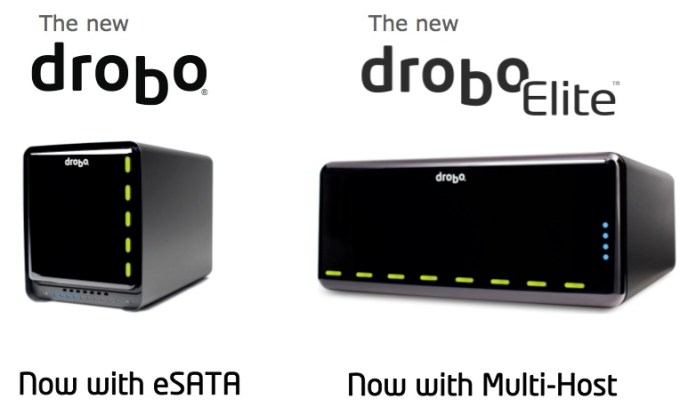
Data Robotics launched the original Drobo in mid-2007, then upgraded that to what we call the Firewire Drobo toward the end of 2008, introduced the DroboPro in April 2009, and now they’re launching the Drobo S, which you can see here, and the DroboElite, addressed in a separate post, also published today.
drobo-s-and-droboelite

This means the company now has four pieces of hardware in their product line, geared toward different groups of consumers, starting with the desktop storage needs of the media-heavy consumer and going all the way to companies’ server rooms:

  1. Drobo,
  2. Drobo S,
  3. DroboPro and
  4. DroboElite

data-robotics-product-comparison

Design

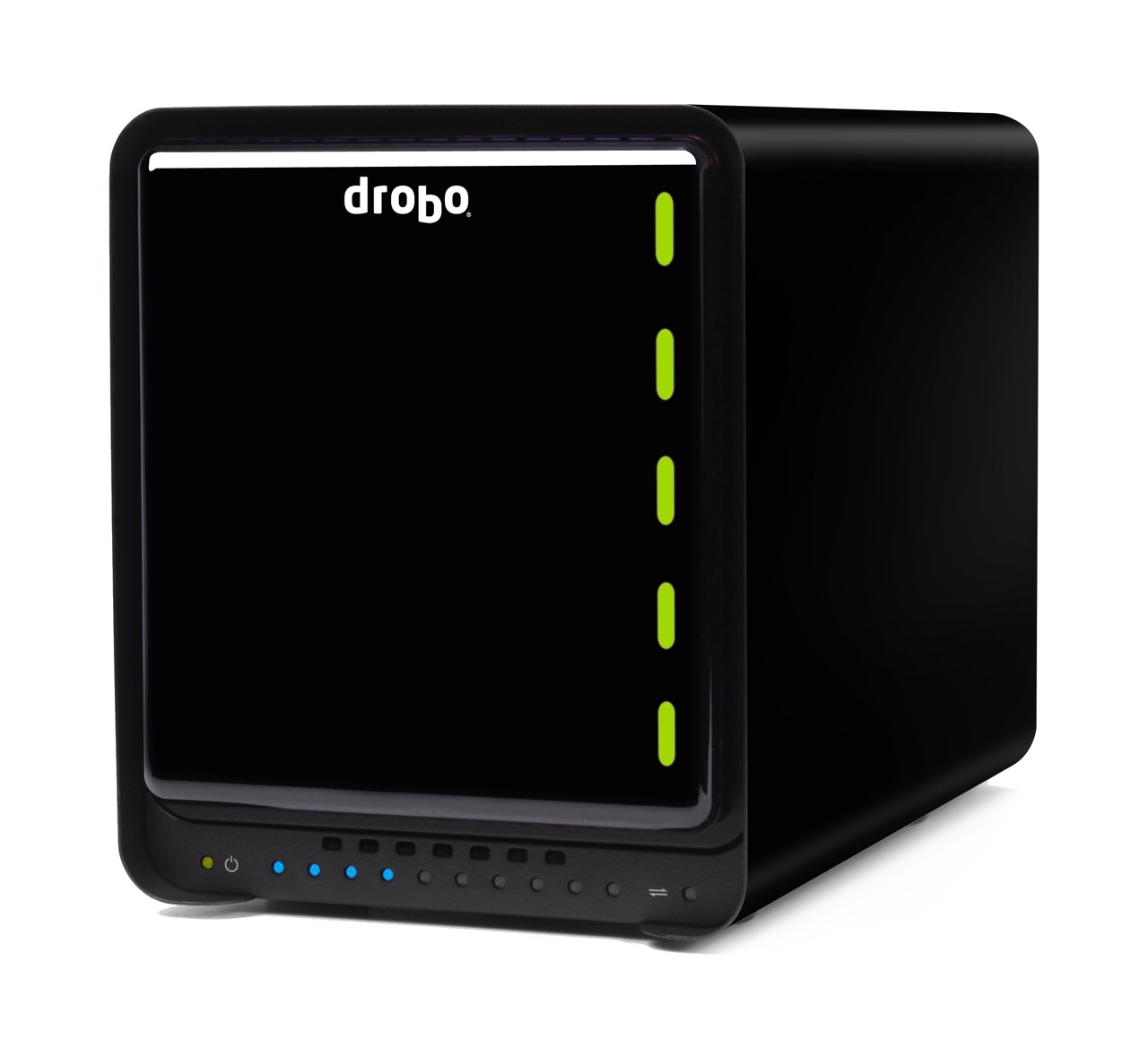
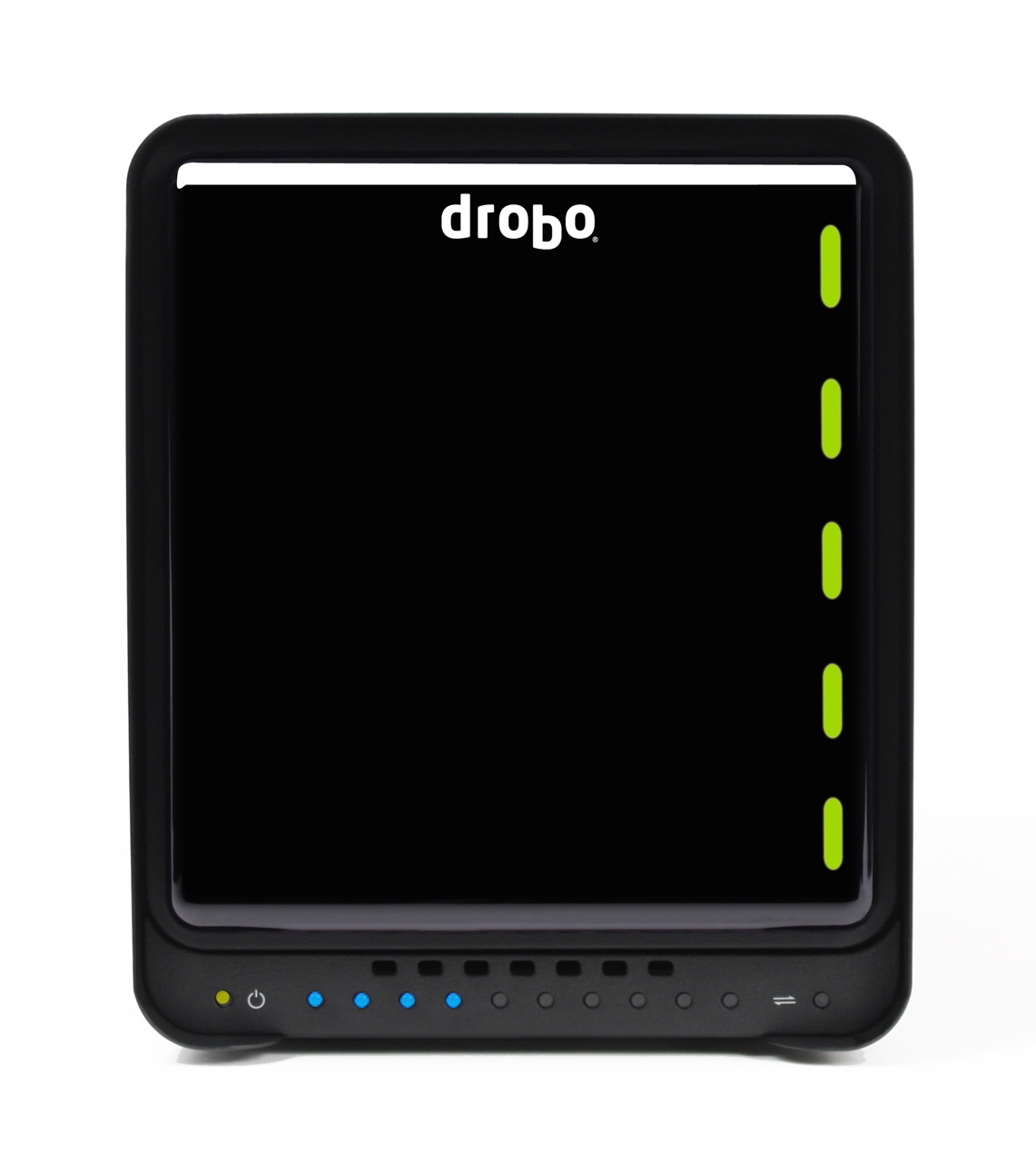
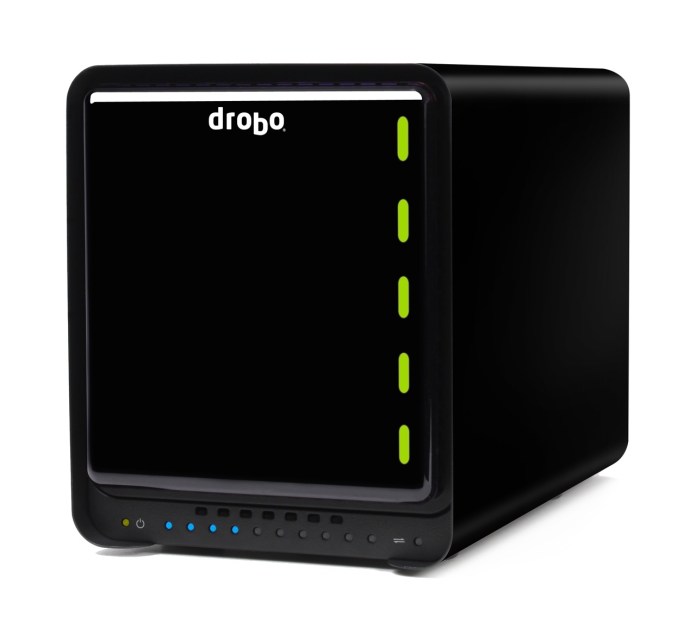
Let’s first look at the exterior of the new Drobo S, to see what’s changed there. On its front side, you’ll notice the bezel is different. Whereas the trademark magnetic cover was flush with the metal bezel of the enclosure, now it’s recessed and no longer covers the entire front surface. The capacity meter was kept at the bottom of the enclosure, but it’s no longer underneath the plastic cover, which was kept square rather than made rectangular, to fit the now-taller Drobo. The power and transfer lights were also made visible and placed inline with the capacity meter. A row of vents was added above the capacity meter, to pull in cool air for the drive bays.

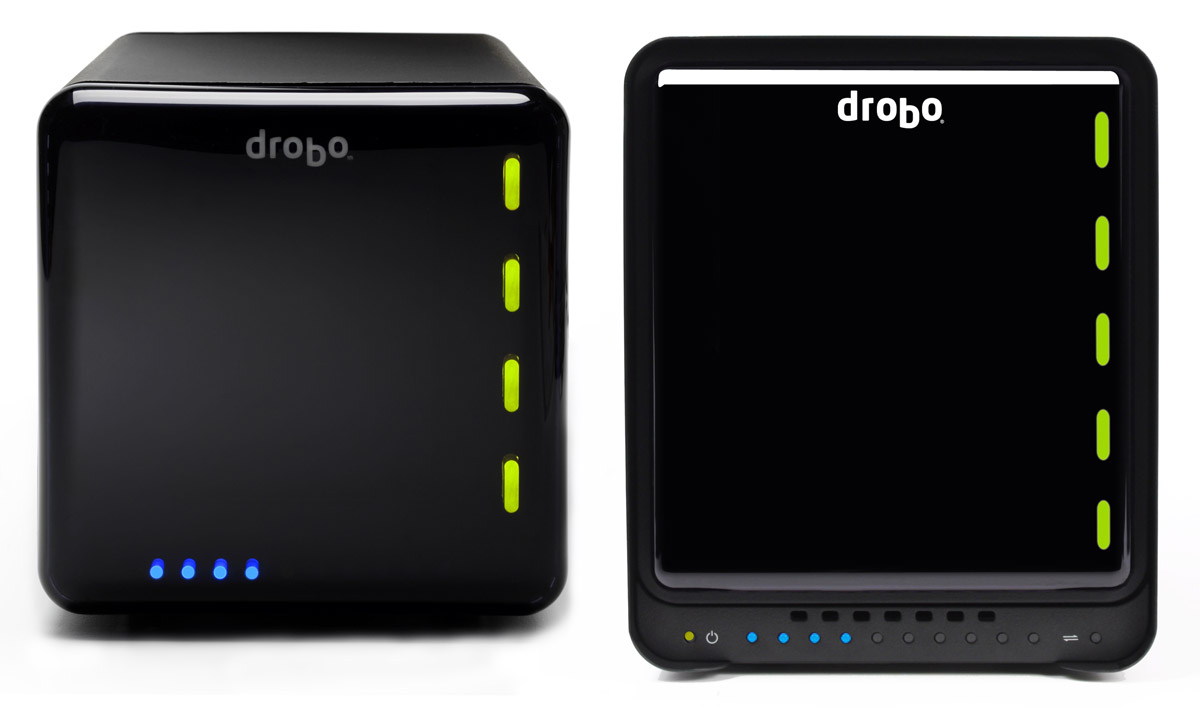
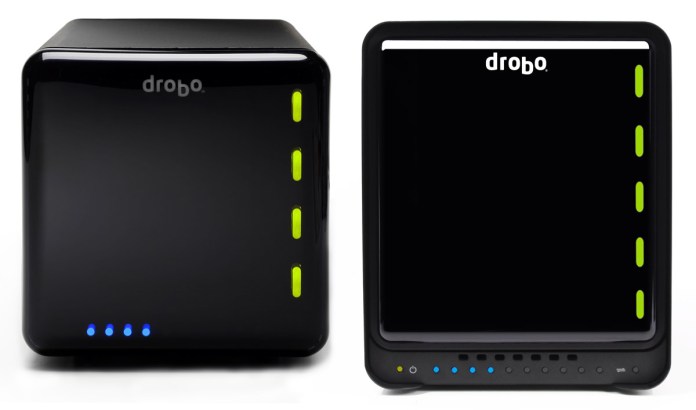
The new dimensions are 5.9″ wide x 7.3″ tall x 10.3″ long, as compared to the regular Drobo’s 6.3″ wide x 6.3″ tall x 10.7″ long. This makes the new Drobo S thinner and shorter than the regular Drobo, in spite of its 5 drive bays and the new eSATA interface. It is taller, though only by a single inch (2.54 cm). That’s an achievement in my book, and I’m sure the Drobo engineers spent quite a bit of time planning out the hardware layout. Kudos to them. The differences are made readily apparent when we look at the regular Drobo and the Drobo S side-by-side. Keep in mind the scale may be a bit off in real life, since I took two separate images and put them together in Photoshop for this article. This image isn’t an official one from Data Robotics, though the individual images are.
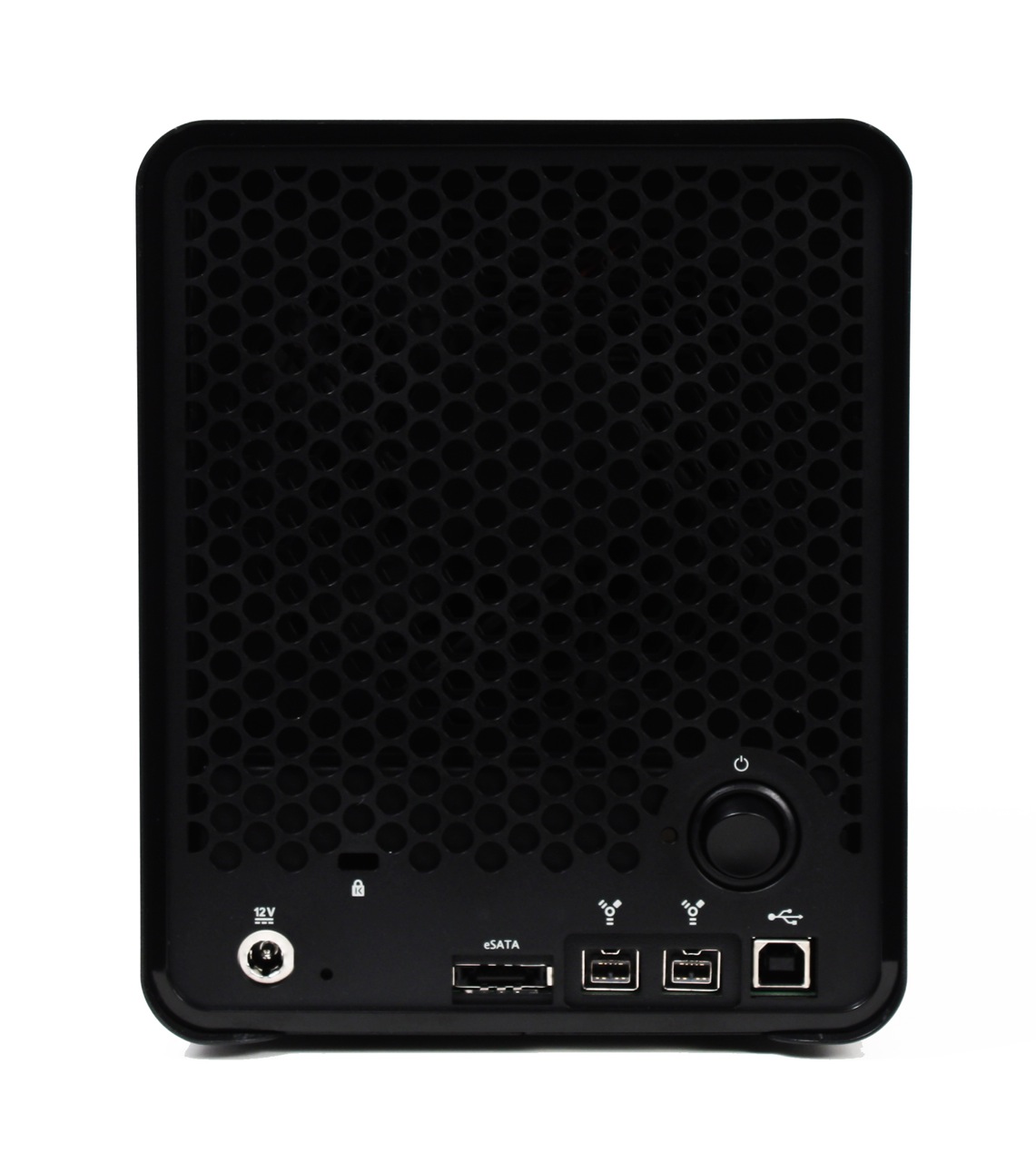
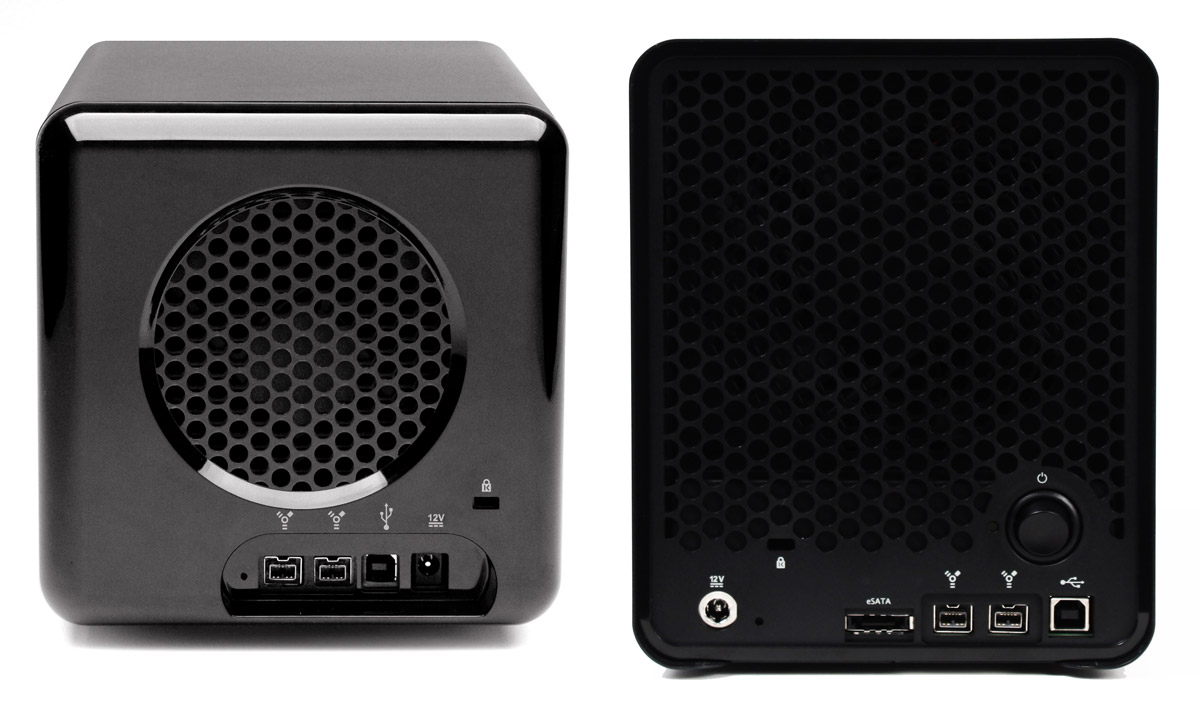
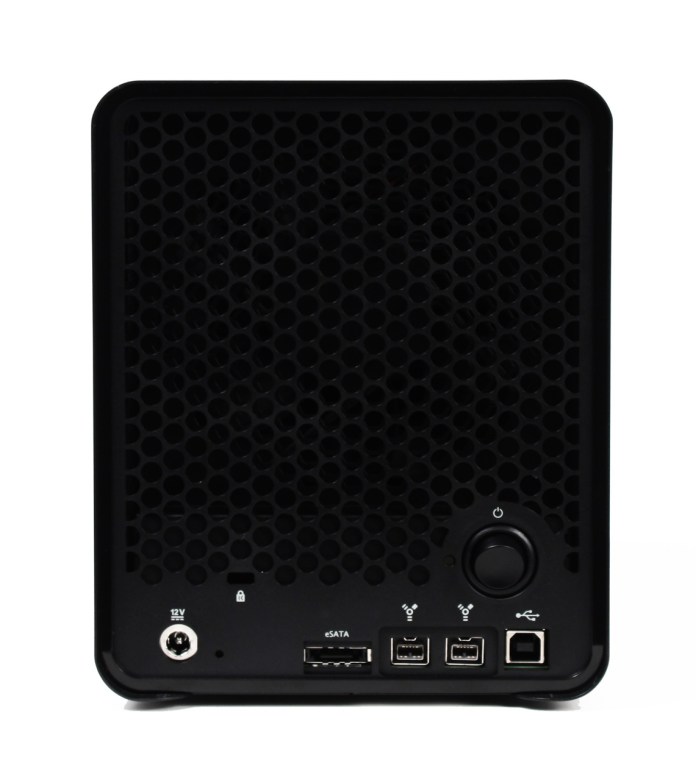
On the back of the new Drobo, we can see a much larger cooling grille, which makes sense given what we’ve discussed above. We also see something new, something which I’ve only seen on the DroboPro so far: a power switch. Then we see the rest of the stuff we expected, like the power connection (which is now marked by a shiny metal circle), the reset switch, the cable lock slot, and, of course, the triple interfaces: eSATA, Firewire 800 and USB 2.0.
Let’s look at a side-by-side comparison of the backs of the Drobo S and the regular Drobo, so we can see the differences in the design.
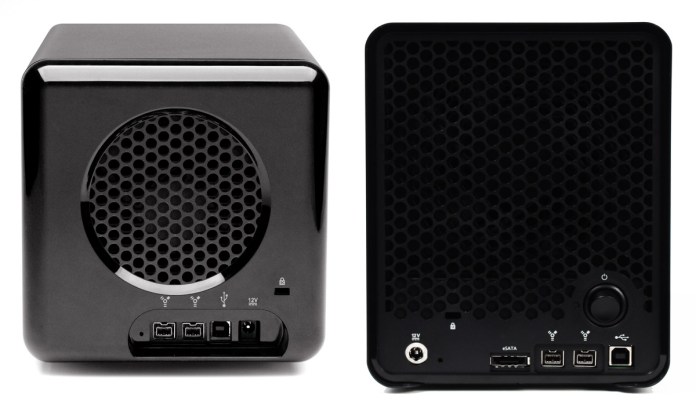
drobo-and-drobo-s-back

When I look at the Drobo S from all these angles, I’d say its design is much sleeker and more streamlined than that of the regular Drobo. There’s no doubt about it, I love it. I felt from the start that Drobo made storage sexy. There are very few storage enclosures on the market that look really good, and Drobo has looked great from the start. When you combine those looks with its amazing capabilities, the result is well worth my money.

You know what else? I think a future iteration of the regular Drobo’s enclosure will include the design elements of the Drobo S. I also believe at some point this same, newer design philosophy will be carried forward to the DroboPro and the new DroboElite.

Let’s look behind the front cover, to see how things look over there.
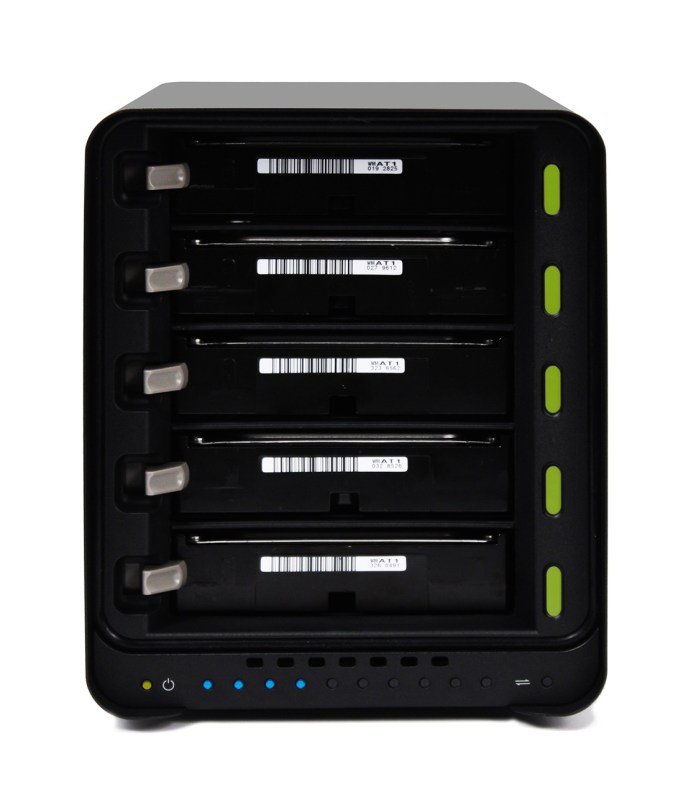
Drobo_S_Open_Hi

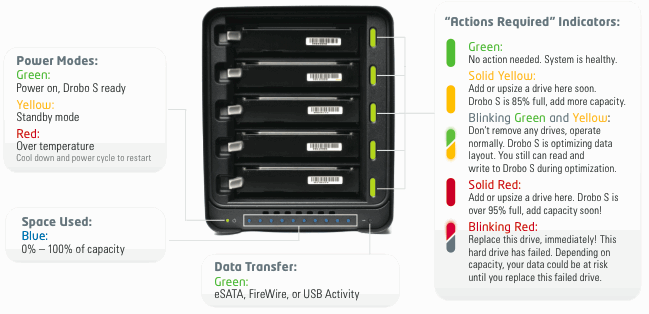
The five drive bays are clearly visible here, as well as the five action indicator lights, as Data Robotics calls them. On the Drobo S, the indicator lights give more status messages than on the regular Drobo, because each light is capable of displaying two colors at the same time. You can see what I mean by looking at this indicator scheme.
drobo-s-lights

Performance

Now let’s talk about performance. Clearly, with an eSATA port, the new Drobo S must also have the capability to stomach all that data that comes at it. It must be able to process all of it and write it to the drives fast enough to make the new interface worth getting. I haven’t tested the Drobo S in person (yet?) but Data Robotics says the new eSATA interface is “up to 50% faster than FireWire 800“. On the Drobo S, the FireWire 800 interface is also faster than on previous hardware, “up to 25% faster“. All these speeds are due to a new, faster processor that can crunch all of those data bits just as quickly as they get to it, writing each of them across the five drive bays.

In my phone conference with Mark Fuccio from Data Robotics, I asked him why Data Robotics hadn’t included a Gigabit Ethernet interface so that Drobo S could also be a NAS device. He explained that the direct-attach market is 4x bigger than the NAS market, so DRI will always go for that market first, and second, the eSATA interface on the Drobo S is faster than is possible going through file sharing protocols like Windows SMB or Apple’s AFP. The Drobo S has “performance ranges between 70-90 MB/sec or approximately 80-90% of the performance of the DroboPro’s iSCSI connection”.

I also asked him what he thought about Light Peak, and if we might see that in the Drobo as another interface next year. He didn’t say no, but he also didn’t promise anything, which was expected. He said it’s likely that DR will build it into the Drobo when and if Intel finalizes the specs and starts to make it available to companies.

It’s important to mention two features of the Drobo S which are just plain wonderful. One is the dual-drive redundancy, which is a feature borrowed from the DroboPro and is so important for those of us who absolutely must protect our data, or else. You can switch back and forth between single-drive and dual-drive redundancy at any time, but keep in mind there’s a capacity trade-off in dual-drive redundancy mode — that is, you get less available free space since the Drobo must now make sure your data is protected against two drive failures.

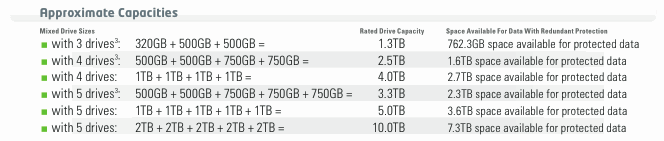
Dual drive redundancy is something Data Robotics was able to offer because it included five drive bays on the Drobo S. It would have been overkill on a four-drive unit, because it would have meant even less available space. Another effect of this dual drive redundancy is more capacity, up to 10 TB, as a matter of fact, given current hard drive specs. With five 2 TB drives in the Drobo S, you would indeed have 10 TB of space, but only 7.3 TB would be available for your data; the rest would be kept for data redundancy. Consult the handy chart below to see approximate capacities given typical drive combinations.

drobo-s-capacity

The second feature worth mentioning is the self-healing technology included with the Drobo S (also available in the DroboPro and DroboElite), which works as follows:

Even when sitting idle, Drobo S will continually examine the blocks and sectors on every drive, flagging questionable areas. This preemptive “scrubbing” helps ensure your data is being written only to the healthy areas of your drives, and that your data is always safe. Even if a drive fails, Drobo S keeps your data in the safest state possible, utilizing the available space on the remaining healthy drives.

I’d like to know if you get that with any other storage device on the market today. Compare it with RAID 0, where even if your drives don’t fail, any hardware or processor mistake in writing the correct bit sequences to the stripes will cause data corruption, leading to data loss.
Drobo_S_Left_Hi

Pricing and Availability

I was told the Drobo S will be available right away, as of today. It’s possible that initial supplies will be sold out, but more units will become available later. Suggested retail price is $799 for the Drobo S itself, or $1,799 for the Drobo S loaded with 5×2 TB drives. Although the price may seem high, keep in mind that at 10 TB capacity, it’s only 18 cents per GB for the Drobo S and the drives, together.

The Drobo S is available for purchase from Amazon or from B&H Photo.

Images used courtesy of Data Robotics. Side-by-side comparison shots were created by me, using press images from Data Robotics, so please obtain my permission if you’d like to use them elsewhere.

Standard