Reviews

Hardware review: Dell S2409W Flat Panel Display

The Dell S2409W 24-inch Widescreen Flat Panel LCD Monitor is a new model from Dell which has a 16:9 display ratio and runs about $350. Its native resolution is 1920×1080 pixels, which means it can display full quality HD content (1080p). It has three inputs: VGA, DVI and HDMI, which means you could connect it to your computer and to a DVD player or some other video device, and switch between the inputs as needed.

I purchased this monitor on 7/31, and it arrived on 8/21. My reason for buying it was the price. It is one of the lowest prices for a 24″ display from a reputable company, and I was also drawn to the 16:9 display ratio. I had a chance to work with it over these past four days.

I like the design of the monitor. It’s fairly thin in terms of depth, the rounded bezel is interesting, and the white power light is a very nice touch. It sits on a round base that has a sort of round indentation built-in, which I found to be a handy spot for post-it notes or a small remote control.

My computer setup is described in detail here. I have a MacBook Pro, and I do a lot of photography editing. As soon as I connected the S2409W to my MBP, I could see that fonts and curves weren’t displayed properly. There was some noticeable rasterization that took place at the edges of smaller objects on screen. I’m not sure of the word to describe it, but edges weren’t smooth, they were craggy.

I set up my MBP and the monitor in dual display mode, and I dragged windows back and forth between the two displays repeatedly, in order to compare the differences. As soon as a window made it onto the Dell monitor, things just didn’t look as good and as crisp as on my MBP’s display.

Also, no matter how much I calibrated it, I couldn’t get the contrast and brightness settings right. If the contrast was too low, then colors and shadows appeared washed out, and if the contrast was too high, the light-dark difference bothered my eyes. If I turned down the brightness, there was too little light on-screen, and if I turned it up, there was too much light, which made my eyes burn.

The next day, I brought my MBP into work and connected it to my Dell W2407WFPb monitor, another 24-inch flat panel display. This particular model belongs to the UltraSharp model line, which is higher quality. Here the colors showed up properly from the start, without calibration, and there was much less rasterization around the edges of letters and other small objects. I had to admit the S2409W display isn’t made as well as the W2407WFPb, which is understandable, since the latter model retails anywhere from $600-700.

I did one more thing: I started my XP VM on the Mac while connected to the S2409W, set it to full screen, and noticed that, at least when running Windows, the display quality was acceptable.

No matter how much I tried to adjust the display while I worked on my Mac, I couldn’t get it to work in a satisfactory manner for me. Since I do most of my work on a Mac and within OS X, the Dell S2409W won’t work for me, and I will have to return it.

Updated 8/28/08: You can read about my Dell return experience if interested. I find it very encouraging that Dell is now engaging with its customers the way they’ve done it after I wrote that post.

On a more general note, I haven’t been very successful with my monitor picks so far. I already tried using an HDTV as my computer monitor, but that didn’t work out. Now using a regular monitor hasn’t worked out either. It looks like I may need to spend upwards of $700 to get a good monitor that will work well for my needs.

Keep in mind that my needs are more demanding than those of the average user, and that I may be more critical of a monitor’s display quality than you may be. You may find the S2409W does just fine for you, particularly if you do most of your work on Windows, where it seems to work better. At $350 for a 24-inch display, it fits the bill as well.

Promotional: Shopping for Dell hardware? Use Dell coupon codes on your next purchase.

Standard
Reviews

A look at noise cancelling headphones

I’ve recently had the chance to try out three noise-canceling headphones:

I looked at these criteria as I used the headphones:

  • Effectiveness of noise-canceling technology
  • Quality of sound
  • Fit and comfort
  • Price

What may or may not surprise you is that all noise-canceling headphones block only low sounds, like the rumble of jet airplane engines. They do not block all sounds. They also rely on passive noise reduction, due to their around-ear design with thick cushions. In other words, don’t expect them to block all sounds, or you’ll be disappointed.

I only looked at around-ear designs, because I cannot stand on-ear designs. They make my ears numb after a half hour or so of wearing them. I need something that fits around my ears and doesn’t press down on them in order to get the comfort I need for prolonged wear.

One thing to keep in mind with around-ear headphones is that some will make your ears hot after a while. If care isn’t taken with the materials used in their construction, the heat that emanates from your ears will build up inside the headphone chamber and raise the temperature, making you uncomfortable. Heat and lack of air circulation are two things that will caused increased bacterial growth in your ears. Yes, this isn’t appetizing, but keep it in mind as you look at headphones and your own headphone-wearing habits.

All three of these headphones come with carrying cases, adaptors (2-pin and 6.3mm) and cables, so don’t let that be a differentiating factor. While I’m on this subject, keep in mind the Bose and Philips headphones only use one AAA battery while the Creative headphones use two AAA batteries. That is a differentiating factor.

Bose Quiet Comfort 2

The Bose Quiet Comfort 2 is priced at $299 and is the pricier of the three. There are more expensive noise-canceling headphones on the market (Sennheiser has a couple of more expensive models), but the Bose headphones are the most well-known of them all.

Its noise canceling capability was decent, but for the market leader, nothing special. It reduced the sound of jet aircraft, but all voices around me remained clearly audible, though just a little muted. I suppose I could describe the technology as elegant, since it allows one to carry on a conversation with someone while wearing the headphones, but I’m sorry, at $300 you ought to be able to adjust the level of noise-canceling in order to block as much or as little of the ambient noise as you want. They didn’t have that capability and disappointed me.

The quality of the sound was tinny. The noise-canceling technology did a number on the lower sounds coming out of the headphones as well, so everything sounded a bit like a tin-can telephone.

I could find nothing wrong with the fit. It was great. It didn’t press down on my ears, it didn’t press down on the top of my head, and the cushioning was just right.

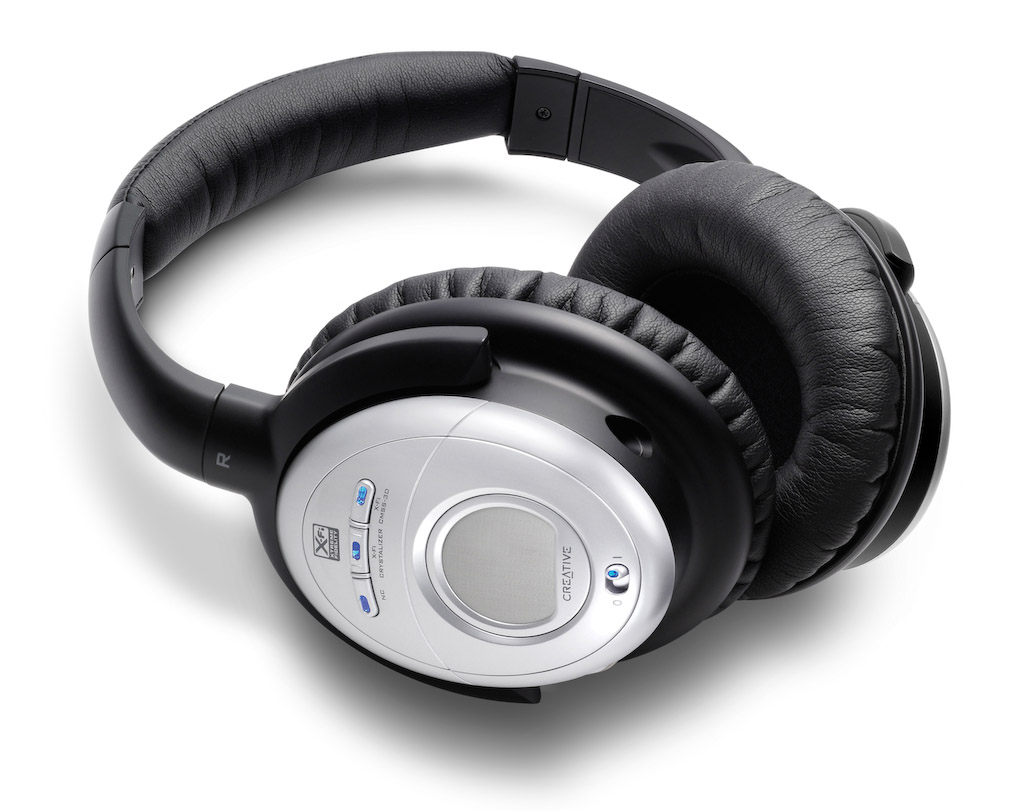
Creative Aurvana X-Fi

These headphones retail at $249 currently, but beware, they’re still listed at $299 at Apple Stores. I have to say I was doubtful of Creative’s ability to offer great headphones, and also suspicious of their price point (frankly, they haven’t earned the right to charge $300 for headphones), and I was proven right on both counts.

The noise-canceling technology was very similar to the Bose QC2 headphones. Same comments apply, and the quality of the sound was just as annoying. I found that the noise-canceling button distorted the sounds significantly, much more so than the Bose headphones.

Creative added two buttons to the headphones, one called X-Fi Crystalizer, which is supposed to give detail and vibrancy, and X-Fi CMSS-3D, which adds spatial characteristics to the sounds. I sat at home for an entire evening, playing with the buttons, turning them on and off, trying to see what and how much the affected the sounds that the headphones produced. I found them to be gimmicky. They did nothing for me. Oh sure, they changed sounds slightly, but not enough to warrant their fancy names and the price of the headphones.

What really annoyed me was their fit and comfort. They pressed slightly on my ears, but their real crime was the quality of the materials used in their build. Within 5 minutes of wear, my ears got hot. Didn’t Creative do any real testing before releasing these? Who did they test them on? Any real person would have noticed that their ears got hot while wearing them, and would have said something.

Philips SHN9500

These headphones offer an equivalent level of noise-canceling technology. Having already explained how I feel about it, there’s no need to go over it again. I found the quality of the sound to be better than with the other two headphones. Quite acceptable, as a matter of fact, and it wasn’t severely affected when noise-canceling was turned on.

What I also liked was the presence of a Mute button on the headphones, which will turn off any sound coming through them, and also turn off noise-canceling. This allows you to hear someone better while you have the headphones on, without needing to remove them. You might say, well, why not just turn off noise-canceling? Because that’s a slider button, while the Mute button is a push-button with a very light action. Quite thoughtful on their part.

The fit and comfort of the headphones was another surprise. They fit nicely, and they’re made of quality materials. My ears do not get hot while wearing these, even for extended periods of time.

The biggest revelation for me was the price: $70 at Costco when I got them less than a couple of weeks ago. Now I see they’re $90 — they must be popular.

All in all, the Philips SHN9500 headphones have the right combination of features, comfort and price to make me happy. These are the headphones I would recommend to you.

More information

Photos used courtesy of Bose, Creative and Philips companies.

Standard
Reviews

The Education of Little Tree (1997)

A little boy loses his parents during the depression, and his grandparents take him to live with them in their mountain cabin. The premise is simple, but the lessons are many. I liked this movie because it taught respect for native Indians.

Let’s face it, the “red skins”, as they used to be called, owned this land. It was theirs long before it was ours. The early American settlers drove them out of their homes and used every possible means to push them aside, to disown them of their inheritance.

That was shameful. And what added insult to injury was the way they tried to “integrate” them into society after they’d been pushed aside for so long. This film tells the story of one such boy. Half-Cherokee, he is forced into an “Indian” school, where he is treated like an animal. The idea is to erase all sense of individuality and family out of him, and to get him to become an “American”.

You might think the subject matter is outdated, but only recently, the Canadian government has had to issue an official apology to Canadian Indians for their treatment of their children.

Quoting from the article: “Between 1870 and 1996, an estimated 150,000 indigenous children were wrenched from their homes and sent to Christian boarding schools, where many were sexually and physically abused.”

The movie offers a solution that I only wish more Indian children had taken. The little child runs away from the school (aided by his grandfather) and spends his teen years hiding from government officials who want to put him back in what they call “schools”. He gets a real education from his uncle, an experienced Cherokee who acts as his surrogate father and prepares him for a solitary, sometimes troubled, but free life in the mountains.

I get raised hackles every time I hear the word “freedom” trumpeted about, yet find clear proof of forced behavior or oppression. For all its talk of freedom, the US has always managed to oppress certain of its population, throughout time. First it was the native Indians, then it was the slaves, then its Japanese and German citizens during WWII, then the presumed Commies during the vile McCarthy trials, then various other groups during the 20th century. Now, this oppression has culminated into the mass reduction of our liberties through the so-called Patriot Act, a filthy lie of a misnomer if I ever heard of one.

The real patriots always stand up for the rights of all, and they always question the system in order to keep it in check. Sometimes, the best statement a free person can make is to stay free, even if it means thumbing your nose at idiotic rules and policies and living in the mountains, outside of society. Because eventually, the government comes around to realize its idiocy, and issues an apology. By the way, the American government is long overdue on just one such apology.

If you want to find out more about the movie or buy/rent it, you can find it at Amazon, Netflix and IMDB.

Standard
Reviews

Watch "The Future of Food"

If you have not yet heard of a documentary called “The Future of Food” (2004), or haven’t yet watched it, please take the time to do so. It is vital that you know what’s going into the food that you eat, and it’s vital that you know it now, before it’s too late.

What’s been happening over the past 20 years here in the States is that our food supply has been slowly taken over by biotech companies who are interested only in their bottom line. They have used tactics akin to racketeering practices in order to get farmers to use their seeds and only their seeds. They have placed their executives in key government positions, in order to ensure that their policies go through. They have done and are doing everything in their power to get us to eat their genetically modified foods, without regard for safety, common sense, decency or ethics. I’m not saying this by myself. The documentary itself will prove it to you.

All that is bad enough, but what’s really appalling is that they are patenting genes. They have patented plant genes, and now they want to patent animal genes and even human genes. They are trying to get the market in their tight snare, so they can squeeze profits out of everywhere and ensure they control our food supply completely. They have even patented one of the genes involved in breast cancer, then sued researchers who had been doing working on it, to force them to pay exorbitant licensing fees. Needless to say, research on that gene has been significantly curtailed, directly due to their malefic influence. That’s the sort of “work” they engage in.

When I call them racketeers, I have a great frame of reference in mind. It’s a short crime drama made in 1936, entitled “The Public Pays“, which won an Oscar. It depicted a protection racket that preyed on the local milk distribution in one American city, and the people’s successful fight against them. The biotech goons may not beat up people and physically destroy their milk trucks and containers, but they have legal “procedures” which wield the same sort of power and yield the same horrible results. This time, they’re working hand in hand with specially-placed government officials who make sure the biotech rules get enforced and the little guys get screwed royally — not to mention that the consumers, and the marketplace in general, are manipulated to no end as well.

Don’t believe me? Watch the documentary. And if you can find “The Public Pays”, watch that as well and compare the two to see the striking similarities. What’s more, if someone can assure me that “The Public Pays” is now in the public domain, I’ll gladly post it online, either at Google Video or somewhere else.

As you get to the end of the “Future of Food” documentary, you’ll get heartened by the organic farming efforts, which are great, but keep in mind that Whole Foods now sells mostly non-organic fruits and vegetables, and also imports supposedly organic foods from China, whose food supply is so laden with pesticides it’s not even funny. Yet Whole Foods still dares to hold the same high prices on their stuff, which means they’ve cut costs and are pocketing the difference. Lesson learned: don’t shop at Whole Foods. Go to Trader Joe’s or MOM’s, if you have them in your neighborhoods.

Seek REAL organic foods, and make sure to vote with your wallets. Where you buy your food, and what sort of food you buy, determines our food supply’s future. Write to your congressmen and demand that the proposed law (introduced by Dennis Kucinich) to label genetic foods as such be finally approved.

My wife just chimed in with some great advice. It turns that while we wait for foods to be properly labeled as GM or not, there’s an easy way to tell already. Fruits and vegetables all have little stickers on them, with numeric codes (4 or 5-digit numbers). It seems that if those numbers start with 4, they’re conventionally-grown, but not genetically modified. If they start with 8, they’re GM — stay away from them! And if they start with 9, they’re organically grown and are safe to eat. Not sure if this is officially true, but she says that’s usually been the case, at least for the organic foods that she buys.

Here’s how you can watch the documentary:

  • Google Video (free, but quality isn’t that great)
  • YouTube (free, but in multiple parts): start here
  • Netflix (instant streaming, DVD quality, but requires subscription)
  • Amazon (you can purchase the DVD)

Standard
Reviews

A glimpse at the new Snow Leopard from Apple

Snow Leopard, the new version of Mac OS X, was announced at the 2008 WWDC in San Francisco. It’s an important release for the following reasons:

  • Builds upon existing technologies and perfects them. It introduces few new features, but will allow Apple to really focus on delivering a very good OS by developing further the technologies introduced with Leopard. I for one am glad to see Apple slow down their frantic development cycle. That sort of rhythm can’t be sustained and leads to burned-out employees.
  • Optimized for multi-core processors. Truth is, most applications and operating systems aren’t optimized for multi-core processors. They’re not even multi-core aware. So while multi-core technology is here to stay and has already made it into all processor makes and models, applications are still hobbling along, relying on built-in chip technology for a sort of multi-core experience, not the real thing. I’m glad to see Apple pursue this seriously and make it easy for developers to build their apps for multi-core systems.
  • OpenCL programming. You know about OpenGL, right? Well, OpenCL will let developers take advantage of the amazing processing power of graphics cards (measured in gigaflops) to do computations previously reserved only for graphics applications. To get an idea of how powerful graphic card processing has become, have a look at FASTRA, a supercomputer built with 8 GPUs.
  • RAM limit raised to 16TB. I did a double take when I read that. I first thought they were talking of 16GB, which would have been impressive, but also a misprint. The Mac Pro can do up to 32GB right now if I’m not mistaken. But 16TB, wow! That’s amazingly high for RAM. Most machines don’t even have that much hard disk space, much less memory. That’s going to be very useful when building supercomputers with Macs. Keep in mind that 32-bit Windows operating systems (the prevalent ones on the market) STILL have a 4GB limit on RAM. Microsoft’s 64-bit OS versions (XP and Vista) are not usable yet, because there are plenty of compatibility issues with drivers and applications. For a clarification of this point, make sure to read my comment below.
  • Quicktime X. Apple’s venerable Quicktime will get an overhaul which will make it much more efficient, and will allow it to support more audio and video formats. Perhaps now we can look forward to Quicktime movie exports taking less than 24 hours? 🙂 Joking aside, I like Quicktime, and I hope it sticks around for a long time.
  • Faster Safari. It will use a new webkit that will make it 53% faster. Nice! I should mention that all the JavaScript used on AJAX-heavy pages like Google’s Gmail or Apple’s new MobileMe is what’s slowing down our browsers. The new Safari webkit is supposed to be able to render JavaScript a whole lot faster.
  • Native support for Microsoft Exchange. In spite of grumblings from various Apple fans, this is a biggie, and it will finally ensure that Macs play nice in Microsoft Shops. In addition to being able to network properly on Windows domains, which they could already do, now they’ll do exactly what Outlook is able to do on PCs, without having to bother with the kludgey Entourage. Mail, Address Book and iCal will communicate directly with Exchange, making it a whole lot easier for corporations to use Macs instead of PCs.
  • Faster OS, smaller footprint. Apple promises the new OS will work faster overall, and will also take up less space on our hard drives. Amen to that. OS bloat is not a welcome thing (just look at Vista), and a faster OS is always a good thing.
  • No support for PowerPC processors (source). According to documentation handed out to developers at WWDC, Apple will indeed break with the PowerPC line on this Leopard upgrade, as rumored. That means my iMac G5 won’t be able to use it. By that time, it’ll be outside its projected 3-year lifespan, but still, it would have been nice…

Image used courtesy of Apple, Inc. More information about Snow Leopard can be found in Apple’s original press release, and on the Snow Leopard website.

Standard