Thoughts

The Simpsons me

I read a post over at Dawn Armfield’s blog today that resonated with me. It’s about one’s online identity, and whether you’re comfortable enough to be yourself even when you can be someone else. If you read my blog regularly, I think you pretty much know where I stand on that. I write in first person, my photo’s everywhere, I’m not shy about expressing my opinions, etc. I would ask where you stand on that, but it might be a moot point. I get the feeling that the people uncomfortable revealing their identity online, for whatever reason, won’t reply. I’ll only get comments from the ones like me.

Something fun did come out of it though, and I wanted to share that with you as well. Dawn built a Simpsons avatar for herself (you can see hers in her blog post) and inspired me to do the same. I headed over to the Simpsons Movie site, which is where you can partake in this fun little experience, and built one for myself. It was a bit difficult to find the bits and pieces that would make the character look like me, but in the end, I arrived at a reasonable facsimile. Have a look below. Ligia got a kick out of it. She said she liked it, and that it was really funny.

I don’t think I’ll be using this as my online avatar, but it’s fun to look at it. For example, I had no idea that I would like a hippie if I wore certain clothes. What do you think? And by all means, if you want to chime in on how you identify yourself online, please do so as well.

The Simpsons Me
Standard
Reviews

James and the Giant Peach (1996)

James and the Giant Peach (1996)Last night was the first time Ligia and I saw this delightful movie (IMDB). I regret not seeing it earlier. I remember the ads on TV back when it came out. I hadn’t read the book by Roald Dahl, nor did I know the story was written by him until I watched the featurette included in the special features on the DVD. I might have known it though.

All his stories weave scary elements into whimsical storytelling with wonderful plotlines and happy endings that remain with you. It makes for such vivid characters and happenings! I still treasure “The BFG” (1989, IMDB), more than 15 years after seeing it. I taped it when it ran on TV, and I still have the tape somewhere — although it’s probably so demagnetized by now that I wouldn’t be able to watch it.

Boy, those aunts of James’ were sure scary! If I were still a child, I might have had nightmares about them. The sets were great. You could tell right away they were sets, but that didn’t detract from their atmosphere at all — in fact, it added to it. I wondered why, and then I saw Tim Burton’s name as Co-Producer. I might have known that as well. The sets had the same feel as “Nightmare Before Christmas” (1993, IMDB) and “Charlie and the Chocolate Factory” (2005, IMDB).

Parents have already picked up on what makes the movie wonderful for children, so I’m only going to mention it in passing: it’s the uplifting message it carries, of course, picked up from the book. James, a child mistreated by his aunts to the point of abuse, hangs on to his imagination and the kindness that his parents instill in him, and proves to be a hero loved by the insects he saves, and by his adopted city, New York. It’s the sort of story that you’ll want to read to your children over and over, and the sort of story they’ll want to listen to over and over and over.

I thought the movie was very well done and highly watchable. I always have a healthy amount of respect for the people that work on these stop-motion animation movies. It takes years to get them done. It took three years for this movie. There are 24 frames per second, which means that each scene had to be rearranged for each frame, 24 times per second and 1,440 times for a full minute of action. That’s a herculean effort, and one has to respect that. When you add in the fact that the finished product looks great, it’s really a wonderful achievement.

Loved it!

Standard
Lists

Cool science videos

The Japanese have come up with a swimming snake robot:

Ronald Mallett is a university professor and a physicist. He believes time travel is possible, has a theory about how it can be done, and is working on a time machine:

The first dynamically-balanced robot, Dexter, learns to walk:

Here’s another robot, called Murata Boy, that can ride bicycles:

A home-made anti-gravity kit. Could be a hoax, but then again, I haven’t tried it out for myself, so I don’t know:

A demonstration of the principle of atomic halving through noodle-making. Awesome!

The FLIP is a research vessel that can literally flip to a vertical position while in water. It’s designed so its stern submerges deep underwater. It becomes incredibly stable that way, and this allows scientists to perform very precise measurements at sea.

Standard
How To

Making it to the first page of Google search results

As I checked my traffic stats over the past few days, I noticed a steady stream of traffic to my reviews of the WD My Book World and Pro Edition II hard drives. I was pleasantly surprised, but couldn’t figure out why. Other than publishing the reviews on my blog, I hadn’t done any sort of promotion. No one had linked to them so far (from what I could tell), yet the traffic was there. It wasn’t an outrageous amount of traffic, but nice, steady and regular. That sort of traffic usually only comes from one source: search engines.

I checked, and sure enough, my two reviews had made it to the first page of Google search results — the dream of any content creator. Here’s a search for WD My Book Pro Edition II, and for WD My Book World Edition II. Not sure how long they’ll stay there, but it’s really nice to see blog content make it to the front page of Google search, and even better, it’s a treat to see my own content make it there. 🙂

I thought I’d check on some other popular content and see how it ranks in Google’s search results. I logged into my FeedBurner account and looked at the most popular pages for the past 30 days. Here are the top ten pages at ComeAcross, in descending order:

In truth, I’m not sure just what it takes to get to the front page at Google. Let’s just say that it involves a fair amount of chance along with the the hard work. I steer clear of dirty SEO tricks like keyword seeding and other such nasty stuff. Also, I haven’t really spent a lot of time optimizing ComeAcross with honest SEO techniques. Other than using WordPress, which has certain built-in SEO advantages, and trying to write good content, I don’t do much to ensure that my posts get good ranks in the search engines. That’s why I find it refreshing to see that content is still king, and as long as one’s design isn’t egregiously awful, you’ll still get indexed just fine and bubble toward the top as more people find your information interesting.

Don’t assume though that I do nothing to promote my work. Remember, I just finished writing about how I promote it using Twitter and Jaiku or other microblogging services yesterday. Here’s part one and part two of that discussion. I also have other tools that I use, though I don’t use them often. I depend on my readers to do that — or rather, I prefer to let my content grow in popularity organically, without “cheating the system”. It’s probably a good idea that I discuss this in more detail in a future post — perhaps next week.

I should also say that I’m not dismissing SEO. It has its value, and if done right, can help push content right to the top. Some people swear by it, and have seen their traffic double. I should probably look into it in more detail at some point in the future. And good web design is crucial. Design may not necessarily matter to search engines (to some extent) but it sure matters to people. If your site’s design is ugly or hard to use, don’t expect many people to read through your content or return to it. By the same token, good web design alone won’t draw the traffic. Good content will do it. Keep that in mind, and thrive.

Standard
Reviews

The value of microblogging services (part two)

This is Part Two of a mini-series on microblogging services such as Twitter, Jaiku and Pownce. You can read Part One here.

I promised you yesterday that I’d continue to discuss microblogging services in today’s post, and in particular, to show you how I use them to promote my own content and that of other bloggers.

First, let me tell you how I’m not doing it: I’m not typing my updates manually at both Twitter and Jaiku. That would be much too much work. It would almost be a full time job. Instead, what I do is to let the functionality of Web 2.0 do the work for me. I harness the power of feeds to do the foot work, while I go on about my regular day.

When it comes to my own content, I have my blog feed, my photos feed, and my videos feed. And when it comes to promoting the content I find on other blogs or websites, I use my Google Reader Share Items feed, and my del.icio.us feed. If it’s a blog post or a website that offers a feed, I’ll share it from Google Reader, and if it’s another website or web resources, I’ll tag it with del.icio.us. Between all of my feeds, I pretty much capture all of the interesting content that I or or other people create (well, at least the stuff I find interesting), and get to share it easily with others.

Jaiku itself offers a nice feed aggregation service, where I can point it to the feeds I want, and it’ll display the feed items on my Jaiku page. There’s no limit (to my knowledge) on the number of feeds displayed. I like the fact that this service is part of Jaiku’s feature set. There are some things I don’t like about it, and I’ll get to that in a bit. Here’s what my Jaiku feeds page looks like:
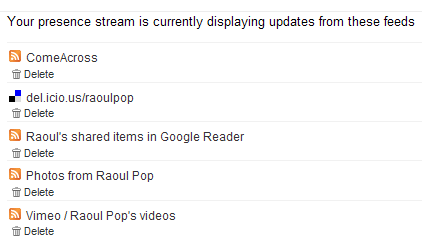
My Jaiku feeds

When it comes to Twitter, it has no feed aggregation service. As a matter of fact, the only way to get things in there is to type them in manually, but that’s not a lot of fun if you want to share a lot of stuff. (Remember to put that statement in the context of the differences between content creators and content consumers.) But what Twitter does have is a very nice and open API, and that means other people can build great functionality on top of the standard feature set. Wouldn’t you know it, someone went and did just that? I discovered a great service called Twitterfeed, which lets me aggregate my feeds just like Jaiku. Here’s a screenshot from my Twitterfeed page:
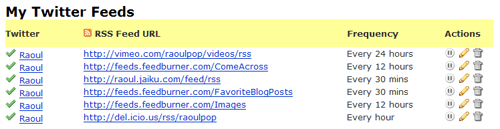
My Twitter feeds

As you can see, I’ve set up all of my relevant feeds to feed into my Twitter page, where they get posted very nicely every time my feeds get polled. If you look at my Jaiku and Twitter feeds closely, you’ll see that I have one more feed set up for Twitter — it’s my Jaiku feed. It’s because I use Jaiku primarily these days, and when I do type in a manual update, I don’t want to type it twice, at both Jaiku and Twitter. I publish it once at Jaiku and let Twitter pick it up through Twitterfeed. Works great!

I mentioned a bit back that there are some things I don’t like about Jaiku’s feed aggregation. Here’s the rub: I have no control over how often my feeds get polled, and my feed items get summarized in a single Jaiku instead of being displayed properly as individual items. This means a lot of the content gets lost, because there’s no way to click on each individual items. You can only click on the last item polled from a particular feed. Have a look at the following screenshot from Jaiku to see what I mean:

Jaiku items

As you can see from the screenshot, there were 19 new items in my Google Reader Share Items feed, yet only one got displayed. Where did the other 19 items go? They’re somewhere in virtual feed land, but they sure aren’t on my Jaiku page… It’s the same with my del.icio.us bookmarks feed. There were two new items, yet only one got displayed. Twitterfeed’s a lot better in this regard, because I can choose how often my feeds get polled, and because it converts each individual feed item into an individual Twitter. But it’s also got its limitations, because it can only display the last 5 items from a particular feed. So if I have more than 5 items, like I usually do in my Google Reader feed or my Images feed, they don’t all get displayed.

You might think that doesn’t happen very often, but I can read and share a lot of articles in the span of a half hour. Those 19 feed items you see in the screenshot above were shared in the span of 10 minutes, after reading through about 40 blog posts and articles. Plus, when I publish photos, I usually have more than 5. Yet the extra ones don’t show up on either Jaiku or Twitter. So yeah, this happens quite often for me.

At any rate, I can’t complain too much. The functionality offered by Jaiku, Twitter and Twitterfeed is fantastic for my needs. I can keep my various web presences up to date with my activities quite easily, and I can share a lot of interesting content in the process. Whether it’s mine or that of others, doesn’t matter that much to me. The important thing is that useful content gets promoted much faster and easier through feed syndication and the power of microblogging services like Jaiku and Twitter.

I hope you found this useful!

Standard