Reviews

The Exakta EXA Ia analog camera

I got a fantastic present for Christmas from close friends of ours: an Ihagee Exakta EXA Ia analog camera.

Exakta in original box

It apparently sat unused in a shop in Mexico since its factory production days back in the late 60s, still in the original box, waiting for someone to purchase it. It came with a whole kit which included a plastic/leather camera case, camera, lens, lens extension kit (for macro shots), two prisms/viewfinders (one normal, one 90-degree), a mechanical timer, a light meter and a ton of lens filters.

Camera case

You can watch a video review below or here, or scroll past it to see the photos and read my review.

The camera kit also included the original instruction manual (in Spanish). Since I don’t speak Spanish, I had to figure out the camera on my own. Here are the specs as best I can figure them out:

  • Exakta EXA Ia body, fully manual, 1964-1968 production (approximated the year based on the serial number)
  • Analog flash sync for bulbs or electronic speedlights
  • Shutter speeds from 1/175 to 1/30 s and Bulb mode
  • DIN sensitivity from 12-30 and ASA from 50-800, including b&w negatives; the list goes as follows: 12, 15, 18, 21, 24, 27, 30 (DIN) and 50, 100, 200, 400, 800 (ASA/ISO), plus C and NC.
  • Exposure counter can accommodate films of up to 36 exposures
  • Shutter release features threads for attachment of mechanical timer (included)
  • Shutter lock
  • Rewind release button and pop-up rewind knob
  • Carl Zeiss Jena lens, f2.8/22 50mm, focusing distance 0.6m to infinity
  • Lens extension barrel for macro shots; barrel disassembles into multiple sections to allow for varying focusing distances and macro apertures
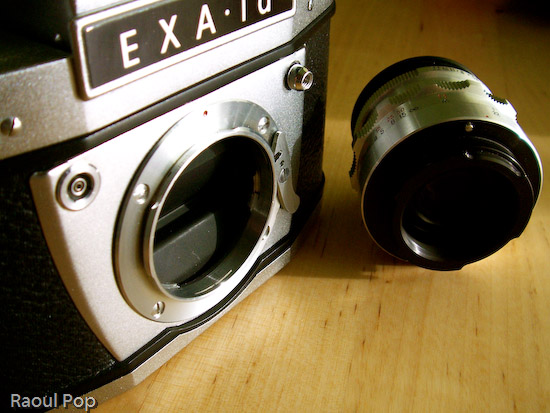
Camera body and lens

If there’s one expression I could use to describe this camera, it’s ease of use. Once I figured out the controls, it turned out to be a joy to play with them. The focus control is so well made, that at close distances, it turns slower, allowing for some real precise focusing. The aperture adjustment clicks, letting me know when I’ve reached a proper setting. The film advancement lever’s travel is short and also clicks reassuringly. The exposure countdown dial clicks as well. I guess I like controls that click, but it’s the sort of feedback that encourages good use. It also gives the impression of something that’s very well-made.

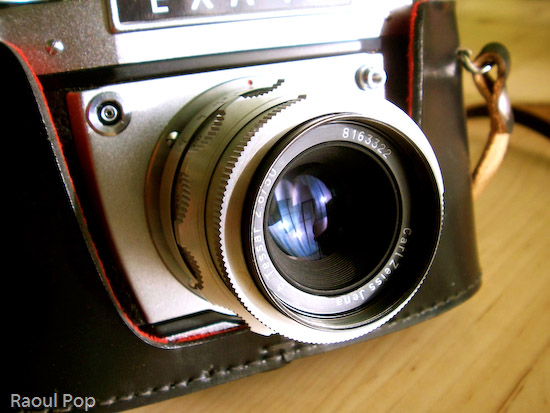
Camera in case

EXA Ia (front view)

It’s quite easy to take the lens off, and I love the fact that the extension barrel breaks down into multiple sections. It lets me vary the focusing length and also changes the perceived aperture of the lens, allowing me to get closer or further away from the object.
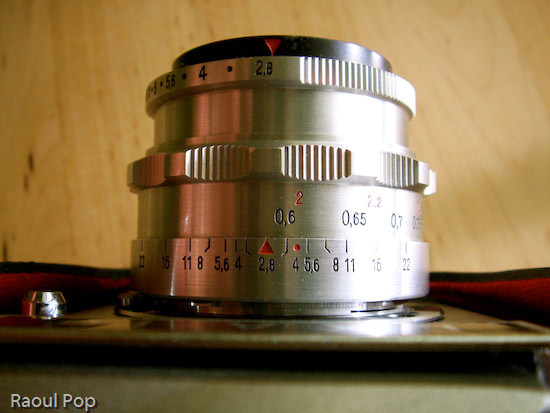
EXA Ia (top view)

The interchangeable viewfinders are so much fun! I can just slide them out and use a different one, allowing me to customize the way I look at my photographic subjects. Both viewfinders allow me to see right through the lens (TTL), so I get a direct preview of the lighting conditions. When I adjust the aperture, the aperture ring closes or opens, and I can see right through the viewfinder how much light comes through the lens. Of course, as I found out with my first roll of film, you’d better know exactly what shutter speed you’re using, or else the photos aren’t going to come out as you saw them through the lens!
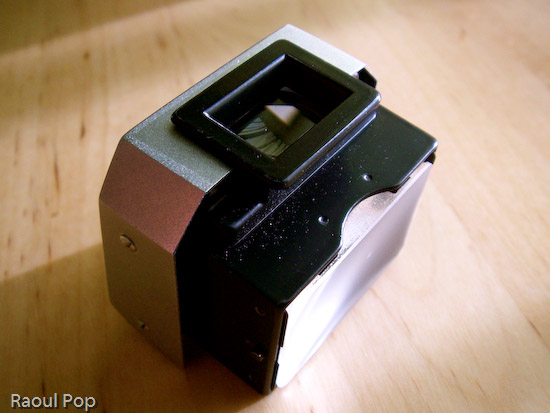
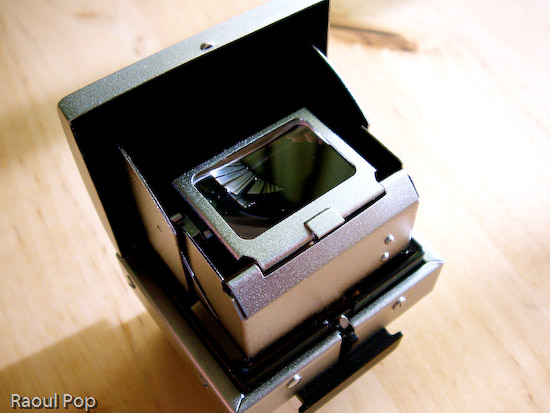
Viewfinder

Rangefinder

Judging from the instruction manual, this camera could be had with some pretty cool accessories when it came out: a lens hood to reduce glare, a tele lens, and a Stereflex Jena viewfinder and lens, that took 3D shots. It could also use a vertical grip and electronic flash, powered by a strap-held, external Braun battery. Pretty nifty! Just goes to show that a great gift doesn’t have to be new!

Macro rings

I need to point out (for those of you that have only used digital cameras) that working with a manual analog camera (especially one as old as this) is a _______ experience. It’s up to you to fill in that blank. Depending on your skill level and willingness to learn new things, it may be an amazing experience, or a completely frustrating one. If you’re only used to point and shoot, there is no such thing on a manual camera. Instead, you have what you see below.
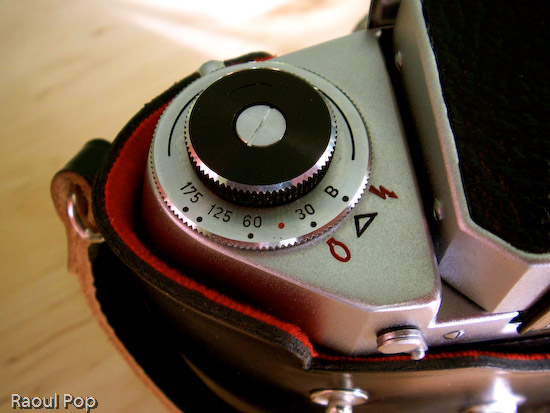
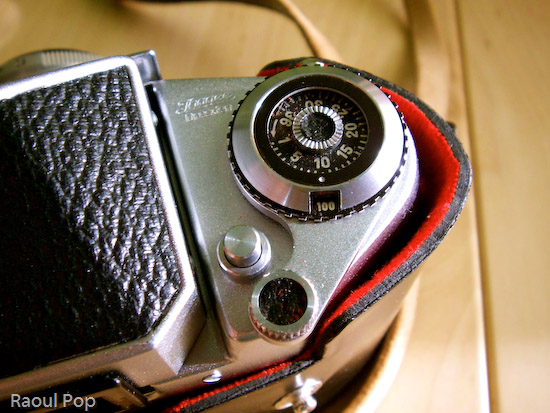
Shutter speed selection

Exposure and ISO indicator

You have to manually adjust the camera settings like aperture and shutter speed based on ambient light. You can guesstimate and live with the results, or use a light meter like this one. If you enjoy using burst mode (where you can shoot 3 or more photos in rapid sequence), you can forget it about it. You have to manually advance the film by cranking on a lever after each photo. Autofocus? Forget about it! Auto-flash? No such thing. You’ll need to manually adjust the power of the flash/strobe based on GN (Guide Number) calculations.
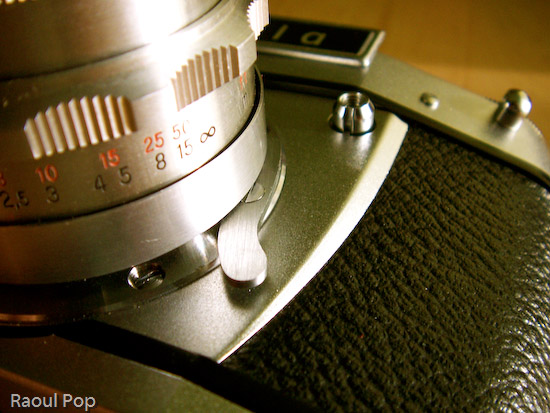
Lens release lever

This may sound discouraging to novices, but believe me, it’s a fantastic learning experience. If you master the use of a manual analog camera, you’ll approach photography with a brand new perspective. The quality of your photos will improve tremendously, and you’ll get real joy out of using your camera, be it analog or digital. Plus, there are other fringe benefits, such as not needing to use batteries (manual cameras don’t need them) and of course, my favorite, the opportunity to pool with a really, really cool gadget. Once you hold one of these cameras in your hand and get to appreciate the fine engineering and craftmanship that went into making it, you’ll know you’ve got something pretty unique, something you don’t see these days, when cameras are made by robots. There’s something captivating about using metal levers and gears and getting real tactile feedback from your camera. I get a really nice feeling when I press the shutter and a mechanical part actually moves inside. It’s not a circuit, it’s not a sensor — it’s a real piece of metal. Now that’s nice!
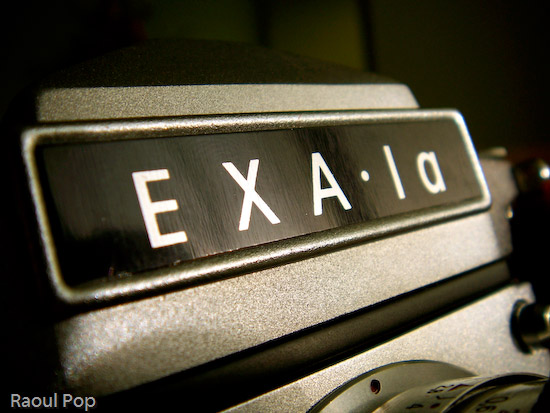
EXA Ia

Camera itself

Updated 12/25/12: I no longer have the camera, please stop asking for the user manual. Thanks! 

Standard
Reviews

Camera preview: Sigma SD14 DSLR

I’m intrigued by the new DSLR from Sigma, the SD14. It’s a 14-megapixel camera that uses a direct image sensor capable of detecting red, green and blue light at every pixel. The product brochure states:

The elements of this 14-megapixel sensor are arranged in three colorsensing layers, comparable to the three layers of emulsion in photographic film.”

Sure enough, the photos they show on their site and in their brochures are stunning. The level of detail and sharpness are fantastic. Were they taken with the SD14? I don’t know, but my interest is certainly piqued. The camera isn’t in stores yet. It’s going to launch early this year. It looks like the retail price will be around $1,600. In this review, I want to have a closer look at the specs of this beautiful camera, and see how they compare to other mid-level DSLRs. See my analysis below.

➡ Updated 10/29/07: Although the advertised resolution for this camera is 14 megapixels, and additively speaking, it’s correct, the actual resolution is about 5 megapixels. That’s because each sensor layer (there are three) has 4.7 megapixels. Added together, that makes 14 megapixels, but we have to remember that the layers are stacked on top of each other. Even though the pixel data corresponds to 14 megapixels, the printable resolution is still only around 5 megapixels, which is markedly lower than that offered by other DSLRs in that same price range. As some people have pointed out, you can safely increase the resolution of the photos in post-processing, but the camera will still only give you 5 megapixels per photo when you press the shutter button.


Sigma SD14 DSLR

First and foremost, there’s the sensor. It’s a newly developed Foveon X3. Here’s what Foveon says about their new sensor:

Similar to the layers of chemical emulsion used in color film, Foveon X3 image sensors have three layers of pixels. The layers of pixels are embedded in silicon to take advantage of the fact that red, green, and blue light penetrate silicon to different depths – forming the first and only image sensor that captures full color at every point in the captured image.”

So it looks like this sensor is groundbreaking, much more so than any other currently on the market. But is it unique to Sigma? Isn’t it found in Canon and Nikon cameras? We need look no further than the Foveon site, which lists the cameras currently using this sensor as the Sigma SD9, Sigma SD10, Polaroid x530, Hanvision HVDUO-5M and Hanvision HVDUO-10M.

It turns out the Sigma SD14 not only uses a pretty unique sensor, but it uses the latest and greatest version as well, the Fx17-78-F13D, which isn’t yet used in any other camera on the market. As you can see, none of the other cameras that use Foveon can boast 14-megapixels. It’s also reassuring to know this is a third generation sensor, so most of the kinks should have been worked out by now.

Furthemore, it looks like just about any camera on the market that uses regular sensors is inferior to the Sigma, simply because of the Foveon sensor’s capability to reproduce color more faithfully. Instead of having to manipulate the image through computations in order to render proper color, the Sigma can just rely on natural color capture through the Foveon sensor, which I’m pretty sure is a great advantage if it works as advertised.

From what I’ve seen in the brochures, I like the controls. As Sigma says, they’ve simplified them and eliminated extraneous functions. All I see on the mode dial is P (point and shoot), A (aperture priority), S (shutter priority) and M (full manual). The on/off dial turns easily for burst, timer and long exposure settings. I like the shape and size of the camera. The hold is rubberized, and the camera’s exterior is clean and simple.

The simplicity of design is exemplified in the accessories as well. There aren’t a ridiculous number of them. You’ve got the nice battery pack that holds two batteries and screws onto the tripod mount, a remote and cable release, two flash guns, one more advanced yet both featuring a bounce head, and an AC adapter. The standard accessories are what one would expect with a camera: battery, charger, USB cable, strap, caps, software and the product manual.

The built-in flash is a good idea. While an external flash is better, a built-in flash is good for fill-in light during daytime shots, and will also do acceptably for indoor shots when nothing else is available.

As I talk about the rest of the SD14’s specs, I’m going to compare it with Canon EOS 5D and the Nikon D200, which are my favorite DSLRs and are also cameras that have set new standards in the field of digital photography. (I own a Canon 5D)

The SD14 is supplied by default with a dust protector that is “put in place with a single action“. I’m not quite sure what that means, but I assume a button on the camera or in the central menu controls it. This is good. Anything that camera manufacturers can do to minimize dust gathering on the sensor is a good thing. It’s interesting that the camera only has a 5-point distance measurement for autofocus. Certainly Sigma has plenty of experience with AF, having designed lenses for a long time. But the Canon EOS 5D has a 9-point AF with 6 supplemental points, while the Nikon D200 has an 11-area AF. Are 5 points enough? I guess we’ll find out when the SD14 comes to the market.

SD14’s pentaprism is rated at 98%x98%, while the Canon has theirs at 96%x96%. The Nikon D200 doesn’t list this info in their specs, though I’d venture to guess they’re in the ballpark. The LCD monitor is at 2.5 inches and 150,000 pixels, which is the same size as on the Canon 5D and Nikon D200, but lower in resolution than theirs, which are both rated at 230,000 pixels. Coverage for the SD14 and 5D is listed at 100%, while it’s only at 95% for the Nikon. Most of the other specs match the EOS 5D and Nikon D200, so I’ll only note the differences.

The SD14’s ISO sensitivity only goes up to 800, although 1600 is listed in Extended Mode. Both the Canon 5D and Nikon D200 go up to ISO 1600, and the 5D even goes up to 3200 in Expansion Mode, which I assume is similar to the SD14’s Extended Mode. I wonder why the SD14 doesn’t go up to 1600 ISO naturally, and my guess is that it’s a limitation of this generation of Foveon sensors. The sensitivity will likely be extended with the next-generation sensors. I also have to wonder how an ISO800 photo on the SD14 compares to an ISO800 photo on the Canon or Nikon. How does it fare in low light? Will there be noise, or will the photos come out clear and beautiful, like they should? Even better, will its light sensitivity trump that of the Canon and Nikon, even if they do go up to 1600? I’d love to find out for myself.

I also need to point out that the top shutter speed, at 1/4000th of a second, is also only half that of the 5D or D200, which both go up to 1/8000th of a second. I’d venture to guess the sensor is the limiting factor here as well, though I can’t elaborate on that. This also promises to be the compensating factor. If the image quality is as good as promised, I won’t care that it can’t go up to 1/8000th of a second.

Since geotagging photos has become so mainstream nowadays, it would have been nice to see some sort of GPS functionality on the SD14, perhaps like the one on the Nikon D200, which allows the photographer to connect a GPS device to the camera and record coordinates to the EXIF data for every photo.

The dimensions and weight of the SD14 are similar to those of the EOS 5D and Nikon D200. The SD14 is 144mm wide, slightly less than the D200 at 147mm or the EOS 5D at 152mm. It’s also slightly shorter, at 107.3mm, than the D200 and EOS 5D, both of which are 113mm tall. It is, however, thicker, which I like, because there’s more to hold and that tends to stabilize the shots. It’s 80.5 mm deep, whereas the D200 is 74mm and the EOS 5D is 75mm. It’s also lighter than the other two. At 700g for the body, it’s 130 grams lighter than the D200, and 110 grams lighter than the EOS 5D. I welcome that, because when you add an external flash or battery pack to a serious DSLR, it gets so heavy you might as well use it for weightlifting. Any weight that gets trimmed off is okay by me.

Battery life is somewhat lower than that of either the EOS 5D and the Nikon D200. The SD14 can take approximately 500 shots on a single battery charge at normal temperatures, and 400 shots at near zero-degree temperatures. The EOS 5D can take approximately 800 and 400 shots at normal and low temperatures, respectively. The Nikon D200 can take up to 1,800 shots per charge at normal operating temperatures; no stats are quoted for low temperatures on their site. Again, to be fair, I think this has to do with the Foveon sensor. Instead of a single layer that must be kept charged, it has three separate layers. I haven’t dug deeply into the Foveon X3 specs, but I gather the sensor probably uses more power than a regular single-layer sensor. (Someone correct me if I’m wrong on this.)

It looks like the SD14 is a natural, unstrained progression for Sigma. After making lenses, then film SLRs, then 1st and 2nd generation DSLRs using the Foveon sensor, they’ve graduated to the SD14, which looks to be a beauty of a camera. If you’d like more information about the SD14, you can access the brochures easily. Click on each link to download a PDF in English: Concept, Product and Major Specifications, or just visit the Sigma SD14 website.

To sum up, the Sigma SD14’s main strength is its Foveon X3 sensor. I’m impressed with this camera, and plan on having a closer look at it as soon as I can get my hands on one.

Standard
Thoughts

Taking foolproof photos

We read about software that can improve blurry photos these days, and about significant improvements to autofocus on even inexpensive cameras. We look at photos that we take, the washed out ones, and wish we’d have exposed them a little less, or a little more. We wonder how they can be improved.

My solution points to bracketing. This is a current feature on one of my digital cameras, the Panasonic Lumix FZ20. When switched on, it will take three photos with three different exposure times (high, medium and low). I only press the shutter button once, and get three photos from which I pick the best one. Of course, this series of photos can also be used to get high dynamic range (HDR) photographs through manipulation, but the point is, the consumer only needs to press the shutter once. That’s the key.

I believe eventually we’ll see cameras that integrate bracketing into every photo. They’ll not only vary exposure times but also focus. The process will be seamless to us. We’ll press the shutter button once, the camera will only seemingly take one photo, but when we get home and download the photos to our computer, our camera software will allow us to use slider controls to adjust the focus and exposure without damage to the photograph’s quality. We’ll be able to bring different elements in and out of focus, and make the photo brighter or darker, just as we please.

Standard
Reviews

Camera preview: Sony Alpha DSLR-A100 DSLR

I’ve been reading reviews about the Sony Alpha DSLR-A100, and I’m impressed. It looks like the successor to Minolta’s D-SLR line is a worthy one, and the features it packs for its price point are powerful. This camera has a 10.2-megapixel image sensor, improved 40-segment metering, a 2.5-inch Clear Photo LCD Plus, and Anti Dust technology. It will have 19 high-quality Sony lenses and a wide range of accessories, not to mention that it will be compatible with Minolta’s line of lenses. The lithium-ion battery will let you get up to 750 shots per charge.

I would love to get my hands on it for an up-close review, but until I do, I’ll leave you with links to some good reviews:

Some detailed specs are also in order:

  • Lightweight and durable magnesium alloy body: frame is 545g and frame+lens is 630g
  • Sony a Alpha/Minolta-A bayonet lens mount
  • 10.2-megapixel Sony CCD sensor with 10M/5M/2.5M image sizes
  • Recording choice of JPEG, RAW, or RAW plus Fine JPEG
  • Super SteadyShot anti-shake system with viewfinder indicators
  • Anti-dust system automatically shakes dust off the imager
  • Large 2.5-inch TFT color Clear Photo LCD Plus
  • Pentaprism viewfinder with 95% coverage and Eye Start AF
  • 9-point AF with Wide, Spot and Focus Area Selection
  • Image adjustments: Contrast, Saturation, Sharpness (5 levels)
  • Shooting modes: Full-auto, Programmed AE with program shift, Aperture priority, Shutter priority, Manual and Scenes
  • Dynamic Range Optimizer using the Bionz image processor
  • TTL metering: 40-segment honeycomb-pattern, Center-weighted or Spot
  • White Balance: Auto, six presets and Manual color temperature
  • Unlimited Continuous 3fps shooting Large/Fine JPEG images, up to 6 RAW
  • Shutter speeds: 30 to 1/4,000 seconds, 1/160 sec. flash sync
  • ISO Range: 100, 200, 400, 800, 1600 (with lo80 and hi200)
  • Built-in TTL popup flash with red-eye reduction.
  • Hot shoe for Sony/Minolta Program Flash units
  • CompactFlash I/II card slot, Microdrive and FAT32 compatible
  • Video Out with selectable NTSC or PAL timing
  • High capacity lithium-ion battery pack and charger included
  • Exif Print, PRINT Image Matching II, PictBridge compatible
Standard
How To

How to choose a camcorder

If you’re interested in purchasing a camcorder, this guide will help you decide what to get when you look at the dizzying array of products out there.

At the moment, the industry is “in the 80’s”, caught between 4:3 and 16:9 aspect ratios, and standard and high-definition video. The HDV, 16:9 camcorders are still expensive, while the standard 4:3 camcorders are months to years behind the technology curve. There are some mongrel/hybrid models out there, that offer a mix of standard to high-def recording, on both 4:3 and 16:9 aspects.

To make things more complicated, there are multiple high-def formats: 480p, 780p, 1080p. There are also multiple media: Hi8, DV, miniDV, DVD, miniDVD, and hard drive. Each kind of media has its pros and cons. Finally, there are multiple connections: Firewire, mini-DVI, S-video, RCA, etc. There are caveats with each connection, and the quality of the video output varies with each, even on the same model camcorder.

So, how do you make sense of all this nonsense? Well, my recommendations are:

  • 16:9 aspect ratio (the extra width to the picture truly makes a difference, and allows you to compose your shots a lot better)
  • HDV (780 or 1080p, preferably the latter)
  • Firewire or mini-DVI connector
  • MiniDV or hard drive media

I should mention that some people like the convenience of storing directly on DVD – just realize that if you do that, it’s harder to edit the video. You have to import it to the computer from the DVD or the camcorder, then edit it, which is a slower process overall, plus most DVD media isn’t reusable, etc. Also, if your camcorder will record to mini-DVDs, realize that some DVD players won’t be able to play them, in particular the slot-loading ones that you find on Apple computers or some in-car entertainment systems.

You should also look for a good optical zoom, low-light capabilities, and optical image stabilization. Good, intuitive controls should also be present, and it’d be nice to have good battery life as well.

If you’re more than an amateur/home videographer, then you should look at the capability to use different lenses, and the presence of relevant physical controls directly on the camcorder’s exterior. You probably also want to look at the ability to switch between different frame rates.
Before you go out there and try to find a camera with all these features, realize the market’s in disarray, and you’ll be disappointed if you look for a camera that has it all. A camera that has my list of desired features will cost over $1,000 at the moment, and that’s out of reach for many people.

CNET’s put together a camcorder guide which will help you narrow down your choices, and my advice is to look through that as well. On their site, they also have reviews of many camcorders. Just realize that the editors are people, and the reviews are subjective, in particular the video reviews. I remember viewing one where the editor referred to the LCD panel as very small, literally “the same size as the viewfinder”, when it was clearly 4-5 times larger in terms of surface area.

The best thing to do is to come up with your own wishlist of features for your dream camcorder, using this guide and other guides like the CNET guide, then go to the stores, and see which model most closely fits your wishlist. You’ll have to compromise or give up on some features, but you’ll come out with a great buy in the end, because you’ll have done your homework.

Standard