Lists

Gadget Monday – March 30, 2009

Here is this week’s list of cool gadgets. Did you see last week’s edition?

Samsung HZ15W Digital Camera

Available starting this month, the HZ15W digital camera has a 12 megapixel sensor and a 10x Schneider zoom lens that starts at an ultra-wide 24mm. The camera also has built-in optical and digital image stabilization, and it records HD video at 720p and H.264 compression. Users can utilize the zoom freely while shooting HD video, which is still a rare feature on digital cameras. The HDMI output allows it to be connected directly to an HDTV.

The HZ15W replaces the HZ10W, which was launched in January at CES and is pictured below.

Samsung HZ10W Digital Camera

2TB Hard Drive from Western Digital

WDC is the first company to have come out with a 2TB internal hard drive. It’s a 3.0GB/s SATA drive that will make a lot of Drobo owners very, very happy.

Western Digital 2TB SATA Hard Drive - 1

Sony Ericsson Idou mobile phone

A new touch screen mobile phone from Sony Ericsson with a 12 megapixel camera and a big 3.5 inch (16:9, 640×320 pixels) display. It has all the goodies you’d expect from a smartphone, and it’ll go on sale later this year.

Sony Ericsson Idou Phone

[via LikeCool]

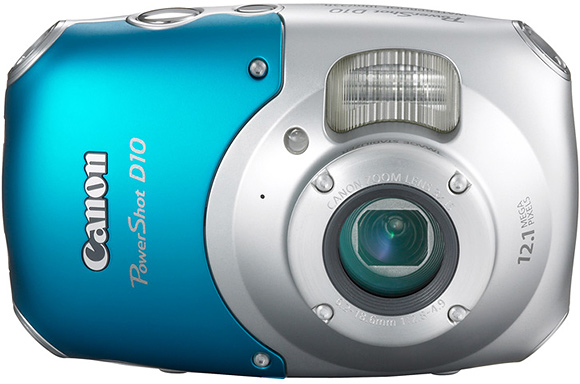
Canon PowerShot D10 digital camera

This little camera is waterproof (up to 10m depth), shockproof (up to 1.2m fall) and freezeproof (to -10°C). It’ll go on sale in May for $330 MSRP, street price will be lower. It has a 12 megapixel sensor, 3x zoom and it shoots SD 480p video.

Canon PowerShot D10 - 1

Canon PowerShot D10 - 2

[via Canon and LikeCool]

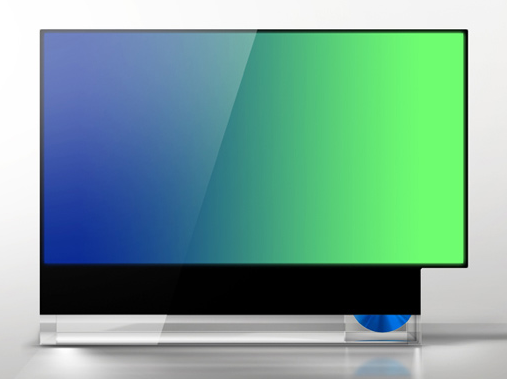
Studio FRST’s 16943 HDTV

The 16943 is a conceptual design for an HDTV that definitely grabbed my attention. It breaks out of the mold of the squarish TV design and allows one to view 4:3 or 16:9 movies at their intended aspect ratios, without letterboxing or pillarboxing them. The designers also want to include a built-in DVD player on the side, which is a nice touch but not really needed, since most people will play their content from other sources, not DVDs, in the future.

Studio FRST 16943 HDTV - 1

Studio FRST 16943 HDTV - 2

Studio FRST 16943 HDTV - 3

[via FRST and The Design Blog]

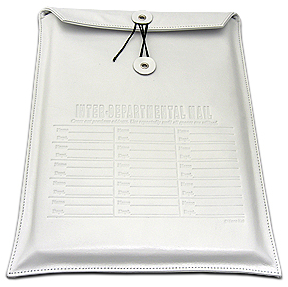
Interdepartment Mail laptop sleeve by Kena Kai

Made of white Italian leather, this is one beautiful laptop sleeve. Available for $70 directly from Kena Kai.

interoffice-mail1

interoffice-mail2

[via TrustyPony]

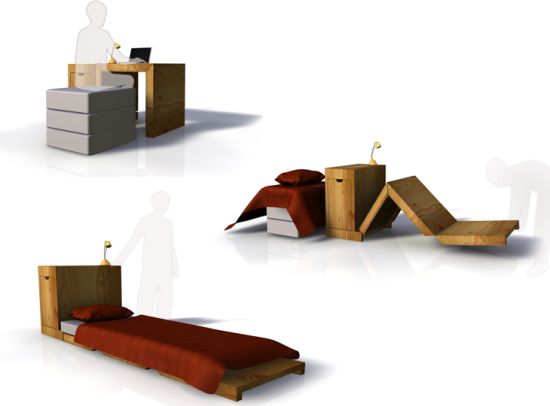
Modular office desk and bed by Florian Jouy

This neat desk can be unfolded and used as a bed at the day’s end. Great for small spaces.

modular-desk-and-bed-1

modular-desk-and-bed-2

[via The Design Blog]

Standard
Lists

Gadget Monday – March 23, 2009

Here are this week’s seven cool gadgets. Did you see last week’s edition?

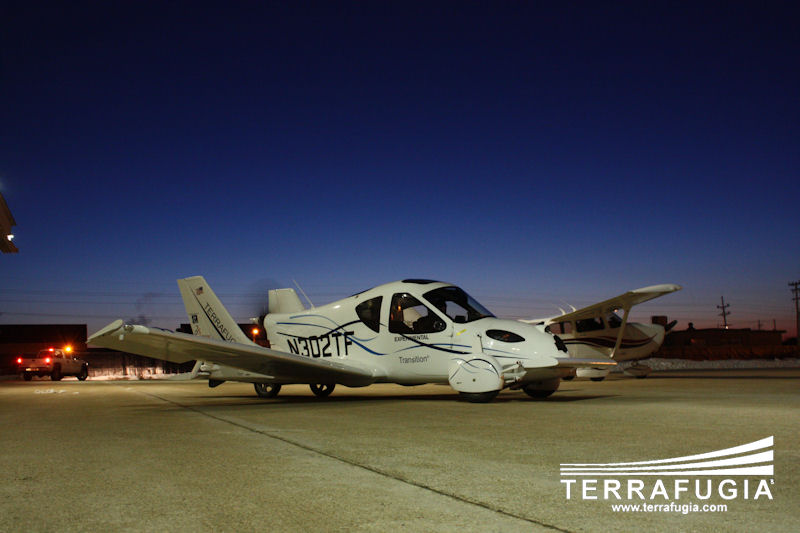
Terrafugia Transition

I wrote about the Terrafugia vehicle back in March of 2006, three years ago. On March 5th of this year, a couple of weeks ago, their first working prototype, the Terrafugia Transition, made a successful runway-only flight. I’m really glad to see they managed to get their design built and working!

The Transition has foldable wings that extend and lock into place when it’s time to fly. It changes from a car into an airplane in less than 30 seconds. It has a top speed of 65 mph on the ground and 115 mph in the air. Its approximate fuel economy is 30 mpg, and it can fly about 450 miles on a full tank. Retail price is $194,000.

terrafugia_morning_hangar

klwmtaxi

first_flight_chase_plane

first_flight_chase_truck

terrafugia_formation

transitiongasstation

Videos (1st, 2nd, 3rd)

[via Terrafugia and Jalopnik]

KOZO Lamps by Design2009

These lamps from Design2009 are hand-made from old-style galvanized steel pipes and feature a faucet-like switch. They can be used with incandescent or halogen light bulbs.

KOZO1

KOZO2

KOZO3

[via LikeCool]

The Jenga Pistol

It’s a coil-action pistol that can be used to knock out Jenga blocks. Watch the video and see, my description is lamer than what this gadget does.

[via Look At This]

SwitchEasy ThumbTacks

They look like thumbtacks, but they’re microphones for your iPod. So cool! At only $13, I’d grab a couple in a heartbeat, except they won’t work with my 1st generation iPod Touch; they only work with the iPod Nano 4G and iPod Touch 2G.

switcheasy-thumbtack-1

switcheasy-thumbtack-2

switcheasy-thumbtack-3

[via SwitchEasy and LikeCool]

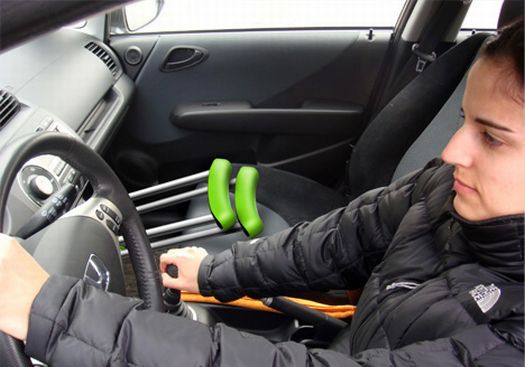
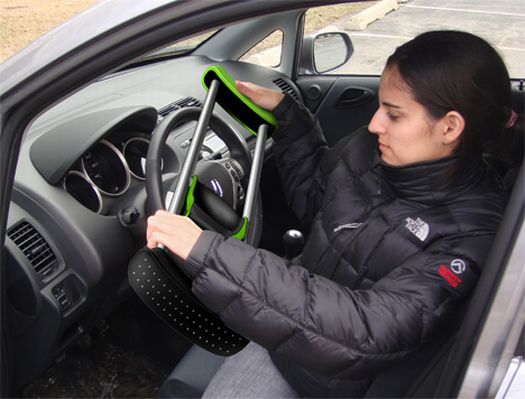
Collapsible Crutch

This may be one gadget I’d rather not use unless it was absolutely necessary, but let me tell you, if it were necessary, I’d rather be stuck with these. I was on crutches almost 10 years ago because of a knee operation, and I found it annoyingly difficult to get them in and out of the car. These collapsible crutches expand and contract very easily, which makes that task a snap.

Collapsible Crutch - 1

Collapsible Crutch - 2

Collapsible Crutch - 3

[via The Design Blog]

D3O

This wonder gel is soft at first touch, but it turns into a solid upon hard impact. It’s already being used in sportswear, and now the British Army has signed a contract with Blue Divine Ltd, the maker of the gel, so it can be used in the helmets of British soldiers. Very cool!

d3o-1

d3o-2

d3o-3

[via Mail Online and Look At This]

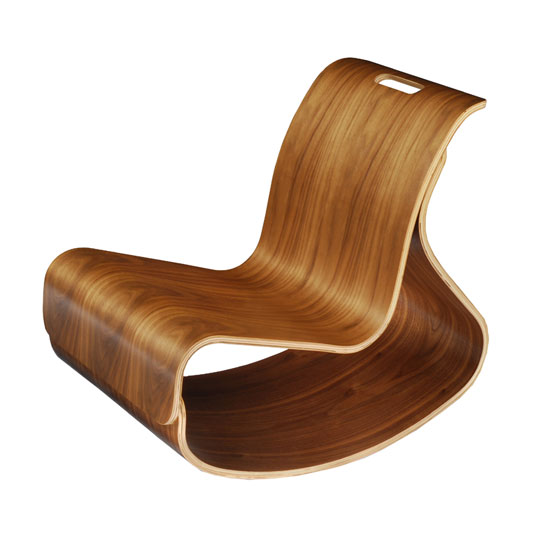
Iglooplay Mod Rocker

Someone tell me why this cool rocker is only made for kids? It’s so nice I’d get one myself. It’s made by ModernNursery of molded plywood, and can take up to 450 lbs of weight.

iglooplay-mod-rocker-1

[via The Design Blog]

Standard
Reviews

Gmail offers another pleasant surprise

The Gmail team has done it again, and they’ve given Gmail users a whole slew of cool new features.

New Gmail features

We’ve now got YouTube, Picasa and Flickr previews, built right into each email message. All we have to do is to put a link to a YouTube movie, or a Picasa or Flickr photo, and its thumbnail shows directly in the message. This feature can be enabled by service from the Labs settings in our Gmail accounts.

I love the “Undo send” feature and have already enabled it. My wife is already using the Offline version of email. It took a bit to sync all her messages, but it’s doing alright now.

Other Gmail features I love are as follows:

  • Superstars, which adds additional stars icons. I organize emails that I need to act on that way.
  • Signature tweaks, which places the signature above quoted text
  • Right-side labels
  • Navbar drag-and-drop, which allows me to re-organize the various items on the Gmail screen
  • Forgotten attachment detector
  • Vacation Time, which lets me specify beginning and ending dates for those times when I can’t get to my email
  • Create a Document, which allows me to create a Google Document right from my Gmail inbox (this is new)
  • Send & Archive, which allows me to reply and archive that message at the same time (this is new)
  • Title Tweaks, which changes the order of the text in the Gmail page title, allowing me to see right away how many unread messages there are (this is new)
  • Google Docs gadget, which displays my most recent Google Documents on my Gmail inbox screen

There’s more information about the new features on the Gmail Blog, here and here.

Standard
How To

How to travel with the Drobo

You might think this is a banal topic, but I don’t. I’ve had to take three of my Drobos with me on a recent overseas trip, and I had to make some clear decisions about how I was going to transport each of them.

The first thing I wondered about is whether there’s a carrying case or bag for the Drobo. I’ll talk about this first, then I’ll give you some practical travel advice.

Right, the carrying case — there isn’t any. There’s a grainy pic on TwitPic of some sort of a large plastic case with foam where you could place the Drobo and its hard drives, but that’s too big to take with you most places, particularly when you have lots of other luggage. It won’t work. We need something slim, something that fits right around the Drobo’s rectangular shape, has handles, sort of like a bowling bag, and yet is well-padded to protect the Drobo. Alas, there isn’t any such thing…

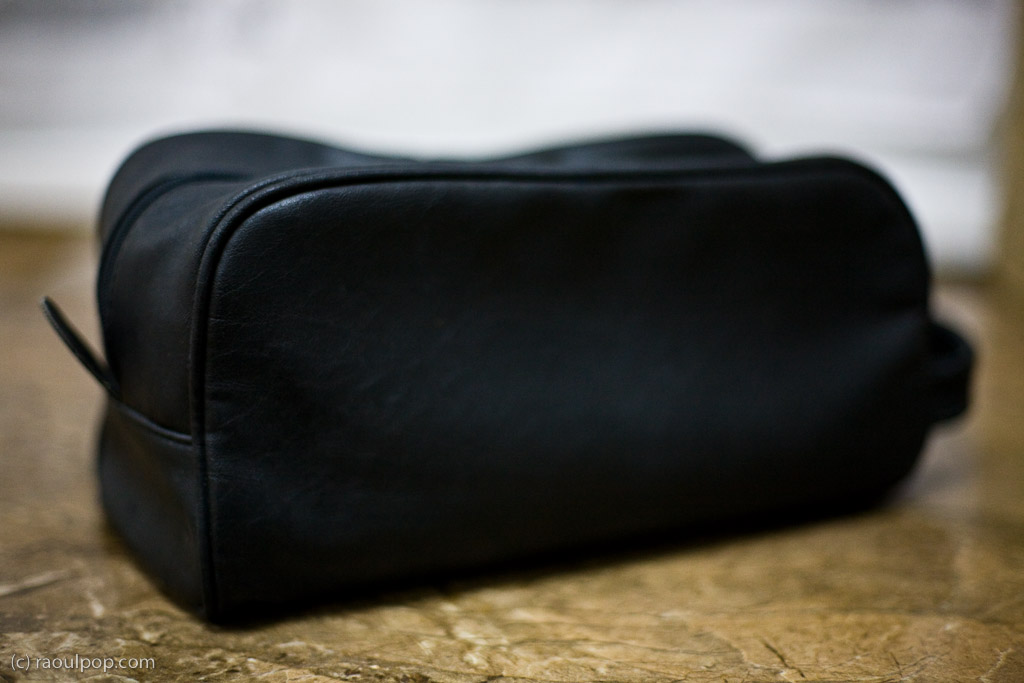
Let me show you a potential design that could work. It’s not something I invented — it’s my travel toiletry bag. Notice its handle is on the front, but I think there ought to be two handles at the top, one on each side, since the Drobo can be fairly heavy with the hard drives inside. The zipper ought to be down the middle of the case, at the top, and the bag ought to have two compartments on each side, or one below, where you can stick the power brick and the USB and Firewire cables.

Potential design for a Drobo carrying case

If Data Robotics or some other company made this sort of a carrying case, we would simply take the Drobo, with its hard drives inside, put it in the bag, and stick the bag in our carry-on luggage. I wouldn’t trust airport personnel enough to check the bag containing the Drobo. Given the way they throw baggage around like it’s bales of hay, they’d likely damage the Drobo and our data.

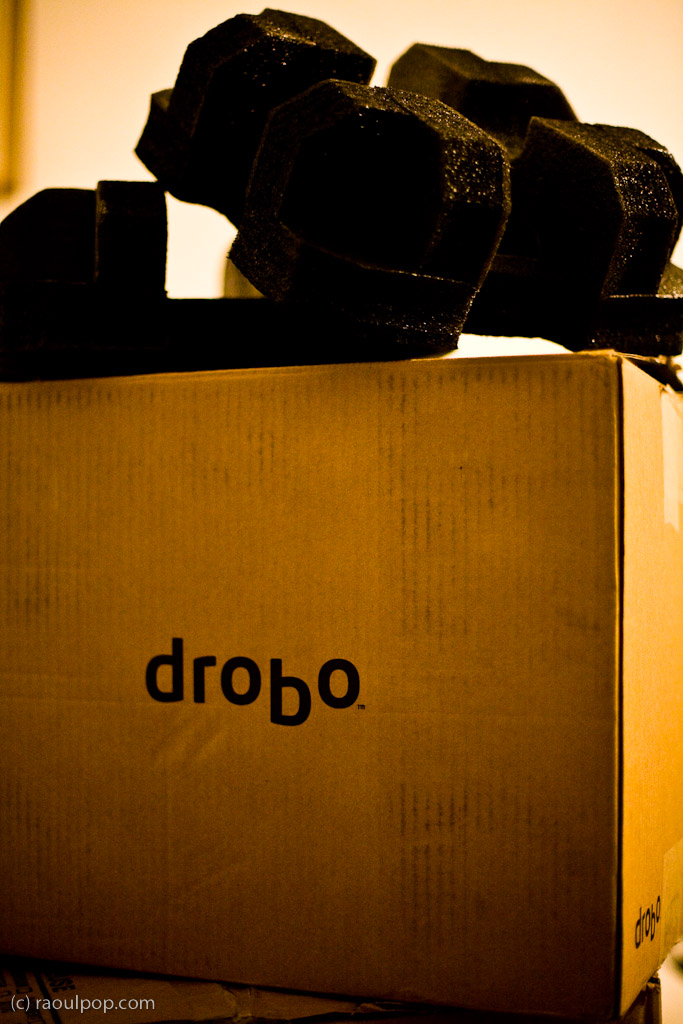
Now let’s get back to reality. There isn’t any carrying case yet. What do we do? What did I do? I was able to send two of my Drobos separately, by ship, and I placed them in their original boxes, which I packed into larger cardboard boxes with other items. They arrived safely, thank goodness. I love those Drobo boxes, they hold up so well! I kept all of them and used them often for storage or transport.

Original Drobo box

As for my third Drobo, the Firewire Drobo, my current primary storage unit, that had to come with me on the plane. I kept the hard drives inside it, packed it in woolen sweaters and other soft clothes, and put it in one of the carry-on bags. Yes, in case you’re wondering, I had to pull it out of the bag for airport security and show it to them. They kept wondering what it was and what it does, and couldn’t believe it was basically an external hard drive. Expect the same treatment from them, at least until they see more Drobos. As for the Drobo’s original box, I didn’t want to lose that, so I flattened it and placed it in one of the checked pieces of luggage along with the foam holders and the box that contains the wires, power brick and software CD. I’m glad to tell you that it arrived safely with me, and it’s connected to my MacBook Pro as I write this.

One last bit of advice. If you travel by car, and there isn’t yet any Drobo carrying case/bag, make room in your trunk for the Drobo’s original box. Pack it inside, and you’ll know that short of an accident, your Drobo will be well protected.

Standard
Reviews

Hardware review: Second-Generation Drobo

➡ Updated 1/14/19: I have revised my opinion of Drobo devices. After experiencing multiple, serious data loss events on multiple Drobo models, even recent ones, I no longer consider them safe for my data.

➡ Updated 11/23/09: The new Drobo S is now available. It has five drive slots, single or dual-drive redundancy, and triple interfaces (eSATA, FW800 and USB 2.0).

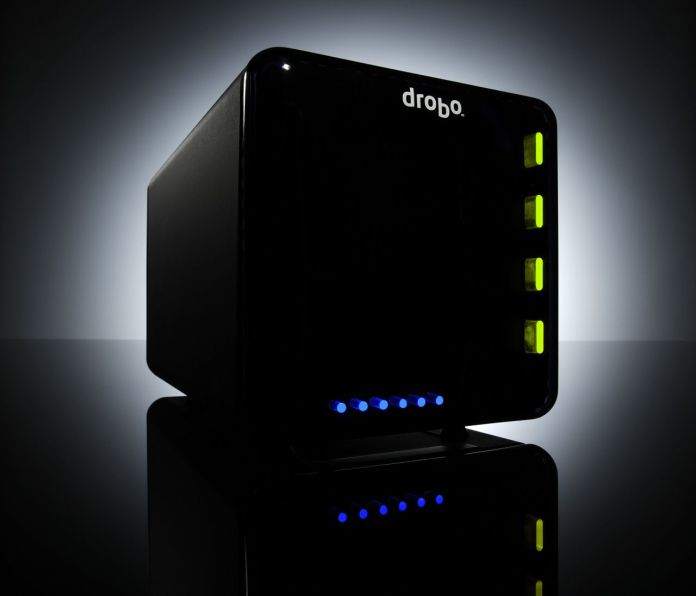
My review of the new Firewire Drobo is somewhat overdue, but I wanted to spend a few good months with it before I wrote it. I have now spent that time, and am happy to say this new Drobo can be an avid computer user’s single storage device. Whatever reservations I had about the first-generation Drobo were eliminated by this new version, and I can now wholeheartedly recommend it to anyone who needs to store a large amount of data and safeguard against a hard drive failure.
Background

You may or may not know that I also reviewed the original Drobo. I published that review in December of 2007, after spending about a month with a USB Drobo, and updated it frequently since then, outlining the various good or bad points I found during my heavy-duty use of the device. Since that time, I became the owner of four Drobos (three USB Drobos and one Firewire Drobo) and found a couple of firmware bugs — I’m not claiming to be the first one to have found them, just saying I also found them — which were later addressed by firmware upgrades. The bugs were an overestimation of used space, and a significant drop in transfer speeds after the Drobo’s used space reached 80% or greater of the total available space. I had a number of different issues with my Drobos, all of which were detailed in my original review, and are now resolved.

I also wrote about the Drobo from the perspective of product design for the consumer and corporate markets. Tom Loverro, one of the execs from Data Robotics, responded at length to my article with some very interesting insights about the inception and introduction of the product to those markets.

What’s new

What is it that differentiates the new Firewire Drobo from its predecessor? I’ll summarize it:

  • Faster read/write performance thanks to an upgraded core processor and faster transfer method (Firewire vs. USB); slower read/write performance was a big point of contention with the first-generation Drobo
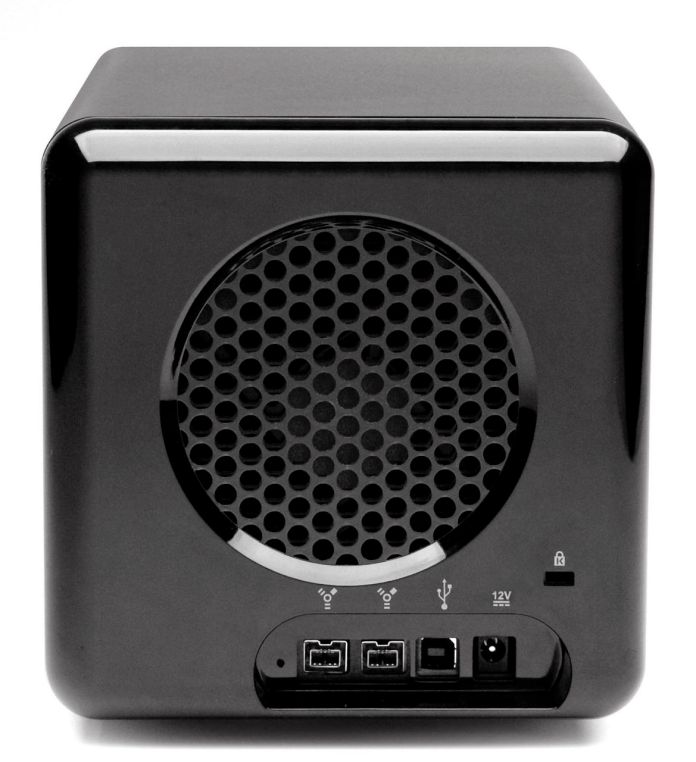
  • Two Firewire 800 connectors in addition to the USB 2.0 connector, so you can daisy-chain other Firewire devices to the Drobo
  • Different design for the cooling grille and a bigger cooling fan (the fan, without the cooling grille, was a silent upgrade that was also applied to some late builds of the first-generation Drobo)
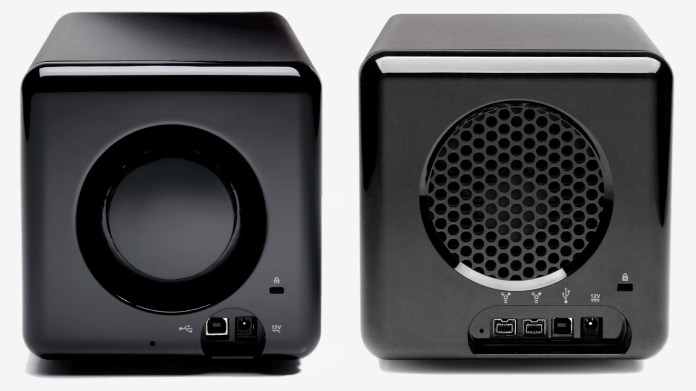
Comparison of the backs of Drobo USB and Drobo Firewire

Faster read/write performance

The official specs from Data Robotics quote the transfer speeds as follows:

  • FireWire 800: Up to 52MB/s reads and 34MB/s writes
  • USB 2.0: Up to 30MB/s reads and 24MB/s writes
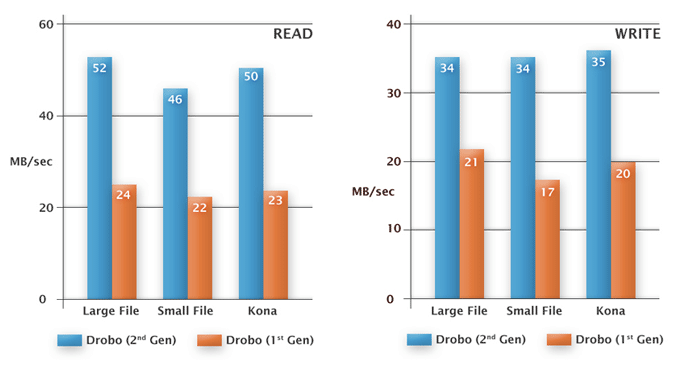
I can vouch for the faster read/write performance myself. As a matter of fact, I can safely say that the performance approaches that of my WD My Book Studio Edition II, which is also a Firewire 800 device, that I have used in both RAID 0 and RAID 1 configurations. In layman’s terms, I can copy about 800 MB – 1 GB per minute to my Drobo, while I can copy about 1 GB – 1.2 GB per minute to my WD My Book Studio Edition II drive in RAID 1 config. These are large files I’m copying, ranging in size from 1-4 GB.

If we do some quick math with the official figures, we can see that you could get up 2040 MB or about 2 GB per minute written to the Drobo over a Firewire 800 connection per the specs. In my real world experience, I was able to get about half that, as you can see above. I don’t think that’s a bad thing. Again, you have to compare the Drobo with another Firewire 800 device, and I did. If I can get about the same performance from my Drobo, which has to write the data across four drives, as I can get from my WD Studio Edition II, which only has two drives to worry about, then I’m pretty happy.

Two Firewire 800 connectors and different cooling grille

Have a look at this photo to get a better look at the different back design for the new Drobo. You can see the two Firewire 800 connectors, the USB 2.0 and DC connectors and the different grille design below.
Miscellaneous notes

In the other-things-that-are-different department, I noticed that Drobo now allows people to format its volumes in the EXT3 file system (Linux), in addition to NTFS, FAT32 and HFS+, although they do say that Linux support is in beta on their website. It has nothing to do with the new Drobo 2.0 hardware, as this involved a firmware upgrade and a Drobo Dashboard upgrade, not a parts upgrade, but it’s a pretty cool move on Data Robotics’ part.

Another thing that looks a bit different is the power supply. The original one was a simple plastic brick, but the new one has a line motif going across it, parallel to its long axis. This newer power supply was also shipped with some of the late builds of the previous-generation USB Drobo.

New Drobo power supply brick

If you look at one of the photos I posted above, the one of the new Drobo’s back, you’ll see a Reset slot. Can you see it, to the left of the FW800 connectors? It was present on the back of the original USB Drobo as well, to the left of its main (and only) USB connector. Sure enough, there’s even a tech note about it, which explains how to wipe the Drobo clean. This means it’s a dangerous little slot, so don’t use it unless you really mean it.

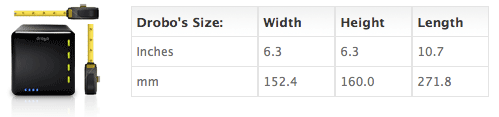
I never got around to posting the Drobo’s dimensions in my original review, so here they are. They haven’t changed with the new Drobo. I like the form factor, I hope it keeps staying the same. In all likelihood, it will stay the same for this four-drive version of the Drobo. I know, thanks to a product survey sent out to selected Drobo customers, that Data Robotics is thinking about or working on an 8-drive and possibly a 16-drive version of the Drobo, one of which (or both) is rack-mountable. Those should be some very interesting products for the enterprise or for those with larger storage needs than what the four-drive Drobo can provide. I understand that Data Robotics is also working on the capability to safeguard against two drive failures in those larger Drobo models, which should be a very cool feature indeed.
In terms of storage flexibility and the safety of one’s data, I believe the Drobo is unmatched. There is no other product like it on the market. The only thing that’s holding it back at the moment, storage-wise, is the capability of the hard drives themselves. Only recently have the problems present in the 1.5TB drives from Seagate been worked out, and only in recent weeks have I seen 1.5TB and 2TB drives from other manufacturers like Samsung and WD. This means, according to the Drobolator, that you can get up to 5.5TB of disk space on a single Drobo unit, which is pretty amazing, but still far from the 16TB limit. I think 16TB is a lot of space to get from a single device, and it should suffice for the needs of most people for the next few years.
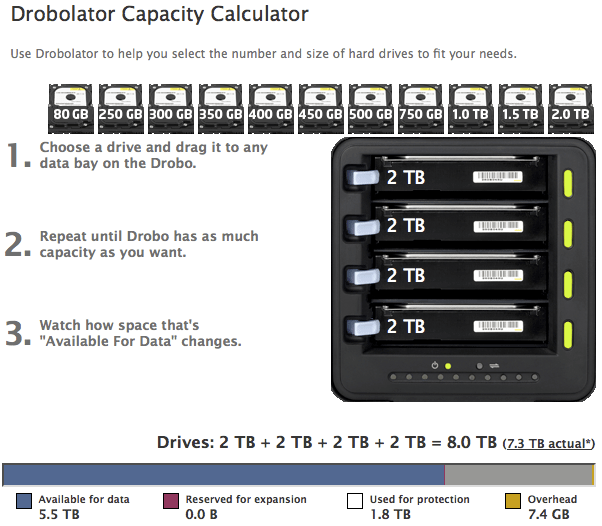
Drobo with four 2TB drives

Cheers to the new and improved Firewire Drobo!

The Drobo is available for purchase from Amazon or B&H Photo.

Images used courtesy of Data Robotics.

Standard