Skype has just released version 2.5 for Windows 2000 and XP. This new version includes the following cool features (on top of existing ones):
- Send SMS messages directly from Skype to contacts’ cellphones.
- View and call your Outlook contacts directly from Skype. This is really cool!
- Auto updates: Skype will automatically update itself – no more downloads and installs.
- Purchase SkypeOut credit directly from Skype – users won’t have to log onto the site and do it there. Nice!
- Quick and easy overseas calling: pick the country and dial the number.
Those were the advertised features. Here are the unadvertised ones:
- In their bid to get more profits, I see they’ve made it much easier for people to purchase ringtones right within Skype. Go to Tools > Rington > Get Latest Ringtones.
- Similarly, they’ve made it easier for people to purchase accessories. Go to Help > Get Headset.
- They’ve introduced Contact Groups, which allow you to place your contacts in pre-defined or custom groups – this means less clutter on the Contacts List.
- The changes made to country codes have also spread to the Edit My Profile window, where the country of your phone number for home, office and mobile is now selected by clicking on the little flag next to the number, and choosing your country from the drop-down menu. This is pretty cool after all.
Now for some problems:
- My existing list of Skype contacts disappeared after the upgrade. Suddenly, I had no contacts! Where did they go? I really don’t feel like entering them in there again. Five minutes later: decided to sign out of Skype and come back in. Bingo! My contacts re-appeared out of thin air… Strange!
- The “view your Outlook contacts” feature didn’t work as expected. First, it’s not automatic, you have to import contacts. When I tried it, I had to allow Skype access to Outlook through the dialog box that came up during the Import operation. Then, the contacts didn’t display in Skype. I had to select the View > View Outlook Contacts feature in order to view them.
And some things that worked as advertised:
- Tried the international calling with the keypad. Sure enough, they placed a drop-down menu listing the country codes right there. It’s helpful for those folks who don’t know how to dial international codes. I’m not sure how helpful it is for me, but I guess they’ve made it foolproof.
- Sent an SMS to a cellphone in Romania, and it worked. Cost near 13 cents for the message, and when I pressed Send, the status changed to Pending, then after 15-20 seconds, changed to a checkmark, indicating it was sent.
And some things that worked but weren’t advertised:
- My photo always disappeared after I upgraded to a new version of Skype. I’m relieved to see they’ve finally managed to fix that problem. My profile’s photo was still there when I checked my profile.
- I see the Video feature is still in Beta. I wish they’d take it out of Beta already and make it available on the Mac as well. The video quality is really good when compared to any other messaging app out there (other than iChat).
Overall, this is a solid upgrade. I like this new version. But then I guess I’m biased toward Skype, and I’ll tell you why. The benefits are clear when one uses the application: great audio, great video, reliable connections, and, my biggest pet peeve, NO ADS, thank God!
I abhor the MSN, Yahoo and AOL Messengers for that very reason: I can’t stand their ads. They stick little banner ads everywhere, bombarding me with them. They flash, they pop up, and they’re completely annoying and distracting. I am truly grateful that Skype hasn’t succumbed to that disgusting practice, and I hope they never do!

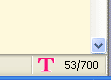 I’ve been trying out a Firefox extension that displays the minutes used in my mobile phone plan (I’ve got T-Mobile) since yesterday, and I’m really excited about it. Once you install it, you can configure it to query your plan and display the minutes used out of the total monthly minutes, right in the status bar, at the bottom of the browser window.
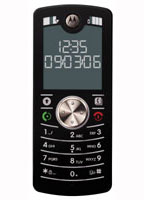 Motorola’s just come up with a very nice and thin cellphone that’s just that: a cellphone. It’s called the Motofone, and has no other features — no music player, no digital camera, no fancy gadgets, games, etc. It’s just a cellphone, and it looks really cool!
 Raoul Pop