Places

A night at the Legg Mason Tennis Classic

I received an exciting invitation from Olympus PR last week. Would I be able to attend the Legg Mason Tennis Classic on August 1st, here in DC? I’d get a box seat and the chance to try out the new E-510 DSLR. Absolutely, I said!

What do you think I did this afternoon? I was center court, sure enough, sitting together with five other folks from reputable news organizations, geeking out on Olympus DLSR stuff and comparing cameras and features. The E-410 was also available to try out. It’s the smallest and lightest DSLR on the market. You’ll remember the E-330 held that title before, but it didn’t have a prism. The E-410 has the prism. It, along with the E-510, now also has Live View, which lets you compose photos on screen.

If you know your cameras, then you know Live View is a pretty innovative feature, which is really hard to accomplish on a DSLR. In the E-330, Olympus used two sensors and a complicated mirror system to accomplish it. With the E-410 and E-510, they’ve simplified things. Now they have only one CMOS that does it all. I’m planning to write a detailed review of the E-510 after I’ve used it thoroughly for a month, and I’ll explain how the Live View works in the review.

Back to the Legg Mason Classic. The weather was filthy hot today, but thankfully the humidity was fairly low for our area, and the sun’s oven-hot rays tapered off around 7 pm. I slathered on plenty of sunscreen, but still got sunburn. Such is life when you’re a pale-face.

The first match, at 4 pm, was P. Goldstein (USA) vs. R. Stepanek (CZE). By the way, you can check the schedule over here. I didn’t know who to root for. Goldstein put up a serious fight and I thought he’d win. Stepanek looked like he was losing, but somehow he kept on top and won the match. Goldstein was the crowd favorite — apparently he grew up in the DC area. Stepanek got booed a few times, but I have a feeling he didn’t really care. He kept at it and brought home the bacon, so to speak — home for him being Monte Carlo, which is not a bad place to call home if I might say so.

The second match was A. Clement (FRA) vs. T. Johansson (SWE). Johansson had some amazingly fast serves. He clocked in at 132 mph once, if I remember correctly. He also had great returns. Clement kept pouting and giving the crowd angry looks if they’d as much as get up from their seats. In the end Clement went home to sulk over a baguette and Brie and Johansson advanced to the next round.

The third (and final match for me) featured the annoying Bryan twins (USA) vs. P. Goldstein and T. Phillips (USA). Yes, you read correctly. That’s the same Goldstein from the first match at center court. How he managed to recover from that exhausting match with Stepanek in the course of a couple of hours, I don’t know, but there he was, ready to put up another good fight. I instantly had to root for him. You have to respect a guy that plays two tournament matches in one night. That’s real dedication and perseverance. Unfortunately, all he and Phillips could do against the (yes, I’ll say it again) annoying Bryan twins was to put up a good fight.

The dynamically annoying duo towered over the shorter Goldstein and Phillips and smiled gleefully as they mercilessly tore away at their opponents. I’m sorry, I don’t care if they’re top seeded and girls find them cute, I found myself calling them names and hoping Goldstein and Phillips would beat the pants off them. I didn’t end up staying for the whole match, and after I got home, I found out that the annoying Bryan twins lived up to their ill-begotten reputation and won it. I so wanted them brought down a notch… They desperately need it.

All in all, I had a LOT of fun, and I’m really glad I got to meet people from the National Geographic Traveler, Internet News and The Washington Post. But all of this would not have been possible without Michael Bourne (yes, that’s his real name) from Mullen, who organized the entire get-together and provided us with some great new DLSRs to test and review. Michael, Mullen, Olympus, thank you! I look forward to processing the photos I got last night, and reviewing the E-510! 🙂

Updated 8/6/07: The photos are available right here.

Standard
Thoughts

The Simpsons me

I read a post over at Dawn Armfield’s blog today that resonated with me. It’s about one’s online identity, and whether you’re comfortable enough to be yourself even when you can be someone else. If you read my blog regularly, I think you pretty much know where I stand on that. I write in first person, my photo’s everywhere, I’m not shy about expressing my opinions, etc. I would ask where you stand on that, but it might be a moot point. I get the feeling that the people uncomfortable revealing their identity online, for whatever reason, won’t reply. I’ll only get comments from the ones like me.

Something fun did come out of it though, and I wanted to share that with you as well. Dawn built a Simpsons avatar for herself (you can see hers in her blog post) and inspired me to do the same. I headed over to the Simpsons Movie site, which is where you can partake in this fun little experience, and built one for myself. It was a bit difficult to find the bits and pieces that would make the character look like me, but in the end, I arrived at a reasonable facsimile. Have a look below. Ligia got a kick out of it. She said she liked it, and that it was really funny.

I don’t think I’ll be using this as my online avatar, but it’s fun to look at it. For example, I had no idea that I would like a hippie if I wore certain clothes. What do you think? And by all means, if you want to chime in on how you identify yourself online, please do so as well.

The Simpsons Me
Standard
How To

Making it to the first page of Google search results

As I checked my traffic stats over the past few days, I noticed a steady stream of traffic to my reviews of the WD My Book World and Pro Edition II hard drives. I was pleasantly surprised, but couldn’t figure out why. Other than publishing the reviews on my blog, I hadn’t done any sort of promotion. No one had linked to them so far (from what I could tell), yet the traffic was there. It wasn’t an outrageous amount of traffic, but nice, steady and regular. That sort of traffic usually only comes from one source: search engines.

I checked, and sure enough, my two reviews had made it to the first page of Google search results — the dream of any content creator. Here’s a search for WD My Book Pro Edition II, and for WD My Book World Edition II. Not sure how long they’ll stay there, but it’s really nice to see blog content make it to the front page of Google search, and even better, it’s a treat to see my own content make it there. 🙂

I thought I’d check on some other popular content and see how it ranks in Google’s search results. I logged into my FeedBurner account and looked at the most popular pages for the past 30 days. Here are the top ten pages at ComeAcross, in descending order:

In truth, I’m not sure just what it takes to get to the front page at Google. Let’s just say that it involves a fair amount of chance along with the the hard work. I steer clear of dirty SEO tricks like keyword seeding and other such nasty stuff. Also, I haven’t really spent a lot of time optimizing ComeAcross with honest SEO techniques. Other than using WordPress, which has certain built-in SEO advantages, and trying to write good content, I don’t do much to ensure that my posts get good ranks in the search engines. That’s why I find it refreshing to see that content is still king, and as long as one’s design isn’t egregiously awful, you’ll still get indexed just fine and bubble toward the top as more people find your information interesting.

Don’t assume though that I do nothing to promote my work. Remember, I just finished writing about how I promote it using Twitter and Jaiku or other microblogging services yesterday. Here’s part one and part two of that discussion. I also have other tools that I use, though I don’t use them often. I depend on my readers to do that — or rather, I prefer to let my content grow in popularity organically, without “cheating the system”. It’s probably a good idea that I discuss this in more detail in a future post — perhaps next week.

I should also say that I’m not dismissing SEO. It has its value, and if done right, can help push content right to the top. Some people swear by it, and have seen their traffic double. I should probably look into it in more detail at some point in the future. And good web design is crucial. Design may not necessarily matter to search engines (to some extent) but it sure matters to people. If your site’s design is ugly or hard to use, don’t expect many people to read through your content or return to it. By the same token, good web design alone won’t draw the traffic. Good content will do it. Keep that in mind, and thrive.

Standard
Reviews

The value of microblogging services (part two)

This is Part Two of a mini-series on microblogging services such as Twitter, Jaiku and Pownce. You can read Part One here.

I promised you yesterday that I’d continue to discuss microblogging services in today’s post, and in particular, to show you how I use them to promote my own content and that of other bloggers.

First, let me tell you how I’m not doing it: I’m not typing my updates manually at both Twitter and Jaiku. That would be much too much work. It would almost be a full time job. Instead, what I do is to let the functionality of Web 2.0 do the work for me. I harness the power of feeds to do the foot work, while I go on about my regular day.

When it comes to my own content, I have my blog feed, my photos feed, and my videos feed. And when it comes to promoting the content I find on other blogs or websites, I use my Google Reader Share Items feed, and my del.icio.us feed. If it’s a blog post or a website that offers a feed, I’ll share it from Google Reader, and if it’s another website or web resources, I’ll tag it with del.icio.us. Between all of my feeds, I pretty much capture all of the interesting content that I or or other people create (well, at least the stuff I find interesting), and get to share it easily with others.

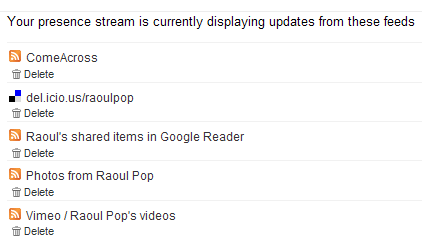
Jaiku itself offers a nice feed aggregation service, where I can point it to the feeds I want, and it’ll display the feed items on my Jaiku page. There’s no limit (to my knowledge) on the number of feeds displayed. I like the fact that this service is part of Jaiku’s feature set. There are some things I don’t like about it, and I’ll get to that in a bit. Here’s what my Jaiku feeds page looks like:

My Jaiku feeds

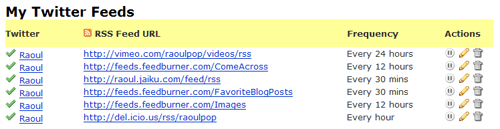
When it comes to Twitter, it has no feed aggregation service. As a matter of fact, the only way to get things in there is to type them in manually, but that’s not a lot of fun if you want to share a lot of stuff. (Remember to put that statement in the context of the differences between content creators and content consumers.) But what Twitter does have is a very nice and open API, and that means other people can build great functionality on top of the standard feature set. Wouldn’t you know it, someone went and did just that? I discovered a great service called Twitterfeed, which lets me aggregate my feeds just like Jaiku. Here’s a screenshot from my Twitterfeed page:

My Twitter feeds

As you can see, I’ve set up all of my relevant feeds to feed into my Twitter page, where they get posted very nicely every time my feeds get polled. If you look at my Jaiku and Twitter feeds closely, you’ll see that I have one more feed set up for Twitter — it’s my Jaiku feed. It’s because I use Jaiku primarily these days, and when I do type in a manual update, I don’t want to type it twice, at both Jaiku and Twitter. I publish it once at Jaiku and let Twitter pick it up through Twitterfeed. Works great!

I mentioned a bit back that there are some things I don’t like about Jaiku’s feed aggregation. Here’s the rub: I have no control over how often my feeds get polled, and my feed items get summarized in a single Jaiku instead of being displayed properly as individual items. This means a lot of the content gets lost, because there’s no way to click on each individual items. You can only click on the last item polled from a particular feed. Have a look at the following screenshot from Jaiku to see what I mean:

Jaiku items

As you can see from the screenshot, there were 19 new items in my Google Reader Share Items feed, yet only one got displayed. Where did the other 19 items go? They’re somewhere in virtual feed land, but they sure aren’t on my Jaiku page… It’s the same with my del.icio.us bookmarks feed. There were two new items, yet only one got displayed. Twitterfeed’s a lot better in this regard, because I can choose how often my feeds get polled, and because it converts each individual feed item into an individual Twitter. But it’s also got its limitations, because it can only display the last 5 items from a particular feed. So if I have more than 5 items, like I usually do in my Google Reader feed or my Images feed, they don’t all get displayed.

You might think that doesn’t happen very often, but I can read and share a lot of articles in the span of a half hour. Those 19 feed items you see in the screenshot above were shared in the span of 10 minutes, after reading through about 40 blog posts and articles. Plus, when I publish photos, I usually have more than 5. Yet the extra ones don’t show up on either Jaiku or Twitter. So yeah, this happens quite often for me.

At any rate, I can’t complain too much. The functionality offered by Jaiku, Twitter and Twitterfeed is fantastic for my needs. I can keep my various web presences up to date with my activities quite easily, and I can share a lot of interesting content in the process. Whether it’s mine or that of others, doesn’t matter that much to me. The important thing is that useful content gets promoted much faster and easier through feed syndication and the power of microblogging services like Jaiku and Twitter.

I hope you found this useful!

Standard
Reviews

The value of microblogging services (part one)

Twitter Jaiku

When Twitter came on the scene, no one knew quite what to make of it. “What’s the point?” was the most frequently asked question. When Jaiku got started about the same time, people again asked that same question. When Pownce got started recently, I was the one asking that question. As a matter of fact, I still am, and I’m not going to join Pownce until I can see what value it’ll bring me in addition to Twitter or Jaiku.

The thing is, that very pertinent question still hasn’t been answered. People are still trying to figure out what to do with them. Here are their current uses, from my observations:

  1. Publish simple activity updates
  2. Chat with friends asynchronously
  3. Self-promotion: point your contacts to something you’ve written or you’re working on
  4. Link sharing: point out interesting articles, videos or sites
  5. Marketing: fake/generic profiles are set up to talk up various products or events, and thousands of people get added as “friends” to that profile in the hope that some buzz gets created

I’ve been using both Twitter and Jaiku to do the first four activities listed above. After a while, #1 gets fairly old. Unless something highly unusual is happening, I’m simply not likely to visit the site and type in an update. I’ve got more important things to do. Plus, if I’ve got something interesting to say, I’d rather hold on to it and craft it into a nice blog post on my own blog than to share it on someone else’s website, where it brings me no added value.

Sure, others might say it’s fun to receive updates on your phone and participate through SMS. I say phooey to that. First, data plans for SMS are more expensive. Plus, I like my phone quiet. I don’t want it to buzz every minute with an update from a contact. And I’m not going to sit there thumbing on that keypad just so I too, can join the legions that say “I’m eating lunch” or “About to drop off my clothes at the cleaners.” Yes, this might be fun if I decided to get a fancy phone with a keypad, either a Windows Mobile device or an iPhone. But I think Windows Mobile devices are ugly, the iPhone is still a build or two away from the featureset I want, and both are too expensive. I don’t see the value in a fancier phone, even if I can surf the web on it, or do email. If I want to surf the web, I’ll grab my laptop and see it on a nice, big screen. So I have both Twitter and Jaiku set to web-only updates. I check both sites a few times a day, and that’s how I keep up with the various conversations.

Numbers 2, 3 and 4 is where the action is. If you are a content creator (refer to this post of mine for the details on that term) self-promotion can be valuable. If done in a non-sleazy way, it can make your contacts aware of something interesting that you’ve either just published or are about to publish, and can potentially extend the reach of your work. I publish links to my blog posts, my photos and my videos on both Twitter and Jaiku.

Link sharing is a very valuable feature of the microblogging services. I use it a lot to point others to various web resources or articles that I find interesting. For example, I read a lot of articles and blogs every day. I share all of the ones I find interesting on both Twitter and Jaiku. I’ll write in more detail tomorrow about just how I do that, and how I promote my own content.

As an aside, the only added benefit I see in using Pownce is for the file sharing feature. But where it could prove to be a value-added service for its founders, Kevin Rose being one of them, is in tight integration with Digg on link sharing. If a particular link is getting passed around between Powncers, that would be a pretty good indication that it could be Dugg as well, so having a section on Digg for popular Pownce links/articles would be a great way to capitalize on that, and to allow Digg users to do their thing with those articles, videos or whatever that link may be.

Last but not least, asynchronous chatting is an efficient way to conduct a conversation if you’re pressed for time or if your contacts are in different time zones. Instead of dedicating a slot of your schedule to a particular conversation, you simply tune in between your more important activities and share your thoughts. Your contacts do the same. Although it takes longer to get answers, I find it very useful for non-urgent matters. Jaiku is a lot better at this particular task than Twitter, because it has threaded conversations, while Twitter doesn’t.

The value of microblogging services lies in the fact that they’re another web presence for you. They’re another way to relate to your contacts and friends. Somehow, it’s easier for someone to Twitter or Jaiku me than to write a comment on my blog. Not sure why, because they get through both ways and I answer them just the same, but the immediacy of these services makes it easier to relate to me, and I assume, to others.

To sum up, these web presences can be used for asynchronous chats and for sharing your own content and other valuable articles, posts and resources with your contacts. I should point out that, just like a blog, if you’ll approach microblogging services with an entirely self-serving attitude, to engage in either shameless self-promotion or sleazy PR techniques, your little experiment’s going to fail. It’s important to maintain authenticity, and to have a good mix of interesting content, otherwise you push away people.

This is why I don’t add contacts left and right on either service, like some people do… I don’t see the point of adding complete strangers just for the sake of bloating my profile with fake friends, or just so I can shamelessly self-promote to a bigger audience. If I know someone, I’ll add them, or if someone adds me and I see from their update history that they have interesting things to say, I’ll add them.

Come back tomorrow because I’ll show you just how I use both Twitter and Jaiku for uses 3 and 4 from the list above.

One more thing. Here are the links to my profiles at Jaiku and Twitter:

[Updated 7/25/07: Part Two of this mini-series is now available. Read it here!]

Standard