Thoughts

Energizer's new Advanced Lithium batteries

In early January, I was contacted by an ad agency on behalf of Energizer. Would I be willing to get the word out about their new Advanced Lithium batteries, as a blogger and photographer? Sure, but I’ll need to try them out first, I said. I promised I would use them in my Canon 5D’s vertical grip and in my 580EX II speedlite, and see how long they last.

Energizer Advanced Lithium Batteries

Well, I just got the batteries. I picked them up at the post office a couple of days ago, and it’s time to try them out. I’ll let you know how things turn out in a little while. Just to keep things on the level, I was not paid to write about them. All I got from the agency was the batteries, as review units.

In the meantime, if you have something to say about the batteries, feel free to do it, either here on my site, or on the forum that Energizer’s already set up.

Standard
How To

New Gmail buttons and shortcuts

Gmail's new buttons

I woke up today to find new Gmail buttons. At first I thought it was just Firefox playing tricks on me, but no, the buttons look the same in Safari. The Gmail Team announced the change on their blog yesterday, on 2/3/09. As expected, the change took a while to propagate to all of the Gmail accounts.

Along with the new buttons, they introduced two new keyboard shortcuts, “l” and “v”, which will allow you to label and label/archive messages on the fly. The “l” key opens a drop-down menu which allows you to label emails. You can navigate the drop-down menu using the arrow keys and mark a label using the Enter key. The “v” key does the same thing, and it also archives the message at the same time, removing it from the inbox.

Don’t forget that while you’re in the Gmail inbox, you can select multiple message by using the Shift key. Left-click on the first one, then Shift-Click on the last one, and all in-between will be selected. You can then use “l” or “v” to apply labels to all of them at once.

Standard
Reviews

A look at the Samsung T260HD HDTV widescreen monitor

I tried, unsuccessfully, to use an HDTV as my main computer display in the past. Although the specs of that Sony HDTV were superb, its brightness and contrast levels were made for a TV, not a computer display, and it gave me headaches when I stood close to it, as I would when I’d work at my computer. Things have a way of working out though. One of the commenters on my HDTV post, Adam Juntunen, pointed me to something that might just work for my needs.

Samsung has come up with a product that is made to work as both a display and an HDTV. It’s the first such product that I’ve heard of: the T260HD, a 26″ widescreen computer display and HDTV. The T260HD is part of a line-up of four monitors which includes the T200HD (20″), T220HD (22″) and the T240HD (24″).
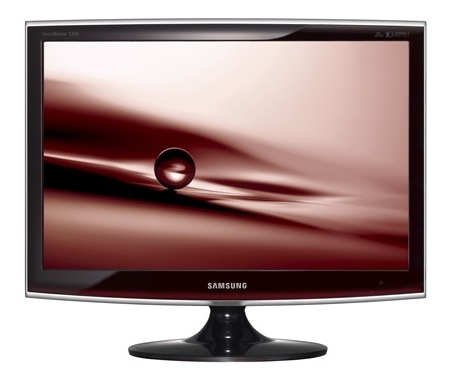
What sets the T260HD apart for me is the fact that it was made to fulfill both functions from the factory. Although I haven’t used it (yet), my hope is that the Samsung engineers accounted for the difference in display characteristics that is needed when one uses it as a computer display vs. a TV. What is heartening for me is that it’s listed among the computer displays, not the HDTVs, on the Samsung website, which means it’s really more of a computer display than an HDTV, which is just what I need.

The design makes this display stand out. The enclosure is made of glossy black plastic, and it looks as if there’s a clear panel of glass set over the front of the display, which should make it easy to clean. A hint of maroon color marks the bottom of the enclosure, right below the logo, giving it a distinctive look. I do hope though that the glossy black plastic doesn’t scuff easily. Other Samsung TVs do scuff over time, which means that as you dust them, small hair-width scratches appear on the plastic, marring its glow.

Promotional: Don’t spend too much on flat screen TVs; there are flat panel TV deals you can take advantage of. LCD TV deals are available for consumers to buy at discounted prices.

The specs listed on the Samsung website are thin on the details, and I can’t make out whether its color depth is 8-bit, 10-bit or 12-bit. My guess, given its price, is that it’s 8-bit or 10-bit — probably the former, not the latter. Color depth in a display is a very important specification, because if you work with photos, like I do, and your DSLR captures 12-bit or 14-bit color images, you won’t be able to edit them competently on a display whose color depth capabilities are much lower. A 6-bit display, for example, like many laptops have, would be fairly useless to you, because it just won’t reproduce the color tones faithfully.

Let’s have a look at some of the salient features of this display:

  • Full HDTV monitor: that’s good, and also to be expected since it’s a computer display as well, and its resolution is 1900 x 1200 pixels.
  • Dolby Digital Surround sound: it has invisible speakers built in, and they’re rated at 3 W each; I’ve heard these types of speakers on other Samsung products, and they’re pretty good — certainly a lot better than most monitor speakers.
  • Dual HDMI, DVI and VGA inputs: that’s impressive for a 26″ display. I see that Samsung didn’t skimp and even included a SCART connector for the European countries. I love that.
  • Low power consumption: one spec says it uses 0.3W in Standby mode, yet another says it uses < 2W in that same mode. At any rate, it only uses 70 W max, and that’s great for a 26″ display.
  • 10,000:1 dynamic contrast ratio: I think this spec is trumped up, as I see it on a lot of other, cheaper displays and TVs. I have no idea what it means. Supposedly, the increased contrast between light and dark helps you see things better. I’ll be the judge of that when I try it in person. I see that the Apple Cinema Displays are listed at a 700:1 contrast ratio, which I think is a much more reasonable figure.
  • 5 ms response time: this is a little sluggish given that most displays in that size are at 3 ms. Still, it’s better than the Apple Cinema Displays, which are still listed at 14 ms. I think 5 ms is sufficient for most movies and video games, but then I’m not into the violent, fast-paced video games.
  • 300 cd/m² brightness: this isn’t as bright as other displays in the same sizes, which are at 400-700 cd/m², but you know what, I’d rather not have headaches caused by too much brightness, so this should be fine for me.

What I’ve seen so far of this monitor has certainly whet my appetite, and I’d love to try it out for myself. If and when I do, I’ll let you know how it works out.

The Samsung T260HD is available from Amazon and B&H Photo.

Photos used courtesy of Samsung.

Standard
Lists

Gadget Monday – February 2, 2009

This is the beginning of what could be a new feature on my site: a (more or less) weekly list of interesting gadgets, selected based on their design and usefulness. I call it Gadget Monday. It’s not exactly an original name — a quick Google search reveals it to be used in plenty of other places — but it’ll do.

Der Bergmönch Folding Bike in a Bag

Made in Switzerland, this amazing mountain bike folds completely into its own backpack and can be carried up the mountain on your back, then ridden downhill. It’s lightweight yet very sturdy, and features, among other quality parts, hydraulic disc brakes. The whole bike weighs 9.5kg, or about 20 lbs.

[via LikeCool and Bergmönch]

Freeride Photographer Backpack

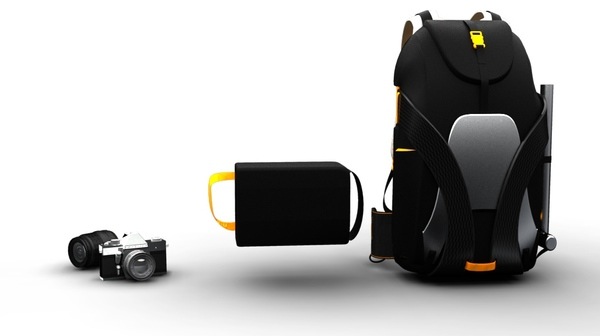
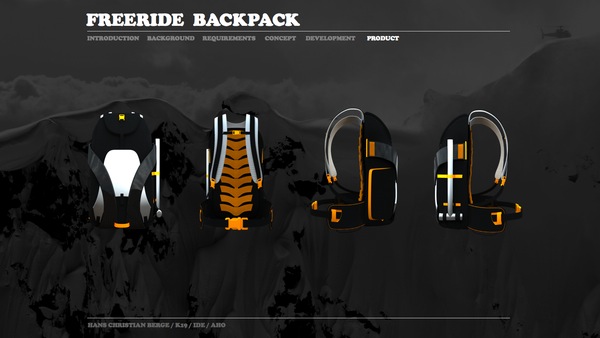
I’m a photographer, and I used to ski quite a bit in my childhood, so this is right up my alley. It has two compartments: one for regular items, and one pull-out compartment for a DSLR. The weight distribution is just right for the frequent twists and turns involved in skiing. From the looks of it, it will probably only fit a medium-sized DSLR like the Canon 5D and a medium zoom lens like the EF 24-105mm f/4L, but that’s good enough for me.

[via DesignLaunches]

Danger Bomb Clock

It’s probably not a good idea to carry this clock with you while traveling, but it’s fun to have it around the house. The alarm sound is a ticking bomb. To disable it, you have to disconnect the cable whose color matches the flashing light, which can be red, blue or yellow.

[via Economist]

Wooden Laptop Case by Rainer Spehl

This looks like a sturdy place to store my MacBook Pro! It’s made of solid wood, and has a magnetic latch to keep it closed. There’s a smaller size for the regular MacBooks as well. I only hope it’s lined with some felt, so my laptop won’t get scratched as it slides in and out.

[via LikeCool]

Prime Gaming Laptop

This laptop, designed by Kyle Cherry, has two collapsible side screens, in addition to its main 13″ screen. When fully opened, the aspect ratio is 32:10, and the screen’s diagonal size goes from 13″ to 26″. It’s a boon for watching movies or playing games, as you can see from the photos below. I love how the side screens slide over the main body of the laptop, allowing its owner to carry it easily.

[via LikeCool]

Porsche Sled

The Porsche design team have come up with this wonderful sled design. The skeleton is made of aluminum, the seat is imitation leather, and the runners are stainless steel. It even comes with its own carrying bag.

[via LikeCool]

Tibetan stick seat by Ashish Chaudhary

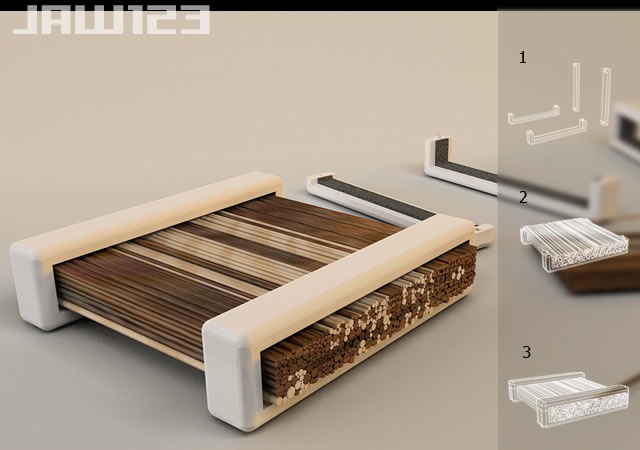
This is a seat made of three elements: two oval wooden clasps which hold a stack of loose sticks. The design is organic, rustic and futuristic at the same time. While it may not be comfortable by itself, I’m sure it’ll be just fine if you spread a fur or some thick wool comforter over it.

[via DesignLaunches]

Standard
Thoughts

Speak softly and… what's that?

I guess when Theodore Roosevelt uttered his now famous phrase, “Speak softly and carry a big stick; you will go far,” he might have been thinking about something like this:

Punt Gun -- Washington, DC

It’s a punt gun. It would not have been used like pictured in the photo above, because the recoil action was too strong. It would have knocked both men on their backs and possibly dislocated the shooter’s shoulder.

There’s a demo video of one of these monster guns in action on YouTube. I recommend you see it to get an idea of the damage it can inflict. It was apparently used for shooting flocks (that’s right, entire flocks) of birds while mounted to the bow of a boat.

[via Shorpy]

Standard