Reviews

I like "The Saint"

It got panned by the critics. Val Kilmer’s acting was indulgent at times. It was somewhat cliché. What was up with those knee-high socks that Elizabeth Shue’s character wore throughout the movie? Those are some of the things that come to mind when I think of “The Saint” (1997). But it struck a chord with me, from the first time I saw it, and I like it even after all these years.

I think it evokes the feel of that time in Eastern Europe very well. I visited Romania in December 1998, for the first time since I’d left in 1991. The movie and the impressions from my trip match. It was cold, snowy, in many ways dreary, there was poverty all around, but still somehow enchanting, inspiring, in a way that made you feel you could do almost anything, as if the slate had been wiped clean and people were free to start things over.


moscow-scene-1

moscow-scene-2

moscow-scene-3

Simon Templar, the character played by Val Kilmer in the movie, has a long heritage that started in books in 1928. The character itself has been played in movies and on TV by several other actors, Roger Moore being one of the more notable ones. I remember watching Moore in the Saint series as a child growing up in Romania. The films were gripping and I loved seeing a modern-day Robin Hood escape from dangerous situations, just as I enjoyed seeing Kilmer’s character escape from similar situations in this latest installment.

Given the character’s long history, Kilmer had some big shoes to fill in this movie. For example, I thought there were too many close-ups of him. Perhaps the director was trying to establish character, and the close-ups were meant to give us an insight into what S.T. was thinking, but at times, I could see the actor hamming it up behind a thinner-than-usual mask. Still, I always thought Kilmer was charismatic and I don’t begrudge him the less than stellar acting here. Every actor goes through a ham stage in his or her career — most notably of all, the famous John Barrymore, who quite possibly illustrated the very phrase in some of his later film roles.

The film’s tech was amazing for its time. Simon Templar’s phone in the movie — that Nokia phone was something else. It blew me away. I think it could do everything modern phones could do — at slower speeds, naturally — except play movies. I learned it was a Nokia 9000 Communicator, thanks to the Saint.org website. And to think, all of that technology was available in 1997! Nokia was very happy about the phone’s appearance in the movie and even issued a press release about it that same year.


nokia-9000-communicator

nokia-9000-communicator-in-movie

All in all, “The Saint” is one of a handful of movies in my library that I’ve watched multiple times, and will probably watch again. I like it.


Standard
Reviews

WordPress.com gets more expensive

Ever since I learned about WordPress, I thought it was the coolest blogging platform, and the more I found out about the WordPress.com network, the more I liked the options they offered their users. To this day, I regret not having started to publish directly on WordPress.com instead of doing it on my own with a self-install of WordPress, but each path has its pros and cons. Incidentally, I discussed them (the pros and cons) at length with WordPress staff recently, and may put together a guide to switching from WP.com to WP.org and vice-versa, at some point.

One of the things I really liked about WordPress.com was the 5GB space upgrade, which, among other things allowed me to upload videos that would be transcoded and played directly inside the blog. For $20/year, it was a great deal. I never got to use it on my own blogs, which were and still are self-hosted, but I recommended it to clients and friends. I liked it because the video player was and still is integrated into the blogging platform. This saves the user the hassle of uploading it to a different video sharing site, then putting the right embed code into the blog post.

Now, sadly, that option is gone. I received an email from WordPress today which announced the arrival of a formal video upgrade option, called VideoPress, at a cost of $60/year. Like other video upgrades on the market (such as Vimeo’s own Plus program), VideoPress allows the upload and streaming of SD and HD video. The price is also the same.

wordpress-upgrades

I can understand this change though. According to WordPress, allowing people to upload videos under the regular 5GB space upgrade was a testing ground which allowed them to figure out what they needed to charge long-term. After all, HD video eats up a lot of space and requires a lot of processing power to compress, not to mention the bandwidth needed to stream it. Here’s what Matt Mullenweg, WP’s founder, says in a response to a question about the price tag:

“We try to run every part of our business in a way that’s sustainable and supportable for the long-term. By charging a fair amount for a superior service we can continue to invest in expanding the feature to be a great option for high-end video, just like WordPress is a fantastic option for high-end blogging. (And you wouldn’t believe how expensive it is to host and stream video, which is part of the reason we’ve waited to launch this until now, we’ve been working at getting the costs down.” [source]

Now when you realize that both WordPress and Vimeo charge $60/year for HD video uploads, think about YouTube, and the astronomical expenses it has to eat up every year because it doesn’t charge its users anything to upload gobs and gobs of video.

I looked at the specs for the video sizes of the new WordPress Video Player, and there are three of them: 400px (SD), 640px (DVD) and 1280px (HD). That’s plenty for live streaming. I do wish there was an option that would let the video authors allow downloads of the original video files, like Vimeo does it.

The upper limit on a single video file is 1GB, although it’s not hard-capped like at Vimeo. WordPress will let you upload 1.5-2GB files, although they say results may vary and uploads may die out if your connection is slow.

One thing I’m not clear on is the space allowed for the uploaded videos. Is there a weekly cap, like Vimeo’s 5GB/week limit, or can we upload as many videos as we want? And if so, what’s the total space limit allotted to us when we purchase the upgrade? Is there a special cap, separate from the standard space of 3 GB per blog? Or does each video count against the total space allotted to the blog? Because if that’s the case, that would mean VideoPress is going to be more expensive than Vimeo Plus, since users will need to purchase space upgrades for their videos in addition to VideoPress.

For example, a user would shell out $60 for VideoPress, then soon find out they’ve filled up their 3GB quota, and need to purchase a space upgrade. It’s not hard to imagine one would need about 15GB or more per year with HD video, and that would mean an additional $50 on top of the initial $60, bringing the price tag to $110. This point definitely needs clarification, because it just wouldn’t be fun to get taxed twice for it.

I do like the nice gesture on WordPress’ part, where they gave existing users of the space upgrade and the video player a free VideoPress upgrade for a year. Had they not done that, the transition would have been too jarring for them, so kudos to WordPress for putting money aside and thinking about the user experience.

Standard
Reviews

CableJive SoundDock and iStubz cables

Back in 2008, I bought a SoundDock cable from CableJive, which allowed me to connect my 1st gen Bose SoundDock to my Mac. Since we bought our SoundDock, Bose has come out with a 2nd gen SoundDock, which has a built-in auxiliary input, making the cable unnecessary. Still, we weren’t about to buy a new SoundDock when ours was working perfectly well, and with the addition of a cable, we could make it work with our Mac, allowing us to have nice, premium sound.

cablejive-sounddock-cable1

I remember looking around for months for a cable that could do the trick. I knew it was technically possible, but no company I knew of made such a cable. Finally, I discovered CableJive. Back then, they were just going into business, judging by their website and lack of customer service. After placing my order, I got no confirmation whatsoever. I had no idea whether they received my order or not. The phone number they listed on the website wasn’t working, and nobody answered my emails. Thankfully, the cable arrived in the mail a few days later, and has been working ever since.

The build quality of the SoundDock cable leaves something to be desired though. The sleeve that fits around the cable at the end that has the thick, iPod-style adaptor is loose, and the plastic that contains the circuits that make the connection with the Bose SoundDock isn’t anchored well into the sides of the adaptor, making it flop around in there. Overall, I’d call the cable flimsy, and considering the price we paid for it at the time ($48), overpriced.

I can only hope their build quality has improved since then, and I’m glad to see that at least they’ve lowered the price to $40. It’s still a hefty price to pay for a flimsy little cable, but like I said, no one else makes them, and if you’ve got to have it, you’ll pay the price or go without.

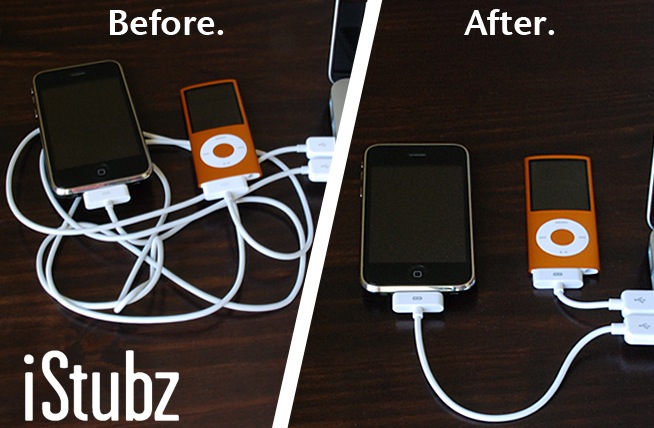
Now I see they make these iStubz cables, which are basically short sync cables for the iPod and iPhone. The ones that ship with the phone are too long for most people’s needs, cluttering up one’s desk. I like the idea, and I also like the price ($8).

cablejive_istubz2

cablejive_istubz

Now here’s my question: why is the iStubz cable, which is more complicated to make (I assume) than the Bose SoundDock cable, only $8, and the SoundDock cable $40?

Images used courtesy of CableJive.

Standard
Reviews

Installed and used the SimplePie RSS plugin

Installed and used the SimplePie RSS plugin for WP on my regular site at raoulpop.com. Its name is somewhat of a misnomer. It’s neither simple, nor “easy as pie” to begin with. Sure, after you check the documentation carefully, a light goes on in your head and you realize how to use it, but there’s a learning curve. I do agree, however, that the things it lets you do are quite nice. For example, I used it to rewrite my SmugMug recent photos feed and show only the thumbnails of the latest 10 images uploaded, each linked directly to the original image. I really like the result, but it took a bit of figuring out.

screenshot-home-page

Standard
Reviews

Checking in with Energizer's Advanced Lithium Batteries

I can finally report on the battery life of the Energizer Advanced Lithium Batteries given to me in late January. I wrote about them on February 4th, and put them in my Canon EOS 5D’s battery grip a week or so after that. They worked until this past Saturday evening, April 25th. When I did the tally, I saw that I’d taken 1,872 photos with them. That’s not a typo. The vertical grip stayed on my 5D all the time, from the time I put the batteries inside it to the time I took them out, and that’s how many photos I got with the batteries.

While that battery life is very impressive, given the 5D’s 500-600 shot battery life with one of its single rechargeable batteries, or 1,000-1,200 shots or so with two rechargeable batteries in its vertical grip, it doesn’t tell the whole story. There are a few things I need to clear up first:

  • During these past few months, I’ve been shooting mostly landscapes. That means I didn’t take lots of photos in one sitting, which would have drained the batteries faster. I would expect that if I shot events, the battery life would have been significantly less.
  • For some reason, and I’m still not sure whether my vertical grip is to blame or the batteries, the battery life sensor kept giving a low battery notice the whole time the batteries stayed on the camera, from the time I put them in to the time I took them out. Sometimes the battery life sensor would even flash the really low battery signal, indicating the batteries only had a few shots left in them. Regardless, they kept on working until Saturday evening. Not sure whether this was because the camera expected 1.5V out of each battery, not 1.2V, or whether my battery grip, which had been sitting in a box, unused, for several months before this, is at fault, but that was my experience.
  • Related to the two bullet points above, the batteries gave out while I was shooting an event. It’s possible that they would have lasted even longer if they hadn’t been put through prolonged, continuous use. It’s also possible that if I stick them back in the camera, they might have enough life in them to let me squeeze off another several shots, but that would go against the conditions of my test, where I wanted to see how long they lasted without taking them out of the camera.

Whatever your mileage may be (and I encourage you to do your own testing), I’m very impressed with the battery life. While it was a hassle to keep the vertical grip on my camera the whole time (I prefer to shoot without it unless I’m doing events), it was an interesting experiment. I would recommend keeping a set of these batteries in your bag as a backup, just in case your regular batteries run out of juice. They have a long shelf life, and they won’t self-discharge like rechargeable batteries.

I also promised in my initial post that I would use them in my 580EX II speedlite. I’m keeping that promise. I’ve been using them in it since February, and they’re still doing fine. Again, I haven’t used the speedlite very much, because I’ve been shooting mostly nature stuff, but I did shoot a wedding recently and it worked flawlessly the whole time. I’ll let you know when those run out and I’ll tally up their shot life, too.

Standard