How To

Switch drive packs between two Drobos while keeping your data safe

Updated 1/14/19: I have revised my opinion of Drobo devices. After experiencing multiple, serious data loss events on multiple Drobo models, even recent ones, I no longer consider them safe for my data.

Sometimes you’ll need to switch your drive packs (the set of drives that sits in a Drobo) between two Drobos. Or say you’re using two drive packs on the same Drobo. How do you switch the two packs safely, to ensure you lose none of your precious data?

That’s the question I asked myself a couple of days ago, when I found that I needed to interchange the drive packs between my 2nd Generation (FW800) Drobo and my 1st Generation (USB 2.0 Drobo). I’d expected this move for a while, as I hinted to it in a recent post entitled “What’s on your Drobo“. It has to do with my photography workflow, and if you’d like to read through the rationale, you’re welcome to check out that post.

So, what’s involved?

  1. Safely shut down the Drobo(s)
  2. Disconnect power and FW/USB cables
  3. Take out disk pack as a whole from one Drobo
  4. Insert disk pack as a whole into another Drobo (or same Drobo, as the case may be)
  5. Connect FW/USB cables
  6. Connect power cables
  7. Boot up the Drobo(s)

I’ve put together a video demonstration of the process, which you can watch below or on YouTube. This was unrehearsed, and it’s not something I did before, so there was a fair bit of related anxiety. I rely very heavily on my Drobo units for data archival, and I don’t ever want to lose any of my data. Thankfully, everything went smoothly, and things are working great!

The detailed steps involved in the process are listed in two tech notes on the Data Robotics website:

  1. How do I safely shut down my Drobo?
  2. Can I move my disk pack from one Drobo storage device to another?

I need to add here that drive packs aren’t interchangeable between all Drobo models. You’ll need to read carefully through that second tech note listed above to make sure you don’t unintentionally corrupt your Drobo volume by putting the pack in an incompatible Drobo device.

If you’re wondering why one ought to bother to switch data packs, the decision needs to be made on a case-by-case basis. In my situation, the alternative would have been a manual copy of the data, which would have taken days, since I work with terabytes. Switching the drive packs took 15-20 minutes altogether (reading through the tech notes, emailing Drobo Support to ask them a question, and actually doing it). The trade-off, if I hadn’t done things correctly, would have been costly and possibly irreversible data loss. Fortunately, things went according to plan!
Standard
Reviews

Reduce your waste with a toothbrush? Yes.

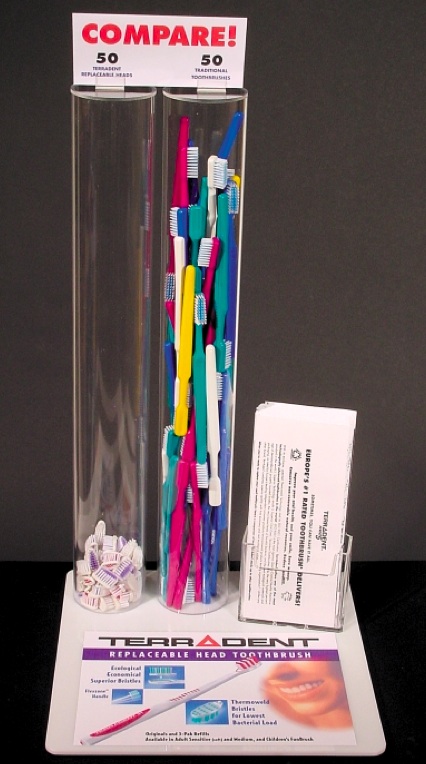
The Terradent toothbrush stands out from the pack of dental hygiene products out there not because of the complicated design of its head and the multitude of angled bristles, but due to the simplicity and thinking behind its design.

In two words, it has replaceable heads. When you need to change the brush, you don’t change the whole thing. You snap in a new head, and you keep the same handle. It’s beautifully simple and yes, it’s hygienic.

After you remove the old head, if you feel it’s needed, you can scrub the handle’s tip with a little soap and a brush, or you can pour some little hydrogen peroxide on it, to make sure it’s squeaky clean before you attach the new head, but don’t get hung up on it. As long as you replace the heads regularly, the toothbrush will be safe to use for years and years.

My wife and I have been using Terradent toothbrushes for about 4 years, and we love them. We only buy replacement heads, which is cheaper than getting the whole toothbrush and means we’re generating less waste. All that fancy rubber and injection-molded handles in today’s toothbrushes means you’re throwing away a whole bunch of plastic, every time you get rid of one. That’s a shame, particularly when the Terradent toothbrush proves it’s so easy to do the smarter thing.

I put together a short video demo of the head replacement on one of our toothbrushes, to show you how easy and simple it is. You can watch it on YouTube or above. I hope you’re going to think about buying one of them the next time you go shopping for your bathroom. They’re available at Whole Foods, Trader Joe’s, or directly from the company’s website.

Image used courtesy of Eco-Dent.

Standard
Reviews

Field video test with the Olympus PEN E-P2

Here’s a HD (720p) field video test I recently did with the PEN E-P2, the diminutive DSLR from Olympus. I shot it in South Florida, and it features tropical plants and flowers. No additional equipment beside the camera and the 14-42mm kit lens was used. The sound you hear is from the in-camera microphone. The DSLR was hand-held, and I had motion-stabilization turned off.

When I edited the video, I tweaked the colors just a little bit, but the images are pretty much right out of the camera. No software motion stabilization was used, either. You’ll see that the kit lens is quite capable of macro shots and it gives beautiful bokeh under the right conditions. There’s even a surprise shot at the end. Try to guess what it is.

You can watch the video on YouTube. And if you haven’t yet read my full review of the E-P2, you might want to check it out.

Standard
Events

Green IT Week: June 1-7, 2010

ComputersOFF.org is hosting a virtual Green IT Week from June 1-7. This is an issue that’s of particular importance to me. Having been an IT director, I know how much power the combined laptops, desktops and servers of an organization can consume, and how much pollution is generated by the disposal of computer hardware (see this post, and this one as well).

I’ve written about this topic since 2004. Here are three of my articles that deal with saving energy in IT:

Green IT deals with two things:

  1. Electronic Waste: Minimizing the negative impact of information technology use on the environment, and
  2. Energy Efficiency: Using information technology to help solve environmental issues

They’ve put together a few facts that help to drive home their message, so I’m going to quote them below.

By turning off your computer each night or when not in use (i.e. lunch times, weekends, when in meetings at night) for a year you save as much energy as it takes:

  • to run a clock radio for 1,392 weeks
  • to make 9,280 bags of microwave popcorn
  • to wash 464 loads of washing
  • to use your blow dryer for 5,568 hours
  • to vacuum for 464 hours
  • to produce 3,480 plastic bags
  • to run your microwave 24 hours a day for a week
  • to boil your kettle for 24 hours a day for 268 days

By turning off your computer tonight when you leave work you will save as much energy as it takes:

  • to run a clock radio for over 3 weeks
  • to make over 20 bags of microwave popcorn
  • to wash over 1 load of washing
  • to blow dry your hair over 12 times
  • to vacuum for over 1 hour
  • to light a 100 watt light bulb for over 10 hours

For both companies and individuals, there are some really easy actions they can take to reduce their energy use, including:

  • Turning off computers, games consoles and TVs when they are not in use
  • Setting your computer to “sleep” after 15 minutes of inactivity (this reduces the power it uses because “sleep” mode is a lower-energy use mode for the computer to operate in)
  • Turning devices off at the power point (because even in standby mode your appliances are using electricity)
  • Buy green energy (to help push electricity suppliers to convert from coal based production – which creates greenhouse gases and requires mining – to sustainable technologies like wind power)
  • Buy and use a laptop instead of a desktop computer. Laptops only use 190kW (average) of electricity per year.

Want more of these neat factlets? They also have 100 Green IT Tips. They’ve put together a video as well, where various celebrities endorse the cause.

Make sure to check their website from June 1 to June 7 for more good info about Green IT.

Standard
Places

Photos of spring in the Mid-Atlantic states of North America

The spring season in a temperate climate is a wonderful time, isn’t it? If one is affected by such things, and I am, the colors, the new life, the fresh air, the sunshine, and the chirping of the birds can make you ecstatic with joy. Just as winter can be a time for quiet thought and reading by the fireplace, and that sort of thing is much-needed after a full year of work, spring is when you can get out of the house once more to explore nature as it comes back to life.

I thought I’d put together a little collection of some of my best spring photographs, taken in states such as Maryland, Virginia and DC. There are 50 photos in this post, all of which you can see individually below, or in the embedded slideshow.

Continue reading

Standard