Exercise

Started on the RPM System today

I’ve always had an abiding interest in exercise. Perhaps it was brought on by the fact that I was very thin as a child. I was shorter, thinner and looked much younger than my age as I grew up, and I got fed up with being treated like a little boy.

When I got to college, I read about weightlifting voraciously. I educated myself and began lifting weights frequently, advancing from 2-3 times/week to 6-7 times/week. I started weightlifting regularly my sophomore year, and by my senior year, I’d put on about 60 lbs of muscle, without illegal supplements.

After college, even though I was still lifting weights intensely, I lost about 25 lbs. There were a few reasons for that. For one thing, I turned vegan, and I didn’t balance my diet properly. Then I had an operation on my right knee for a torn ACL, and was out of commission for 6-7 months. I became unhappy with going to the gym, for other reasons as well… so I focused my efforts on my job and my personal projects, such as writing for my websites. Over time, that meant more weight loss, until my weight settled around 155-160 lbs. I was still interested in exercise though, and I wrote several articles about the subject when I began to publish online in 2001.

On a side note, if you ever wonder whether you should play rugby or not, keep in mind I broke a rib, then my nose, then tore my ACL playing rugby. It’s not an easy sport on the body. I decided to stick to regular exercise and leave rugby to those with sturdier constitutions and cauliflower ears.

Back to my adventures in exercise… I coasted onward, relying on my previous years of workouts to keep my body in a residual shape, and that worked, for a time, until I noticed that even though my weight stayed the same and my waist stayed the same, I was getting flabbier. The basic shape was still there, but muscle tone was nowhere near what I used to have, and I was accumulating body fat, slowly but surely.

I had several false starts over time, where I tried to go to a gym regularly, but that didn’t work out. So far, my exercise routine has been irregular. I do pull-ups and crunches every now and then, but it’s not enough.

Imagine my surprise, when out of the blue, I was contacted by one of the founders of the RPM System — a low-cost, highly customizable fitness program that tailors itself to each user’s needs after a baseline fitness and diet assessment — and I was asked to review it honestly, without pulling any punches. (RPM stands for Results Power Movement.)

Here was a fitness program I could do at home, with minimal equipment (an exercise band and an exercise ball), using only my body weight. Absolutely, I said, bring it on!

So here I am! I did my initial assessment today, and you can see my results below. My power score is 64, which, on a scale from 1-100, gets me a D (barely). It looks like I need some serious work…

It’s not that I could only do 4 push-ups, and so on… Their website grades each of my numbers on a scale of 1-10, then assigns me a score on a scale of 1-100. Here are my actual numbers for each test:


Continue reading

Standard
Thoughts

Meet Trixie and Mitzi

I’ve said for some time that we have two kittens and a tomcat (actually, it’s three kittens and a tomcat now), but I’ve never really introduced them to you. So here are Mitzi and Trixie, our first kittens, as they were the night we brought them home, in late June, 2009.

They might look tame and playful here, but they were pretty much feral. They were born to a half-domesticated cat that had made its home in the barn of an old stove-maker in our town. The poor man got his arms and chest scratched pretty badly by the kittens and their mom when he pulled them out of the barn for us.

We’d seen the mother before she’d given birth, and she was adorable, so we begged him to give us two of the kittens when they were ready to be weaned. He was more than glad to do so — he didn’t want a colony of stray cats in his yard.

Here they are the second day, when we put them outside, in the sunlight. They would hiss at us whenever we got near, so it took a bit for us to gain their trust.

Trixie is the one on the left, and Mitzi is the one on the right. Mitzi is the one that looks like her mother, and the resemblance is even more striking now that she’s grown up and is also pregnant. I’ll show you those photos in a later post…

Here’s Trixie again.

Doesn’t she look like she’s laughing in this photo?

Continue reading

Standard
Places

Butterfly World

Butterfly World, located in Tradewinds Park, Coconut Creek, Florida, opened in 1988 and is the largest butterfly park in the world. It contains over 3,000 live butterflies. The butterflies are bred and live in what is essentially a botanical garden, filled with all sorts of beautiful flowers they can feast upon.

Visiting Butterfly World is a wonderful experience. You can just sit around and watch the butterflies do their thing, and you might even get one or two that will land on your hand and stay there for a bit.

As you walk around, you’ll get to see beautiful flowers like these.

Continue reading

Standard
How To

Always check a SATA drive’s jumper settings

I made a quick video that shows you why it’s always important to check a SATA drive’s jumper settings. Many of us assume that since we’re dealing with SATA, not PATA/IDE drives, the jumper settings are no longer important. After all, the Master/Slave relationship no longer applies to the SATA model. Not so. The jumper settings on SATA drives control other important drive settings, such as their speed of operation.

Have a look at this Seagate 500GB SATA drive, the one in my video. I assumed (wrong) that it was operating at 3.0 Gb/sec all along. It wasn’t. For over 2 years, I had three of these drives in one of my Drobo units, and I thought I was getting 3.0 Gb/sec from them, when in fact I was only getting 1.5 Gb/sec. That’s because they shipped with a jumper set to limit their speed of operation at 1.5 Gb/sec from the factory, and I didn’t check it before sticking them in my Drobo and forgetting about them.

Only now, as I re-shuffled the drives between my Drobo units, did I realize I hadn’t been getting 3.0 Gb/sec from them, and corrected the situation right away.

I can understand why Seagate would want to ship the drives set to 1.5 Gb/sec. After all, some older computers might not be capable of 3.0 Gb/sec, and you’d run into compatibility issues. They assume IT geeks would know what to do, and they’re right, they would, if they’d only bother to look…

Standard
Reviews

Hardware preview: ioSafe SSD – fireproof, waterproof, crushproof and shockproof

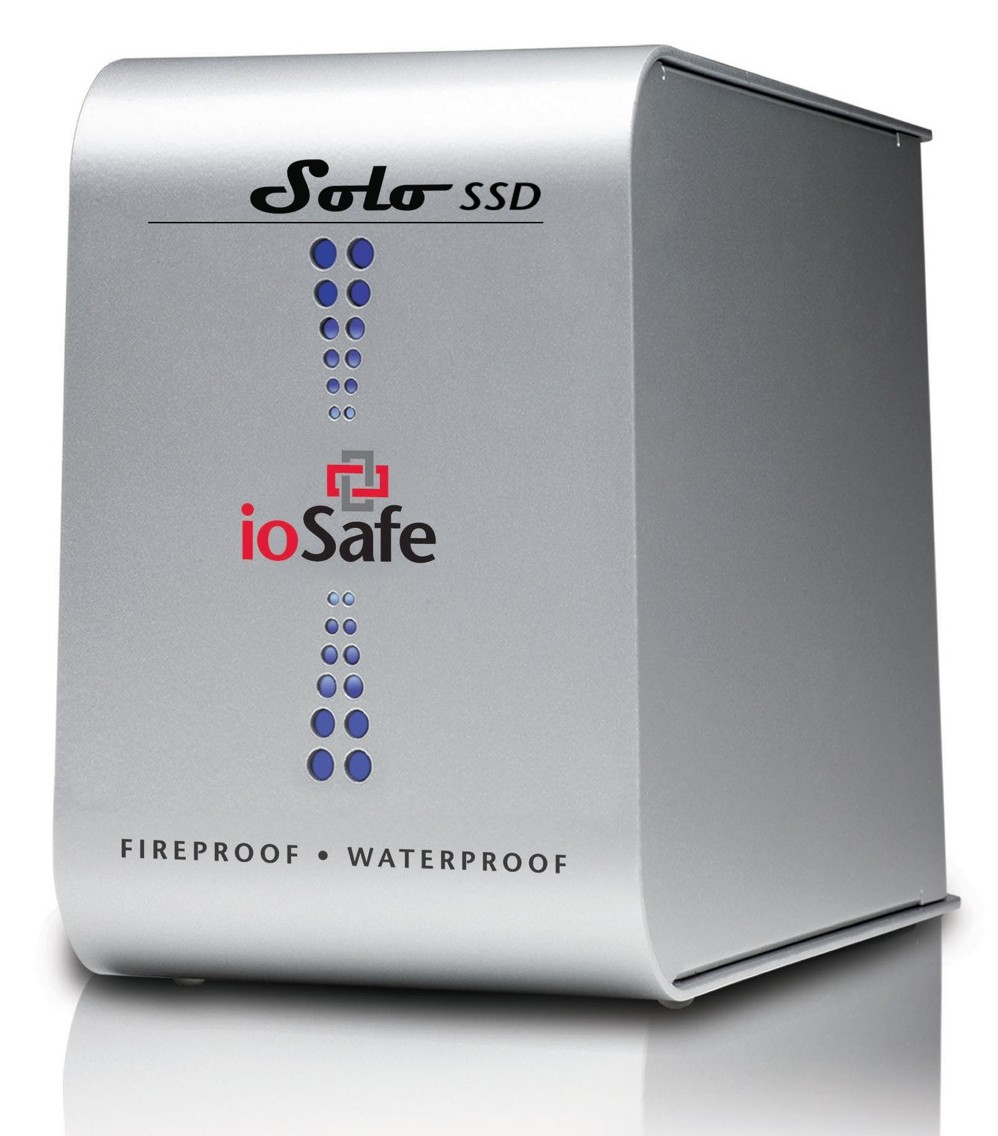
Back in September 2009, I wrote about the ioSafe Solo, a fireproof and waterproof drive. In January 2010, at CES in Las Vegas, ioSafe, the company behind these disaster-proof drives, launched a new product, the ioSafe Solo SSD.

It’s the same size as the ioSafe Solo, it looks the same outside, except for the branding, which now adds “SSD”, but inside, it’s a whole new ballgame. Instead of using a regular 3.5″ SATA drive, they’re using a 2.5″ Solid State Drive. This means they have even more spare space to play with when it comes to disaster-proofing the device — which they certainly did!

The ioSafe SSD isn’t only fireproof (same serious specs as ioSafe Solo), and waterproof (better specs than ioSafe Solo, now with full immersion up to 30 ft for 30 days with no data loss), but it’s also crushproof (5000 lbs, any axis with no data loss) and shockproof (20 ft drop into rubble, 1000g shock for 1ms with no data loss).

Here’s a video from CES where Rob Moore, the company’s CEO, burns the drive, then floods it with a firehose, then has it dropped from about 20 feet, then has it run over with a bulldozer. In the end, even though the enclosure gets destroyed, the data stored onto it remains perfectly safe.

Quoting from the press release:

“Combining ioSafe’s new proprietary ArmorPlate, a military grade steel outer casing with SSD technology, the new ioSafe Solo SSD adds unprecedented shock, drop and crush protection to the existing fire and water protection.

The ioSafe Solo SSD combined with ArmorPlate helps to protect data in a two story building collapse, 5000 lb. crush forces, 20’ drop into rubble and up to a 1000g shock. In addition the original HydroSafe™, FloSafe™ and DataCast™ work to keep the drive cool during normal operation and protect the data from fires up to 1550°F for 1/2 hour and complete water submersion of 30’ for 30 days in fresh or salt water. Like all ioSafe products, the ioSafe Solo SSD comes with ioSafe’s Data Recovery Service, a “no questions asked” policy to help customers recover from any data disaster including accidental deletion, virus or physical disaster.”

The specs say the ArmorPlate military-grade steel is 1/4″ thick. That’s mighty thick. It also makes the ioSafe SSD about 5 lbs heavier than the ioSafe Solo. It now weighs in at 20 lbs.

I wonder if the whole device could withstand bullets, because then it would make a perfect military storage device for use in conflict zones. For example, it could be placed in tanks, humvees and helicopters to store video, audio and coordinate information during patrols. And at 256GB for the largest size drive, it could store plenty of HD video, if the military should want to go in that direction.

But let’s not go into hypothetical situations. The ioSafe SSD can work for disaster recovery right now. Should your place of business burn down or fall down or be flooded, any data stored on the ioSafe SSD will be available to you immediately, as soon as you dig it out of the rubble. That’s a tangible advantage. You can simply add this drive to your server room, or put it in the CEO’s or CFO’s office, and let him or her back up important documents to it, knowing they’ll be there in case of a disaster.

The thought just occurred to me — do you know how they could make it better? If it’s meant to survive disasters and be buried in rubble, it needs a geo chip of some sort, so you can locate it with a proximity device. It could be something simple that beeps faster the closer you are to the drive, so you don’t have to dig through all the rubble to find it, should it come to that.

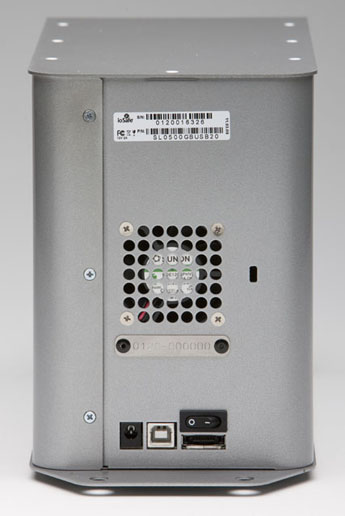
And there’s another goodie packed into the drive: an eSATA interface. This, coupled with an SSD, means you’ll get blazing fast write and read speeds. You can see the eSATA connector on the back, next to the USB and power connectors.

Pricing for the three different Solo SSD models starts at $499 for 64GB, $749 for 128GB, and $1250 for 256GB. It’s a bit steep, but then, SSDs are still expensive, and no other drive on the market (that I know of) offers this level of physical protection for your data.

Images used courtesy of ioSafe. You can see photos, videos, specs and more information about the Solo SSD on their website.

Standard