
So funny… this little black kitten fears a hammer head and keeps pawing it.
http://video.google.com/videoplay?docid=-1757803256836451754
So funny… this little black kitten fears a hammer head and keeps pawing it.
http://video.google.com/videoplay?docid=-1757803256836451754
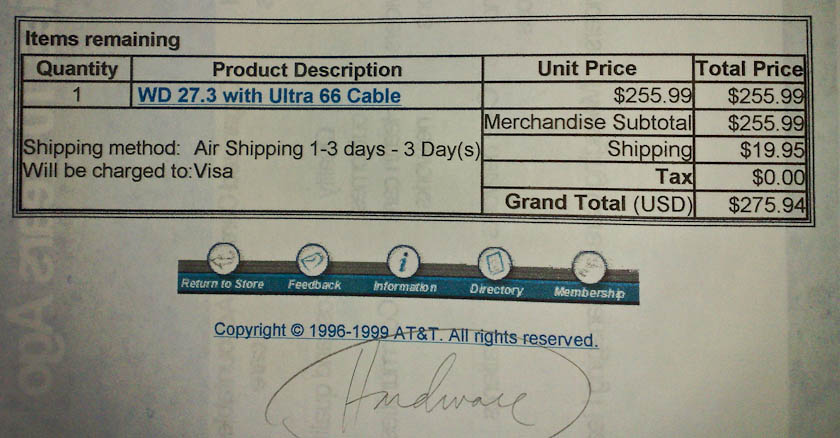
While cleaning up old paperwork, I ran into a receipt from late 1999, for a WD 27.3 GB hard drive with an Ultra 66 Cable. The price for that thing was $275.94 with taxes. Nowadays, I can get a 2 TB hard drive (that’s 2,000 GB) for less than $150. How times have changed!
You can get buried in paperwork in this modern, electronic, paperless society of ours. Bank statements, tax records, property tax statements, mortgage statements, credit card statements, store receipts, business expenses, insurance records, car records, the receipt for last Tuesday’s gadget purchase that you have to keep for two years because you also got an extended care plan, the restaurant receipt from last August’s meal with a client that you have to keep for the IRS since you’re deducting it from your taxes, etc., ad nauseam.

Can’t we have it simpler? Can’t it all be truly electronic? Can’t everyone just send us email receipts and statements instead of giving us paper ones? I like the way the Apple store does it. You buy something, you have the option of getting an email receipt. They have these neat credit card swipe machines they carry with them (they’re wireless), they check you out where you are in the store, and you get an instant receipt listing your purchase. It’s beautiful! Why can’t restaurants do this too? Why can’t the vehicle emissions and inspection stations do this? Why can’t all stores do this? Why can’t all banks and credit card companies handle everything electronically? My bank (USAA) has been doing it for years, and it works beautifully. Why can’t city and county governments do this? Why can’t mortgage companies do this?
On a larger and more important scale, why don’t hospitals and insurance companies handle EVERYTHING electronically, without any paper of any sort? If you’re a doctor and you have to file claims, you know what I’m talking about. If you don’t, then your secretary or claims specialist does… You have paper records for everything. Everyone has electronic systems, but very few talk to each other, and paper is still the only way to transfer information. This is pathetic. Hospital information systems ought to be able to send an electronic record of a patient consultation filed by a doctor to that doctor’s medical records system, which in turn ought to be able to process that information and send it to insurance companies electronically, who in turn ought to be able to process that claim and send an electronic notification to the doctor’s medical records system to update the claim status, then issue an electronic funds transfer to that doctor’s bank account. There should be no paper involved whatsoever, but those of us who deal with this stuff know it’s a far cry from it.
If there’s overpopulation, and we’ve got dwindling resources, and forests are being cut down at alarming rates all over the world, why do we have this constant avalanche of paper rolling toward us every month of the year, burying us under? If you’ve got multiple credit cards and bank accounts, a mortgage, a couple of cars, and a business on the side — and it’s your misfortune that the business is a medical one — you’re likely suffocating under paperwork. It’s nuts.
I’d like to congratulate Apple Customer Service for the way they handled the most recent issue with our iMac G5.

If you’re a regular reader, you may know we’ve had problems with our iMac right from the start. Virtually as soon as we brought it home from the Apple Store, we had issues with it. These things got worse with time, and although we took the iMac in for repairs, repeatedly, the problems persisted. I detailed that first set of issues in this post. Several months later, we took it in for service at our local Apple Store, where we had a terrible experience. A few months after that, we took it in for service again, and then, a month or so before Apple Care ran out in late 2008, we took it in for what we hoped would be its last service call.
Unfortunately, it stopped booting up a month after Apple Care ran out. We were packing for what would turn out to be a long trip abroad, and didn’t have time to take it in for service during the 90-day warranty window offered for that last repair. I kept it boxed up, hoping I’d get to it at some point and who knows, perhaps it would auto-magically boot up. I was soured up with the whole affair, and said as much in this post. In three years of using the iMac, we’d had problem after problem, and I felt as if we never got our money’s worth from that machine. I liked it, Ligia liked it, but it just couldn’t be relied upon, and it was a shame.
By the time I got to have a look at it, it was late 2009, about a year later… I followed the steps outlined in this Support Note from Apple, and according to those instructions, the motherboard was at fault, again. I called Apple Support to explain the situation, hoping someone would be kind enough to understand and sympathize. I was very pleasantly surprised when the tech who answered the call wanted to help. He got a hold of one of the senior support engineers, whose name was Christopher, and he was also willing to help. I mention his name because I hope he’ll get some sort of recognition at work for the nice thing he did for me.
Christopher authorized an out-of-warranty repair for our iMac. We were still abroad, but when we got back to the States, I took it in for service, and the folks at the Genius Bar of the Aventura, FL, Apple Store couldn’t have been nicer, too. They did some testing and discovered, to my surprise, that it was only the power supply, and, even better than that, repaired it within hours. I dropped it at the store at 11 am, and got it back by 7 pm, in working order! I was able to boot up our iMac after more than a year and access our documents, photos, emails and more. It was like reuniting with a long-lost friend.
Now that’s my kind of Apple repair experience! I don’t know if my past repair experiences were flukes, or if something changed at Apple since then, but all I can say is that I’m very pleased to see our iMac working again, and I want to congratulate everyone involved in the resolution of this support ticket for being so understanding and so willing to help us. Great job! Thank you!
Last night, I completed what could be called an unusual site migration. I went from a self-hosted WP install to WP.com. That’s right, my full site is now hosted at my WP.com account. People usually migrate from WP.com to WP self-installs after their site gets big and they decide they want more options, like the ability to run all sorts of ads and fiddle with the code, etc. With me, it was the opposite. I wanted to stop worrying about my web server and focus on publishing my content.
As I mentioned here, things got worse after upgrading to WP 2.9. My server kept going down for no reason, and often, too. It’d go down several times a day. I’d have to keep watching it all the time, and that got old real quick, especially when I traveled and had no internet access. I’d often get home to find out my site was down and had been down for several hours, if not more. Since I hadn’t mucked about with my server to make things worse, and had already fiddled with optimized my Apache, MySQL and PHP settings to last me a lifetime, I decided to have WP have a go at hosting my site and let them worry about keeping it going. Judging by the initial results, it looks like they had a bit of trouble with it too (see this, this, this and this), but at least it’s not my headache anymore.
During the migration process, I learned three things:
Granted, my site migration does not represent the usual WP user’s migration path, nor was it a typical migration. By current count, I have 1,552 posts, 4,129 comments and 3,090 media files. That’s quite a bit more than your average blogger, and I think that’s what served to point out the bugs in the Import Wizard.
What exactly were the bugs?
Here’s where I need to acknowledge the help I did receive from WP Support. My WXR file was over 20 MB. The WXR upload limit at WP.com is 15 MB. WP Support modified the upload limit to allow me to go through with the WXR upload, and they also adjusted the timeout limit, because the migrations timed out prematurely as well. So I thank them for that help.
The big problem turned out to be the third issue mentioned above. The Import Wizard didn’t change all the paths to the image files. It turned out to be a very hit-or-miss operation. Given the scale of the operation, I might even call it a disaster. Some posts were fine, some weren’t at all, and some were a hodge-podge of images that were okay, and images whose paths were wrong, or whose links were wrong, or both. You might imagine that checking and fixing the image paths for over 3,000 media files can turn out to be a very big job, and it was.
I was also under pressure to finish the job quickly, since the site was live. Imagine how you’d feel as a reader if you visited a website and none of the image files showed up — you’d probably think the site was dead or dying, right? Well, I certainly didn’t want people to think my site was on its last legs, so I had to act quickly.
Thankfully, only (sic) about 40% of my posts had their image files messed up. The rest were fine, but then I also had plenty of posts with no images. If all my posts contained images, I might have had 90% of my posts to worry about… Still, I had to check every post, and as you might know if you’re a regular reader, I post lots of images per post, and where a post was messed up, brother, I had to do a bunch of work to get it fixed up. Just as an example, some posts have anywhere from 20-50 images…
Here are a couple of screenshots that show you how things stood. Here, the image link was okay, which meant I didn’t have to modify it. This was a happy scenario. However, the image path was still wrong, as you’ll see below.

The image source, or path, didn’t change during the import process, which meant I had to change it manually, or browse for the image by title or file name in the media library and re-insert it.

The image size was also lost, which meant that if I changed the image path manually, I had to also enter the width of the image.
What made things more cumbersome was the lack of an image insert button in the Gallery dialog box. That’s one of the differences between a WP self-install and WP.com. This meant that even though I’d uploaded a certain image for a certain post, and it showed on the Gallery tab, I couldn’t go there and re-insert it into a post. I had to go to the Media Library tab, search for it, then re-insert it, which takes precious time and clicks, particularly when you’re dealing with thousands of images.

In spite of all the extra work which I had to do, and which took about 1½ weeks of my time, I got done last night. My site is now fully functional, thank goodness!
As for my experience with WP Support, there are no hard feelings. I like the WordPress platform and it’s done good by me so far. I wasn’t a VIP customer and they didn’t have any financial incentives (besides the small fees for a space upgrade and a domain mapping) to get their hands dirty with my code. They offered minimal support, and to a certain degree, that’s to be expected when most of your customers are non-paying customers, as is the case with the large majority of WP bloggers.
Still, I would encourage them to consider doing the following:
If you were one of the folks who kept seeing no images during this transition period, sorry for the inconvenience, and I’m glad you’re still around. If you’re still seeing no images, definitely get in touch with me, I might have missed a few — after all, I’m only human.
 Raoul Pop