
This is one of those posts I don’t enjoy writing but this must be said.
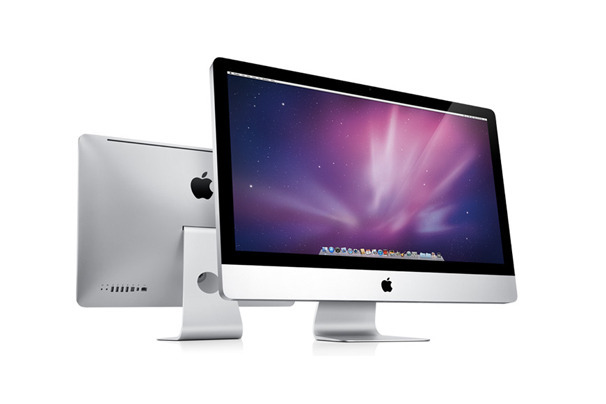
I have a mid-2011 27″ iMac (with AppleCare). It has now broken down three times for the very same problem (its video card goes bad). Other things on it also broke down, like the SuperDrive.
Bottom line: Apple has refused to replace it, although I’ve asked them twice. I think they’re just trying to kick the ball down the road until AppleCare expires. This isn’t the first time, they did it to me with another iMac.
Section 3.1 in the AppleCare agreement says the following:
“Apple will either (a) repair the defect at no charge, using new or refurbished parts that are equivalent to new in performance and reliability, or (b) exchange the Covered Equipment with a replacement product that is new or equivalent to new in performance and reliability, and is at least functionally equivalent to the original product.”
Notice they’re giving no clear rules about when they’ll replace it, although when you speak with Apple technicians, they’ll say three times is when it happens. It’s been three times for me and still no replacement. Not specifying when a defective computer must get replaced in the AppleCare Terms of Service gives Apple lots of backpedaling room, so they can delay that expense as much as possible, perhaps until AppleCare expires.
Here’s what makes this unscrupulous and unacceptable from my point of view:
- They did this to me before with my iMac G5 (Rev. B). Those of you who owned that computer know it had a lot of issues; most often, its motherboard went bad and needed to be replaced. The board on that iMac broke down three times during its AppleCare coverage. It was in the shop for other issues as well: the Super Drive, the Bluetooth module, the WiFi module, fan speed issues (fans would go on high and stay there permanently). The motherboard broke down for the third time a month or two before AppleCare expired. They fixed it but refused to replace it. Then it broke down a few months after AppleCare expired and by then, it wasn’t their problem anymore.
- It’s unconscionable for an Apple computer to break down in such a major way, repeatedly, after a little more than a year of use, which is when the problems with my current iMac started. Imagine where I’d be if I hadn’t bought AppleCare for this thing. It’d be sitting in my attic alongside my iMac G5. Essentially, I would have paid about $2,000 (after taking out tax and cost of AppleCare) for a computer that would have lasted a little more than a year. How shoddy was Apple’s quality control when this computer was made?
- When the video card in my iMac broke down a second time, I was promised by a technician from Apple’s Advanced Support department, that when it happened for a third time, I’d get a replacement. Now they tell me his promise wasn’t documented in the case history so it doesn’t count. Perhaps the technician lied to me at the time to delay the replacement.
- I’ve been an Apple customer since 1994, when I bought a PowerBook 150, my first Apple notebook. I’ve bought plenty of Apple stuff since then. Is this the way they’re treating long-time customers?
- Apple has been putting me through all this unpleasantry right around my birthday. They have my birthday on file. No comment here.
- Apple is one of the richest, if not the richest, companies on earth. They ought to be treating their customers right, because it’s because of them that they are where they are. It’s the right thing to do and they have the wherewithal to do it.
I wrote to Tim Cook, Apple’s CEO. No response from him, but a few days later, I was contacted by one of the people at Apple Executive Relations EMEIA in Cork, Ireland. I thought my situation would then be handled properly. No, just insincere apologies and a refusal to replace it. I wrote to Tim Cook again. No response, instead more of the same from Apple Executive Relations in Ireland. That confirmed it for me: you know what they say, a fish starts to stink from the head down. It looks to me like he’s instructed his people to do everything possible not to replace computers, even when they should be replaced. What other conclusion can I draw but this?
I was asked to accept the repair one last time and was promised that my iMac would get replaced for sure the next time its video card broke down. I asked the woman with whom I spoke to put that promise in writing. She refused point blank. I assume this was yet another lie from Apple to delay the replacement. What else can I assume when a person won’t put their promise in writing?
What complicates matters somewhat in my situation is that I bought the iMac in the States but have since transported it to Romania, which is where we spend some of our time. I can take it into an authorized Apple Repair shop and AppleCare covers its repairs there, so technically, replacements should also work. Not that this is a problem. I’ve told Apple they can ship the replacement to my US address. But I think what’s happening here is that they’re using geography and customs complications as an excuse not to replace my computer.
What should have happened is this: Apple should have replaced my current iMac, no questions asked. And out of embarrassment because of the way they handled the repairs on my iMac G5, they should have offered to at least repair it, if not replace it with its modern-day iMac counterpart.
The AppleCare agreement also says this:
For consumers in jurisdictions who have the benefit of consumer protection laws or regulations, the benefits conferred by the above mentioned plans are in addition to all rights and remedies provided under such laws and regulations. Nothing in this plan shall prejudice consumer rights granted by applicable mandatory laws, including consumer’s right to the remedies under statutory warranty law and to seek damages in the event of total or partial non-performance or inadequate performance by Apple of any of its contractual obligations.
Apple is currently in breach of EU/Romanian consumer protection laws on at least two counts, by my understanding:
- European/Romanian consumer protection laws mandate that repairs be made with new parts, not refurbished parts. Apple technicians, including the people from Apple Executive Relations, have admitted that they’ve been using refurbished parts to fix my iMac until now, and only this last time have they used a new replacement video card. The woman from Apple Executive Relations Ireland said that to me during one of our phone conversations… So they’ve been in breach on this point from the get-go.
- European/Romanian consumer protection laws further mandate that the customer must be offered the choice of a replacement or repair. The choice rests with them, not with Apple. I asked for a replacement, didn’t get it, they’re in breach of the law.
Since I bought my iMac in Florida, I also put in a request for assistance with the Office of the Attorney General there and I’ll see what they say. If any of you reading this are knowledgeable on the matter, please chime in.
I’d like to quote from a recent ad campaign from Apple. Keep in mind the things you’ve just read above as you see what they’re saying:
This is it.
This is what matters.
The experience of a product.
How it makes someone feel.
…
Will it make life better?
…
We spend a lot of time
On a few great things.
How am I supposed to feel after the way you’ve just treated me, Apple? Would you say that you’ve made my life better?
Couple this self-congratulatory ad piece with Tim Cook’s stating during the WWDC Keynote that Apple is #1 in Customer Satisfaction and that it “means so much” to him. If this stuff means so much to Apple, they wouldn’t be doing this to me (and who knows to how many others).
There will probably be some comments about switching to another platform. This isn’t about that. I love my Apple hardware and software. It’s just that quality control seems to be going down the drain and Apple execs seem to be in risk management mode. Apple computers have traditionally been about two things: design and quality. That’s what I’ve been paying for when I bought Apple products. Now it seems they’re about one thing: design.
I want to make it clear that I think what’s now happened to me twice is not the norm of my experience with Apple; that’s why I still buy Apple products. For example:
- The Powerbook 150 I bought in 1994 lasted about 6 years before the hard drive went bad; if I fix it, I might even be able to boot it up and use it today,
- The 15″ MacBook Pro I bought in 2008 is still going strong; along the way, I replaced the hard drive and the two cooling fans, but I can still edit HD video on it,
- The iMac I advised my parents to buy in 2008 is also still going strong. It had a couple of minor issues but they occurred while it was still covered by AppleCare,
- The 13″ MacBook we bought in 2008 still works; although the video conks out every once in a while, a reboot sets it straight, and
- My experience with Apple software has been positive from the get-go; I’ve always found it to be stable, a joy to use and easy to live with.
I suppose whatever happened to my two iMacs was inevitable as their volume increased (making more of everything means there will be also be more manufacturing defects) but the way they’re choosing to handle the situation reminds me of PC companies, and I don’t think Apple shareholders and customers want to see it go down that road.
Still, if that’s what’s in the cards for Apple and their stuff is going to become less and less reliable, then I guess they’ll have to convince their customers to buy their stuff for looks alone and for the real work, people might have to build Hackintoshes, where they’ll get to use the Apple software they love and get the reliability, serviceability and upgradeability that we should be getting directly from Apple. With a Hackintosh, we won’t need to pay extra for AppleCare, which now appears to be a band-aid that tides you over with refurbished parts for the three contractual years only to have your computer break down soon afterward. Planned obsolescence and a price premium? Is that the Apple way?
My take-home message for Tim Cook and Apple: this isn’t the way you should be doing business.





 Raoul Pop