Thoughts

Where’s the SmugMug Publish Service for Lightroom?

I love the Flickr Publish Service in Lightroom 3, and would love to see SmugMug make their own.

The only thing missing for the Flickr service is for it to know which photos I’ve exported and uploaded to Flickr before the service became available, in previous versions of Lightroom. I for example have either tagged the photos uploaded to Flickr with, obviously enough, “Flickr”, or have added them to a Flickr collection in Lightroom, so I could easily find them.

Here’s where SmugMug has the chance to shine! I’d love to be able to publish my photos to SmugMug directly from Lightroom, using the Publish Services functionality, so I could always sync up any photos that I’ve re-developed or where I’ve updated the metadata. But for this service to really stand out, it needs to know which photos I’ve already uploaded.

You can see where this is going, right? I’ve already tagged all my SmugMug photos, and have already placed them in collection sets and collections that match my SmugMug categories breakdown exactly. With a little bit of computing power and some smart algorithms, the folks at SmugMug could put together a killer Publish Service for Lightroom that incorporates all the Flickr functionality and bests it by matching my already-uploaded photos.

What about the cost? The Flickr Publish Service is free to use for all Flickr users, but you cannot re-publish uploaded photos if you’ve changed them in Lightroom. (You can, but if you’re not a Pro, it’ll wipe out any comments and faves on the photo, so it’s not advisable.)

SmugMug could use a similar approach. Their Publish Service could be free for basic SmugMug users, with limited functionality, and it could offer full functionality to Power and Pro users. (I myself have the Pro membership.) I’d even be willing to pay a one-time fee to download and install the service, because I think the functionality would be amazing.

Standard
Reviews

Flickr launches People in Photos

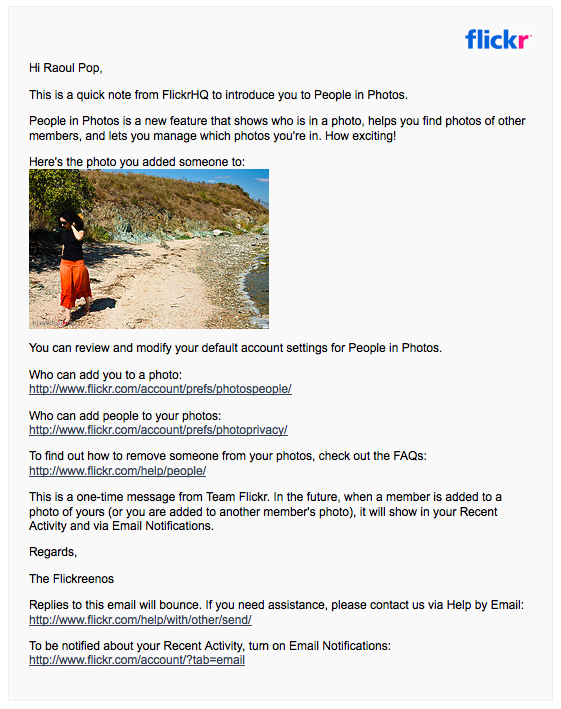
Flickr launched a new feature they call People in Photos a few hours ago, on October 21, 2009. It lets you tag people in your photos or in your contacts’ photos. I guess it was only a matter of time before this happened. While Riya and iPhoto went the route of computer-aided facial recognition, which is a pretty cool feature indeed but processor-intensive, Facebook and now Flickr have gone the more low cost route of letting members manually tag people in their photos.

At any rate, the process is easy and real-time. You start typing in some identifier for a person you want to identify in a photo, such as a name or screen name or email address, the database of members is searched live, and you’re presented with a drop-down list of people that narrows down with each letter you type. Pretty cool. Flickr also went the extra mile and included the ability to let you determine who can add you to photos, and who can add people to your photos. Very nice touch there.

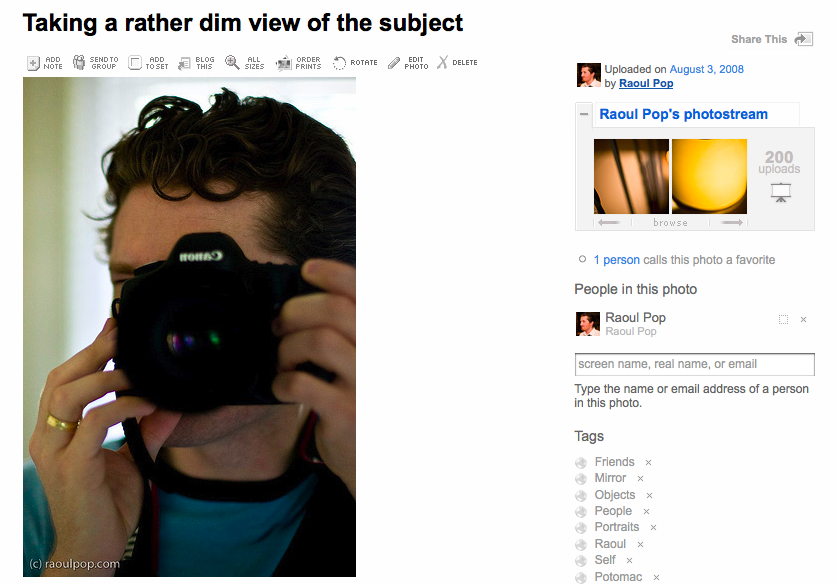
I added my wife and myself to a couple of photos where we appear, and took the following screenshots to show you what the new feature looks like. The only reason I noticed it is because I logged into my Recent Activity page a few minutes ago and saw a small change in the options, as you can see below.

flickr-people-in-photos-1

The option to add people to a photo is located in the sidebar, below the photostream and groups thumbnails and above the tags.

flickr-people-in-photos-2

As soon as I got done tagging my wife and I in the photos, I got an email from Flickr where they explained the new feature to me and allowed me to set the privacy options I mentioned above.

flickr-people-in-photos-3

Like I said, pretty cool implementation, user-friendly, too, and it was something that was bound to happen sooner rather than later. There’s also a post on Flickr’s official blog announcing the feature launch.

What I’d like to know now is if Flickr can read the iPhoto person tags and somehow match them up with Flickr members, so that photos uploaded to Flickr from iPhoto get people-tagged automatically. Or is that the next step down the road?

Standard
Places

Cutting edge

The edge of a tropical plant's elongated leaf is shown in macro mode.

The edge of a tropical plant's elongated leaf is shown in macro mode.

Also from my parents’ yard (like this one). Did I mention I like my parents’ yard?

Standard
Places

Mack the Knife

The claw-like leaves of a palm leaf with the sun's rays shining through.

The claw-like leaves of a palm leaf with the sun's rays shining through.

In my parents’ yard. They live in South Florida, which was home to me for many years.

Standard
Places

The evening breeze

Stems of long grass flutter in the cool evening wind.

Stems of long grass flutter in the cool evening wind.

One of my most favorite photos. Not sure why it’s not one of my more popular at Flickr, but I like it. A LOT. Taken in North Bethesda, MD, in our community.

Standard