Reviews

Google Reader translates posts?

Yesterday morning, I added a new feed to my subscriptions in Google Reader, and noticed what I thought was a new feature: the ability to translate posts automatically, within GR. The feature was actually launched in November of last year, and it works through the normal drop-down menu. A new option was added there, and it looks like this:

Google Reader automatic post translation

Isn’t that cool? The translation technology used is the same one found in Google Translate. What’s also cool is how the languages are detected. I assume the translate option with GR uses the language setting saved in the GR settings or in the Google Account settings, and then it either uses the auto-detect capabilities built into Google Translate to figure out the language, or it looks at the language setting encoded within the feed itself.
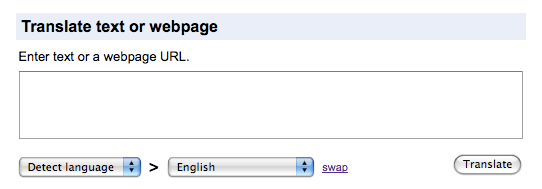
Google Translate

It’s an incredibly useful feature, because it allows people to read blogs in other languages without worrying about copying and pasting the text into a separate translation tool. Just think, if I write a post in Romanian and publish it on my site, the auto-translation tool within GR will allow you to read it as if I’d written it in English! Granted, the translation is machine-generated so it won’t read fluently and might even miss a few meanings here and there, but it’s certainly better than nothing, which is what we had before.

I’d also like point out that if you’re reading articles on my site instead of the feed, I’ve recently added auto-translation capabilities to each post via the same Google Translate technology. You’ll have the option to translate any of my articles into several languages, by clicking on a particular language, right under any post title, as shown below. I hope this will prove useful to my readers from other countries.

Post header showing auto-translation capabilities

Standard
Reviews

Gmail offers another pleasant surprise

The Gmail team has done it again, and they’ve given Gmail users a whole slew of cool new features.

New Gmail features

We’ve now got YouTube, Picasa and Flickr previews, built right into each email message. All we have to do is to put a link to a YouTube movie, or a Picasa or Flickr photo, and its thumbnail shows directly in the message. This feature can be enabled by service from the Labs settings in our Gmail accounts.

I love the “Undo send” feature and have already enabled it. My wife is already using the Offline version of email. It took a bit to sync all her messages, but it’s doing alright now.

Other Gmail features I love are as follows:

  • Superstars, which adds additional stars icons. I organize emails that I need to act on that way.
  • Signature tweaks, which places the signature above quoted text
  • Right-side labels
  • Navbar drag-and-drop, which allows me to re-organize the various items on the Gmail screen
  • Forgotten attachment detector
  • Vacation Time, which lets me specify beginning and ending dates for those times when I can’t get to my email
  • Create a Document, which allows me to create a Google Document right from my Gmail inbox (this is new)
  • Send & Archive, which allows me to reply and archive that message at the same time (this is new)
  • Title Tweaks, which changes the order of the text in the Gmail page title, allowing me to see right away how many unread messages there are (this is new)
  • Google Docs gadget, which displays my most recent Google Documents on my Gmail inbox screen

There’s more information about the new features on the Gmail Blog, here and here.

Standard
Thoughts

WordPress Stats plugin has gone cuckoo

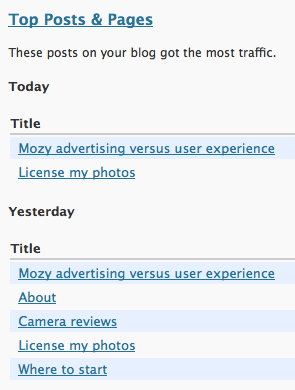
For over a month now, I have been unable to rely on the official WordPress Stats plugin. (I say official because the folks that made WordPress also made this plugin.) It, all of a sudden, started assigning all site visits to the same article, so that all of my stats became completely skewed. Let me explain it with a screenshot:

WordPress Stats has gone cuckoo

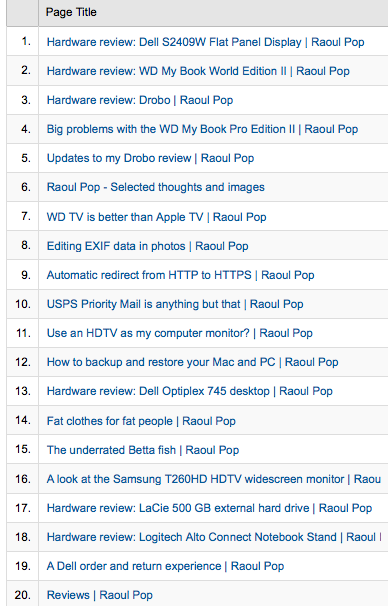
Instead of seeing the proper distribution of site visits by titles, which is what happened in the past, almost all of the site visits get assigned to a random post. I have no idea any more which titles get the most traffic for a given day. I know this is wrong because I’m also using Google Analytics. Here’s a screenshot of the 20 most popular titles for the past 30 days.

Google Analytics Content by Title

I like WordPress Stats because they aggregate the data almost instantly, whereas there’s a 3-4 hour delay with Google Analytics. Sometimes they even correct the data a day afterward (this happened to me recently) so you can’t rely on their figures until 24-36 hours after the fact [reference].

I stopped using WordPress Stats for a while, hoping the problem would somehow work itself out, but when I re-activated the plugin, all that happened is that it started assigning all site visits to a different random post. Whoopee…

If someone at WordPress reads this, please let me know if it’s something I’m doing wrong, or if it’s something that you’ve got to work out on your end. I posted about this problem in the WordPress forums, but I have yet to receive a reply there.

Standard
How To

New Gmail buttons and shortcuts

Gmail's new buttons

I woke up today to find new Gmail buttons. At first I thought it was just Firefox playing tricks on me, but no, the buttons look the same in Safari. The Gmail Team announced the change on their blog yesterday, on 2/3/09. As expected, the change took a while to propagate to all of the Gmail accounts.

Along with the new buttons, they introduced two new keyboard shortcuts, “l” and “v”, which will allow you to label and label/archive messages on the fly. The “l” key opens a drop-down menu which allows you to label emails. You can navigate the drop-down menu using the arrow keys and mark a label using the Enter key. The “v” key does the same thing, and it also archives the message at the same time, removing it from the inbox.

Don’t forget that while you’re in the Gmail inbox, you can select multiple message by using the Shift key. Left-click on the first one, then Shift-Click on the last one, and all in-between will be selected. You can then use “l” or “v” to apply labels to all of them at once.

Standard
Thoughts

Please check to see if you're subscribed to the correct feed

This is an important message for my feed subscribers.

It’s been over a year since I changed my feed URL and domain name, and I now see, inexplicably, that over 35% of my subscribers still show up under the old ComeAcross feed.

My feed traffic has been redirected (with a 301 status message, which indicates a permanent change) for that same year, which means that if your feed reader hasn’t already changed your subscription over to my new feed, you’ll need to do it manually.

The old feed will go down in the very near future, possibly within days. It was set to be deleted one year after the redirection. Please check your feed readers to make sure you are indeed subscribed to feeds.feedburner.com/Raoul, which is my main site feed, or you will not receive future updates from my site.

For historical reference, I talked about the feed changes on 1/16/08, and on 1/29/08, I explained how I did the transfer of the content.

I also want to give you advance notice of another possible change to my feed URL, which may happen when I transition my feeds from FeedBurner to Google within the next 1-2 months. You may recall that Google bought FeedBurner in 2007. Now they’re at the point where they’re moving FeedBurner publishers to the Google infrastructure, and I’m not sure how they’re going to manage the process.

I thought the migration from FeedBurner to Google was going to be fairly smooth, but I’ve already run into a roadblock. One of my feed URLs is somehow in use on Google’s servers, and my migration fails every time I initiate it. I’m not sure how that’s going to be resolved, and I would appreciate any help from Googlers out there.

So, just to be on the safe side, do a manual check in your feed reader and make sure you see feeds.feedburner.com/Raoul. When I hear what the new Google feed URL is, I’ll be sure to let you know.

Standard