Thoughts

Google Reader changes things, slightly

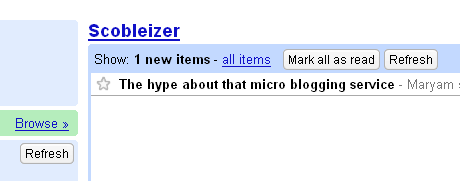
Logged into Google Reader this morning to get my daily fix of feeds, and saw that something changed. Took me a few seconds to realize it, but it looks like they replaced the command links with nice, rounded buttons. Have a look:

The new Google Reader buttons

Those buttons used to be links. Maybe this happened yesterday, maybe it happened overnight, but I just caught it, thought it was cool, and wanted to share the news. Certainly makes for a better look.

It also looks like Robert Scoble‘s spending too much time on Twitter and not enough time on his blog. Just one new post since yesterday afternoon?

Standard
Reviews

Google Docs (and their online office suite)

Until yesterday, I just didn’t see the point of online office suites and of apps like Google Docs. Sure, I thought they were nice as proof-of-concept stuff. They made me go “Ooh! Look, cool Ajax!” but I didn’t use them. But this past weekend, I needed to find and work on an old document. Problem was, I hadn’t touched that thing in months. So I had to wonder which one of my computers I used when I last made changes to it, because that’s where the latest version would be.

Finally, I dug it up, and emailed it to my Gmail account. I figured I’d open it later and review it. And when I opened that email containing it, there was an option to open it up in Google Docs instead of saving it locally and editing it in Word. So I thought, why not, let’s give Google Docs a shot! I opened it up there, and all of a sudden, things clicked! I realized that instead of always digging up the latest version on my local computer, I could simply keep one version on Google Docs, edit it where I like, and attach it to emails I send from my Gmail account or save it locally. I know, this is basic stuff, but until I actually correlated the access-anywhere functionality of Google Docs with the need to use it, it didn’t click for me. And I suppose it’s the same with a lot of other people.

Storing important documents online makes sense. It especially makes sense for those things you only need infrequently, and by the time you need them, you can’t remember where you put them. For example, a list of your belongings (to use for home owner’s insurance claims), or letters to people (for those rare cases when you need to write and mail them), or a list of places to see when you go on a trip, etc. are all documents that can benefit from being easily accessible and editable. Or how about that short story or article you’re working on? Give it a try and see how it works for you!

While I’m on the subject of Google Docs, I should mention there was a bug with the option to email a document right from the Google Docs interface. It just didn’t work for me, so the Google engineers might want to have a look at that. I also think it’d be nice if an option to attach a Google Docs & Spreadsheets file was added to Gmail’s file attachment dialog. Currently, if I’m writing an email and wish to attach a Google Docs file, I need to either save it locally (defeating the purpose of using it online) or publish it, and include the URL to that file in the email. I’d like to be able to browse my Google Docs & Spreadsheets storage area and select a particular document right from within Gmail’s interface.

Standard
Events

DC FAN Meetup last night

Ligia and I attended the DC FAN (FeedBurner Ad Network) meetup last night. It took place in downtown DC, at Capitol City Brewery. It started around 6:00 pm and lasted well after 8:30 pm. It was lots of fun and we really enjoyed it. Got to meet the cool folks from FeedBurner, without which my site wouldn’t be where it is today.

I use all of their services, and love them. I burn my feeds through them, I offer email subscriptions to my various content, I repackage my feed content and display it on various web pages like this one or this one for example. I use their ads, of course, which is how I monetize my site and feed content, along with Google’s AdSense. I use and love their feed stats, and I’m really excited they recently introduced site stats as well. I also use something they call feed flares, which are the little snippets you see at the end of every one of my posts. They let you do things like subscribe to my feed, email me, add a post to del.icio.us or submit it to Digg, etc. It’s really, really cool stuff.

I covered FeedBurner on my blog in the past as well. If you’re interested, you can read more here, here, and here. And of course, let’s not forget the time when Rick Klau, VP of Biz Dev at FeedBurner, stepped in and stopped me from making a feed gaffe early last year. Rick was at last night’s meetup, so I was really glad to meet him.

Rick Klau

So, who attended? The folks at FeedBurner were well represented. There was Rick of course, and Eric Olson and Jake Parillo.

Eric Olson

Jake Parillo

Eric coordinated the event and invited me, so a big thank you goes out to him. Various folks showed up throughout the evening. Sphere CEO Tony Conrad and VP of Biz Dev Jeff Yolen were there.

Rick Klau, Tony Conrad and Jeff Yolen

A few people from AOL’s content division showed up. George from Fat Pitch Financials was there as well. As we left, more people showed up.

Sitting at the table

George (Fat Pitch Financials)

I really liked being able to interact directly with the FeedBurner folks. I got to hear about some cool upcoming features like blog networks, got the scoop on how Site Stats hit the ground running, had a chance to give some direct feedback about the Ad Network, and of course, the highlight was that Rick Klau loves photography. We had fun chatting about that!

Shutterbug meta

There was an interesting mural on the wall above our table.

More beer

Beer

There was plenty of food, and of course there were pretzels as well. 🙂

FeedBurner pretzels

Standard
Reviews

Giving thanks for innovative technology

This year, there were a handful of technology/software products that truly changed my life, and I wanted to take a little time to thank their makers publicly.

WordPressThe first, and most important, is WordPress. Without it, this site wouldn’t exist, because I wouldn’t have had the opportunity to combine the content from my various other sites into a single, easy to use collection. The WordPress motto — “a state of the art semantic personal publishing platform” — couldn’t be truer, and I’m here to attest to that. It was easy to combine content from my previous Blogger blog and two of my personal sites into what I now call ComeAcross, and it is easy, every day, to publish more content that may benefit others. That’s really the purpose of ComeAcross — sharing what I think is useful information with others — and WordPress made it possible.

Updated 1/1/08: I’ve since merged ComeAcross into Raoul Pop, which is the site you’re on right now.

GmailGmail has been another wonderful product. Although I started using it in 2005, it was this year that I really started to appreciate its features, ease of use, open standards and fantastic spam filter. The account size is more than generous, the ads are not intrusive, I love being able to label my messages, and the search feature is right on. On top of that, I can retrieve copies of my messages through the POP protocol (that’s Pop, as in my last name :-)), and make them searchable on my iMac through Spotlight.

LoudblogFinally, I’m grateful for Loudblog. It’s an open-source podcasting platform that’s fast, easy to install, and easy to use. I use it to publish my three podcasts: ComeAcross and Dignoscentia (in English and Romanian). I have to apologize because I haven’t had time to publish any podcasts recently, but that doesn’t mean I don’t appreciate how easy Loudblog made the publishing of podcasts for me.

So there you have it, three products that have made it incredibly easier for me to publish content and communicate this year. I’m truly thankful for them, and who knows, maybe they’ll help you as well!

Standard
Reviews

Google Groups gets a makeover

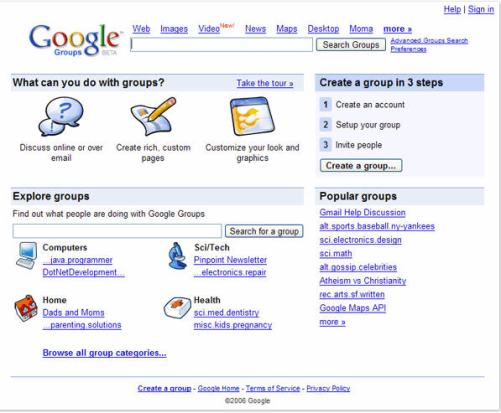
After Google launched the new Reader, I couldn’t help thinking they might just give Groups a re-design as well. My hunch was correct. Brett Lider announced a couple of days ago on the Official Google Blog that a new version of Groups is currently in Beta. It looks a little nicer, but beyond that, no extra functionality was included. Oh yes, there was. There’s now a drop-down menu at the top (Ajaxified) which displays the groups I’m subscribed to without needing to visit a separate page.

The new Google Groups

Beyond that, I think the old version of Groups made better use of the space on the page. When I log into the Groups Beta, my groups get grouped in a right-hand column, and since I’m subscribed to more than 10, the page ends up stretching down with lots of white space in the main column and the groups squished in the right column. It just doesn’t look good.

Overall, I think they’re going in the right direction with the new version of Groups, but it still needs work, particularly in the page layout. I just don’t think enough time was devoted to thinking through the functional areas of the Groups, and how they need to be arranged on the page.

Standard