Reviews

Some really cool news and products

Wired News is running a great FAQ on Intel’s Dual Core processors – what’s on the market now, and what’s going to get here pretty soon. Bottom line – if you’d like some fast laptop processors, wait until the Merom line gets on the market, which will be late August. Perhaps some laptop makers (Apple included) will allow us to pre-order?

The Economist has an insightful article on the history of the PC and what awaits us in the future. Bottom line: some of the basic PC functions, like email and the web, are being relegated to other devices/appliances. The PC’s functions are changing, but that’s not to say its popularity is diminishing.

Western Digital has put out a new mini-HD called the Passport Pocket, at 6GB for $100, that can automatically sync itself to certain folders on your computer, will automatically encrypt the data, and will allow you to enter contact and reward info that will be useful in case you lose it. Only this information will be visible to strangers. Nice!

Merriam Webster has come out with a USB Dictionary and Thesaurus that they’re storing on a 256MB hard drive. The tool comes with a few freebies as well: a phonetic spell correction, a grammar guide, confusable word alerts, and a crossword puzzle solver. Alright!

You’ll finally be able to use that RDS function (RD-what?!) on your radio, with the Kensington iPod FM Transmitter with RDS. What this means is your car’s radio will now be able to display the artist and song info, so you won’t have to endanger yourself and others on the road by squinting at the iPod screen. Very, very nice!

Standard
Thoughts

Apple's notebook market share is now 12%

Among other news, like their 48% rise in profits, helped by the iPods, Apple has also proven the dominance of their hardware and software market by achieving a 12% share of the notebook market. That’s double its previous share of 6%, as measured from June of ’05 to January ’06. Over 75% of the new notebooks sold used Intel processors, which showed, beyond a doubt, that Apple’s move to Intel chips was the right one.

If you’re sneering at 12%, and saying that Dell or some other PC company might have more, think about why people buy Dells. Not one person I’ve talked with who owns a Dell says they love it. They buy Dells because they need them for their work. On the other hand, people buy Apple computers because they love the design. It’s a gut decision, not a business one. And as billions of beer bellies show, the gut wins every time. Expect Apple’s share of the market to continue to grow, and Dell’s to decline.

Standard
Reviews

Two great bargains: HP Pavilion dv2000 and dv6000 series laptops

As detailed in my last post, I’ve been scouring the market looking for laptop deals, and I found two that were really good. After I compared the specs for these two laptops with similarly equipped laptops, I found them to be hundreds below comparable models, and on top of that, well-made – at least when it came to their exterior.

The HP Pavilion dv2000 and dv6000 series laptops are part of HP’s re-design of its Pavilion laptop line. They feature upgraded hardware and beautiful exteriors. I can’t speak about their reliability, since I only got the chance to use them for a few minutes at a computer store, but when it comes to looks and features, they’ve got it! From the moment I touched the keyboard and used the trackpad, I could tell HP invested serious attention to detail when they made these laptops. If you’ve ever used a Dell laptop, then you know what I’m talking about. The keys are so thin, that your fingers sometimes get pinched inbetween them. Not on these two HP laptops! The keys are thicker, smoother, and have better action. The trackpad is responsive, and the left and right mouse buttons are soft to the touch. I thought the travel could be shortened a bit, but other than that, it’s a very good experience. The lines are well defined, the color tones are well chosen, the overall thickness is kept to a minimum (around 1″ height for either one) – what can I say, they look good!

A well-equipped dv2000 series laptop features Windows XP Pro, a dual core Intel 2.0 GHz processor, a 14.1″ BrightView wide screen, integrated 802.11 a/b/g and Bluetooth, an integrated webcam with dual noise-cancelling microphones, a 120GB SATA hard drive, a 128MB NVIDIA(R) GeForce(R) Go 7200 video card, 2GB of RAM, a LightScribe Super Multi 8X DVD +/- RW with Double Layer drive, a 12-cell battery that lasts up to 8 hours, a 2-year HP Accidental Damage with Express Repair extended service plan, a credit-card sized remote control for the InstantOn feature that lets you play DVDs and CDs without turning on the laptop, an HP Silver Messenger Bag, HP Mobile Noise Cancelling headphones, a retractable phone, ethernet and USB cord kit, and a FREE printer. The price for the whole set is $2,051.93 ($1801.93 without the extended service plan). Try matching these specs with another laptop (Lenovo, Sony, Dell, Acer, Asus) and see if it’s still that low. Go ahead, I’ve done it, and it isn’t.

How about the dv6000 series? A well-equipped dv6000 includes the following: Windows XP Pro, a dual core AMD 1.8 GHz processor, a 15.4″ wide screen, a 256MB NVIDIA(R) GeForce(R) Go 7200 video card, integrated 802.11 a/b/g and Bluetooth, an integrated webcam with dual noise-cancelling microphones, a 120GB SATA hard drive, 2GB of RAM, a LightScribe Super Multi 8X DVD +/- RW with Double Layer drive, a 12-cell battery that lasts up to 8 hours, a 2-year HP Accidental Damage with Express Repair extended service plan, a credit-card sized remote control for the InstantOn feature that lets you play DVDs and CDs without turning on the laptop, an HP Silver Messenger Bag, HP Mobile Noise Cancelling headphones, a retractable phone, ethernet and USB cord kit, and a FREE printer. The price for the set is just $2.111.94 ($1,861.95 without the extended service plan). Again, I dare you to match these specs and see if you can get a similar price.

I have only two bad things to say. I haven’t heard good things about HP reliability from my friends and contacts. I also know from personal experience that once HP decides to discontinue a product, their interest in supporting it goes downhill, and it’s basically forgotten. Perhaps that’s changed now that they’ve re-designed their laptops, but still, I’d recommend getting the extended support plan. The one I mentioned above includes two years (there are 1 and 3 year options as well) of Accidental Damage (in case you drop it or spill something on it) and Extended Repair (when your hardware just plain fails). I would actually recommend getting an extended support plan for any laptop or desktop you purchase, because you don’t want to be left stranded when you’re in a bind.

The second thing is more like a wish, and that is for the dv6000 line to include dual core Intel processors. It currently doesn’t. Although AMD may beat out Intel with its recent line-up of dual core processors, the Core Duo 2 line of processors, code-named Merom, that Intel will come out with in August, are already beating AMD’s line-up. Plus, they’re readily interchangeable with the current dual core Intel chips. That means you can get a laptop now, and upgrade your processor to a screaming fast Merom chip when the price for those goes down.

At any rate, I can’t find a better deal for the specs and looks that these two laptops, so if you’re in the market for a Windows laptop, get your hands on one of these!

Standard
Thoughts

To buy or not to buy an Apple

➡ Updated 3/7/08: My opinion has changed quite a bit since I wrote this post. I am now going to get a 15″ MacBook Pro after working on a Windows laptop for the past two years. Feel free to read this further though, because it shows how far things have come since then.

I’ve been doing a lot of research lately, because I’m looking at buying a new laptop. I’ve got this terrible dichotomy in my head. On one hand, I love Macs, and I’d love to get a Mac, but on the other hand, most of the work I do (web development stuff) is still handcuffed to Windows. It’s not minor stuff, either: Access, SQL Server, ASP, ASP.NET.

Yes, I know, I can run Windows on the Mac with Boot Camp now, but have you taken a look at the caveats? Apple’s had to write the Windows drivers for the Apple hardware, and certain things simply won’t work. Among them are: the Apple Remote Control, the Apple Wireless Bluetooth keyboard and mouse, Apple USB Modem, the sudden motion sensor, the ambient light sensor, and, most importantly, the built-in iSight camera.

The very reasons I want to get an Apple – fantastic design, tight integration when it comes to software and hardware, obsessive attention to detail – are stopping me from getting one. Since I’ll need to run Windows on it, and my cool Apple hardware won’t work with Windows, what’s the point? I’ll be forever shutting down either Mac OS or Windows XP in order to use the features I want out of each system. Want to use iChat to talk with my wife? Oops, need to boot up in Mac OS. Need to do a bit of development work? Oops, got to boot up in Windows. Got to use Skype Video Chat? Double oops there, since only the Windows version can use a webcam, and iSight doesn’t work in Windows!

As if laptop hard drives aren’t small enough, I’ll need to partition the drive and share it with Windows. Not cool! On the one hand, I want to handle photos, music and videos on the Mac, filling up the drive with that stuff. On the other hand, I need to do development work and create large graphics in Photoshop and sites in Dreamweaver, both of which are Windows licenses, by the way. I work with large files there as well, and I know I’ll fill up that drive. What am I supposed to do? Shuffle files between the two operating systems using an external drive? Sounds easy enough, until you realize that Mac OS doesn’t read NTFS partitions and Windows doesn’t read Mac drives. Huh? Yup, it means you can’t copy files bigger than 4GB to that external drive, since it needs to be formatted in FAT.

Oh yes, let me not forget about emulation/virtualization software… Or rather, let me forget. I still shudder at the dismal performance of Virtual PC on my PowerBook G4 or my iMac G5. Yuck! Everything crawled, including the web browser. Copying files back and forth between the operating systems, although it was only a drag-and-drop operation, was excruciatingly slow. Running software like Dreamweaver took forever, needless to say. Virtualization software like VMWare, running Windows on Windows, albeit a little faster, was still slow in the desktop version. Although the speed should improve if virtualization software is run on the new Intel Macs, I don’t hold high hopes for it.

There are plenty of caveats with virtualization, other than performance. Software doesn’t always behave as expected, because it’s not a real computer, and certain things simply aren’t available. Then there’s that always disappointing jump between the real OS and the virtual OS. Although it’s as easy as Alt+Tab on Windows or Command+Tab on the Mac, the performance hit is depressing every time one needs to use the virtual machine. I tried other emulation software as well. Q, was one of them, and although the interface was nicer than Virtual PC’s, it still disappointed. No, no thanks.

I’ll let Parallels talk about how fast their virtualization is all they want. I’ll believe it when I see it encode video and run the latest versions of Photoshop and Visual Studio at near the full speed of the CPU. Meanwhile, I’ve had enough of emulation/virtualization. It may be good for servers, as VMWare is proving with their Enterprise suite of products, but it’s not good when one’s computing needs involve lots of high-availability graphics, memory and processing power.

It seems like I’m hopelessly caught between Scylla and Charybdis, not knowing where to turn, part of me wanting Mac OS and part of me needing Windows. What to do? Nothing to do but to hold off for now, and hope that either Apple or Windows get their act together for people like me.

Standard
Reviews

Hardware review: Apple MacBook

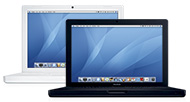
The Apple MacBookI visited the Apple Store over the weekend and took a look at the new MacBook (the iBook replacement). Apple’s outsourced the production of this laptop to Asus, but it’s definitely still an Apple. It was supposed to arrive in June, so it’s ahead of schedule.

The overall impression is that it’s a very nice laptop, and a welcome successor to the iBook, whose design I thought was in need of improvement. The MacBook is thin, glossy, and beautiful. The design is very similar to the MacBook Pro, except that the case is plastic, not aluminum.

The option to get it in two colors is a nice touch, and coming from Apple, is a tip of the hat to PC laptop users, who are used to the black color. The two finishes are a bit different. While the outside of the computers are similarly glossy, no matter the color, the insides are another story. The white MacBook’s inside finish is a little grainier than that of the black MacBook.

Having never owned a white iBook before, I wondered what grime from everyday use would do to the keyboard and the white finish. I can say that my white iMac keyboard has stood the test of time well so far (since last September, at any rate.) I can also say that I could see grease from people’s hands on the black MacBook in the store. The grease didn’t show on the white MacBook, but there was a bit of grime. I guess you can take your pick: grease or grime. That’s why I always wash my hands before using the computer.

Apple did another nice thing by including some of the features people have come to love on the MacBook Pro as standard on the MacBook: integrated iSight, remote control with FrontRow, and the MagSafe power adapter. This is good stuff!

The wide screen is beautiful. I know people are used to the matte screens, but either finish is fine with me. What I look for in a screen is brightness, high resolution, a wide aspect ratio, and wide reading angles, and the MacBook has all those.

The lid doesn’t have a latch like the MacBook Pro or the now-extinct PowerBook. Instead, it has a notch, so you can just pull it up. What I didn’t like so much is that the lid seemed pretty flexible. If I grabbed the corners, I could bend it back and forth, and I wondered what that would do to the display after long-term use.

The keyboard is interesting. One thing I liked on the iBook was the ability to remove the keyboard in just a few seconds. That was handy in case you spilled something on it. You could rinse it, and wipe underneath. With the new MacBook, the keys rise out of the plastic casing, and they’re more square around the edges than I’m used to. They’re very similar (although the feel is much better) to the keyboards one finds on the computers inside REI stores. The design is utilitarian. But again, I wonder if Apple’s placed anything under the MacBook keyboard to guard against spills.

I wasn’t thrilled with the battery lock, which is a coin-screw. I guess that’ll come in handy for college students without a screwdriver, but I would have liked to see a latch. The coin screw will get damaged over time (it’s plastic) and it’ll look bad. The store model’s screw was already damaged.

I like that Apple’s put a Firewire port on the MacBook. I think their decision to start moving away from Firewire was a very silly one. Firewire is so much better than USB in many ways, and I’ll hopefully detail them in a future post. The digital audio inputs and outputs, which used to be standard only on the PowerBook G4 17″ models, are now standard across the line, including the MacBook. I was amazed to find out this little tidbit.

The Intel Core Duo chip is another nice surprise. Initially, there was talk of only having a single core chip on the MacBook, so this is a bonus as far as I’m concerned. The applications loaded very fast, even with only the standard 512MB of RAM. I’d like to see how the MacBook works with 1GB of RAM and Photoshop. The graphics card uses shared memory, so if you’re thinking of using this laptop for graphics-heavy applications, in particular video, you may want to upgrade to the MacBook Pro line, which has a graphics card with dedicated memory.

I wasn’t happy when I learned that it weighs 5.5 lbs. For a 13.3″ laptop, that’s a lot of weight! But I guess that’s what happens when you pack a lot of features into a tiny laptop. They add to the weight. It’s the same as my MINI. You wouldn’t think a car that small could weigh over 2,700 lbs., but it does!

Last but not least, the MacBook comes with the latest version of the iLife software, which allows for just about the easiest creation of web pages, blogs and podcasts.

Bottom line: I really liked it, and I’ve already started recommending it to my friends. But, given the shortcomings outlined above, such as the overly flexible lid and new keyboard, I’d also recommend buying an AppleCare Plan, just in case.

(Photo courtesy of Apple. This review can also be read on BlogCritics.)

Standard