Thoughts

Predictions about computer drives in the future

72GB SanDisk SSD SATA 1.8"

On 1/16/09, Computer World published an article where the author paints a future full of SSDs. He puts forth the idea that drives will not only be replaced by memory chips, but that these memory chips will be integrated into the motherboard, doing away with the SATA interface. There are a number of things I don’t agree with in that article, and I’m not the only one who’s annoyed. Others have called out the author for his statements as well.

For one thing, let’s remember that computer memory once relied on chips integrated into the central circuits. Going back to that sort of approach would be like going back in time. Weren’t we supposed to progress, not regress? The advantages have to be truly worthwhile, and I’m not convinced.

A claim made in the article is that of increased speed: “By making the drive part of a system’s core architecture — instead of a peripheral device — data I/O performance could initially double, quadruple or more.” I love these nebulous claims, don’t you? It could double, quadruple or more. Hey, why not 8x faster? Maybe 16x faster? Let’s just inflate the numbers, it looks great on paper…

From my experience, I noticed that transfer speeds to flash memory vary tremendously — based on how much used space there is on the memory itself, or the file size. Larger files transfer much faster than smaller ones. Sure, in my experience, there was a SATA or USB interface in the way, but that doesn’t change what happens with the flash memory itself.

We should also keep in mind that flash memory is limited in the number of write operations it can take before it expires. On the other hand, regular hard drives have a much longer life span. I for one don’t want to be in a situation where I have to replace an expensive SSD on my laptop because I’ve saved one too many files and it has just gone belly up.

That brings to mind another issue: will these SSDs be soldered onto the motherboard, or can I pull them out and replace them as needed, like I do with RAM modules? I think you can readily imagine how inconvenient it would be to have to service your computer if its SSD is soldered onto the motherboard.

How about space on the SSD? What do I do if I want to increase the space on my drive? Do I have to buy another full SSD? I’d much prefer we had SSD bays, like RAM bays, where I could stick additional SSD modules to automatically increase the space, just like it works with RAM. A partitioning tool integrated within the OS should then allow me to resize my existing partitions and spread them over the newly available space, or to create another partition out of that space.

I keep hearing people say that 250GB or 160GB is plenty of space for your laptop. That’s nonsense. I’m always maxing out my laptop’s hard drive when I go on trips, because I fill it with photographs and videos which I then unload to my external storage when I get home.

I find that for my needs, a 500GB or 1TB laptop hard drive is what I need right now. At some point in the future, I may need more. I haven’t started working with HD video for example. I know that’s a tremendous space hog. I think a 1TB drive would be the minimum I would need if I started to work in that arena.

With SSDs, price is still an issue, and so is space, at least for now. I just don’t find it practical to spend money on SSDs at the moment, and I don’t think my opinion will change unless their prices and storage specs start to match those of regular hard drives.While we’re on the subject of price, where in the world did Gartner get their figure of 38 cents per gigabyte? That’s the figure quoted in the article. I’m sorry, Gartner, but you folks need to check your math. I came up with 9 cents per gigabyte recently.

On the other hand, I do understand that the additional interface between the motherboard and the hard drive is a bottleneck. If we can do something to speed that up, I’m all for it. But you’ve got to prove to me (and to other consumers out there) that your technology is affordable and reliable and offers tangible benefits other than tech media hype.

I’m also excited about the possibility of increasing drive space on a modular basis, where I simply put in more SSD modules in expansion bays on the motherboard, like I do with RAM. But there’s no indication that we’re heading in that direction from the article itself. Until we get to that point, I’ll still continue to think that SSDs are aimed at the wrong market segment. Not everyone is a MacBook Air-toting management type. The bulk of computer users out there need affordable technology with plenty of storage, well made, and reliable over 3-4 years or more. SSDs just aren’t there yet.

Image used courtesy of SanDisk Corporation.
Standard
Reviews

Hardware review: WD My Passport Studio

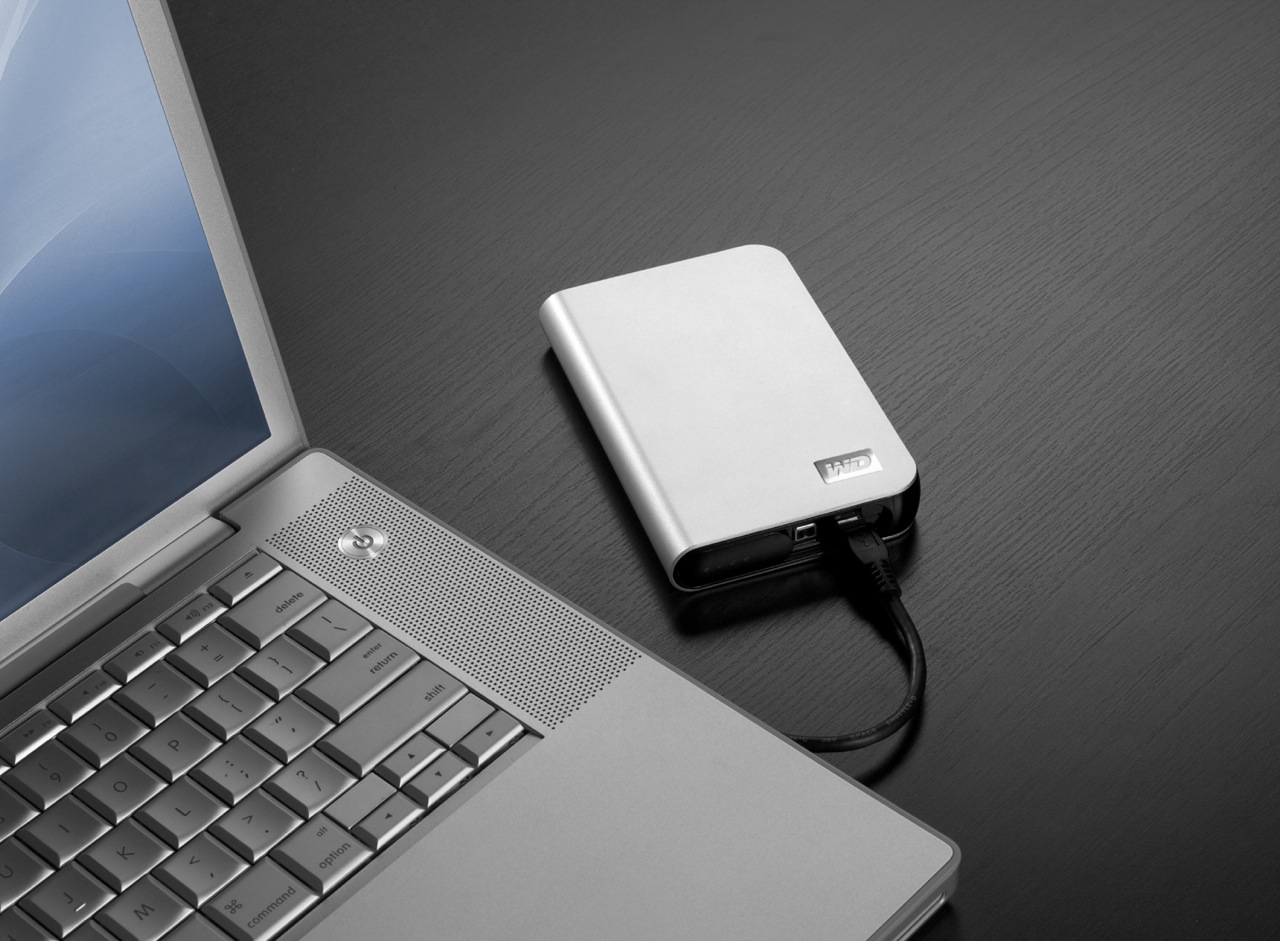
While the WD My Passport line of portable drives is a couple of years old, their My Passport Studio models are new, and their specs and capacities were greatly improved recently. The My Passport Studio line is meant for Mac users and comes formatted in HFS+, although the drives can be used just as well with Windows machines if they are reformatted to NTFS or FAT32.

On 10/30/08, WD introduced Firewire 800 connections and new capacities (400GB and 500GB) for these wonderful little drives. The base capacity was upgraded to 320GB, and the 250GB size was phased out. These latest drives feature triple interfaces (USB 2.0/Firewire 400/Firewire 800), which is something one normally sees only on external desktop hard drives (the 3.5″ size).

Technology moves fast, doesn’t it? Just a few months ago, the My Passport Studio models featured USB 2.0 and Firewire 400 connections. The top capacity was 320GB. I myself have a 1st generation My Passport drive, a 160GB model with a USB 2.0 connection. I bought it in February of 2007, and it’s worked great ever since.

The more recent models from the My Passport line have something that my 1st gen My Passport drive doesn’t have: an external capacity gauge. I think it’s neat to see how much space is used up on the drive at a glance. These latest drives also have something I haven’t seen before: turbo drivers for faster data transfers. The drivers are available for Mac computers only. I haven’t used the drive yet, but when I get it, I’ll be sure to test out data transfers with and without the drivers, to see if there’s an improvement between the two modes. I hope the drivers are well-developed and won’t introduce any sort of OS stability issues. I’ll also test data transfers between USB, FW400 and FW800.

I’m really looking forward to getting a 500GB Studio drive, because of its unbelievable capacity. It is double the size of my MBP’s hard drive, which is 250GB. I’m going to be able to store lots of photos and videos on it when I’m traveling, and use it to back up important files from my MBP and my iMac. I also think the My Passport line of drives are some of the best-designed portable hard drives on the market.

I can’t find the 500GB model in any online stores yet. Newegg still lists the Firewire 400 models, albeit at reduced prices, and Amazon only has the 400GB model. B&H Photo also only lists sizes up to the 400GB model. I don’t think I need to worry, since it’s very likely that by the end of November or sooner, the 500GB model will be available in most stores.

Photos used courtesy of Western Digital Corporation.

Standard
Reviews

Google launches video chat, ignores PowerPC Macs

A few days ago, Google launched something that a lot of people had wanted for some time: the ability to do a video chat, right from Gmail. Everyone got really excited, and for good reason. I was very happy too, until I discovered that PowerPC Macs were out of the picture. Why?

Here’s what I get when I access the Google Video Chat site from my Intel MBP:

And here’s what my wife gets when she accesses that very same site:

So while she gets to see this when I’m away from home:

I’ll still only get to see this, which makes me sad:

Why, Google, why?

Standard
Reviews

Netflix Watch Instantly comes to the Mac

On October 27 (last month), Netflix started testing a new way to stream movies for its Watch Instantly feature. They began using Microsoft’s Silverlight player, which is platform-independent and can still handle the DRM that movie studios love so much. This meant that Mac users were no longer left out of the picture, and could finally watch Netflix streaming movies on their machines.

On October 31, they finished their first round of testing and allowed all Netflix customers to opt into the new feature. They cautioned users that there might still be some bugs and lower-than-expected quality on some movies. I started using the new feature immediately, and after having watched a few movies, here are my impressions:

  • Streaming quality is indeed a bit lower than expected on some movies, and during some scenes. Not sure why, but it’s not prevalent, and will likely be addressed soon.
  • PowerPC Macs are left out of the picture, not due to Netflix, but Microsoft, who have not released a version of Silverlight for PowerPC Macs — I doubt they will, unfortunately. This means our iMac G5, which now works great (after repeated trips to the Apple Store for repairs), will never be able to stream Netflix movies. I think that’s pretty sad.
  • Silverlight doesn’t come with any preference pane for Macs where its various options can be adjusted. This means that unless certain of its built-in options are adjusted “from the factory”, so to speak, your Mac’s screen will go dim and your screensaver will come on while you’re watching a movie on full screen. Your Mac might even go to sleep. Every time the screensaver comes on, Silverlight exits full screen mode. This gets old pretty quickly, as you can imagine, and it’s not ideal by any measurement.
  • Movies cache and play much quicker than before.
  • Netflix will remember where I stopped watching a movie, and will bring me back to that exact point when I log on again and hit play on a title. I watched a portion of The Adventures of Baron Munchausen while logged onto Netflix from Safari, then went to bed; the next day, I logged on through Firefox, clicked on Play, and almost instantly, the movie started playing from the very spot where I’d stopped watching.
  • Did I mention we can watch streaming movies on our Macs, finally? This is incredibly cool!

I couldn’t be happier with Netflix. As a service, I think it’s one of the best business ideas that was ever put into practice. It fulfills a customer need at a reasonable price, and (at least for now), that price includes the ability to watch a LOT of streaming movies at no extra charge. I say “for now” because, let’s face it, there are costs associated with licensing and serving streaming movies (copyrights, hardware, bandwidth, overhead, etc.), and at some point, I think Netflix will have to adjust its prices to reflect this. I don’t think the price changes at that point will be big, but as more and more people start using the Watch Instantly feature, the extra usage will need to be taken into account.

I also believe that long-term, Netflix intends to emphasize its movie streaming service and slowly phase out its DVD mailers. It won’t happen until they can ensure a ubiquitous streaming experience for its customers, and that means flawless streaming for TVs and computers alike. They’ve already made incredible inroads with Roku, Xbox 360, and with Tivo, which can all stream Netflix movies directly to TVs. Now that you can watch streaming movies on both Macs and PCs, things are looking better and better, and Apple TV looks more hamstrung than ever.

Standard
Reviews

WD TV is better than Apple TV

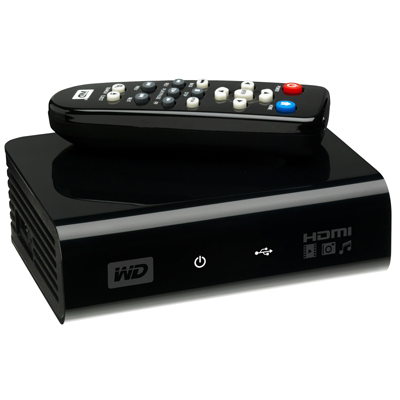
WD has put a new device on the market, and it’s called the WD TV HD Media Player. It’s a small box that can connect to a TV via HDMI or Composite output cables, and can take most USB external hard drives as input (it should even read USB flash drives as long as they’re formatted in FAT32). Once a device is connected, the WD TV will read the media from that drive (movies, photos, music) and let you browse through them and play them on your TV. What sets this device apart for me is that it has gone beyond other similar devices like the LaCinema Premier, or Apple TV. I’ll explain below.

The LaCie product, for example, doesn’t play as many formats as WD TV, and can only support NTFS and FAT32 file systems.

You’re limited in the amount of content you can play with LaCinema Premier, since the drive is integrated within the device itself, and because not as many video formats are supported (see the specs on the LaCie website). That means you have to lug the whole thing from your home office to your living room, re-connect it at each place, and copy files onto it when you want to refresh its inventory. The remote also leaves something to be desired (too many buttons).

I know and like Apple TV myself, having bought one and configured it for my parents, but frankly, I find it overpriced and under-featured. The more you use Apple TV, the more limitations you find:

  • It has an internal hard drive that syncs with content over a wireless network, which means you have to wait forever to get a movie onto it. The drive can also fill up quickly, depending on which size you pick. (Yes, you can also connect it via a Gigabit network, if you’ve pre-wired your living room and home office with Gigabit wires already — but most people have not.)
  • You can stream to it, but then you always have to keep iTunes open, and it’s a hassle to remember that, especially when you’ve just sat down on the living room couch and turned on the TV.
  • You also need to be able to troubleshoot WiFi issues in case you’re not getting enough bandwidth and Apple TV playback stutters.
  • You have to add every single video clip you want to play on Apple TV to the iTunes library, and I don’t care for that sort of thing. I just want to store my stuff in folders and browse it from a device (like WD TV).
  • Apple TV has a USB port on the back, but you can’t use it for anything but “diagnostics” unless you hack the device. This is stupid. I can’t use the port to connect Apple TV to my computer and copy content onto it, I can’t use it to connect an external hard drive to it and have it read the content from it (like WD TV), and it just sits there, unused, unless I pay for a hacking device like aTV Flash.
  • It overheats like crazy. It can burn your fingers if you’re not careful.

I love the design of Apple TV and its diminutive remote. I love the fact that I can swap remotes between it and my laptop if I want to. I think the on-screen menus are well done. I also like the fact that it can stream Flickr photos and YouTube videos, but these extra functions are just that: extra-neous. It simply cannot do its basic job well, and that is to play my media conveniently.

I’m not alone in being frustrated with it. Thomas Hawk has written repeatedly against Apple TV, and for the very same reasons I describe in this post. Steve Jobs recently said he’s not sure what to do with Apple TV. He’s treating it like an unwanted step child. It’s not listed in the Mac product lineup on Apple’s website. It sits off to the side in a section of its own, and you have to do a search for “Apple TV” in order to find it. Corrected 11/11/08: It’s listed in the iTunes and More line-up along with the iPods.

For one thing, Mr. Jobs, you can stop being so greedy in your approach to the device and let people use the USB port on the back. Or how about letting people stream Netflix videos with it, so they don’t have to buy a separate device? I’m a Mac user and have a Netflix account. Until Netflix release Roku and opened up its streaming program to Mac users, I was in the dark. You probably don’t want to do these things because it’ll cut into your video rentals and purchases, and you like that extra revenue stream, but the fact remains that sales of the device will always remain low if you insist on hamstringing it.

The WD TV Player, on the other hand, is made to suit most people. It has a USB port where you can connect most external hard drives. It will read NTFS, FAT32, and HFS file systems too. (I found that out from WD Support, because the info isn’t listed among the specs. They pointed me to KB article #2726.) There seems to be an issue with HFS+ file systems, but they’ll still work, only differently. I’ll have to look into that later.

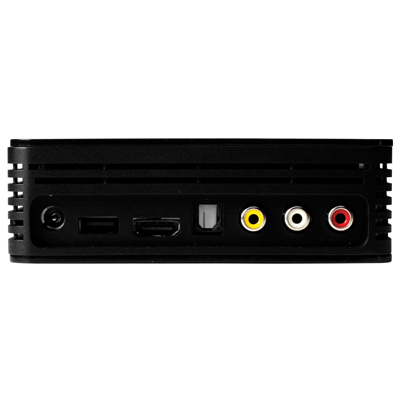
Also not listed among the specs is an Optical Audio port, but when I look at the back of the device, it seems to me I can see one there.

To me, WD TV is the long-awaited answer to my media player needs. At around $99 (street price), this is one device that will make its way to my Christmas stocking pretty soon, because I’ve got a Drobo full of content I’d like to play my way, not to mention that I also have two WD Passport drives.

I may even get one for my parents, to replace their Apple TV. They’ve had to keep their Drobo connected to their iMac in the home office, with iTunes open, all this time, just so they could watch a movie or two from the Drobo. That’s not right. Once I get the WD TV, I can take their Drobo, put it in the living room, and hook it up right there, without worrying about WiFi, streaming, iTunes, and a whole bunch of nonsense. Apple dropped the ball with Apple TV, and WD picked it up and started running with it.

The WD TV supports the following file formats:

  • Music: MP3, WMA, OGG, WAV/PCM/LPCM, AAC, FLAC, Dolby Digital, AIF/AIFF, MKA
  • Photo: JPEG, GIF, TIF/TIFF, BMP, PNG
  • Video: MPEG1/2/4, WMV9, AVI (MPEG4, Xvid, AVC), H.264, MKV, MOV (MPEG4, H.264). It will play MPEG2/4, H.264, and WMV9 videos up to 1920x1080p 24fps, 1920x1080i 30fps, 1280x720p 60fps resolution. That’s awesome.
  • Playlist: PLS, M3U, WPL
  • Subtitle: SRT (UTF-8)

I plan to get one soon, and I’ll let you know in this post if it lives up to its specs and my expectations. If you’d like to get one too, Amazon lists them. See below.

You can buy the WD TV Player from:

Standard