Reviews

ffmpegx, the best video encoding and compression on the Mac

A little while ago, I wrote a post outlining the things I didn’t like about my Mac, and while most of the issues I pointed out are still affecting my iMac, I have to really thank one of the people who left a comment, by the name of Howard Dratch. He pointed me to a great app for video encoding and compression on the Mac, called ffmpegx. I was a little skeptical, but hey, it was free, so I gave it a shot. After the first compression, I was amazed! The compression is fast, clean and very, very good. I can barely notice the difference between the original and the compressed copy. I highly recommend it. It’s one of the best applications I’ve ever used, and I don’t think I exaggerate when I say that it’s probably the best video encoding/compression tool on both the Mac and the PC platforms. Granted, there is no Windows version, but still, I’m hard pressed to find its equivalent there.

What sets it apart is not only the ease of use (though there are tons of options to choose from) or the speed of encoding (although it’s among the fastest I’ve used) or the fact that it’s free (because it is — well, shareware anyway), but it’s all of these things together. It’s a great, all-in-one, wonderful package.

Now, before you think I use it for illegal purposes, I don’t. I’ve never downloaded illegal moves from BitTorrent or anywhere else on the Internet. I’ve never shared movies illegally, and I don’t intend to. I use ffmpegx or any other of my video tools for legitimate purposes, and I encourage you to do the same. When I use tools like these, I use them so I can edit and compress my movies, and fit more of them on my hard drive.

One of things I like to do is to use a PVR (a Tivo-like device for the Mac), and schedule it to record my favorite shows and movies. I happen to like shows like Cartoon Alley on TCM, and I like old movies (made from the 20s through the 60s). So in order to help you learn how to use ffmpegx, I took a few screenshots of a typical movie encoding that I do.

First the main screen. I love its simplicity. You have the original movie on one side, and the compressed movie on the other.

ffmpegx main screen

I prefer to encode with the H.264 codec, but I use the mencoder H.264 flavor. The Apple H.264 codec, also available through ffmpegx, is much slower and the resulting file isn’t as small. As you can see, the basic properties of each file are summarized in the columns. Now let’s have a look at the next screen, listing the Video options:

ffmpegx video screen

Here you can adjust the bitrate, fit the movie size to a particular archival disc (if you’re so inclined), and adjust its size. If you’re encoding a DVD, you can select which title, chapters and angle you want to encode. What I really like is using the Best button to let it select the best bitrate for the video size. Now let’s have a look at the Audio options:

ffmpegx audio screen

Here you can select the codec, and the audio parameters. If the movie you’re encoding has more than one audio track, you can select the one you want here, and you can even amplify it if so desired. If this is a silent movie, you can add your own track, or if you’re doing a mash-up video, you can add your own voice-overs or soundtrack.

The Filters screen is where things get really, really interesting. Can you see why?

ffmpegx filters screen

Forget all the other cool options, what I really like is the Crop option! Although the Autocrop only works sometimes, because the opening credits or sequences may confuse it, it’s a really cool button. If there are extra portions of screen estate taken up by nothing but fuzz or black space, you can take them out through a crop. Remember how wide-screen movies were letterboxed when shown on TV? Well, you can cut away the letterbox and be left with only a nice, widescreen movie! It’s a fantastic option! Oh, and in case the Autocrop button doesn’t work, you can also specify your own crop settings, and preview them by clicking on the Preview button. A white border will indicate the crop settings.

The Options screen lets you adjust the encoder parameters even further, and of course, lets you specify 2-pass encoding if you want extra quality.

ffmpegx options screen

The Tools screen has a bunch of sub screens that let you play with the video options even more. There are a lot of features squeezed in there!

ffmpegx tools screen

Oh, let’s not forget the Progress window:

ffmpegx progress screen

Finally, if you should need more instructions on how to use ffmpegx, there’s a great how-to section right on their site.

In case you’ve been wondering just what I’ve encoded as I took the screenshots, it’s a lovable and joyous little movie called Luxury Liner (1948). It stars Jane Powell, one of my favorite actresses, Lauritz Melchior, the famous tenor of that time, and George Brent, one of my favorite actors, who also starred in Honeymoon for Three (1941). Incidentally, he was married to Ann Sheridan (his co-star in that movie and another of my favorite actresses) when Honeymoon for Three was filmed. See, now aren’t you glad you read this post to the end? You just learned something new! 🙂
Standard
Lists

Oldies, but goodies

As news go, these are weeks, and even months-old, but they sure are good. Stumbled onto them in a folder full of bookmarks. Enjoy!

  1. Full of nostalgia for the 80’s? Try Engadget, cca. 1985.
  2. Want to donate your old computer? Better wipe that drive first!
  3. The generational gap can be seen in the workplace, too. Seriously, it’s rude to get up and walk out in the middle of a conversation.
  4. Kawaii Not – the web comic for cute gone bad! Cute indeed, and witty to boot!
  5. Want to get a small PC?
  6. The 25 worst tech products of all time, according to PC World.
  7. Ever thought of public spaces as dance floors? “You’ve got to move it, move it… MOVE IT!”
  8. Check out photos of Chicago from the 40’s to the 90’s.
  9. Want to get the scoop on classic movies? Then check out Reel Classics.
  10. In love with USB? Check out this list of flashy USB accessories, like a bra with a USB clasp.
  11. Want the latest in wiretapping devices?
  12. How will the newspaper look in just a few short years?
  13. You thought invisibility cloaks were a sci-fi thing, right?
  14. Great advice on advancing your career as you start over, move, take a part-time job or have money problems.
  15. Video sites, comically analyzed and summarized.
Standard
Reviews

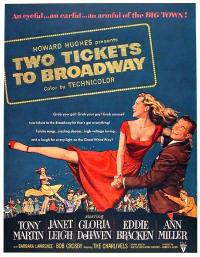
Two Tickets to Broadway (1951)

Two Tickets to Broadway (1951)The story of this movie is simple, and normally bankable: small town girl makes good in big city. This is a story with plenty of room for nice little twists and turns that make a movie worthwhile. However bankable the story is, the movie feels fake all the way through. Granted it’s a musical, and they’re always a little fake, but still, it’s terrible, and I can point exactly to what’s ruining it: the screenplay. Who wrote this pickle of a screenplay, anyway? Yikes! It’s just not grounded, it goes all over the place and tries to do too much. They should have used it for toilet paper instead of filming it.

It’s a shame, too, because the actors were good, and the singing was good, even great at times. Bugsby Berkeley’s choreography was surprisingly toned down, and it sort of fit in with the atmosphere of the movie. I say sort of, because Bugsby’s stuff never really fits in, it always stands out. When he steps into a movie, it changes. Thank goodness there were none of his usually outlandish dance numbers here, although I have to say the American-Indian dance was too weird. It was just insulting, and I bet it wouldn’t get done nowadays, in our more relaxed culture. What were those people thinking when they left that number in?

Things to watch for if you want to kill some time watching this movie: Janet Leigh is great all the way through, Tony Martin sings beautifully, Ann Miller is her usual self, dancing all over the place and baring her long legs as usual, and the reparte between Charles Dale and Joe Smith, as Leo and Harry, the owners of the deli, is just plain funny.

Standard
Thoughts

The Ultimate Star Wars Personality Test

Just took this thing, and found out I’m Qui-Gon Jinn. Okay, interesting. I should mention I haven’t seen any of the newer Star Wars movies. Oh wait, I did see the first one the came out, I think. It was so long ago…

Standard
Reviews

The Fog of War (2003)

Just saw The Fog of War (2003), a documentary of Robert S. McNamara’s time as US Secretary of Defense, and was blown away by the behind-the-scenes look at what goes on during troublesome times. What strikes me is how lonely, how isolated, these people who hold key positions of responsibility must feel. Sure, there are plenty of people advising you, but in the end, if you’re the one making the decision, it’s an utterly heavy responsibility that is solely yours.

How do you decide to kill 100,000 people, or even less than that? Could you live with yourself afterward? Can you make a decision like that even when there’s a chance the data is faulty and/or its interpretation is wrong? How many politicians currently vying for top spots would be ready to make these decisions? Do they know that’s what they might have to do? Do they know everyone else around them will fade into the background and the decision will hang, like a millstone, around their necks? When do you decide to cut the cord?

I’m also impressed by the need to be more forgiving of the decision-makers of today. I can’t imagine the pressures of power have changed. If anything, they’re even more stressful nowadays. Yet so few people take the time to understand the issues before they start criticizing. I’ve been guilty of it myself. Robert S. McNamara makes a very good point in the documentary. One of his principles is that you should empathize with your enemy, in order to understand him. I’m not saying politicians are our enemies, but I think we should take the time to really understand where they’re coming from and the situations they’re facing before we, too, declare war against them, and yell for a change of office. The fact is, everyone makes good and bad decisions, and when the pressure of office is on, it’s even harder to sort through all of the conflicting information and do what’s right. You’re going to get some things right, and some things wrong, no matter what. We’re human, and we err. We can’t trust our senses and our perception of events is often wrong. It’s a wonder we don’t mess up more often.

What’s also true is that war as we know it is no more. It’s been evolving into some shapeless mass that rears its ugly head here and there, only to disappear before we can bonk it on the head and dispatch it. The frontlines of war are non-existent. We can no longer point out the enemy by their uniform, and Iraq is a perfect example of it. I say this because some people say there are plenty of “lessons learned” that could be applied. Perhaps, in some aspects of war, they prove useful. But when war has changed so much, and we still don’t know our enemies like we should, can we fault our leaders for making the wrong decisions? A lot of criticism out there is mere political posturing. We, as responsible citizens, should do our homework before we pick up the next critical catchphrase and hurl it at whoever’s in power.

I’m left with a feeling of surprise after watching the movie, and it’s because of this: political and world events are so complex, and wars are such ugly beasts, that I’m amazed we haven’t bombed ourselves out of existence yet. I’m thankful that calmer minds have prevailed, and that we’re still alive.

Standard