Lists

Gadget Monday – February 2, 2009

This is the beginning of what could be a new feature on my site: a (more or less) weekly list of interesting gadgets, selected based on their design and usefulness. I call it Gadget Monday. It’s not exactly an original name — a quick Google search reveals it to be used in plenty of other places — but it’ll do.

Der Bergmönch Folding Bike in a Bag

Made in Switzerland, this amazing mountain bike folds completely into its own backpack and can be carried up the mountain on your back, then ridden downhill. It’s lightweight yet very sturdy, and features, among other quality parts, hydraulic disc brakes. The whole bike weighs 9.5kg, or about 20 lbs.

[via LikeCool and Bergmönch]

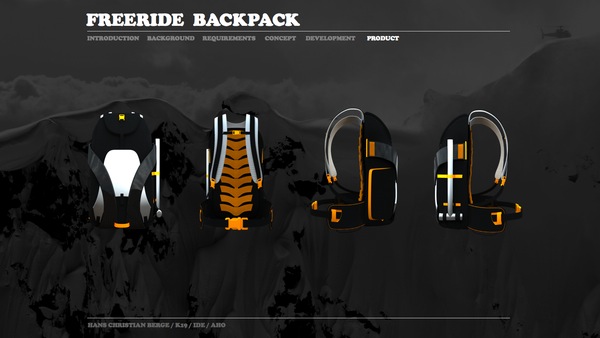
Freeride Photographer Backpack

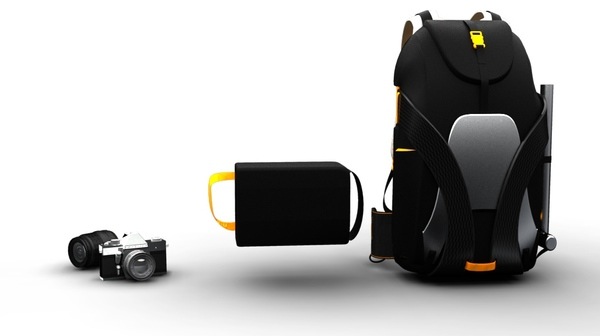
I’m a photographer, and I used to ski quite a bit in my childhood, so this is right up my alley. It has two compartments: one for regular items, and one pull-out compartment for a DSLR. The weight distribution is just right for the frequent twists and turns involved in skiing. From the looks of it, it will probably only fit a medium-sized DSLR like the Canon 5D and a medium zoom lens like the EF 24-105mm f/4L, but that’s good enough for me.
[via DesignLaunches]

Danger Bomb Clock

It’s probably not a good idea to carry this clock with you while traveling, but it’s fun to have it around the house. The alarm sound is a ticking bomb. To disable it, you have to disconnect the cable whose color matches the flashing light, which can be red, blue or yellow.

[via Economist]

Wooden Laptop Case by Rainer Spehl

This looks like a sturdy place to store my MacBook Pro! It’s made of solid wood, and has a magnetic latch to keep it closed. There’s a smaller size for the regular MacBooks as well. I only hope it’s lined with some felt, so my laptop won’t get scratched as it slides in and out.

[via LikeCool]

Prime Gaming Laptop

This laptop, designed by Kyle Cherry, has two collapsible side screens, in addition to its main 13″ screen. When fully opened, the aspect ratio is 32:10, and the screen’s diagonal size goes from 13″ to 26″. It’s a boon for watching movies or playing games, as you can see from the photos below. I love how the side screens slide over the main body of the laptop, allowing its owner to carry it easily.

[via LikeCool]

Porsche Sled

The Porsche design team have come up with this wonderful sled design. The skeleton is made of aluminum, the seat is imitation leather, and the runners are stainless steel. It even comes with its own carrying bag.

[via LikeCool]

Tibetan stick seat by Ashish Chaudhary

This is a seat made of three elements: two oval wooden clasps which hold a stack of loose sticks. The design is organic, rustic and futuristic at the same time. While it may not be comfortable by itself, I’m sure it’ll be just fine if you spread a fur or some thick wool comforter over it.
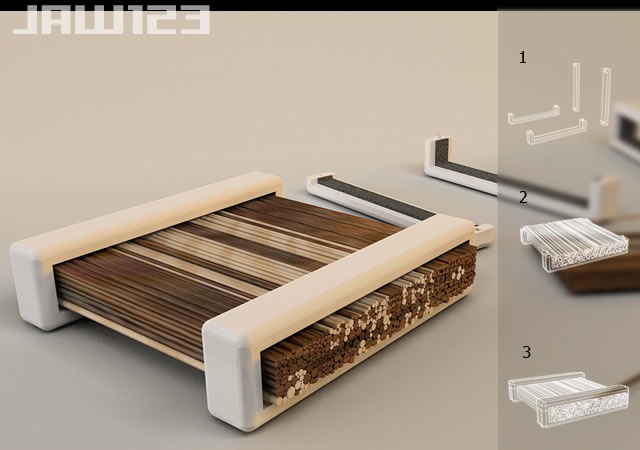
[via DesignLaunches]

Standard
Thoughts

Predictions about computer drives in the future

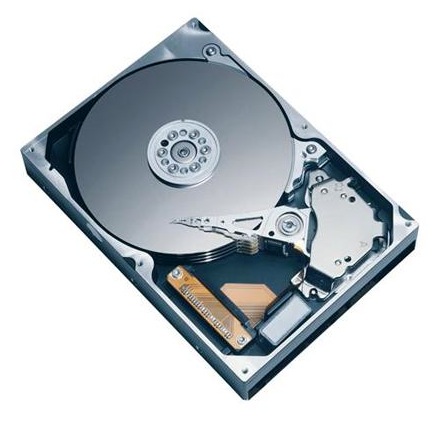
72GB SanDisk SSD SATA 1.8"

On 1/16/09, Computer World published an article where the author paints a future full of SSDs. He puts forth the idea that drives will not only be replaced by memory chips, but that these memory chips will be integrated into the motherboard, doing away with the SATA interface. There are a number of things I don’t agree with in that article, and I’m not the only one who’s annoyed. Others have called out the author for his statements as well.

For one thing, let’s remember that computer memory once relied on chips integrated into the central circuits. Going back to that sort of approach would be like going back in time. Weren’t we supposed to progress, not regress? The advantages have to be truly worthwhile, and I’m not convinced.

A claim made in the article is that of increased speed: “By making the drive part of a system’s core architecture — instead of a peripheral device — data I/O performance could initially double, quadruple or more.” I love these nebulous claims, don’t you? It could double, quadruple or more. Hey, why not 8x faster? Maybe 16x faster? Let’s just inflate the numbers, it looks great on paper…

From my experience, I noticed that transfer speeds to flash memory vary tremendously — based on how much used space there is on the memory itself, or the file size. Larger files transfer much faster than smaller ones. Sure, in my experience, there was a SATA or USB interface in the way, but that doesn’t change what happens with the flash memory itself.

We should also keep in mind that flash memory is limited in the number of write operations it can take before it expires. On the other hand, regular hard drives have a much longer life span. I for one don’t want to be in a situation where I have to replace an expensive SSD on my laptop because I’ve saved one too many files and it has just gone belly up.

That brings to mind another issue: will these SSDs be soldered onto the motherboard, or can I pull them out and replace them as needed, like I do with RAM modules? I think you can readily imagine how inconvenient it would be to have to service your computer if its SSD is soldered onto the motherboard.

How about space on the SSD? What do I do if I want to increase the space on my drive? Do I have to buy another full SSD? I’d much prefer we had SSD bays, like RAM bays, where I could stick additional SSD modules to automatically increase the space, just like it works with RAM. A partitioning tool integrated within the OS should then allow me to resize my existing partitions and spread them over the newly available space, or to create another partition out of that space.

I keep hearing people say that 250GB or 160GB is plenty of space for your laptop. That’s nonsense. I’m always maxing out my laptop’s hard drive when I go on trips, because I fill it with photographs and videos which I then unload to my external storage when I get home.

I find that for my needs, a 500GB or 1TB laptop hard drive is what I need right now. At some point in the future, I may need more. I haven’t started working with HD video for example. I know that’s a tremendous space hog. I think a 1TB drive would be the minimum I would need if I started to work in that arena.

With SSDs, price is still an issue, and so is space, at least for now. I just don’t find it practical to spend money on SSDs at the moment, and I don’t think my opinion will change unless their prices and storage specs start to match those of regular hard drives.While we’re on the subject of price, where in the world did Gartner get their figure of 38 cents per gigabyte? That’s the figure quoted in the article. I’m sorry, Gartner, but you folks need to check your math. I came up with 9 cents per gigabyte recently.

On the other hand, I do understand that the additional interface between the motherboard and the hard drive is a bottleneck. If we can do something to speed that up, I’m all for it. But you’ve got to prove to me (and to other consumers out there) that your technology is affordable and reliable and offers tangible benefits other than tech media hype.

I’m also excited about the possibility of increasing drive space on a modular basis, where I simply put in more SSD modules in expansion bays on the motherboard, like I do with RAM. But there’s no indication that we’re heading in that direction from the article itself. Until we get to that point, I’ll still continue to think that SSDs are aimed at the wrong market segment. Not everyone is a MacBook Air-toting management type. The bulk of computer users out there need affordable technology with plenty of storage, well made, and reliable over 3-4 years or more. SSDs just aren’t there yet.

Image used courtesy of SanDisk Corporation.

Standard
Thoughts

Storage drops below 9 cents per gigabyte

I see that Newegg.com lists the Seagate 1.5TB SATA hard drive for $129.99 with free shipping. Sure, it’s an OEM drive, which means it’s not boxed, but who cares? Do you realize what this means? It means you’re paying $0.086 per terabyte gigabyte. Storage has become even cheaper — unthinkably cheap. The previous relevant price point was $100 for a 1TB drive, which meant $0.100 per gigabyte (a dime).

Seagate 1.5TB SATA Drive

A gigabyte is now cheaper than a dime! I just didn’t think it would happen this fast. I remember when a dime would get you 100MB, and I thought that was a lot. Okay, let me not kid myself: I remember when a dime would get you 1MB or less. Now you get 1GB, which is 1,000 times the storage capacity, for less than the same tiny dime. Amazing!

If you’re looking for extra storage capacity, now would be a good time. If I hadn’t already filled up my main Drobo with 1TB drives, I’d jump all over these, because they’re definitely at the right price point, especially now that they’ve been cleared for use with the Drobo once more.

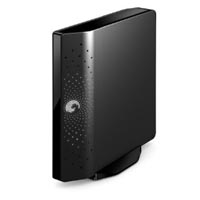
Seagate FreeAgent Xtreme 1.5TB

While I’m on the subject of good deals, let me remind you of my guide to getting good deals on hard drives. I mention it because Micro Center happens to be selling the Seagate FreeAgent Xtreme 1.5TB (a triple interface external hard drive) for $149.99. This means that you’re paying $20 for the enclosure over the price of the hard drive alone.

Remember, this is a triple interface drive (USB 2.0/FW400/eSATA), and that means the enclosure is very inexpensive. Instead of buying one of those DIY enclosures that may or may not work (I’ve been there), you’ll get something that’s guaranteed to work, or you can return it.

Standard
Reviews

Hardware review: WD My Book Studio Edition II

WD MyBook Studio Edition II - 02

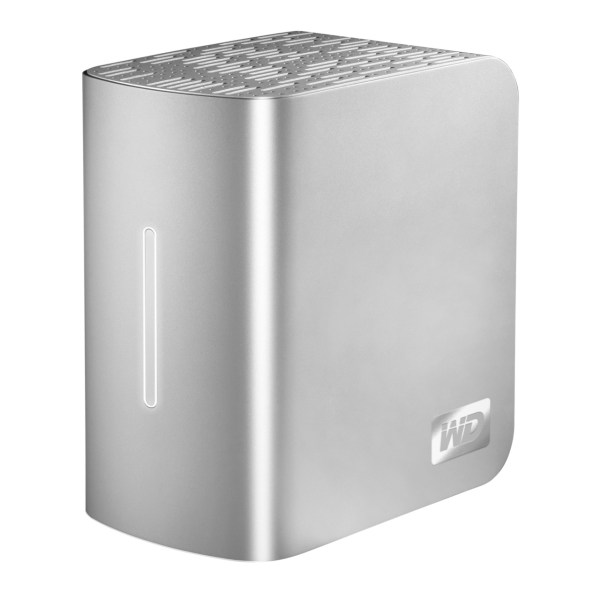
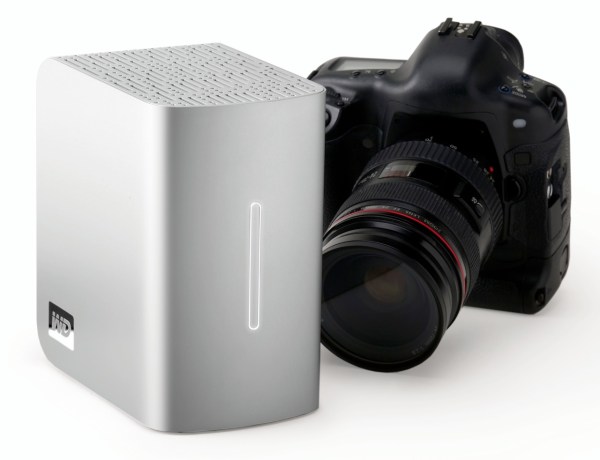
I have been working daily with a WD My Book Studio Edition II drive for the past eight months (since April ’08). I mentioned it back in July in my popular “What’s on my desk” post. It is a quad interface (USB 2.0, FW400, FW800, eSATA) 2TB drive that can run in RAID 0 (2TB total space) or RAID 1 (1TB total space). My review can be summed up in these three words: it works great.

I should say here, just as I said in my other two reviews of the My Book Pro Edition drive (see paragraph below for links), that this drive was given to me by WDC as a replacement for my faulty My Book Pro drive. I didn’t purchase it, but at the same time, I am under no obligation to anyone to praise it needlessly. I do so because it has really worked for me.

After all these months of heavy use, I have nothing bad to say about this drive. I have put it through its paces, transferring terabytes of data back and forth from it to my laptop and to my other drives, I have used it daily, I have put it through sustained data writes of several hundred gigabytes at a time, and it has not failed me yet. In stark contrast to my experience with the WD My Book Pro Edition II drive, this drive has outshined all of my other external storage devices, including my Drobo.

True, while nothing beats the Drobo when it comes to sheer storage space and flexibility in terms of its building blocks (the drives themselves), the My Book Studio Edition II drive has been faster than the Drobo when it came to working with my photos in Lightroom, in both RAID 0 and RAID 1 modes, and it has also been faster when it comes to data transfers (writing to the drive itself).

WD MyBook Studio Edition II - 07

I did not have a chance to use the drive through the eSATA interface. I used it mostly through the FW800 interface, and, briefly, through the FW400 and USB interfaces. Given that it can transfer data at up to 3GB/s through eSATA, I might just buy an adaptor for my MacBook Pro in the future. I was pretty happy with the FW800 speeds though (up to 800 Mb/s).

My feelings about this drive are somewhat harder to understand for those of you that have not had to deal with a My Book Pro Edition drive. If you did not have to put up with constant overheating, data loss, fan noises, disconnects and computer resets while using that drive, then you can’t possibly appreciate how WDC managed to get things so right with the My Book Studio Edition drive.

Somehow, they have, and for me, it’s a pleasure to use this drive. It suffers from none of the problems of its predecessor. It works reliably, each and every time. It’s fast. It’s quiet. It doesn’t overheat. It doesn’t cause my computer to crash. It doesn’t lose any of my data. The enclosure looks even better. The white LED on its front is much less annoying than the blue LED on the My Book Pro. It has greater capacity. It has more interfaces. It has a 5-year warranty, which amazes me when I consider that most tech products have a 3-year projected lifespan. The list goes on and on, and I have only good things to say about it.

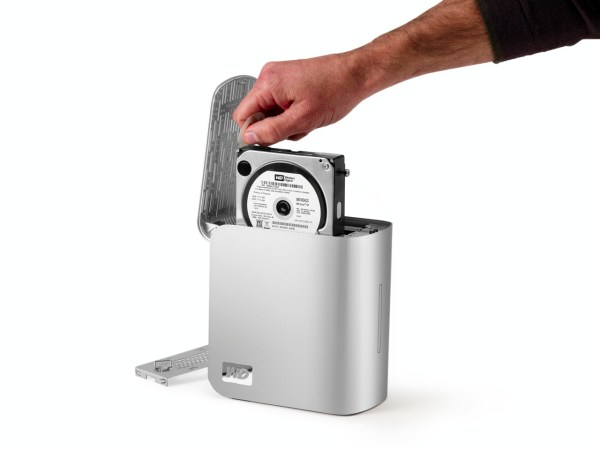
The drive uses the new GreenPower drives from WD, which use 30% less energy and do not get as hot as older hard drives. This means the new enclosure doesn’t need a fan. Another cool thing is that it’s much easier to replace the hard drives, since you won’t need a screwdriver. The enclosure opens easily, and the hard drives pull out with the aid of tabs. Having needed to open the enclosure for the My Book Pro Edition drive, I can tell you it was a lot more convoluted than this.

WD MyBook Studio Edition II - 08

The wonderful thing about this drive is that it’s such a great deal right now. As I pointed out in a previous how to article entitled “A look at hard drives: finding the best deals“, it’s always a good idea to compare the price of the hard drives themselves to the price of the enclosure plus the hard drives, to see how much you’re paying for the packaged, branded product, and whether it’s worth it. Well, 1TB hard drives are anywhere from $100-140 at the moment (there are two of them in the My Book Studio Edition II), and the product itself costs about $280-290 right now. That means, if you factor in the best price scenario for the hard drives, that you’re getting a quad-interface enclosure which is quiet and it actually works on most computers (which isn’t something I can say about other off-the-shelf DIY enclosures) for about $80-90. That’s a great deal in my book.

Detailed specs for the My Book Studio Edition II drive are available from the WDC website. You can buy it from Amazon or from B&H Photo.

Photos used courtesy of Western Digital Corporation.

Standard
Reviews

Hardware review: WD My Passport Studio

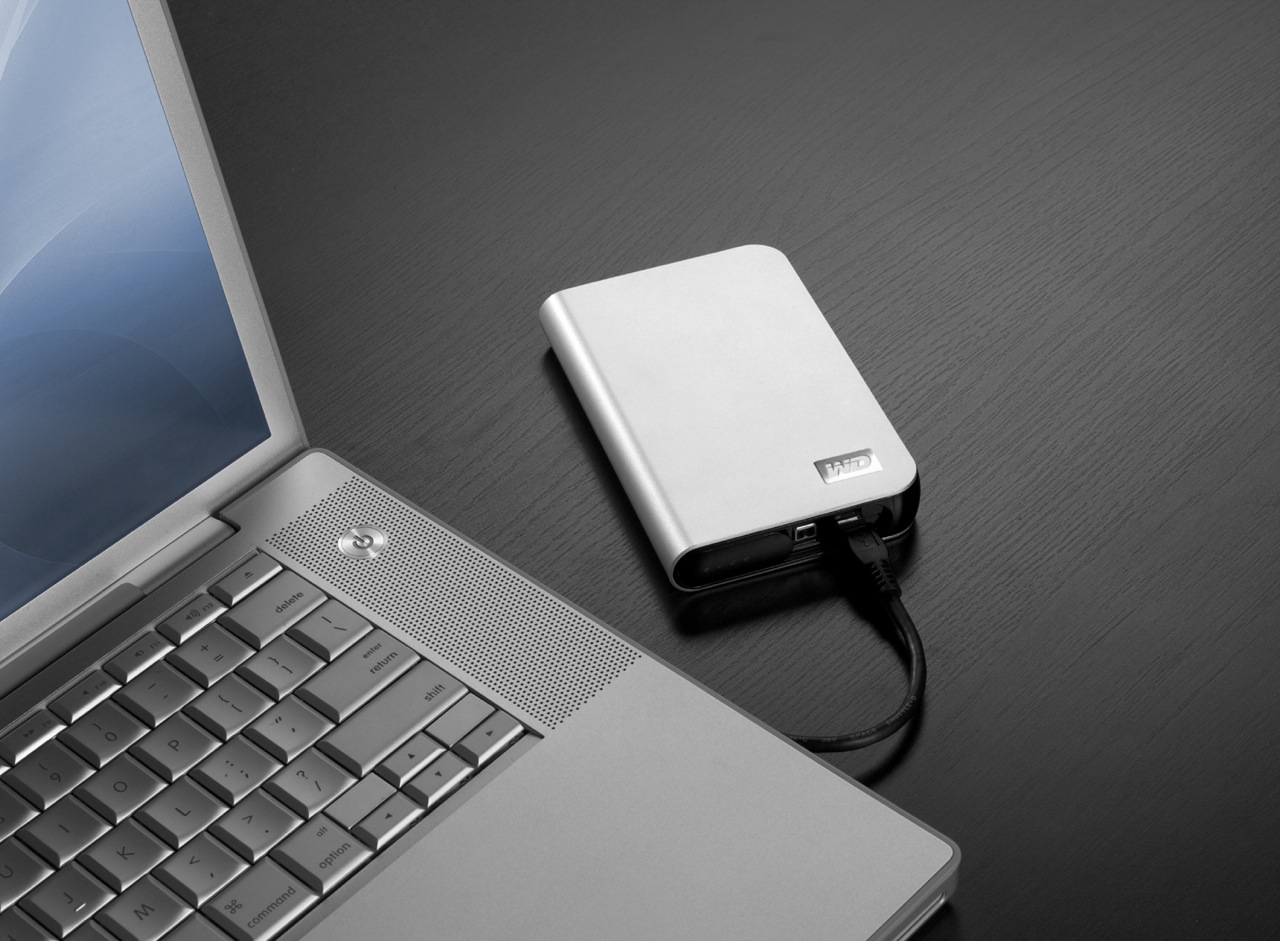
While the WD My Passport line of portable drives is a couple of years old, their My Passport Studio models are new, and their specs and capacities were greatly improved recently. The My Passport Studio line is meant for Mac users and comes formatted in HFS+, although the drives can be used just as well with Windows machines if they are reformatted to NTFS or FAT32.

On 10/30/08, WD introduced Firewire 800 connections and new capacities (400GB and 500GB) for these wonderful little drives. The base capacity was upgraded to 320GB, and the 250GB size was phased out. These latest drives feature triple interfaces (USB 2.0/Firewire 400/Firewire 800), which is something one normally sees only on external desktop hard drives (the 3.5″ size).

Technology moves fast, doesn’t it? Just a few months ago, the My Passport Studio models featured USB 2.0 and Firewire 400 connections. The top capacity was 320GB. I myself have a 1st generation My Passport drive, a 160GB model with a USB 2.0 connection. I bought it in February of 2007, and it’s worked great ever since.

The more recent models from the My Passport line have something that my 1st gen My Passport drive doesn’t have: an external capacity gauge. I think it’s neat to see how much space is used up on the drive at a glance. These latest drives also have something I haven’t seen before: turbo drivers for faster data transfers. The drivers are available for Mac computers only. I haven’t used the drive yet, but when I get it, I’ll be sure to test out data transfers with and without the drivers, to see if there’s an improvement between the two modes. I hope the drivers are well-developed and won’t introduce any sort of OS stability issues. I’ll also test data transfers between USB, FW400 and FW800.

I’m really looking forward to getting a 500GB Studio drive, because of its unbelievable capacity. It is double the size of my MBP’s hard drive, which is 250GB. I’m going to be able to store lots of photos and videos on it when I’m traveling, and use it to back up important files from my MBP and my iMac. I also think the My Passport line of drives are some of the best-designed portable hard drives on the market.

I can’t find the 500GB model in any online stores yet. Newegg still lists the Firewire 400 models, albeit at reduced prices, and Amazon only has the 400GB model. B&H Photo also only lists sizes up to the 400GB model. I don’t think I need to worry, since it’s very likely that by the end of November or sooner, the 500GB model will be available in most stores.

Photos used courtesy of Western Digital Corporation.

Standard