Reviews

Drobo overestimates used space

Here’s what happens. When the Drobo is connected to a computer and the Drobo Dashboard software isn’t running, the Drobo’s capacity meter will overestimate the used space, potentially triggering a low space alert. When the Drobo Dashboard software is started, it does its own used space calculations and corrects the capacity meter, literally turning off one to two or even three of the blue LEDs that indicate how much space is used.

There are 10 blue LEDs, one for each 10% of space used on the Drobo. When I connect one of my Drobos to my computer, the capacity meter lights up 9 of the LEDs, indicating 90% disk space used. When I start up the Drobo Dashboard software, two of the lights are turned off, leaving 7 on, or 70% disk space used. Also, although low space warnings are triggered when the Drobo Dashboard is started, after it calculates the space used, the warning go away, and the Dashboard screen goes from yellow to green.

I made a video which shows this quite clearly. I apologize for its poor quality, but I made it without any prior setup, just to show you that I’m not making this up. This also happens for my other Drobo, where the capacity meter shows 50% disk space used when I connect it, but drops to 30% disk space used when I start up the Drobo Dashboard. If you have a Drobo yourself, try it out and see.

Download Drobo overestimates used space (640×480, MP4, 35MB)

I notified Drobo Support of this issue a couple of days ago, but I have not yet received a reply from them. I will be glad to include any feedback/clarification from them right here, and will update this post with further information as I receive it.

I should also point out that there’s still no fix for the other two issues I outlined in my original Drobo review recently, where I pointed out that:

  • The transfer speed slows down significantly (and somewhat inversely proportional) to the amount of disk space remaining on the Drobo after the 70% mark is reached. In other words, the less space there is (in terms of the percentage, not GB remaining), the slower it’s going to be to access and transfer data to the Drobo.
  • The Drobo becomes excessively noisy when the fourth hard drive is inserted, and the fan will go into high gear when the Drobo isn’t even used. It seems this is loosely tied to the ambient room temperature, and once it goes over 75 degrees Fahrenheit, the fan kicks on and stays on for a long time. But again, you’ll only see this issue when the 4th hard drive is inserted. Given that the Drobo is a consumer device which is meant to operate at room temperatures, not in a climate-controlled server room, this is not appropriate behavior and should be corrected.
Standard
Reviews

Hardware review: Super*Talent 8GB USB flash drive

The 8GB Super*Talent USB flash drive I ordered from Brando arrived last night, and it was a very pleasant surprise to see how tiny it really is. It’s smaller than a simple USB connector, in both width and thickness. I am amazed by how small it is — and the thought that 8GB of data somehow fit onto this minuscule piece of steel and silicone boggles my mind.

I put together a short video review to show you the drive’s size and also to do a quick speed test. I copied a 1GB movie onto it, and the copy operation took about 3 minutes. That means it’s about half as slow as a Drobo in terms of transfer speeds.

The photos of this flash drive do not do it justice. It’s much smaller than it looks in the online stores. I hope that the video itself will do a better job of demonstrating its size (to scale), and its beautiful and simple design.

Download Super*Talent video review (640×480, MP4, 41.2MB)

This USB flash drive’s size and design leave me thrilled to no end. If you’re in the market for a spacious yet tiny flash drive, the Super*Talent fits the bill perfectly. The only thing left for it to prove is its long-term durability. It is rated PICO-C, which means it’s rugged and water resistant. I am very interested to see how long it lasts — if I don’t lose it first.

Updated 10/30/08: Still works just fine after 5 months of use. I have it attached to my keychain, and I carry it around in my pocket all the time. It’s got a few scratches, but it works as advertised. Still happy with it.

Standard
How To

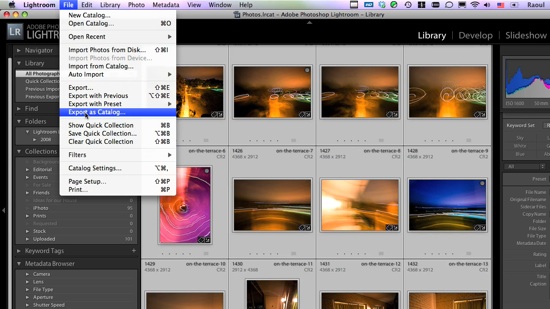
How to transfer photos between Lightroom catalogs

This screencast will show you how to transfer photos between different Lightroom catalogs, and it will go beyond that by also demonstrating how the whole process could be made a LOT easier if Adobe wanted to.

In the screencast, I refer to an article I wrote a while back, entitled “The next stage for Lightroom“, where I put forth a proposal for improving the way Lightroom stores photos, with an eye on catalog portability (laptops, for example). If you have the time, please read through that article after you see the video.

The video is about 10 1/2 minutes long, file size is 78MB, and it’s 720p HD, MOV. You can view it online by clicking on the screenshot below, or download it.

Standard
Reviews

Problems with meta-data entry in Lightroom

I’ve been having problems with meta-data entry in Lightroom, particularly the location meta-data. It’s not my computer that’s to blame. The problems exist on both the PC and Mac versions of Lightroom, although they’re more apparent on the Mac version.

When I first mentioned this on Twitter and Friendfeed (see here, here and here) I promised I’d put together a video if I found a good screencasting application. Ken Verburg pointed me to iShowU, which I used to make a short screencast demonstrating the problems. Thanks Ken!

I uploaded the video to my Vimeo account last night, but don’t try to view it there. The compression is terrible and you won’t be able to see what I’m doing. Instead, go there and scroll down till you see the download link. Click on that and view it locally on your computer (you’ll need Quicktime or iTunes). Another option is to download the video directly from my site. The original video has no loss in quality and you’ll be able to see everything properly.

The video will do a good job of conveying my frustration with the user interface in Lightroom. I really do hope the final version of Lightroom 2 will address these issues, because entering location metadata in Lightroom right now is terribly frustrating.

Standard
Lists

Condensed knowledge for 2008-03-22

Standard