Thoughts

Google Reader changes things, slightly

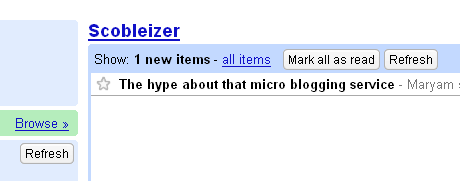
Logged into Google Reader this morning to get my daily fix of feeds, and saw that something changed. Took me a few seconds to realize it, but it looks like they replaced the command links with nice, rounded buttons. Have a look:

The new Google Reader buttons

Those buttons used to be links. Maybe this happened yesterday, maybe it happened overnight, but I just caught it, thought it was cool, and wanted to share the news. Certainly makes for a better look.

It also looks like Robert Scoble‘s spending too much time on Twitter and not enough time on his blog. Just one new post since yesterday afternoon?

Standard
Thoughts

A lot of good things are happening

I’m pretty excited, because Canon confirmed today that they’ll be shipping out an EOS 30D to me for review. It’ll come with an 18-55mm zoom lens, which is actually going to act like a 28-88mm lens because of the 30D’s 1.6x focal length conversion factor which, being an EF-S lens, won’t be affected by the 30D’s 1.6x focal length conversion factor (thanks Erik!). So I’ll have that gorgeous camera for 30 days, and I’ll be sure to take lots of photos with it. Meanwhile, I’m saving up for an EOS 5D, and may be able to purchase one in a few months.

My blog readership is growing as well, and I don’t know yet if it has to do with my use of Twitter. At any rate, my thanks to all of the new subscribers!

Finally, I’ve just finished a review of the Fuji FinePix S9100, and I’ll likely submit it to BlogCritics tomorrow. After that, I’ll publish it here as well. While the review’s good (tooting my own horn, I know), the camera isn’t. Stay tuned for the details.

Standard
Reviews

Google Docs (and their online office suite)

Until yesterday, I just didn’t see the point of online office suites and of apps like Google Docs. Sure, I thought they were nice as proof-of-concept stuff. They made me go “Ooh! Look, cool Ajax!” but I didn’t use them. But this past weekend, I needed to find and work on an old document. Problem was, I hadn’t touched that thing in months. So I had to wonder which one of my computers I used when I last made changes to it, because that’s where the latest version would be.

Finally, I dug it up, and emailed it to my Gmail account. I figured I’d open it later and review it. And when I opened that email containing it, there was an option to open it up in Google Docs instead of saving it locally and editing it in Word. So I thought, why not, let’s give Google Docs a shot! I opened it up there, and all of a sudden, things clicked! I realized that instead of always digging up the latest version on my local computer, I could simply keep one version on Google Docs, edit it where I like, and attach it to emails I send from my Gmail account or save it locally. I know, this is basic stuff, but until I actually correlated the access-anywhere functionality of Google Docs with the need to use it, it didn’t click for me. And I suppose it’s the same with a lot of other people.

Storing important documents online makes sense. It especially makes sense for those things you only need infrequently, and by the time you need them, you can’t remember where you put them. For example, a list of your belongings (to use for home owner’s insurance claims), or letters to people (for those rare cases when you need to write and mail them), or a list of places to see when you go on a trip, etc. are all documents that can benefit from being easily accessible and editable. Or how about that short story or article you’re working on? Give it a try and see how it works for you!

While I’m on the subject of Google Docs, I should mention there was a bug with the option to email a document right from the Google Docs interface. It just didn’t work for me, so the Google engineers might want to have a look at that. I also think it’d be nice if an option to attach a Google Docs & Spreadsheets file was added to Gmail’s file attachment dialog. Currently, if I’m writing an email and wish to attach a Google Docs file, I need to either save it locally (defeating the purpose of using it online) or publish it, and include the URL to that file in the email. I’d like to be able to browse my Google Docs & Spreadsheets storage area and select a particular document right from within Gmail’s interface.

Standard
Thoughts

A bit of site maintenance

I made time tonight to do a few things that I’ve wanted to get done for some time:

  • Introduce a new section called Faves, which displays my shared items from Google Reader. This is where I’ll showcase the posts I find really interesting and worthwhile to read from the various blogs and feeds that I’m subscribed to. I’ve been sharing blog items in Google Reader for months, and until now, they only showed up in a little box in my sidebar, but I wanted to present them a little better by dedicating an entire site section to them. They will all have links right back to the original items, and I’ve also included Feed Flares (through FeedBurner) that will allow you to subscribe to their particular feeds, Digg them and save them to del.icio.us right from the site. Yes, you’ll be digg-ing and bookmarking the original items, not my site/feed, not to worry about that. The intent is to promote these stories and their authors.
  • I did away with the Mobile and News sections. Judging by the stats, very few people were using them.

While I’m on the subject of site updates, I also wanted to let you know that I put together a unified/single feed for all of my content. I used the My Networks feature of my FeedBurner account (gotta love them!) and put together a single feed that gathers my ComeAcross, Zooomr, YouTube, del.icio.us, and Twitter content and packages it in nice little, eatable nibblets — well, they’re XML nibblets anyway. Rick, thank you so much for telling me how to do this! And, just in case you were wondering, I didn’t include my three Dignoscentia feeds. Since this will be a commercialized feed, it just didn’t feel right to include content I didn’t want to commercialize at all.

And yes, you can still subscribe to individual feeds for all of this stuff. Just navigate to the various site sections using the menu at the top of this page, and choose whatever feed you want. Not sure yet if I’ll feature this single feed anywhere on the site (other than this post), because I don’t want to confuse people. Many still don’t know what feeds are (sad, but true), so I’ll just wait a little longer and give it some more thought. Want to know the fun part? The URL for this unified feed is: http://feeds.feedburner.com/Raoul. Beautiful, isn’t it? 🙂

Standard
Thoughts

Updated blogroll and links

Finally found some time to update my blogroll and links sections with the blogs and sites I think are worthwhile to read (I check them daily myself.) So in case you’re looking for a few interesting blogs to add to your feed reader, check out the sites I’ve highlighted.

On a related note, sorry for the less-than-regular posts, I am trying to complete some consulting projects. I’m also going through my photo library (18,000+ photos) and uploading the better ones to photo sharing sites. As both of these activities are time consuming, my free time has been significantly reduced. On the bright side, I get to make my clients happy and share good photos with the world, so it’s not that bad.

Standard