Thoughts

My Drobo review is first at Google

A couple of days ago, I noticed an increase in the traffic to my Firewire Drobo review, most of it from search engines, so I did a quick search on Google for the phrase “drobo review“, which is what people were using to find me. To my surprise, my review was the first search result that came up! I’d been in the #2 spot for a long time, just under CNET, for the same phrase, but now, without having made any changes to my review since I’d written it, I ranked first.

drobo-review-google-search

This makes me happy, because when I created my site, I wanted to sit down and write good articles while staying away from any unethical SEO tricks or even white-hat SEO tricks like keyword loading and other such unappealing, tedious stuff. I just wanted to create good content and get noticed because of that, not because I’d tricked the search engines into ranking me higher up the page. That would have been an empty success indeed.

It also makes me happy because I like my Drobos. So far, they’ve worked well for me, and I’m glad I’ve found a reliable and expandable way to store all my data. It’s also worthwhile to note that my Firewire Drobo review was published months after it came out officially. I did not get a review unit, I didn’t have to pull any strings to be among the first to get one, and I didn’t spend a feverish night working on my review after it first came out. You know how the press clamors to get review units of products when they first come out… I didn’t do that, and it’s very refreshing to see that after taking my time and really putting my Firewire Drobo through its paces, intensively, for a prolonged period of time, I was able to write a truthful review that is now ranked first at Google.

It’s been about three years of intensive writing, and my work has begun to pay off. (I began publishing multiple articles per week in 2006. I’d only been publishing sporadically until then.) In 2007, almost two years ago, I noticed I was getting more and more traffic from search engines, and made a list of the articles that were getting noticed. For a lot of them, I was either on the first page of search results, or among the first few search results, right at the top.

Still, it’s something to be the first search result for what is a fairly common tech phrase such as “drobo review”, and it really makes my day that I, a writer working alone, using WordPress and hosting my site on my own little Ubuntu web server at SliceHost, has outranked CNET and other big names such as Engadget and others, on Google, the world’s biggest search engine. It serves to illustrate very well a point Matt Cutts from Google has made time and time again: just focus on writing good content, and the rest will come. You’ll get indexed, and as your site builds a larger collection of articles, your online trust will cause you to rise up among the search results, until you make it to the top. You don’t need tricks, you don’t need to get headaches from trying to squeeze SEO juice out of every paragraph and page title and others — you just need to write informative articles.

I’d like to thank God for this. You see, I live by certain principles which are rooted in my religious beliefs, most notably in the Ten Commandments found in the Bible. When I began to write online and created my site, I didn’t want to steal, and I didn’t want to lie. Taking content from others (content-scraping) is theft, so I don’t condone it or do it. Using dirty SEO tricks to rank higher in search results is also theft, because those who do it are robbing others of those spots and robbing tech engineers at search companies of their time, which they will have to use to modify algorithms and clean up the search results. And using those same dirty SEO tricks is effectively a lie, because those who do it are misrepresenting their websites and their articles. That’s not me, I don’t want to do those things, and I’m really glad to see that God proved me right when I stuck by my principles. I’m also glad to see that a company such as Google exists, and that it rewards honest, forthright behavior.


Standard
Reviews

WordPress.com gets more expensive

Ever since I learned about WordPress, I thought it was the coolest blogging platform, and the more I found out about the WordPress.com network, the more I liked the options they offered their users. To this day, I regret not having started to publish directly on WordPress.com instead of doing it on my own with a self-install of WordPress, but each path has its pros and cons. Incidentally, I discussed them (the pros and cons) at length with WordPress staff recently, and may put together a guide to switching from WP.com to WP.org and vice-versa, at some point.

One of the things I really liked about WordPress.com was the 5GB space upgrade, which, among other things allowed me to upload videos that would be transcoded and played directly inside the blog. For $20/year, it was a great deal. I never got to use it on my own blogs, which were and still are self-hosted, but I recommended it to clients and friends. I liked it because the video player was and still is integrated into the blogging platform. This saves the user the hassle of uploading it to a different video sharing site, then putting the right embed code into the blog post.

Now, sadly, that option is gone. I received an email from WordPress today which announced the arrival of a formal video upgrade option, called VideoPress, at a cost of $60/year. Like other video upgrades on the market (such as Vimeo’s own Plus program), VideoPress allows the upload and streaming of SD and HD video. The price is also the same.

wordpress-upgrades

I can understand this change though. According to WordPress, allowing people to upload videos under the regular 5GB space upgrade was a testing ground which allowed them to figure out what they needed to charge long-term. After all, HD video eats up a lot of space and requires a lot of processing power to compress, not to mention the bandwidth needed to stream it. Here’s what Matt Mullenweg, WP’s founder, says in a response to a question about the price tag:

“We try to run every part of our business in a way that’s sustainable and supportable for the long-term. By charging a fair amount for a superior service we can continue to invest in expanding the feature to be a great option for high-end video, just like WordPress is a fantastic option for high-end blogging. (And you wouldn’t believe how expensive it is to host and stream video, which is part of the reason we’ve waited to launch this until now, we’ve been working at getting the costs down.” [source]

Now when you realize that both WordPress and Vimeo charge $60/year for HD video uploads, think about YouTube, and the astronomical expenses it has to eat up every year because it doesn’t charge its users anything to upload gobs and gobs of video.

I looked at the specs for the video sizes of the new WordPress Video Player, and there are three of them: 400px (SD), 640px (DVD) and 1280px (HD). That’s plenty for live streaming. I do wish there was an option that would let the video authors allow downloads of the original video files, like Vimeo does it.

The upper limit on a single video file is 1GB, although it’s not hard-capped like at Vimeo. WordPress will let you upload 1.5-2GB files, although they say results may vary and uploads may die out if your connection is slow.

One thing I’m not clear on is the space allowed for the uploaded videos. Is there a weekly cap, like Vimeo’s 5GB/week limit, or can we upload as many videos as we want? And if so, what’s the total space limit allotted to us when we purchase the upgrade? Is there a special cap, separate from the standard space of 3 GB per blog? Or does each video count against the total space allotted to the blog? Because if that’s the case, that would mean VideoPress is going to be more expensive than Vimeo Plus, since users will need to purchase space upgrades for their videos in addition to VideoPress.

For example, a user would shell out $60 for VideoPress, then soon find out they’ve filled up their 3GB quota, and need to purchase a space upgrade. It’s not hard to imagine one would need about 15GB or more per year with HD video, and that would mean an additional $50 on top of the initial $60, bringing the price tag to $110. This point definitely needs clarification, because it just wouldn’t be fun to get taxed twice for it.

I do like the nice gesture on WordPress’ part, where they gave existing users of the space upgrade and the video player a free VideoPress upgrade for a year. Had they not done that, the transition would have been too jarring for them, so kudos to WordPress for putting money aside and thinking about the user experience.

Standard
Reviews

Installed and used the SimplePie RSS plugin

Installed and used the SimplePie RSS plugin for WP on my regular site at raoulpop.com. Its name is somewhat of a misnomer. It’s neither simple, nor “easy as pie” to begin with. Sure, after you check the documentation carefully, a light goes on in your head and you realize how to use it, but there’s a learning curve. I do agree, however, that the things it lets you do are quite nice. For example, I used it to rewrite my SmugMug recent photos feed and show only the thumbnails of the latest 10 images uploaded, each linked directly to the original image. I really like the result, but it took a bit of figuring out.

screenshot-home-page

Standard
Thoughts

WordPress Stats plugin has gone cuckoo

For over a month now, I have been unable to rely on the official WordPress Stats plugin. (I say official because the folks that made WordPress also made this plugin.) It, all of a sudden, started assigning all site visits to the same article, so that all of my stats became completely skewed. Let me explain it with a screenshot:

WordPress Stats has gone cuckoo

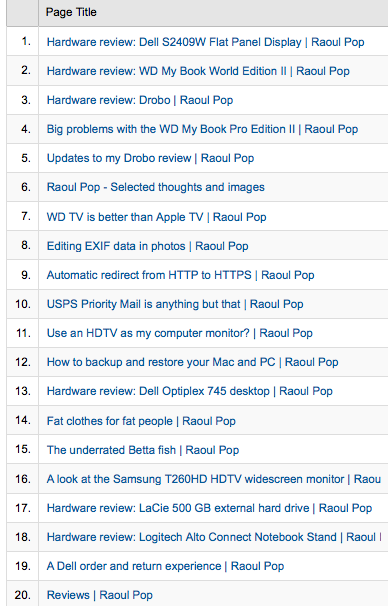
Instead of seeing the proper distribution of site visits by titles, which is what happened in the past, almost all of the site visits get assigned to a random post. I have no idea any more which titles get the most traffic for a given day. I know this is wrong because I’m also using Google Analytics. Here’s a screenshot of the 20 most popular titles for the past 30 days.

Google Analytics Content by Title

I like WordPress Stats because they aggregate the data almost instantly, whereas there’s a 3-4 hour delay with Google Analytics. Sometimes they even correct the data a day afterward (this happened to me recently) so you can’t rely on their figures until 24-36 hours after the fact [reference].

I stopped using WordPress Stats for a while, hoping the problem would somehow work itself out, but when I re-activated the plugin, all that happened is that it started assigning all site visits to a different random post. Whoopee…

If someone at WordPress reads this, please let me know if it’s something I’m doing wrong, or if it’s something that you’ve got to work out on your end. I posted about this problem in the WordPress forums, but I have yet to receive a reply there.

Standard
Reviews

PictureSurf, a new gallery plugin for WordPress

PictureSurf Plugin

PictureSurf is a new WordPress plugin that launches today (February 10, 2009). It aims to make it easier for bloggers to upload galleries to their WordPress sites.

I spoke with PictureSurf’s founder, Alan Rutledge, via chat this morning, and I wanted to find out what makes his plugin different from the standard WordPress functionality. You may or may not be aware of the fact that WordPress offers an Image Gallery feature that’s built into the core WP install.

From Alan’s perspective, the PictureSurf plugin differentiates itself by offering:

  1. An enhanced user interface, because it lets you drag and drop photos to rearrange them, label multiple photos at once and,
  2. A little more SEO juice, because of better permalinks and conditional nofollow tags on the thumbnail links. The nofollow tags are activated when there’s too little content on the photo page — for example, your description of the photo is too short, etc.

As I told Alan, I don’t see enough of a difference between this plugin and what WordPress already offers to convince me to use it myself. The PictureSurf website claims that it’s faster to build a gallery with their plugin than with WP, but I ran into a glitch when I tried to use it. I couldn’t upload any photos. The upload engine froze and even though I hit Cancel and tried to re-upload the photos a few more times, I wasn’t able to do it. Still, that’s not too important. I’m sure that if I had more time, I could have gotten it working properly.

The thing is, I built a WordPress Image Gallery for this review in under 30 seconds. Each thumbnail links to its own photo page, very much like PictureSurf does it. I was able to choose how many images I wanted in each row. And I was also able to drag and drop the images to change the order in which they appear in the gallery. You can see the gallery below.

Another claim made by the PictureSurf plugin is that you can monetize your blog much better when an image sits on its own page instead of displaying on a blank page. I’ll agree with that, but I’ll also add that WordPress lets you do the very same thing. In WP’s Image Gallery options page, you get to choose where the thumbnail links go: they can go to the images themselves, or to something called attachment pages, which are pages that WP generates dynamically for each photo, using your blog’s own theme. So I ask again, what is it that differentiates PictureSurf from WP’s built-in functionality?

As much as I love WordPress plugins, I’m a big believer in built-in functionality. I don’t want to be stuck in a situation where I need to stop using a plugin, for whatever reason, and have my post archives become unusable because the plugin is no longer there. I ran into that issue with a video plugin I used in the past. It stopped being supported, and then I had to modify all of my old posts where I embedded videos, in order to make them playable again. If the long-term survival of your content is not a concern for you, then don’t worry about it. It is a concern for me though.

Last, but not least, I found PictureSurf’s design somewhat rough. It just doesn’t integrate as well as it should into the WordPress Editor. Furthemore, if it aims to take over the image gallery role, then it should fully take over that role. If I install PictureSurf, once I click on the Image Upload button in the WordPress Editor toolbar, it’s the PictureSurf AJAX window that should open up, not the WordPress Image Uploader. And when I access an old post that uses an image gallery, written before I installed PictureSurf, it should automatically take over that gallery and display the images using the PictureSurf gallery settings. But none of this happens. Old posts remain the same. I’d have to modify each and every one, manually, in order to get PictureSurf working there. As a publisher and writer, that’s a labor I’m not willing to undergo.

For me, the PictureSurf plugin does not differentiate itself enough from the standard WordPress functionality and does not offer enough added value in order to make it to my roster of active plugins. I find the WordPress Image Gallery feature quite adequate and necessary, and therefore, using the PictureSurf plugin becomes a matter of preference, not need. I myself do not need it, therefore I won’t use it. Your situation may differ. Feel free to try it out and see what you think.

Standard