How To

If you can't see the photos on this site

Just had a friend tell me he can’t see the photos in my posts, so I called him and we figured out the problem. There are two things to check, and this solution applies to all blogs out there that might have this problem.

  1. Are you at work? If you are, there’s a good chance that your network admins might have blocked photo sharing sites like Flickr. Therefore, all blogs using those sites to host their images will have problems displaying their photos. While the blog might very well come up, the images won’t, and if you don’t know what’s going on, you’ll be wondering if the blog’s owner is in a right state of mind, talking about pictures that aren’t there… But really, everything’s on the up and up, except for your lousy network admins and cheesy IT policies.
  2. Are you using Firefox? If so, have you gone to Tools >> Options >> Content >> Load Images and checked the box next to “For originating site only”? If you did this, no images of any kind (GIF, JPG, PNG, etc.) will show up unless hosted directly on the blog. Uncheck that option, and a whole new world will open up to you. Here’s a screenshot of that Options tab in Firefox.

Load images option in Firefox

Hope this fixes it for you!

Standard
Thoughts

Someone's reading your email at work

This is a bit of old news, but the NYT is running a story on how companies read their employees’ email at work. The bottom line’s worth repeating, because people just don’t seem to learn: don’t use work email for personal messages!

I say this from experience. I’ve been an IT Director twice in my career, and I read people’s emails on both occasions. I didn’t and I don’t relish it – as a matter of fact, I hate it. But I had to do it, in order to see if activities that could incriminate or damage the organization were taking place.

Now I understand that my IT policies were actually pretty relaxed. I didn’t read email all the time, only when someone or something aroused my suspicion or that of the executives, and it was then that I went searching for evidence. I understand that in other places, this sort of a thing is automated, and happens routinely. Every email going out of the company is either scanned by a machine for keywords, or read by an employee, or even worse, every piece of email, internal or external, is scanned and flagged for further review as needed.

People, learn from this! It was not seldom that I stumbled onto emails where employees were flirting with each other at work, or talking about their supervisors in demeaning language. These sorts of things result in disciplinary action! If you’ve got to talk about those things, get a personal email account, and do it there, but don’t use company email for that sort of a thing! But I guess if you’re ignorant enough to badmouth your boss with a co-worker while you’re at work and supposed to be working, you’re ignorant enough to talk about it on company emails that can and will be used against you.

It’s time people realized the whole of their work activities is a permanent record, and this includes emails, and pretty soon will likely include voicemails. Make sure your email record is squeaky clean, and reflects your work ethic. If you talk the talk, walk the walk! If you say you’re a professional, let your email reflect that. Ask yourself this: if someone were to go through your work email now, would you be ashamed of what they’d find there? Is there something you could be disciplined or lose face for? If you work in a company that deals with secret/classified information, are you leaking company secrets, knowingly or not? If there is, cut it out! Put a stop to it! It won’t do any good to go back and delete emails, the company probably keeps a backup of the messages anyway. Just change your behavior and move on.

If you must get personal emails at work, use your personal account, or get a free webmail account from Gmail, Yahoo or Hotmail, and check that. Tell people to SMS you on your cellphone instead of emailing you. But for goodness’ sake, and for the sake of your career and bank account, don’t use your work account! It’s just plain dumb.

Standard
Thoughts

HP to cancel telecommuting for its IT division

In a move that stunned its IT workforce and the public, HP’s new CIO announced it will eliminate telecommuting for most of its IT folks. They’ll be forced to come to work at some 25 offices in various locations around the world. If they don’t, they’ll be out of a job without severance pay. Due to its previous policy of encouraging telecommuting, HP now has employees spread as far apart as the East coast when the job is on the West coast. If such employees want to keep their jobs, they’ll have to uproot their lives and families, which is just plain silly.

As a past IT Director with change management experience, I can say the following:

  • 180-degree turns are traumatic, and don’t turn out well. This is one such change, and it will be messy and painful. It will alienate a lot of bright folks. From a management standpoint, it’s not right. Change is best done gradually, and by co-opting people.
  • Making the bright people come into the office in order to straighten out the poor performers, as HP’s CIO hints, is yet another silly decision. Yes, I can tell you certain IT personnel should be on-site, but not everyone needs to be there. If HP’s IT workforce is peppered with poor employees, this is a recruitment/management issue, not a telecommuting issue. The decision is a non sequitur. If your tire is flat, plugging the exhaust pipe won’t solve the problem. Seems to me a much better solution would be to pair up the poor performers with good performers who live in the same area, and have them work together on issues, whether it’s at someone’s home or my IM/phone. Training would also be another solution.

Overall, I think this is a pretty rude change in policy, and not well thought out. It was done namely for the sake of shaking things up, not because a specific goal needed to be accomplished.

Standard
How To

100 Potential Interview Questions and other great resources

Monster has put together a great list of 100 potential interview questions. If you’ve ever had an interview, and I’m betting you have, you’ll have encountered at least a few of these beauties. Take a peek at number 7: “Where would you like to be in your career five years from now?” Yuck! But, you’ll get asked these questions, so you’d better have an answer ready.

After you review the questions, take a look at the top right corner of that page, because they’ve got links to other great articles about job interviews, like how to make a great first impression, how to prepare for an interview even if it’s tomorrow, the answers that interviewers are looking for, nonverbal communication, job interview pointers, a podcast with interview tips, how to assess your skills, and how to get ready. Good stuff!

Standard
A Guide To A Good Life, How To

An example of cable management

Ligia and I have recently downsized our living room desk. We used to have a big, bulky desk, and now we’ve got a secretary desk. It’s very beautiful, but it also has much less space than the previous desk, and no integrated cable management whatsoever. What to do? With about $8 of stuff from Home Depot (including plastic ties), I’ve modified the desk to allow us to manage our computer cables in a practical way. The end result and the steps are described below, with photos (click on the thumbnails to enlarge). It took about 45 minutes, but it’s worth it!

This is how our desk looks after the modifications. Notice how there are no annoying cables and wires on the floor. We can move the desk if needed, and we can easily vacuum underneath. It’s a joy!

Desk with cable management in place

So, what did I need to be able to do? First, I needed to fit the following pieces of hardware on that desk:

  • iMac G5 plus keyboard/mouse
  • Two stackable backup hard drives
  • Our PVR (we love it!)
  • The mixing board for our podcasts
  • Lamp
  • Various other paperwork and things
  • Printer (I know it sits beside the desk, but I include it since the cables still have to be managed under the desk)

First, I needed to drill a hole for the iMac cable. I debated its location for a while, but decided on the left hand side, for various reasons:

  • There’s a bookshelf behind the computer
  • There are drawers which couldn’t have opened because of the wire
  • If I put it in an easily accessible location, I can use that to route other cables up, like the one for my cellphone charger.

Here is a photo of that cable hole, which I drilled using a readily available drillbit. I stained it at its inside edge so it would match the color of the desk.

Hole drilled for power cable

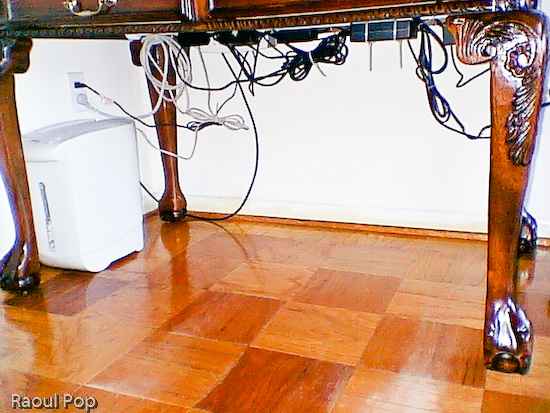
The next step was to cut a piece of white painted pipe (which I bought for something like $2) to the width of the desk, and mount it to the inner sides with two plastic pieces that cost me about $2 each. I used some wood screws I already had. Then I took some assorted cable ties which I’d bought in bulk, and secured the cables to the bar, as shown in the photo below. You can probably get a package that’ll suffice for a job like this for under $2.

Notice how I mounted the surge protector to the inner side of the desk. Again, I used wood screws that I left half-screwed. The surge protector had holes just for this purpose on its back, and it was a matter of measuring the space between them and putting the screws in the wood at the right length. It hooked right on.

I secured the cables to the pipe with the plastic ties after folding the cables nicely, so they wouldn’t dangle needlessly. Notice I left a bit of slack for those cables I’d need to pull. There are few things more annoying that setting everything up perfectly then discovering you need to move a piece but can’t because the cable’s too tight.

A couple of additional things: I also needed to put a paper shredder underneath the desk. I was able to accommodate it just fine. I also routed the coaxial cable along the wall, and to the PVR with the aid of a little cable tie that I screwed into the wall with a drywall screw.

Here’s the end result. Notice that none of those cables are trailing on the floor. I can’t stress the convenience of such a setup enough. It’s a real pleasure to work at that desk now, and it’s also very easy to keep the floor clean.

Underneath the desk with cable management in place

Standard