Thoughts

Open source software and its use by for-profit companies

Everyone is happy to use free, open source software these days, and for-profit companies are only too happy to join that bandwagon. After all, they’re supporting the open source movement — or are they?

If you’re not sure, there’s an easy litmus test: see how much they contribute to the open source movement.

  • Look at how much they donate to open source. Many companies will make token donations to open source organizations, but let’s face it, that money isn’t going to the developers themselves, it’s going to public relations and ads and the CEOs of those organizations. (Lest we forget, the CEO of Mozilla made $500K/year while the developers made nothing.)
  • Look at how much of their own code (written in-house) they give back to the open source community. If they don’t do much of either, there’s a pretty good chance they’re in it simply to profit off the backs of the many unpaid open source contributors.

After all, companies are more than happy to use free, open source software, since it means they have to do less development themselves, and they don’t have to pay anything at all for that software. But then they charge an arm and a leg for products developed using open-source software. They win, the original developers get screwed, and the customer pays through the nose for something that was free.

I find that sort of a business practice completely hypocritical. Building your business on the backs of malnourished, borderline-healthy geeks, coding their nights away, unpaid is unethical and exploitative. It harks right back to medieval times, when lords would get filthy rich at the expense of poor, overworked serfs. We were supposed to have evolved beyond that, but as it turns out, those sorts of practices haven’t been phased out, they’ve just been sublimated and adapted.

It gets even worse than that. Some companies aren’t content with just using free, open source software to fatten their pockets. They turn around and try to lock the products they’ve built on the free software, and to make it illegal for users of those products to change them. This is quasi-legal and reproachable, because it goes against the original GPL license of that software. You can’t modify open source software by lines of code here and there, and then call that software yours. It’s intellectual theft. This is why I support GPLv3, in spite of the fact that Stallman gives me the willies.

Some developers would argue that they’re writing free software because they want to, and they don’t care if and when they get credit or if they get paid, or even if some ethically questionable company will use their code to make money. They say they’re only interested in writing free code. I say they’re devaluing their work, and when they’ll find themselves without a job, they’ll wish others placed more value on their code.

I don’t need to name specific companies. You just apply this simple litmus test to the big name (or small name) companies out there, and you’ll find them out soon enough.

In the end, a company’s real commitment to the open-source software philosophy can be measured by how much new, internally written code, it contributes back to the open source community.
Standard
How To

How to install or upgrade WordPress via SSH

If you know how to log in via SSH (Secure Shell Access), then you will be able to upgrade your WordPress site in three minutes or less by using the following lines of code.

I have to admit right away that I’m highly indebted to this pre-existing tutorial from Techtites. But that tutorial is a little dated for the newer versions of Linux, and one of the commands given there no longer works on my web server, because it’s been deprecated (I use 1and1). I thought it useful to provide the right commands in this post, and to keep it updated in case something changes.

A few words of CAUTION:

  1. BACK UP all of your site files and your site database before running the upgrade. Take the time to do both, or you may deeply regret it later. As a matter of fact, it’s a great idea to back up your site files and database on a weekly basis, if not more often, just in case you get hacked or the web server crashes, etc.
  2. I’m not a Linux expert. I’m just glad I found these commands and that they’ve made the upgrade process easier for me. Don’t ask me to help you configure this for your web server. If the commands don’t work there, or something gets screwed up, you’re on your own.
  3. Should you use the WP-Cache plugin, disable it and delete any cached files BEFORE running the upgrade process. Even better, disable ALL your plugins before the upgrade process. If you don’t do this, you may get a big, fat 500 error afterwards.

Now, initiate a SSH session to your web server (I use Putty). Your web host should have the directions on how to do this. Go to the root level of your site/WP install folder (this is NOT the same as the root level of your SSH login).

Once you’re at the root level of your WordPress install (the one where you can see the wp-config.php file), enter the following Bash commands, in the order they appear. Wait for each of them to execute successfully before proceeding to the next one.

This will download the latest version of WP directly from WordPress.org:

wget http://wordpress.org/latest.tar.gz

This will unzip it, creating a directory called wordpress:

tar xfz latest.tar.gz

This will delete the wp-includes and wp-admin folders:

rm -rf ./wp-includes/
rm -rf ./wp-admin/

This will take you inside the wordpress folder:

cd wordpress/

This will copy everything inside the wordpress folder to the root level of your site, overwriting any existing files and directories. This line is the only line that’s changed from the Techtites tutorial:

cp -rpf -f * ../

This will take you back out to the root of your WordPress install:

cd ..

This will delete the wordpress directory and the downloaded WP archive, since they’re not needed any more:

rm -rf ./wordpress/
rm -f latest.tar.gz

Hope this helps!

Standard
Reviews

Pepco fails to fix store's electrical panel after 6 months

Updated 5/27/2008: It has now been a month since I wrote this post, and Pepco still HAS NOT fixed the electrical panel. This makes it 7 months, which is simply unacceptable. I am going to write to Chris Van Hollen, our Congressman, to see if he’d like to get involved in the matter.

Updated 6/09/2008: We received a reply from Congressman Van Hollen on 5/28/2008, just a day after I wrote to him via email, assuring us that he would look into the matter, and putting us in touch with one of his staffers, Miti Figueredo. Today, on 6/09/2008, Pepco showed up with a team of about seven people and got the electricity working again in a matter of hours. I know this wouldn’t have happened without Congressman Van Hollen’s intervention. Congressman, we are deeply grateful and thank you from the bottom of our hearts!

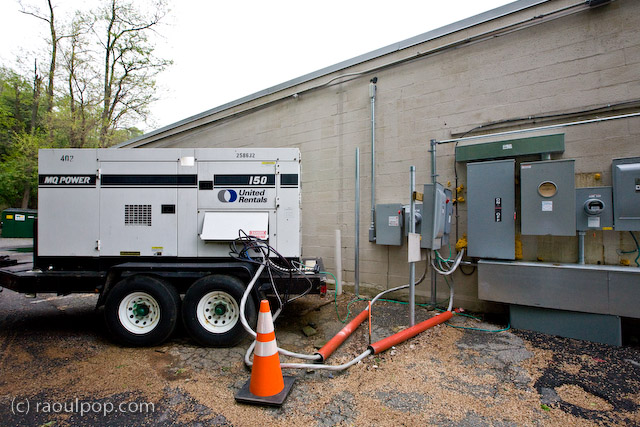
Piano Place, the store where Ligia has her studio, experienced a power outage on November 2, 2007 (over 6 months ago). It was caused by a badly wired electrical panel outside the store, which caught on fire. Pepco, the local (and only) electrical company, has failed to fix that panel ever since, in spite of having the luxury of over 6 months to do it.

When the panel caught fire, the fire department and the police evacuated all of the stores for a day out of bureaucratic zeal, even though the fire didn’t spread inside the building. Then the store was without power for a few days until a generator was installed outside and connected to the electrical panels.

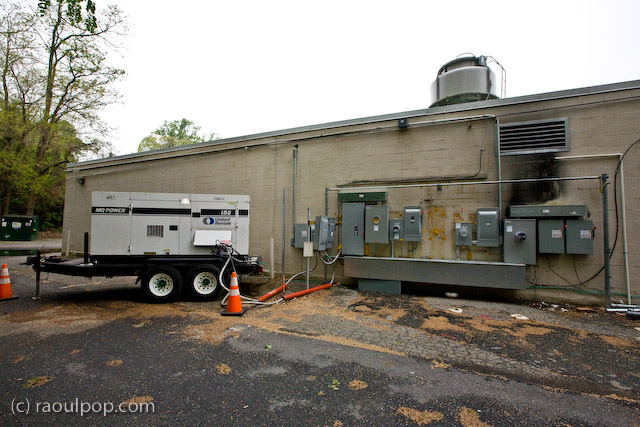
That same generator has sat outside the building since it was installed in November of last year (for over 6 months), waiting for Pepco to get off their lazy bums and fix the electrical panel. You’d think a job like this is of epic proportions, and that’s why it’s taking so long, but as you’ll be able to see from the photos, it’s something that could be done in a day or less with the proper crew.

The smoke on the wall mark the extent of the fire caused by the faulty panels. The wires that carry electricity inside the buildings weren’t damaged, because the generator is connected to them, and the store is able to feed off the generator to get part of its power. Pepco would simply need to fix the panels themselves, but they have offered up excuse after excuse during each of these six months. Appeals to their executives have not helped. The Washington Post has refused to get involved by publishing news of this complete failure in customer service.

Meanwhile, the store is paying $15,000 each month to rent the generator (with fuel charges extra), and still is not up to full power. It has had no air conditioning (only lights) all winter. That means they’ve had to do with space heaters here and there, and Ligia has frozen on many an occasion inside the studio because of Pepco’s utter laziness and unresponsiveness.

Now that summer is approaching and temperatures are climbing into the 80s, the store gets stiflingly hot (understandably so) on those days, because it has no air conditioning. Who’s to blame? Pepco, that’s who!

As if all this is not enough, the store has had the generator stolen once (the entire thing!), and on a separate occasion, it has even had the fuel siphoned off from the generator.

I have to wonder when Pepco will get their act together and fix the damned electrical panel. What will it take to get them to move on this?!

I see this as the strongest possible argument for competition in the marketplace. Pepco has a monopoly on the local power market. There is no other electrical company here, so Pepco can do whatever it pleases and get away with it. There is no one to hold them responsible. The lazy hacks can get away with treating customers like this for months and months, and no one from the local governments seems to care.

I find this outrageous, and I’m fed up with it. So the next time I hear one of Pepco’s hypocritical ads that say “We’re connected to you by more than power lines”, I’ll have to ask what they’re connected with: laziness, lies, inefficiency, procrastination, lack of customer service, monopoly, irresponsibility?

And when I see one of their trucks, I’ll know what sort of people drive them: the sort that would have people freeze in the middle of winter and bake in the summer heat rather than do their jobs.

Standard
Events

Photos from TECH cocktail DC 2

This past Thursday evening, Ligia and I attended the 2nd DC TECH cocktail mixer/conference, and it was a lot of fun. It was held at MCCXXIII, a club on Connecticut Ave. Frank Gruber and Eric Olson, the TC co-founders, hosted their first TC DC event at the same venue last year. They invited me to take photos at that time, and it looks like they were happy with the results, because they called me back this year.

I was glad to see how the event has grown in just one year. With 400 people in attendance, the club was literally packed, as you’ll see from the photos. There was no room to move — I had to squeeze between bodies and do a lot of shoulder tapping to get from spot to spot, all the while trying not to shove my camera in anyone’s face.

Selected photos from the event are enclosed below. The full set is available on the TC website, or in TC’s Flickr account. I tried a few new things this year, mainly different angles and a few movement/blur type experiments. You’ll see as you look through the photos.

It looks like Frank and Eric will need to find a new location for next year, given TECH cocktail’s growing popularity. I wish them all the best! They’re doing a great service to startups by making it free for them to attend and show their products to the audience.

Standard
Reviews

Hardware review: Rolodex laptop stand

What I find interesting about this Rolodex laptop stand is its modularity. A few years or so after it launched, it’s still on the market. I’ve been using it for two of those years with my Windows laptop, and while it doesn’t look cool or feel cool, it’s sturdy, and it works just fine.

The stand is made of metal mesh and reinforced with rounded steel frames at the edges. Its tilt level can be adjusted as needed, and — here’s where the modular part comes in — it can be fitted with a wire organizer and a USB hub. The wire organizer comes with the stand and attaches as seen above, and the 4-port USB hub is sold separately. Once purchased, the hub slides into a slot on the back of the stand and is secured there by two metal arms on each side.

It’s best suited for 15-inch laptops like the one you see in my photos. Its design would make a 17-inch laptop feel oversized, and I’m not sure that it could support the weight of some of the heavier 17-inch laptops I see on the market nowadays.

The stand works best with an external keyboard and mouse. Although you can type comfortably on the laptop while it’s positioned on the stand, you’ll get tired pretty soon of the sound that the stand makes as you type on the laptop’s keyboard. Remember, it’s made of metal mesh, and it will resonate with each key click.

Once you position it at your eye level and plug in an external keyboard and mouse set, this stand will perform just fine for your needs, and at an affordable price, too.

Because it holds the laptop in place with the aid of two raised metal lips on each side, you need to make sure it doesn’t block any ports on your laptop. For example, it would definitely not work with any MacBook Pro laptops, which have the CD/DVD slot in the front. The placement of my audio line out/line in ports on my Averatec Windows laptop meant that it blocked those ports with the right support lip, as you can see below.

The USB hub that can be bought along with the stand is not self-powered (it does not have its own power supply cable), and that means it’ll draw power from the laptop’s USB port. This means you’ll likely experience power surges if you should plug in a USB drive that also does not have its own power supply. See my Logitech Alto Connect review for more details on this particular issue.

If interested, you can buy the stand and the USB hub to go along with it from Amazon. There’s even a variation on the hub which has only 2 USB ports but features a grounded, three-prong plug.

Standard