How To

Do not allow websites to resize your browser window

Websites that resize my browser’s window or maximize it are completely annoying. When someone does that to me, no matter how interesting their content may be, I go somewhere else instantly. Fortunately, there’s a way to block anyone from messing with my browser windows or tabs in Firefox. Here’s how to do it:

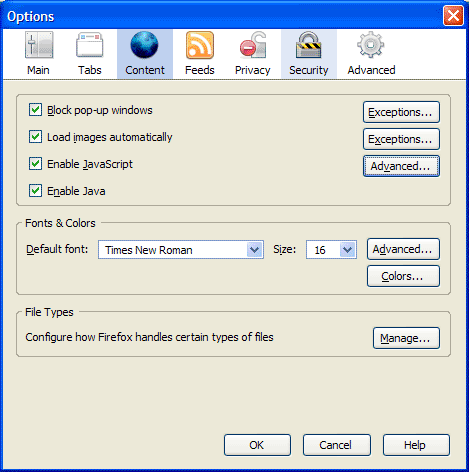
First, go to Tools >> Options, then click on the Content icon in that dialog box. It should look like this:

Firefox content options

Now click on the Advanced button next to the “Enable JavaScript” checkbox. You’ll get the following dialog box:

Firefox advanced javascript settings

Make sure to uncheck the following options:

  • Move or resize existing windows
  • Raise or lower windows

Click on the OK button twice to save the changes, and then you’re done. This will disallow any website to adjust the size of your browser window. It’s a great way to make sure your browsing experience stays yours.

Standard
Places

Visited by a ladybug

Just as I was getting ready to download the photos from my camera last night (I’d been out photographing the wonderful fall foliage), a ladybug flew by me, and stopped to rest on one of our lamps.

I have no idea how it got inside our home, since we have screens at our windows and doors, but they always seem to find a way, don’t they? It must have been woken up from its hibernation by the unusually warm weather we had (over 60F). I realized that I’d never gotten macro shots of a ladybug before, so this was my chance.

There was no time to set up a tripod, so I took these handheld, at 1600 ISO, with my 100mm macro lens. There was some overhead light from the lamp, just enough to get the right atmosphere. The poor thing still had fuzz on it from who knows where. They find the strangest places to spend winter…

The climb

Red and black

Silhouette

It’s Thanksgiving today here in the US, so if you celebrate it, I hope you have a wonderful one!

Standard
How To

Block anonymous calls with SkypeIn

You may or may not know that Skype offers a service called SkypeIn, which lets you get a local number that people can call to reach you anywhere in the world, provided you’re logged into Skype. I’ve had a SkypeIn number for the past couple of years, and I love it. Want the number? It’s +1 (301) 637-6885.

Do you know why I can give it out so freely? First, because all my calls go right to voicemail. I get that bundled with SkypeIn. I screen all my calls that way and delete all of the annoying telemarketing calls. Second, because of a great feature that I’ve discovered yesterday. It’s hidden away in the Advanced settings for Calls, and it blocks most telemarketing calls automatically.

Here’s how it works. Open Skype and go to Tools >> Options. Then click on the Calls icon, located in the sidebar of the Options dialog box. You’ll get the following screen:
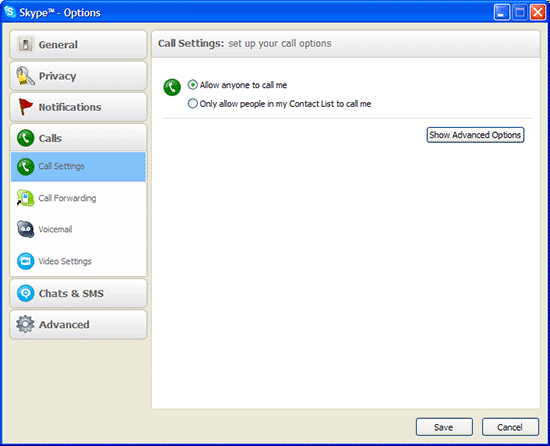
Basic call settings in Skype

Now click on the “Show Advanced Options” button. You’ll get this screen:
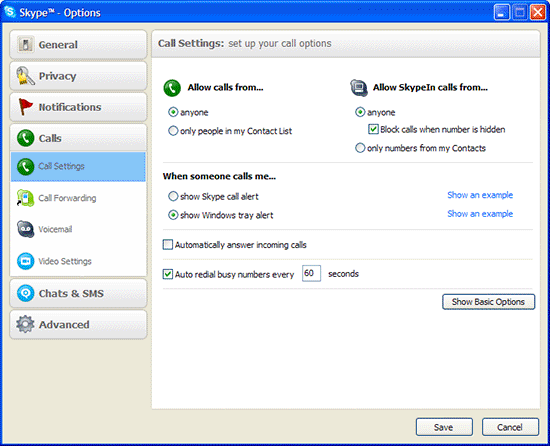
Advanced call settings in Skype

Now look for the option that says “Allow SkypeIn calls from…” and select “anyone”, then make sure to check the option called “Block calls when number is hidden”.

Doing this will block most telemarketing calls, since they usually hide their numbers. Isn’t that beautiful?

If you want to make sure none of them get through to you, just go to the Voicemail section and look for the “Send calls to voicemail if…” option, then change the number of seconds to 1 or something really small. That way everything that makes it past the initial call filter goes right to voicemail. This allows you to listen to the messages later and hit delete without wasting your time. I have my threshold set to 10 seconds. If I’m logged into Skype, that usually gives me enough time to see who’s calling and decide if I want to take the call or not. If I’m not logged in, then all the calls go directly to voicemail anyway.
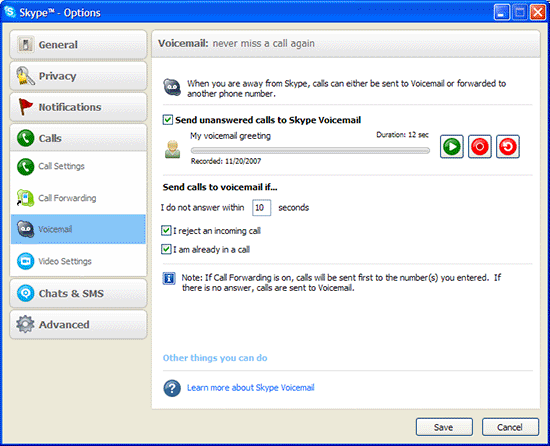
Voicemail settings in Skype

Hope this helps!

Standard
Places

That unforgettable sky

Long-time readers of my blog know my obsession with the sky. I never tire of photographing it. I take photos of it almost every day. Here are a few I took just a few days ago in North Bethesda, MD.

Majestic

Spotted and swirled

Light fantastic

Into the abyss

Golden hour

Standard
Thoughts

Photographs for sale

My photographs (a select number of them) are now up for sale through both Alamy and the PhotoShelter Collection. Here are the links:

Alamy presents you with a search page first. To see my photos without doing a search, just click on my name. PhotoShelter presents you with the photos right away.

Of course, you can still purchase any of the photographs I post here by simply contacting me via email and indicating the photo you’d like to purchase. More info on this is available on my Photos for Sale page. But for those of you that prefer a more streamlined look and an instant price quote, Alamy and the PhotoShelter Collection should do nicely.

If you should lose the links to my sites at Alamy and PhotoShelter, don’t worry, I’ve made it easy by listing them in the sidebar. Just look for this section:

Purchase my photographs

Happy shopping and many thanks!

Standard