Reviews

How houses get built in the DC area

I thought that when I lived in Florida, the construction there was shoddy. I was wrong. At least there they used concrete pillars and floors for the houses, and the building code was so strict everything was anchored properly, especially after Hurricane Andrew. When I moved to the DC area, I thought construction would be better here, since it’s a temperate climate and the houses should be built to last and hold up to the weather. I was wrong. Construction here is horribly shoddy.

I have never been so shocked at the cheap and flimsy “workmanship” I see every time I pass some house or building under construction. It never ceases to amaze me what passes code in these parts, and I’ve lived here since 2003. It’s downright thievery, I tell you. I’ll show you some photos below to help you see what I mean. I call it thievery because you’d think housing would be dirt cheap given the materials and level of effort that goes into the construction, but it isn’t. It’s terribly expensive, to the point that people making below what would be called upper middle class in other parts of the country can’t afford to live inside the Beltway, much less outside it. They have to go find housing either in bad neighborhoods, or way out in the boonies, in order to get anything affordable.

It’s not right. It makes my blood boil. Honestly, I can’t believe what goes on. It’s the same construction everywhere, from the (relatively) cheaper townhomes and single family homes right up to the McMansions that have sprung up on River Rd, Georgetown Pike and other richer places. The only thing that changes is the size and price of each monstrosity, but they’re all just as flimsy.

Do you want to see what I mean? Take a look at these photos. They’re from a house currently under construction in my area.
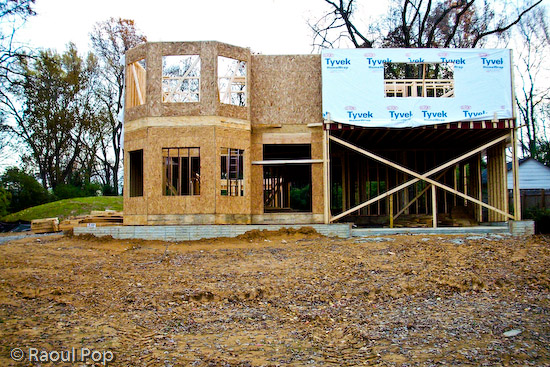
House under construction

Some unwitting soul is going to pay several hundred thousands of dollars for this piece of crap, and he won’t know what a lemon he’s getting. It’s all 2×4 construction. There’s nothing solid and concrete there except the foundation, and I’m not sure how thick that is, either. It’s all either cheap, soft wood or plywood, including the upper floor. Not only that, but the beams aren’t straight, and the joints aren’t secured properly.
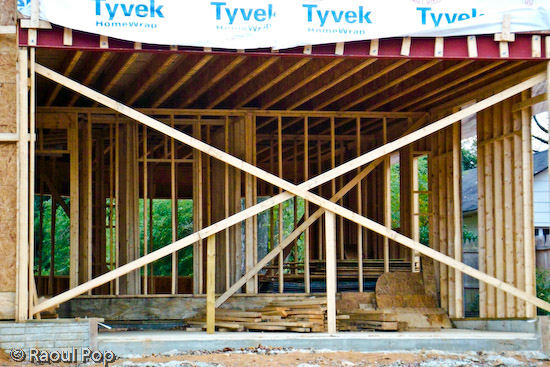
House under construction

It’s basically a big plywood box. I’m not sure what its projected lifetime is, but I can’t imagine it’ll last more than 30 years. It’ll start needing serious repairs even before the mortgage is paid off. Isn’t that terrible?

Do you see that cheap, flimsy Tyvek plastic? That’s the weatherproofing. No, I’m not kidding. That’s it. That’s also the insulation. I doubt they’ll put glass fiber or any other kind of insulation between the drywall and the beams. They might, but I seriously doubt it. I’ve seen the inside of many walls, and they’re usually empty.
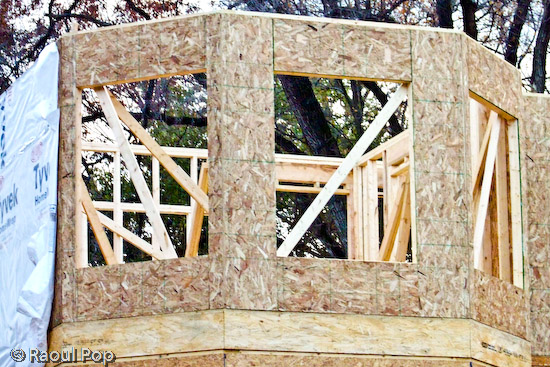
House under construction

Can you say cheap? I can. It’s cheap construction! It’s a travesty. Look at that horrible plywood shell. That’s going to be a tower. It’s going to look so nice, clad in fake brick or plastic siding only 1-2 inches thick… It’s also going to be horribly inefficient when it comes to temperature preservation. And if water should happen to leak in through that cheap brick cladding and through that flimsy Tyvek sheet, the plywood will rot away quietly and the owner won’t even know it… Wonderful, isn’t it? Isn’t this piece of crap worth mortgaging your life away?

Should we be ill-fortunate enough to get a hurricane or some tornado in our area, the roof on this thing will probably get torn off, and the entire house might or might not be standing when nature’s done with it.

Look, don’t get me wrong. I understand that America has a long history of 2×4 construction. It’s how the West was won. It’s cheap, affordable, goes up quickly, etc. But this isn’t the West, and it’s not the 1800s. This is the supposedly refined East. We should know better by now. It’s our nation’s capital. And the prices of these plywood boxes aren’t cheap. No, they’re so high most people can’t afford them.

I also understand the builders have to make a profit and the cost of land in this area is expensive. But this is ridiculous! If you’re going to build something that someone will want to call their home, and will pay dearly for it, sinking most of their productive, working years into paying it off, then God help you if you don’t build something worthwhile, something that’ll last. You’ll get what’s coming to you, don’t you worry about that…

What I wonder about is how the people and companies that put up these things can live with themselves. That’s what I want to know. How can they sleep at night knowing someone’s going to pay a fortune for something that’ll start falling apart after the first several years, for something that’s so horribly inefficient when it comes to energy use that they’ll be paying through the nose to cool it in the summer and to heat it in the winter? Don’t tell me about efficient windows! You can get the most expensive windows out there — if the walls themselves can’t conserve the inside temperature, you’ll still be nowhere. There’s such a thing as global warming to worry about. Have you heard of it? Everyone needs to reduce their carbon footprint, and it starts in the home.

Whatever happened to the good, old masonry work? What happened to quality stone construction? Yes, it’s more expensive, but isn’t it worth it? Why can’t you builders put a little more pride in your work? Why can’t you make a concrete skeleton, and use thicker insulation and better materials for the cladding? Is it so hard to do? So you’ll make a little less money. You might have to mark up the price a little. You might have to educate the consumers that know nothing about quality construction. But isn’t it all worth it in the end? Won’t you feel better knowing the house you built will last a long time? Won’t you feel better knowing the people that will buy your house will thank you for your solid construction later? Isn’t it it worth it to build good will instead of ill will?

Standard
Thoughts

A few suggestions for FeedBurner

FeedBurnerI’m a very happy user of FeedBurner, the wonderful feed management service from Google. I’ve been using it since early 2006, and I log on multiple times every day to keep track of my feeds. I’d like to talk about some features and options that I’d love to see on the site.

Ability to splice multiple feeds without having to add them to a network or put them in FAN. I’d love to be able to have a single feed that combines all of my content, without having to go through what I’m going now, which is to create a feed network, add my own feeds to it, and burn that feed to a feed… I know there are other services on the web that do this, but I’d rather be able to do it through FeedBurner.

Ability to splice external feeds (ones not burned at FeedBurner), into a single FeedBurner feed. This would work sort of the way that Jaiku or TwitterFeed work, in the sense that I’d take my feeds with very few subscribers, like my Twitter feed or my Vimeo feed, and add them to my single feed without needing to “burn” them as separate feeds at FeedBurner, and having them show up under My Feeds. I’m not really interested in managing those feeds at this point — I just want to add them to my single feed.

Better revenue reporting from FAN (FeedBurner Ad Network). I never know how much I’m getting, because the figures are just approximations, and the pay is somehow always less than what’s indicated in the control panel. AdSense always reports my revenues correctly, Amazon does it too, but FeedBurner always leaves me wondering how much money I’m going to get. Maybe I just don’t know where to look, but believe me, I’ve looked all over the place. There’s only one place where revenues are reported centrally, and then there are ad revenues for each individual feed in FAN, and still I don’t know how much money I’m making with my feed ads.

Ability to “refresh” feed flares. Old feed flares display with old preferences, so I have a ton of flares showing up for older posts. I understand that they’re cached, and they have to stay cached, because it would be murder on a database if the flares would be constructed dynamically for every feed item, including the older ones… But I’d like to have a manual “refresh” function for the flares, that would let all of the old posts and old feed flares inherit the most recent settings for my feed flares.

Ability to separate feed flares from the ads. I’d like to display the feed flares at the top of my posts, for example, and the ads at the bottom. Right now they’re together and there’s no way to display them but right next to each other.

The SmartCast feature is a bit confusing. Either I’m the one that doesn’t get it, or it doesn’t quite work as advertised. Here’s what it says on the site:

“Makes podcasting easy in feeds that normally cannot support it. Link to MP3s, videos, images, and other digital media in your site content and SmartCast creates enclosures for them automatically. Optionally adds elements required for a richer, more detailed listing in iTunes Podcast Directory and sites using Yahoo Media RSS.”

When I took my podcast feed, which is a simple category feed from my blog, and turned on the SmartCast option, enclosures for the media files linked from each post weren’t turned into enclosures. The iTunes elements were added to the feed, but it still didn’t become a feed that I could subscribe to from iTunes, so I gave up on it.

Now, a little more than a month since my last podcast, I see that I can subscribe to that feed in iTunes, and the podcast downloads just fine. But only the last item shows up instead of every single episode, or at least the last 10 feed items, which is the standard. Why? And why didn’t it work when I first turned on SmartCast for this feed? I can’t help but be confused by this. SmartCast can be a very elegant and easy way to turn a normal feed into a podcast feed, but it looks like it still needs some work.

Photo Splicer only works with the Flickr ID. The Photo Splicer option says I can put in either my Flickr user ID or my screen name, but it really only works with the User ID, which is annoyingly hard to find on Flickr. It would be nice if the User ID would be automatically looked up if I entered my screen name.

I know the FeedBurner folks will read this. They’re very conscientious and follow up on these things. I don’t want special treatment, but it would be very nice if they could consider my feature requests and see what can be done. FeedBurner has my thanks for a wonderful service!

Standard
Reviews

Upgraded to Leopard

Mac OS X LeopardAlmost two weeks ago, on 11/16/07, I upgraded to Leopard, the new version of Mac OS X. In spite of some negative experiences I’d read about, my upgrade went smoothly and I didn’t lose any data. All of my applications worked afterwards. A couple of them, like 3D Home Architect, required Leopard updates to make them stable again. My version of EyeTV needed to have its most recent upgrade re-applied.

There were a couple of hiccups that I wanted to mention. One occurred during the upgrade process itself, and the other afterwards.

  1. I started the upgrade process and booted from the DVD. Went through the various steps, but when it came time for the Leopard installer to find our iMac’s boot disk, it couldn’t see it. I waited for about 5 minutes, then I clicked the Back button a couple of times, went through those screens again, and after I waited for about 2 minutes, it finally saw the boot disk and allowed me to go on to the next step. I have a feeling this might not have been a hiccup, but that the installer was busy calculating the free disk space on the drive. I thought I’d mention this just case some of you have the same problem.
  2. After the upgrade completed, I configured Time Machine to back up to one of my external drives, and it started the initial backup. It kept going through the evening and overnight, then it crashed in the morning, and the iMac required a hard reboot. In other words, everything was frozen and I had to power it off manually. After I started it back up and restarted Time Machine, it finished the initial backup and it picked things up exactly at the point where it crashed. In other words, it didn’t start backing up the entire drive once more, which I thought was a nice touch.

One thing I did before starting to upgrade was to disconnect ALL peripherals. I figured there was no reason to complicate the upgrade process by having extra USB and Firewire drives, printers and other gadgets connected during that time. When the upgrade process completed, I re-connected them, and found, to my delight, that a new driver for my printer had been packaged with the OS. I didn’t have to run HP’s crummy, old drivers from 2005. Very nice!

I’m very happy with Leopard since we installed it. Our iMac runs a little faster now, thanks to the better memory management and pre-fetching features in Leopard. I love Time Machine and the Remote Desktop features included with the new iChat. These two features were my reasons to upgrade to Leopard, and I’m very glad to see that Apple delivered the goods.

Another feature I love is Spaces. I love being able to separate my applications so easily, and I love being able to assign them to different screens. I know that when I start up a certain app, it’ll run in a certain space and won’t clutter up my primary space. That’s awesome.

One thing I didn’t like about the previous version of OS X (Tiger), was the fact that when I used a key shortcut to access my home folder (Command + Shift + H) or the apps folder (Command + Shift + A), it would commandeer any existing open window and go to that location. I wanted to keep the existing location and open a new window, but Tiger wouldn’t let me do it. The same thing still happens in Leopard, and what’s more, when I use Spaces and I’m in screen 2, for example, pressing a key shortcut to access the apps folder will open it up in Screen 1, defeating the purpose of using separate screens. This is one piece of interaction that should be changed.

Mac OS X Leopard Guided Tour I’m otherwise a very happy customer, and I think Leopard is a worthwhile upgrade from Tiger. The new features are awesome.

If you’re thinking about upgrading, I would highly recommend watching the guided tour so you know what to expect. If you can’t watch the video, the booklet included with the Leopard DVD disc is another great resource.

More information

Standard
Places

A trip to the freezer

Here are some of the photos I took on a recent trip to our freezer. 🙂 They combine my love for macro photography, colors, out of focus photos, bokeh and fun. Enjoy, and if you’d like, you can try to guess the various items I photographed.

More than meets the eye

Passionately frozen

Apex

Purple designs on your heart

Bluish anguish

Maroon thoughts of yesteryear

So cold it burns

Design is everything

Standard
How To

Do not allow websites to resize your browser window

Websites that resize my browser’s window or maximize it are completely annoying. When someone does that to me, no matter how interesting their content may be, I go somewhere else instantly. Fortunately, there’s a way to block anyone from messing with my browser windows or tabs in Firefox. Here’s how to do it:

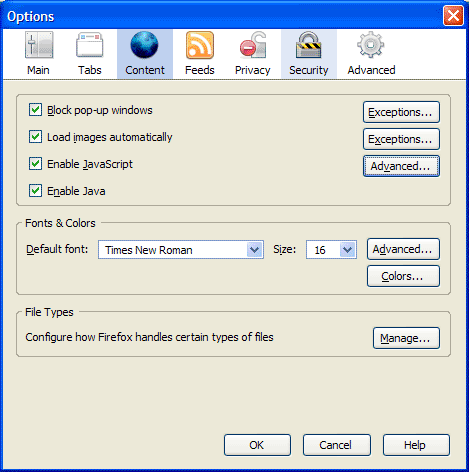
First, go to Tools >> Options, then click on the Content icon in that dialog box. It should look like this:

Firefox content options

Now click on the Advanced button next to the “Enable JavaScript” checkbox. You’ll get the following dialog box:

Firefox advanced javascript settings

Make sure to uncheck the following options:

  • Move or resize existing windows
  • Raise or lower windows

Click on the OK button twice to save the changes, and then you’re done. This will disallow any website to adjust the size of your browser window. It’s a great way to make sure your browsing experience stays yours.

Standard