Reviews

Pepco fails to fix store's electrical panel after 6 months

âť— Updated 5/27/2008: It has now been a month since I wrote this post, and Pepco still HAS NOT fixed the electrical panel. This makes it 7 months, which is simply unacceptable. I am going to write to Chris Van Hollen, our Congressman, to see if he’d like to get involved in the matter.

âť— Updated 6/09/2008: We received a reply from Congressman Van Hollen on 5/28/2008, just a day after I wrote to him via email, assuring us that he would look into the matter, and putting us in touch with one of his staffers, Miti Figueredo. Today, on 6/09/2008, Pepco showed up with a team of about seven people and got the electricity working again in a matter of hours. I know this wouldn’t have happened without Congressman Van Hollen’s intervention. Congressman, we are deeply grateful and thank you from the bottom of our hearts!

Piano Place, the store where Ligia has her studio, experienced a power outage on November 2, 2007 (over 6 months ago). It was caused by a badly wired electrical panel outside the store, which caught on fire. Pepco, the local (and only) electrical company, has failed to fix that panel ever since, in spite of having the luxury of over 6 months to do it.

When the panel caught fire, the fire department and the police evacuated all of the stores for a day out of bureaucratic zeal, even though the fire didn’t spread inside the building. Then the store was without power for a few days until a generator was installed outside and connected to the electrical panels.

That same generator has sat outside the building since it was installed in November of last year (for over 6 months), waiting for Pepco to get off their lazy bums and fix the electrical panel. You’d think a job like this is of epic proportions, and that’s why it’s taking so long, but as you’ll be able to see from the photos, it’s something that could be done in a day or less with the proper crew.

The smoke on the wall mark the extent of the fire caused by the faulty panels. The wires that carry electricity inside the buildings weren’t damaged, because the generator is connected to them, and the store is able to feed off the generator to get part of its power. Pepco would simply need to fix the panels themselves, but they have offered up excuse after excuse during each of these six months. Appeals to their executives have not helped. The Washington Post has refused to get involved by publishing news of this complete failure in customer service.

Meanwhile, the store is paying $15,000 each month to rent the generator (with fuel charges extra), and still is not up to full power. It has had no air conditioning (only lights) all winter. That means they’ve had to do with space heaters here and there, and Ligia has frozen on many an occasion inside the studio because of Pepco’s utter laziness and unresponsiveness.

Now that summer is approaching and temperatures are climbing into the 80s, the store gets stiflingly hot (understandably so) on those days, because it has no air conditioning. Who’s to blame? Pepco, that’s who!

As if all this is not enough, the store has had the generator stolen once (the entire thing!), and on a separate occasion, it has even had the fuel siphoned off from the generator.

I have to wonder when Pepco will get their act together and fix the damned electrical panel. What will it take to get them to move on this?!

I see this as the strongest possible argument for competition in the marketplace. Pepco has a monopoly on the local power market. There is no other electrical company here, so Pepco can do whatever it pleases and get away with it. There is no one to hold them responsible. The lazy hacks can get away with treating customers like this for months and months, and no one from the local governments seems to care.

I find this outrageous, and I’m fed up with it. So the next time I hear one of Pepco’s hypocritical ads that say “We’re connected to you by more than power lines”, I’ll have to ask what they’re connected with: laziness, lies, inefficiency, procrastination, lack of customer service, monopoly, irresponsibility?

And when I see one of their trucks, I’ll know what sort of people drive them: the sort that would have people freeze in the middle of winter and bake in the summer heat rather than do their jobs.

Standard
Reviews

Hardware review: Rolodex laptop stand

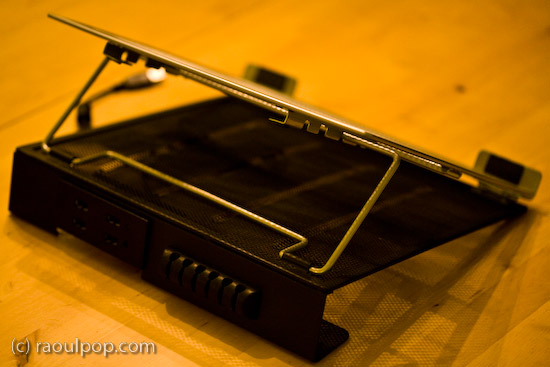
What I find interesting about this Rolodex laptop stand is its modularity. A few years or so after it launched, it’s still on the market. I’ve been using it for two of those years with my Windows laptop, and while it doesn’t look cool or feel cool, it’s sturdy, and it works just fine.

The stand is made of metal mesh and reinforced with rounded steel frames at the edges. Its tilt level can be adjusted as needed, and — here’s where the modular part comes in — it can be fitted with a wire organizer and a USB hub. The wire organizer comes with the stand and attaches as seen above, and the 4-port USB hub is sold separately. Once purchased, the hub slides into a slot on the back of the stand and is secured there by two metal arms on each side.

It’s best suited for 15-inch laptops like the one you see in my photos. Its design would make a 17-inch laptop feel oversized, and I’m not sure that it could support the weight of some of the heavier 17-inch laptops I see on the market nowadays.

The stand works best with an external keyboard and mouse. Although you can type comfortably on the laptop while it’s positioned on the stand, you’ll get tired pretty soon of the sound that the stand makes as you type on the laptop’s keyboard. Remember, it’s made of metal mesh, and it will resonate with each key click.

Once you position it at your eye level and plug in an external keyboard and mouse set, this stand will perform just fine for your needs, and at an affordable price, too.

Because it holds the laptop in place with the aid of two raised metal lips on each side, you need to make sure it doesn’t block any ports on your laptop. For example, it would definitely not work with any MacBook Pro laptops, which have the CD/DVD slot in the front. The placement of my audio line out/line in ports on my Averatec Windows laptop meant that it blocked those ports with the right support lip, as you can see below.

The USB hub that can be bought along with the stand is not self-powered (it does not have its own power supply cable), and that means it’ll draw power from the laptop’s USB port. This means you’ll likely experience power surges if you should plug in a USB drive that also does not have its own power supply. See my Logitech Alto Connect review for more details on this particular issue.

If interested, you can buy the stand and the USB hub to go along with it from Amazon. There’s even a variation on the hub which has only 2 USB ports but features a grounded, three-prong plug.

Standard
Reviews

Vista SP1 addresses some of my previous frustrations

I’ve had Vista SP1 installed on my machine for a week or so, and I’m pleased (surprised as well) to see that Microsoft addressed some of the issues that have frustrated me in the past. I guess when your expectations are low, any step toward something better is noticeable.

If I sound somewhat bitter, it’s because the SP1 install was problematic. I detailed that ordeal previously (you’re welcome to read it if you’d like). Basically, it had to do with language pack installs, which caused the prep time for the SP1 install to take several days instead of 15-30 minutes.

Once the extra language packs were out of the way, the actual SP1 install itself posed no issues for me. I’ve heard plenty of horror stories, but for me, the experience was normal, if somewhat protracted. Once the computer finished the three install steps (2 pre-reboot, 1 post-reboot), my machine was up and running with SP1.

As I began to use it, the first thing I noticed was the correct calculation of the RAM present in my machine (see screenshot above). That was a nice little surprise. I found it frustrating (pre-SP1) when the BIOS said I had 4 GB of RAM, yet Windows could only see 3,069 MB of RAM. It didn’t make sense. Now that’s fixed, although, as Ben Watt points out in this comment, Vista will still not use all of it due to 32-bit limitations.

Boot-up times also seem to have improved. I haven’t done any stopwatch testing, but I don’t find myself sitting around twiddling my thumbs as much when I need to reboot. That’s nice.

More importantly, I am now able to do something which I couldn’t do pre-SP1, even though it was an advertised feature of Vista: back up my machine (see screenshots above). That’s right, before SP1, a full PC backup was impossible. There was a bug that didn’t allow you to go through with that operation in Vista Ultimate. Now that’s no longer the case, and I’m happy to say I completed my first full PC backup this afternoon.

I also understand that Microsoft is now making Vista SP1 available in more languages, which will help reduce the language uninstall times for those people who were unfortunate enough to install the optional (or in my case, required) language packs.

Furthermore, they’re offering free, unlimited SP1 install and compatibility support, which is laudable — but given the fact that one has to jump through hoops to install SP1 — also needed. In my case, I doubt they could have helped. After all, what I needed to do was to uninstall the language packs, and Microsoft made the uninstall process so freakishly long that all I could do was to either stare at the screen, fuming, or take a walk, then come back to find it still going on…

What I do not approve though, is the way they’re trying to get the word out about Vista and SP1. They’re doing it through an internal (leaked?) video that makes me want to pull my eyes out. It’s as if they’ve learned nothing from the Bank of America video debacle. Worse, it’s as if they took that video and did their best to outdo it. They succeeded all right, in a very sad way.

Standard
Reviews

Hardware review: Logitech Alto Connect Notebook Stand

I bought two Logitech Alto Connect Notebook Stands (with 4-Port USB Hub). One’s a keeper and the other is going back. I love its design and functionality, but there are a couple of things that you need to know if you intend to buy it.

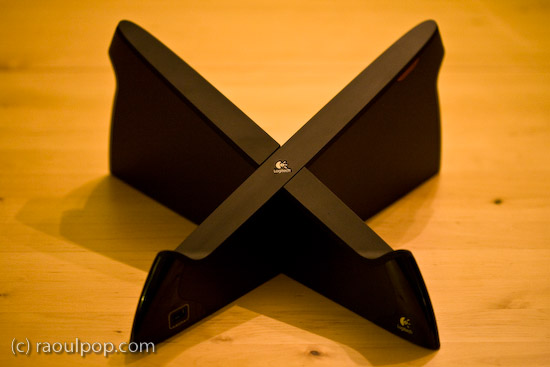
This innovative stand is shaped like an X and wrapped in glossy, black plastic. Does the shape remind you of anything? How about OS X? Or the X-Men? Or the old saying, “X marks the spot”? Not that Logitech is copying anybody, but that shape looks cool, is very different from any other laptop stand on the market, and supports a larger amount of weight, meaning it can work with heavier laptops.

The stand comes unassembled in the box, and you must put the two pieces together (they dovetail precisely). The assembly time is 1-2 minutes or so. It may take you a try or two until you figure out the right way to join the two pieces together (there’s a 50/50 chance you’ll get it right the first time).

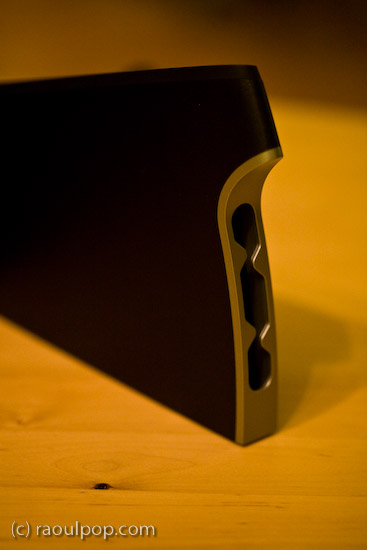
An added benefit of this stand is the addition of a built-in USB hub. The hub is self-powered, meaning that you’ll need to plug in a small adapter (included in the box). One port is located on the left front leg of the stand (visible above), and the other three ports are in the back, as you can see below.

As I said, I love this stand, and I think the design is wonderful. I have a lot of respect for Logitech. I’ve used wireless keyboards made by them, Kensington and Microsoft, and Logitech has consistently stood head and shoulders above its competitors when it came to battery life and ease of connectivity. I have a Logitech wireless keyboard and mouse set right now, have been using it for almost two years, and have nothing but good things to say about it. Last, but not least, I like Logitech because they use ColdFusion on their website, and CF is my favorite programming language. 🙂

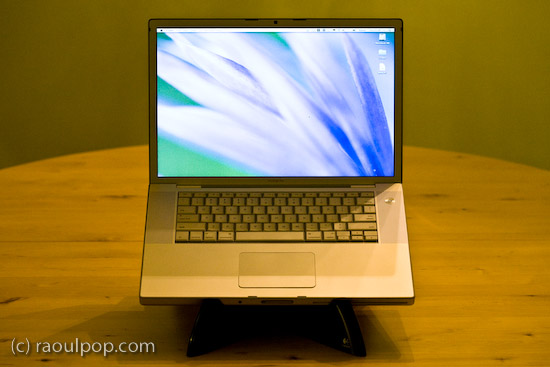
I bought the first one of these stands for my father’s MacBook, and it works just great with it. The X-shape allows for greater cooling than the flat stands, and it blocks none of the laptop’s ports. My father uses it happily. I noticed an issue with the built-in USB hub though, as soon as I started using it.

I have a Western Digital Passport drive, which I carry pretty much everywhere. That drive has worked with any computer where I’ve used it. I love it. It’s powered directly by the USB port, and that’s where the issue lies when it comes to the Logitech Stand. Right after I plugged it in on my father’s stand, I got a message on-screen (on the laptop) telling me that the USB port where I’d connected the USB hub had experienced a power surge and was shut off. I had to unplug the port from the laptop, and re-connect it without the drive.

Let me clarify. The USB hub built into the stand is self-powered. It has its own power supply. It should be able to power just about any USB device. Why then did it draw power from the laptop when I plugged in the drive? Obviously the design of the hub is defective in some way if every time you plug in port-powered devices like the WD Passport drive, it causes a power surge in the USB circuitry. The only way I could get the drive to connect to the laptop was to plug it directly into the laptop, which I did, and it had no problems there.

The only time when I’ve had issues with port-powered devices was when I plugged them into USB hubs that had no power supplies of their own. On those occasions, the devices would draw power from the hub, which would then draw too much power from the laptop’s USB port, would cause a small surge, and shut off the port. But when you have a self-powered USB hub, this simply shouldn’t happen.

Just so you’re not confused, let me state outright that USB flash drives, which have no moving parts and thus draw much less current, can be used just fine with the built-in USB hub in this stand. And USB drives which have power supplies of their own (the regular 3.5″ drive enclosures of products like Drobo or LaCie) will work just fine with the hub, too.

Second, although the stand will work with pretty much any laptop on the market, it will not work with the MacBook Pro line. That’s because it blocks the CD/DVD slot on those laptops. I didn’t realize this until I bought the second stand to use with my 15″ MacBook Pro, which I’d just bought as well. I brought the stand home, sat my laptop on it, and this is what I saw.

Oops… While I appreciate the need for a built-in USB hub (even a half-working one) on a laptop that has only 2 USB ports, I’m going to return this second stand. I’m not going to take my laptop off the stand every time I need to burn a CD or play a DVD. Incidentally, on the Logitech website, this stand is recommended for Windows, not Apple computers, but I bought both stands at the Apple Store, so I doubt Logitech intended it only for the PC market.

Otherwise, like I said, I really like this stand’s innovative design. It’s beautiful, functional and sturdy. It even has a built-in wire routing slot, which is a nice touch.

And let’s face it, it complements very nicely the design of just about any laptop.

If you don’t have a MacBook Pro, and you don’t mind the USB surge issue with the built-in USB hub, then give this stand a try, you might like it quite a bit. Have a look at the other photos in the gallery below to get a better idea of its looks.

One more thing… The good thing about the way it raises the laptop is that the height of the front lip is low enough to let you type directly on the laptop without discomfort, but the height of the display is high enough for you to maintain proper posture. Of course, you can also use it with a separate keyboard and mouse if you’d like.

Buy the Logitech Alto

Standard
Reviews

Theodora Goes Wild (1936)

Movie poster for Theodora Goes Wild.

One of the many wonderful comedies made during the Great Depression, Theodora Goes Wild explores a young woman’s quest for freedom in a society where tight constraints are the norm. The film’s humorous and entertaining look at some of the hang-ups of the period is a very fun way to spend about 90 minutes. Interestingly enough, we discover that not many things have changed since. Gossip still rules, small town folk are always too interested in each other’s lives, and people still yearn to live their lives the way they see fit.

Theodora Lynn, a respected daughter of the town’s prominent family, has written a book called “The Sinner”. It’s a wildly successful look at the life of an imaginary woman who does things her own way, very much unlike Theodora. She has penned it under the name Caroline Adams, to protect her identity. Meanwhile, the town is in an uproar over the scandalous morals of the book’s main character, all the while unaware that the very same young woman that plays the organ in church every Sunday morning and obeys her aunts to the letter is the author of said scandalous book.

Theodora visits her publisher on an occasion, and while there, meets Michael Grant, played by Melvyn Douglas, a debonair artist who works for the publisher but is very informal. He takes an immediate liking to her, and coaxes his way into having dinner with her and the publisher that evening. During dinner, he gets her to drink (which she never does) and as she unwinds and lets loose, he enjoys his little game more and more. He decides to pursue her back to her town and “free” her, as he puts it. He succeeds, but he has unleashed a force greater than him. She now intends to “free” him.

The film’s gloriously funny twists and turns had us in fits of laughter throughout. And the skewering of the old biddies in that small town was great fun too! The film showcases Irene Dunne’s incredible talent for comedy and sexiness (it’s no wonder she made such a great on-screen pair with Cary Grant), and fits Melvyn Douglas to a tee. He has an endearing quality that shows through his devilish smirks and his on-screen antics. That same quality made him perfect for the role of Leon in Ninotchka (opposite Greta Garbo) three years later. I can safely say that he’s become one of my favorite actors.

Just one year later, Irene Dunne made The Awful Truth (1937) with Cary Grant, one of my all-time favorite movies. It’s so funny to see her honing and refining the same skills she used to great success in that movie while watching this one. The same little trills of laughter, the same thin smiles, the same looks, glances… It’s wonderful to catch great actors doing some of their best work. It’s time well spent to watch them act.

There’s an important lesson to be learned from the movie as well. It’s easy to forget nowadays how stifling society used to be, and how scandalous certain behaviors were considered just a few decades ago. To some extent, that was a good thing, but it must have driven some people mad with frustration. Nowadays, things are much more relaxed, although we still tend to be judgmental. It seems we always want to tell others what to do and what not to do. Sure, it’s important to point out what’s morally and ethically wrong, but that’s the duty of our parents and families, NOT our neighbors and townsfolk. I don’t believe in the saying that “it takes a village to raise a child”. No it does not! That sort of a village would be the quickest way to get me to rebel if I were still a child.

It’s also important to point out that while Theodora rebelled against the gossipy old biddies and against society, she did it all with a purpose, all while not compromising her own morals. She did not demean what she saw as her true worth. She simply put on a show to prove a point, and she certainly proved it. That’s something to keep in mind for the young people of today, who are so ready to step over any rules they might have set to get at what they want. Sometimes there are horrible consequences to that sort of behavior. If you watch the movie, you’ll remember that Theodora kept “both feet on the ground”. Keep that in mind. Have your fun, achieve your dreams, prove your point, but don’t do something you’d later regret.

More information

Standard