Reviews

Camcorder review: JVC Everio GZ-MG21

JVC Everio GZ-MG21 Camcorder

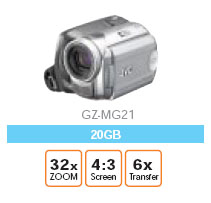
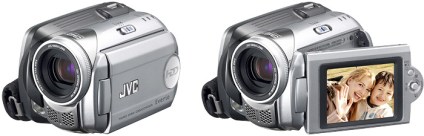
Friends of ours bought the JVC Everio GZ-MG21 camcorder a little more than a month ago, and aren’t too happy. Granted, it’s a 1st generation hard-drive based camcorder, so it’s bound to have certain downsides. So, with that in mind, here they are:

  • Start-up time is long, which means bye-bye to catching those candid moments on tape um, hard-drive.
  • Video quality is ho-hum. It’s better than VHS tape, but definitely not as good as Hi-8 or miniDV tapes.
  • Still quality is horrible, and that’s to be expected, since the max and only res for stills is 640×480.
  • No image stabilization + small camcorder = shaky video. This means the 32x optical zoom, while normally a great thing, is useless without a tripod.
  • Every time you press the record button, a new video file is created. Which means that when you do scene-by-scene shots, you end up with a whole bunch of little video files that you have to stitch together in your video app if you want to view them on a computer. My friend thought it’d be better if video kept getting appended to a single file. I can understand the logic of why JVC has a file by file approach, but I have to agree with my friend that a simpler method needs to be found. Yes, creating different movie files for each scene is an easy way to differentiate between the different scenes, and also saves battery time and minimizes lag since you don’t have to seek an existing large video file to find the end point and append to it. But, it is annoying.
  • Battery time is less than advertised.

Now for the good points:

  • Very small, easy to carry.
  • Convenient.
  • No tapes to worry about.

JVC Everio GZ-MG21It’d be interesting to compare my friends’ Everio model to the newer ones that have come out since, like the GZ-MG505, which is supposed to have 3, yes three, 4.5-inch CCD sensors, and shoot 5 megapixel stills. It also has a larger filter, and a larger LCD monitor.

But, it also consumes 75% more power and weighs 25% more. However, the video quality has to be better, and the stills would probably look stunning compared to the MG21.

I still have to assume, unless I’m presented with evidence to the contrary, that multiple video files are created, and that’s an annoyance. Plus, battery time has to be less than the MG21. And, I’d expect a little more than 30GB in drive space, especially given how cheap hard drives are these days. I mean, c’mon, an iPod has more drive space!

Here is the Everio Specs PDF.

Standard
Reviews

Boot Camp 1.1 Beta just released by Apple

Apple Boot Camp 1.1 BetaI complained in a previous post about how I wanted to buy a Mac laptop that I’d use for both work on pleasure, but couldn’t, because I was shackled to Windows OS for most of my development work, and there were certain things that just didn’t work on the Mac, with either Boot Camp or with virtualization software.

Well, I can’t have been the only one with gripes, because Apple just released Boot Camp 1.1, addressing some of the very concerns I voiced, both here and at BlogCritics. Here’s what the new version includes:

  • Support for “the latest Intel-based Macs”: this means the Core 2 Duo chips, code-named Merom, coming out at the end of this month. It could also be referring to the new Quad Xeon chips installed in the Power Macs, but I have a feeling 1.1 covers the Merom line as well.
  • Easier partitioning: version 1.0 was somewhat limited (let’s say minimalistic and be nice about it) in the choice of partition sizes.
  • Ability to install Windows XP on any internal disk. It still stinks that we can’t install it on a USB/Firewire drive, but I assume that’s coming down the line.
  • Support for built-in iSight cameras: this was one of my biggest gripes. Trying to use the iSight camera would give the dreaded BSOD.
  • Suppor for built-in microphones: about time! This was a pretty basic requirement.
  • Right-click when pressing the right hand Apple key on Apple keyboards. Interesting, although I’ll probably still use Ctrl + Click.
  • Improved Apple keyboard support: again, about time! Keys like Delete, PrintScreen and NumLock are used by most users on a regular basis.

So what still doesn’t work? The Apple Remote doesn’t. And neither do the Bluetooth Wireless Apple Keyboard and Mouse. Now, while it’d be nice for me to control iTunes while in Windows with the Apple Remote, I can live without that, but why wouldn’t the keyboard and mouse work? So okay, they don’t – fine. But what bothers me is that the sudden motion sensor and the ambient light sensor don’t work either. Those are not only cool, they’re very practical technologies. The sudden motion sensor in particular should be a must have feature.

I can just imagine Apple Tech Support when an unfortunate fellow calls them (hopefully not me):

  • User: “My laptop was resting on its laptop stand, and when I picked it up, it slipped out of my hand and dropped on the table. Now it won’t boot up!”
  • Support: “How high was the drop?”
  • User: “Only 4-6 inches! What’s going on?”
  • Support: “Were you using Windows at the time?”
  • User: “Uh, yes?!”
  • Support: “Well, you’re out of luck. If you were using Mac OS, the sudden motion sensor would have protected the hard drive, but since you used Windows, that hard drive is kaput. Plus, we don’t support Windows. You’ll need to get a new hard drive.”

In a related note, most of the new Lithium Ion batteries are subject to meltdowns and explosions when shaken, overheated or dropped. Something to think about as you hold that laptop in your lap…

Standard
Reviews

A side by side comparison of the 2003 MINI Cooper S and the new 2007 MINI Cooper S

I posted a couple of days ago about the launch of the new 2007 MINI Cooper S, and I said I wasn’t too crazy about the exterior. I still hold that opinion, and to prove it, here are some photos of my very own 2003 Cooper S, alongside a couple of photos of the 2007 Cooper S.

Now, can you honestly admit the new 2007 MINI looks better? They did away with the aggressive, sexy curves on the hood! Where’s that nice, aggressive hood? They pinched it and made it thin. They also made the lights rounder and smaller, and they did away with the extra air scoop on the bumper. But in doing so, they didn’t compensate, and the MINI’s now lost its flair.

Sure, the new one is slightly more sculpted, and it looks like they did away with some of the fat, plus they added two fog lights instead of the single red one you see on the 2004-2006 MINIs, but still, I prefer the back of my 2003 MINI. It’s nicer.

Standard
Reviews

IconSurf: the visual search engine

I’ve been meaning to post about IconSurf for some time. It’s a cool site/search engine that lets you search for other sites based on their favicon graphics – you know, the .ico files that reside at the root level of sites, they show up in your browser’s address bar, next to the URI. What’s stopped me is that the site loads very slowly. I thought its author would do something about it, but since nothing’s changed in a few months, I guess that’s about as fast as it’ll get.

Still, as frustrating as it is to use, it’s an interesting concept. You can alphabetize the sites in its directory (over 40,000 at the time of this writing) by TLD (top-level domain), by starting character (a, b, c, d, etc.) or search by a keyword or phrase within the URI. Obviously, this is a basic sort of search functionality, but it does let you narrow your search, and as I said, the site is interesting-enough overall to make you forget about its limitations.

Just think about the possibilities! If a proper image-search engine is put in place, you could organize the sites by color schemes (primary colors, pastels, etc.), by shapes (round, square, oval, etc.), by colors (ex: find a site that uses red in its favicon). This engine has possibilities!

I encourage you to give it a try! Go to it, then step away from the computer for a couple of minutes while it loads. When you come back, you’ll have a nice surprise. Enjoy!

Standard
Reviews

The new Tesla electric is a screamer

You may or may not have heard about Tesla Motors – if you haven’t, you’ll soon get an earful, and not just from me. There are plenty of other people (Wired News, Wired’s Autopia, Jalopnik, LA Weekly, New York Times, USA Today, LA Times, SF Gate, Washington Post, CBS Evening News, American Public Media’s Marketplace, CNET News, Newsweek) singing the praises of this amazing electric sports car. Here are just a few highlights:

  • 100% electric
  • 0 to 60 mph in about 4 seconds
  • 250 miles per charge
  • Equivalent consumption: 135 mpg
  • Gorgeous styling, amazing responsiveness
  • Truly innovative
  • Rule-breaker
  • Have a look at the tech specs for the other details

Tesla Motors just held a launch party for this amazing car – in CA, where it is based and funded by Silicon Valley millionaires. The event was invitation-only: selected potential buyers and journalists got the special invites, and each of them got chauffered around in the hot little roadster.

With all the excitement surrounding it, it’s easy to lose sight of the fact that it’s amazingly energy efficient given its capabilities. Yes, you read correctly above: its equivalent consumption (in miles per gallon) at the current cost of electricity is 135 mpg. It costs about a cent per mile to drive!

If you want to see it in action, CBS News has a video posted alongside the article right here. It also features the Governator – Arnold himself – in the passenger seat, getting a really fast test drive around the hangar where the launch party took place.

Of course, there are also tons of photos available. I posted a few below, and there are a ton more on the Tesla site.

Standard