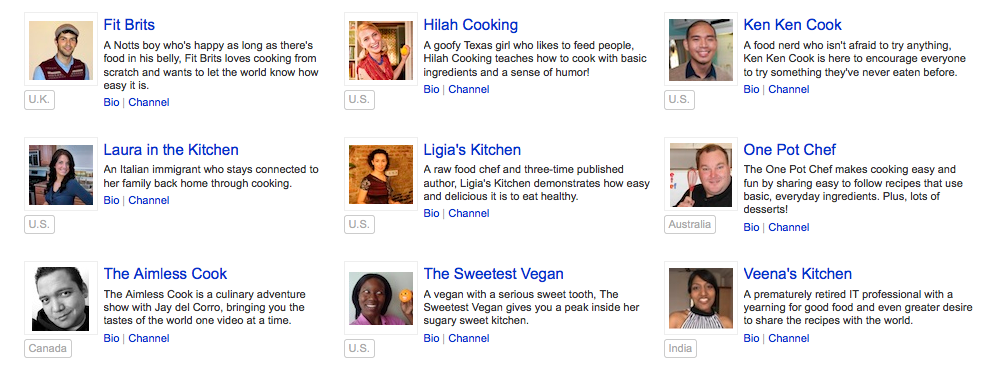
A little while ago, we heard about a contest Google had announced, called the YouTube Next Chef Program. We immediately thought about Ligia’s cooking show, Ligia’s Kitchen, and what a great fit that would be for the contest. Ligia applied, but didn’t think she’d win, particularly because the field of applicants was global, and the program promised to be exceptionally good in terms of the training and rewards offered. I had a gut feeling about it, I knew we’d put in the hard work needed to produce a quality show and felt we had a really good chance.

The contest winners would receive a 12-week training course in improving the quality and content of their videos, in marketing and promoting their videos and shows, and would also receive a package worth about $15,000 in exposure across YouTube and in new video equipment.

Time passed quickly and last week, we found out to our amazement that she’d been chosen as one of the 16 winners! I couldn’t believe it! For her, it was nothing short of a miracle. For me it was a confirmation of our efforts.

We got in touch with the folks at YouTube to find out the details, and were advised to be ready to receive inquiries from the American media. Sure enough, on Tuesday night around 1 am our time, we were talking with a journalist from the Sun Sentinel, the biggest paper in South Florida, who then wrote about Ligia on his blog. From what we understand, Ligia will also be mentioned or featured in the printed version of the newspaper within a few days.

We couldn’t say anything until yesterday, when the official announcement was made on the YouTube blog. We can’t thank Google enough, and Ligia can’t wait for the courses to begin! I’ll join in on the courses as well and look forward to learning new things.

You can watch all the episodes of our show, Ligia’s Kitchen, here. And if you’re not yet subscribed to Ligia’s channel or her website, let me invite you now to do so.

Thoughts

Why are we still syncing in iTunes?

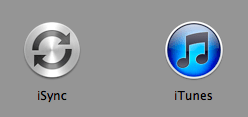
What I have to talk about has to do with these two apps, which are closely related and happen to sit right next to each other in my Apps folder: iSync and iTunes. We could call it part 2 in a series of posts where I look at things that don’t sit right with Apple computers (here’s part one). I don’t intend to become a critic of Apple, but I think it only right to point things out when they don’t make sense.
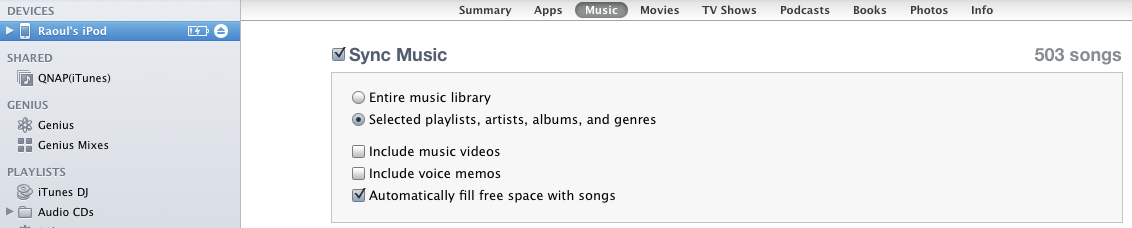
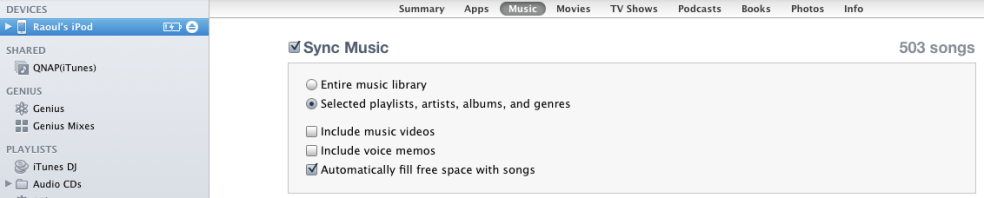
I’ve always been bothered by the fact that the syncing of our devices (iPods, iPhones, iPads) takes place in iTunes and not in an application dedicated to the syncing of external devices, designed from the start for this purpose, like iSync.

Perhaps at the get-go, when the iPod had just gotten released, and there was only music on it, it made sense to tie it into iTunes. But now, when most iPods do a lot more, like sync contacts, calendars, TV shows, movies and apps like video games and more, why are we still syncing in iTunes? It makes no sense to shoehorn all those syncing functions into an app designed for the organization and playback of our music.

While I’m on the subject, why is it still called iTunes? It also organizes and plays podcasts, TV shows, movies and books. Shouldn’t it be renamed to something like iMedia? (Disclaimer: I haven’t given a lot of thought to the new name, but I know iTunes doesn’t quite fit anymore.)

Back to iSync — doesn’t it make much more sense to sync devices in it? Shouldn’t it be the go-to-app for all our devices? Shouldn’t it sit prominently in the dock, and be the button we click when we connect a device, whether it be through USB or through WiFi?
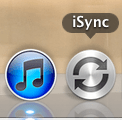
It’d be a fairly easy task for Apple to take the whole syncing process out of iTunes and place it within iSync. Then, we’d see something like this when we opened iSync.
Instead, what Apple did with the new OS X version, Lion, was to take iSync out entirely. I had to go back through my Time Machine backups in order to resurrect it and restore it to my Apps folder. Their move makes no sense whatsoever!

I’d like to issue a challenge to Apple: bring back iSync, properly re-written as a syncing app for all Apple devices, and slim down iTunes — also, rename it to something more appropriate that reflects the many media files it can handle these days.


Standard
Places

The Paltinis mountains in autumn

We visited the mountain resort of Paltinis today. It’s about 25-30 km from Sibiu (Hermannstadt), Romania, and the road to it is in pretty good shape. The views are wonderful, so if you’re in the area, drive on over.

Funny thing about Paltinis… It’s the place where I almost wasn’t… My mom was skiing on their bunny slope when she was pregnant with me, and she had a bad fall which could have resulted in a spontaneous abortion. Thank goodness it didn’t, or I wouldn’t be around today.

Here are a few photos I took there, which I shot with an iPhone. I used a “pre-filter” for some of the photos — my driving sunglasses! It’s a neat little trick you can do if the lens of your camera is small enough to be masked completely by the lens of your sunglasses, and it works particularly well if they’re polarized. You simply hold the camera right next to your glasses and shoot through the lens. You can compare the resulting effect below. Another thing I should mention is the panoramic-sized photos were stitched together in Photoshop, they’re not single exposures cropped to look like panoramic shots. Click through to view them large.

Standard
Thoughts

Why is it that Apple has three messaging apps?


Back when Apple brought out FaceTime, I couldn’t get why it had to make a separate video chat app when it already had iChat. Now we have a third app included with iOS 5, called iMessage. Why?

If the people at Apple are intent on making little messaging apps, each with their micro-purpose, then I’d like to suggest some new ones to them:

  • iShmooze: giving people a direct chat line to their boss or work hierarchy
  • iRx: so you can chat about your medications with your neighbors and know-it-all relatives, and get better prescription advice than from your doctor
  • iExChat: for venomous quips exchanged between ex-spouses and other ex-es…
  • iSeeAds: for people interested in seeing targeted ads; perhaps you can work in a micro-pyramid scheme where people can get something like 1-5 cents when they view an ad or invite their friends to view ads; that should be popular…
  • iSeeDeadPeople: photo sharing for zombie and vampire lovers
  • iPotty: for those who love to share those precious moments in the bathroom
  • iAte: see above and substitute food; this one could come with a photo sharing option, for those who love taking photos of said food; in hindsight, perhaps the photo sharing option could be extended to the iPotty app as well, I saw some folks online who would be interested in that.

For a company renowned for its design and the clear focus of its products, I’m surprised to see three messaging apps. Why? Didn’t anyone put their hand up to say, “Hey, don’t we already have iChat?”

Perhaps it makes sense to have the separation, from a software and procotol perspective. Perhaps iChat was designed for the computer. Perhaps the AOL messaging protocols it still uses aren’t suited for the purposes of FaceTime and iMessage. But it still makes NO sense.

If Apple was able to take OS X and turn it into iOS, then take features from iOS and put them back into OS X, then it’s quite capable of making iChat the go-to app for all its messaging needs. Rewrite it and make it work! It’s already incredibly capable on the desktop. It can do text chat, audio chat, video chat, file sharing and screen sharing. I use it all the time to do video conferencing with my parents, all the way across the Atlantic Ocean, and I use it for screen sharing as well, when I help them troubleshoot issues on their computers or simply teach them how to use them better. Why in the world would you leave a capable app like that behind and write a new one called FaceTime? And then why would you further fragment that segment and make another one called iMessage? Why?

I’d like to see iChat be the one and only app that does everything this set of three apps does and more. I’d like to challenge the people at Apple to make it work the way it should work, tailored to the capabilities of each device where it will be installed.

Standard
Thoughts

Do not use iMovie sounds for YouTube videos

Updated 4/24/12: YouTube has greatly improved the copyright claim dispute process in recent weeks, and it seems that even copyright holders have gotten much more responsive and willing to relinquish claims falsely flagged by YouTube’s Copyright ID engine. These are all good steps in the right direction! 

Are you a YouTube Partner? Great! Then don’t use sounds or tracks from the Final Cut Pro/iMovie/iLife library in your YouTube videos, because sooner or later, they’ll be flagged, taking them out of the revenue sharing program.

I’ve touched on this topic in this post and this earlier post as well. Until now, I thought filing a copyright dispute and trying to work within that process on the issue would lead to the correct solution, which would be a rejection of the false claims, but unfortunately that’s not the way the copyright dispute process is structured.

There is no mechanism on YouTube to adequately dispute a copyright claim, because the process is heavily tilted in the favor of the supposed copyright holder. There is a first step, which allows you to raise your hand and say to the alleged copyright holder, “Wait a minute, I’m not using your music, the track I’m using here is royalty-free, here is the iLife SLA, see where it says I’m allowed to use it commercially”, which may lead to the removal of the copyright claim, or not, in which case you can re-dispute but risk jeopardizing the standing of your YouTube account, the removal of your video along with its view count and the possible loss of your Partner status. That can be a terrible situation.

That’s right, beyond that initial “raising of your hand”, there is nothing else you can do. If YouTube staff is nice, they might give you an email address for the supposed copyright holder, and in some rare cases, someone might read your email at those places, respond and actually do something meaningful about your problem, but that chance is slim. The majority of the time, you’re going to be screwed over, and some alleged copyright holder is going to profit from your work.

The really annoying part in this whole screwing-over business is there’s no middle ground. Your video’s either in the revenue sharing program or it isn’t. YouTube has chosen to ignore the whole video aspect of this altogether, meaning that when a copyright claim is filed for the music in a video, even though you have a video which is wholly yours, and only the music might belong to someone else (but it doesn’t when you use sounds from iMovie, because they’re royalty-free), they pull the video out of revenue sharing altogether, as if there’s no video, only audio. Shouldn’t they allow you to continue to make some money on that video? After all, you shot it and edited it! Your only “fault” (if we could even call it that) was using royalty-free tracks from Apple to score it. In a logical world, that’s what would happen, but we don’t live in a logical world. We live in a world where YouTube chooses to obey the demands of alleged copyright owners without standing up for its YouTube Partners. All these supposed owners have to do is to upload sound-alike tracks to their YouTube catalog and they’re set. YouTube’s Content ID engine will start identifying videos that are using similar-sounding tracks and flagging them, leading to a lot of frustration on our part. I know this sounds harsh and I love Google and YouTube, but this is so frustrating for me that I’m not sure how else to put it.

Things have gotten so bad that now the copyright trolls have started to make music that sounds like the tracks from the iLife Library, for the express purpose of cashing in on YouTube. See this thread in the YouTube forums. And for a bit of background on the issue, see this thread as well. The problem’s existed for years, not months. YouTube likely knows about it. Privately, they’re likely tweaking the copyright engine algorithm and they’re trying to address the problem, but publicly, all I’m seeing is people getting screwed over by the copyright trolls.

You can’t even rely on the initial copyright warning anymore. In the past, you’d upload a video to YouTube, and within a few minutes, you’d get a warning saying the video matches content from such and such entity. Fine. I’d pull it down and re-edit it, using other sounds, even though the sounds I’d used were also from Apple’s royalty-free library. But now, you upload the video, everything’s fine, and months down the road, after the video’s been seen by thousands of people or more, and it’s been linked to, etc., you get the dreaded copyright warning. What are you going to do then? Pull it down? As you can see from the thread I linked to in the paragraph above, the copyright trolls are going through popular YouTube videos, identifying the music used in those videos, and then profiting from this loophole. We, the YouTube Partners, who do the hard work to create the videos that make YouTube a popular website are the ones getting screwed over. When is YouTube going to stand up for us?

To be fair, I think the blame rests squarely on the shoulders of both Google and Apple on this matter.

What Apple should have done, years ago, was to sign up for the Content ID program and upload all of the tracks in the iMovie/iLife Library (you know, the ones they keep saying are royalty-free). Then, they should have indicated to YouTube that whenever a video uploaded to the platform matches one of the tracks in their library, YouTube should do absolutely nothing about it, because it’s perfectly okay, they’re royalty-free tracks. If they had done that, we wouldn’t be in this mess now, would we?

YouTube is to blame as well. The copyright dispute process does not work. It puts all the balance of power in the hands of those who file the copyright claim, and because no person at Google reviews our disputes, the trolls have all the say in the matter. (I understand the sheer amount of work it would take if YouTube staff would have to review every dispute filed for false claims, but at least they could do it for their YouTube Partners, there aren’t that many of us.)

Instead our copyright disputes only get seen by the staff at the various copyright holding groups, who have an interest in maintaining their claims, since there’s no recourse from Google/YouTube for wrongly identified videos, and of course, let’s not forget the copyright trolls, who hang onto every claim they make no matter what one says in a dispute.

I make that distinction above because there are some groups within the music industry who aren’t copyright trolls. For example, I’ve had copyright disputes reviewed by staff at the GoDigital Media Group and the Warner Music Group, and they’ve ultimately agreed with me and retracted their copyright claims. So there are some good guys around, there just aren’t enough of them.

So my advice to you, as stated at the start of this post, is do not use music from the Final Cut Pro/iMovie/iLife Library at all if you’re a YouTube Partner. You’re better off using music from independent artists and licensing it directly from them, or getting it from websites like MusOpen — or scoring your videos yourself, with original music.

Perhaps Apple and Google will fix this at some point. Until then, do yourself a favor and follow my advice. You’ll be able to sleep better for it.

Standard