Thoughts

A few suggestions for FeedBurner

FeedBurnerI’m a very happy user of FeedBurner, the wonderful feed management service from Google. I’ve been using it since early 2006, and I log on multiple times every day to keep track of my feeds. I’d like to talk about some features and options that I’d love to see on the site.

Ability to splice multiple feeds without having to add them to a network or put them in FAN. I’d love to be able to have a single feed that combines all of my content, without having to go through what I’m going now, which is to create a feed network, add my own feeds to it, and burn that feed to a feed… I know there are other services on the web that do this, but I’d rather be able to do it through FeedBurner.

Ability to splice external feeds (ones not burned at FeedBurner), into a single FeedBurner feed. This would work sort of the way that Jaiku or TwitterFeed work, in the sense that I’d take my feeds with very few subscribers, like my Twitter feed or my Vimeo feed, and add them to my single feed without needing to “burn” them as separate feeds at FeedBurner, and having them show up under My Feeds. I’m not really interested in managing those feeds at this point — I just want to add them to my single feed.

Better revenue reporting from FAN (FeedBurner Ad Network). I never know how much I’m getting, because the figures are just approximations, and the pay is somehow always less than what’s indicated in the control panel. AdSense always reports my revenues correctly, Amazon does it too, but FeedBurner always leaves me wondering how much money I’m going to get. Maybe I just don’t know where to look, but believe me, I’ve looked all over the place. There’s only one place where revenues are reported centrally, and then there are ad revenues for each individual feed in FAN, and still I don’t know how much money I’m making with my feed ads.

Ability to “refresh” feed flares. Old feed flares display with old preferences, so I have a ton of flares showing up for older posts. I understand that they’re cached, and they have to stay cached, because it would be murder on a database if the flares would be constructed dynamically for every feed item, including the older ones… But I’d like to have a manual “refresh” function for the flares, that would let all of the old posts and old feed flares inherit the most recent settings for my feed flares.

Ability to separate feed flares from the ads. I’d like to display the feed flares at the top of my posts, for example, and the ads at the bottom. Right now they’re together and there’s no way to display them but right next to each other.

The SmartCast feature is a bit confusing. Either I’m the one that doesn’t get it, or it doesn’t quite work as advertised. Here’s what it says on the site:

“Makes podcasting easy in feeds that normally cannot support it. Link to MP3s, videos, images, and other digital media in your site content and SmartCast creates enclosures for them automatically. Optionally adds elements required for a richer, more detailed listing in iTunes Podcast Directory and sites using Yahoo Media RSS.”

When I took my podcast feed, which is a simple category feed from my blog, and turned on the SmartCast option, enclosures for the media files linked from each post weren’t turned into enclosures. The iTunes elements were added to the feed, but it still didn’t become a feed that I could subscribe to from iTunes, so I gave up on it.

Now, a little more than a month since my last podcast, I see that I can subscribe to that feed in iTunes, and the podcast downloads just fine. But only the last item shows up instead of every single episode, or at least the last 10 feed items, which is the standard. Why? And why didn’t it work when I first turned on SmartCast for this feed? I can’t help but be confused by this. SmartCast can be a very elegant and easy way to turn a normal feed into a podcast feed, but it looks like it still needs some work.

Photo Splicer only works with the Flickr ID. The Photo Splicer option says I can put in either my Flickr user ID or my screen name, but it really only works with the User ID, which is annoyingly hard to find on Flickr. It would be nice if the User ID would be automatically looked up if I entered my screen name.

I know the FeedBurner folks will read this. They’re very conscientious and follow up on these things. I don’t want special treatment, but it would be very nice if they could consider my feature requests and see what can be done. FeedBurner has my thanks for a wonderful service!

Standard
Reviews

Upgraded to Leopard

Mac OS X LeopardAlmost two weeks ago, on 11/16/07, I upgraded to Leopard, the new version of Mac OS X. In spite of some negative experiences I’d read about, my upgrade went smoothly and I didn’t lose any data. All of my applications worked afterwards. A couple of them, like 3D Home Architect, required Leopard updates to make them stable again. My version of EyeTV needed to have its most recent upgrade re-applied.

There were a couple of hiccups that I wanted to mention. One occurred during the upgrade process itself, and the other afterwards.

  1. I started the upgrade process and booted from the DVD. Went through the various steps, but when it came time for the Leopard installer to find our iMac’s boot disk, it couldn’t see it. I waited for about 5 minutes, then I clicked the Back button a couple of times, went through those screens again, and after I waited for about 2 minutes, it finally saw the boot disk and allowed me to go on to the next step. I have a feeling this might not have been a hiccup, but that the installer was busy calculating the free disk space on the drive. I thought I’d mention this just case some of you have the same problem.
  2. After the upgrade completed, I configured Time Machine to back up to one of my external drives, and it started the initial backup. It kept going through the evening and overnight, then it crashed in the morning, and the iMac required a hard reboot. In other words, everything was frozen and I had to power it off manually. After I started it back up and restarted Time Machine, it finished the initial backup and it picked things up exactly at the point where it crashed. In other words, it didn’t start backing up the entire drive once more, which I thought was a nice touch.

One thing I did before starting to upgrade was to disconnect ALL peripherals. I figured there was no reason to complicate the upgrade process by having extra USB and Firewire drives, printers and other gadgets connected during that time. When the upgrade process completed, I re-connected them, and found, to my delight, that a new driver for my printer had been packaged with the OS. I didn’t have to run HP’s crummy, old drivers from 2005. Very nice!

I’m very happy with Leopard since we installed it. Our iMac runs a little faster now, thanks to the better memory management and pre-fetching features in Leopard. I love Time Machine and the Remote Desktop features included with the new iChat. These two features were my reasons to upgrade to Leopard, and I’m very glad to see that Apple delivered the goods.

Another feature I love is Spaces. I love being able to separate my applications so easily, and I love being able to assign them to different screens. I know that when I start up a certain app, it’ll run in a certain space and won’t clutter up my primary space. That’s awesome.

One thing I didn’t like about the previous version of OS X (Tiger), was the fact that when I used a key shortcut to access my home folder (Command + Shift + H) or the apps folder (Command + Shift + A), it would commandeer any existing open window and go to that location. I wanted to keep the existing location and open a new window, but Tiger wouldn’t let me do it. The same thing still happens in Leopard, and what’s more, when I use Spaces and I’m in screen 2, for example, pressing a key shortcut to access the apps folder will open it up in Screen 1, defeating the purpose of using separate screens. This is one piece of interaction that should be changed.

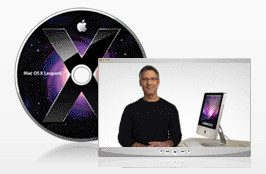
Mac OS X Leopard Guided Tour I’m otherwise a very happy customer, and I think Leopard is a worthwhile upgrade from Tiger. The new features are awesome.

If you’re thinking about upgrading, I would highly recommend watching the guided tour so you know what to expect. If you can’t watch the video, the booklet included with the Leopard DVD disc is another great resource.

More information

Standard
Places

A trip to the freezer

Here are some of the photos I took on a recent trip to our freezer. 🙂 They combine my love for macro photography, colors, out of focus photos, bokeh and fun. Enjoy, and if you’d like, you can try to guess the various items I photographed.

More than meets the eye

Passionately frozen

Apex

Purple designs on your heart

Bluish anguish

Maroon thoughts of yesteryear

So cold it burns

Design is everything

Standard
How To

Do not allow websites to resize your browser window

Websites that resize my browser’s window or maximize it are completely annoying. When someone does that to me, no matter how interesting their content may be, I go somewhere else instantly. Fortunately, there’s a way to block anyone from messing with my browser windows or tabs in Firefox. Here’s how to do it:

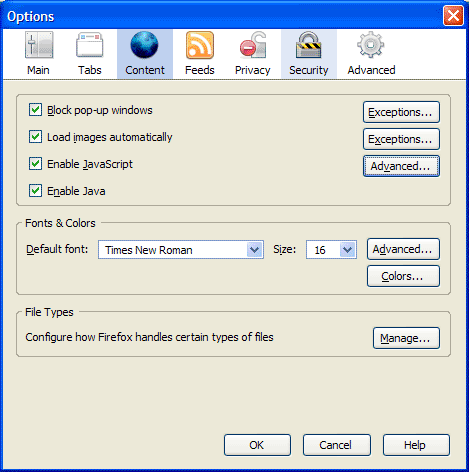
First, go to Tools >> Options, then click on the Content icon in that dialog box. It should look like this:

Firefox content options

Now click on the Advanced button next to the “Enable JavaScript” checkbox. You’ll get the following dialog box:

Firefox advanced javascript settings

Make sure to uncheck the following options:

  • Move or resize existing windows
  • Raise or lower windows

Click on the OK button twice to save the changes, and then you’re done. This will disallow any website to adjust the size of your browser window. It’s a great way to make sure your browsing experience stays yours.

Standard
Places

Visited by a ladybug

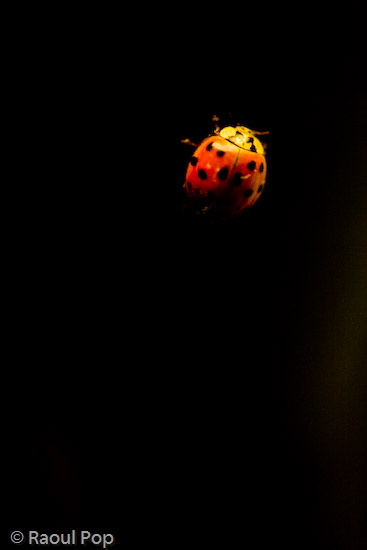
Just as I was getting ready to download the photos from my camera last night (I’d been out photographing the wonderful fall foliage), a ladybug flew by me, and stopped to rest on one of our lamps.

I have no idea how it got inside our home, since we have screens at our windows and doors, but they always seem to find a way, don’t they? It must have been woken up from its hibernation by the unusually warm weather we had (over 60F). I realized that I’d never gotten macro shots of a ladybug before, so this was my chance.

There was no time to set up a tripod, so I took these handheld, at 1600 ISO, with my 100mm macro lens. There was some overhead light from the lamp, just enough to get the right atmosphere. The poor thing still had fuzz on it from who knows where. They find the strangest places to spend winter…

The climb

Red and black

Silhouette

It’s Thanksgiving today here in the US, so if you celebrate it, I hope you have a wonderful one!

Standard