Thoughts

More petunia photos

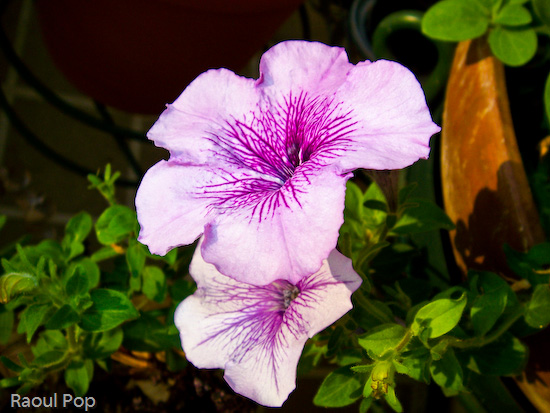
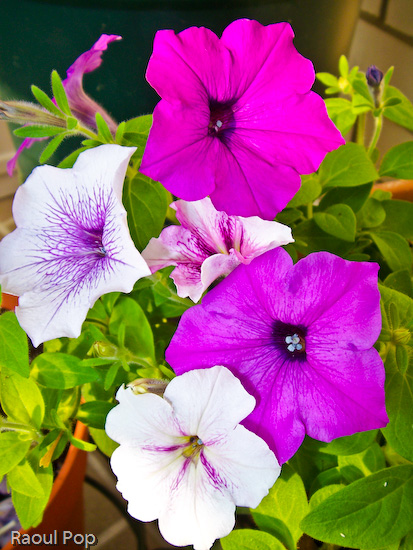
I’m posting more petunia photos. Can’t help it, they look so good — the poor things are still going strong as I write this, and it’s already October. Ligia must have done something right taking care of them. Incidentally, she grew them from seeds she harvested from last year’s crop of petunias. You should have seen her taking care of these beauties from the time they were seedlings.

We thought we’d lose them a few weeks ago when these green butterfly larvae infested them. Those little nasties would eat both leaves and flowers, and there’d be no end of them! We’d pick them off the flowers and squish them, and there’d be more in the morning… Thankfully, they disappeared, and our petunias came back to life, more glorious than ever, as you can see.

Red, white and purple petunias

Red, white and purple petunias

Red petunias

White and purple petunias

Red and white petunias

Mauve petunia

Blue petunias

Standard
Reviews

Google Groups gets a makeover

After Google launched the new Reader, I couldn’t help thinking they might just give Groups a re-design as well. My hunch was correct. Brett Lider announced a couple of days ago on the Official Google Blog that a new version of Groups is currently in Beta. It looks a little nicer, but beyond that, no extra functionality was included. Oh yes, there was. There’s now a drop-down menu at the top (Ajaxified) which displays the groups I’m subscribed to without needing to visit a separate page.

The new Google Groups

Beyond that, I think the old version of Groups made better use of the space on the page. When I log into the Groups Beta, my groups get grouped in a right-hand column, and since I’m subscribed to more than 10, the page ends up stretching down with lots of white space in the main column and the groups squished in the right column. It just doesn’t look good.

Overall, I think they’re going in the right direction with the new version of Groups, but it still needs work, particularly in the page layout. I just don’t think enough time was devoted to thinking through the functional areas of the Groups, and how they need to be arranged on the page.

Standard
Thoughts

Photographs of petunias

Here are a few photos of petunias that we grew ourselves. I’ll post some more in the next few days. If you like petunias, you’re in luck! 🙂

Deep blue petunia

Purple petunias

Red, mauve, blue and white petunias

Pink petunias

Standard
Reviews

Clean your computer with CCleaner

CCleanerI tried CCleaner, a wonderful little freeware app that will clean temp files and other unused files, registry keys and cookies, on three separate PCs, and I’ve come to rely on it already. Two of those PCs were XP Professional machines, and one was a Windows 2003 Server running on VMWare Enterprise as a virtual machine. It did a great job on all three. It gave no error messages, it just cleaned things up nicely.

When I ran it on my first machine (at work), it found over 300 MB of files it could safely delete. Then I ran it on the server (also at work) and it found about 50 MB of files (granted, this was a new install, only days old.) Then I ran it on my laptop at home, and it found over 500 MB of files. I took a few screenshots for you to see. I like the fact that the CCleaner is very customizable. I can tell it what to delete and what to leave intact. I particularly like that I can specify which cookies to keep, and which to delete. To do the same yourself, go to Options >> Cookies. This means that I can keep a set of “safe” cookies, for sites I like and visit often, and delete all the rest. It’s wonderful, because it means that I won’t have to re-type my login information after running CCleaner.

CCleaner - Main Screen

This is the screen where you specify the registry scanning options:

CCleaner - Issues Screen

This is the screen where you tell it what cookies to keep, and what cookies to delete:

CCleaner - Cookies Screen

I highly recommend CCleaner. It works as advertised, and doesn’t cause any problems. A word of warning though. Before running it on my XP Pro machines, I created System Restore points, and I advise you to do the same before running it. (There is no such option on Windows 2003 Server.) Although CCleaner caused no problems whatsoever on all three machines where I used it, freak accidents are possible on Windows machines, and it’s good to have something to fall back on.

By the way, I think it’s a great idea to create System Restore points before you install any piece of software. It’s just good practice. That way, if something goes wrong, you simply restore your computer and move on, no harm done. Don’t rely on Windows to create the restore points automatically. I found out the hard way that sometimes you simply can’t restore from those points. Manual creation of restore points is the safest bet.

Standard
Places

White's Ferry and Edwards Ferry

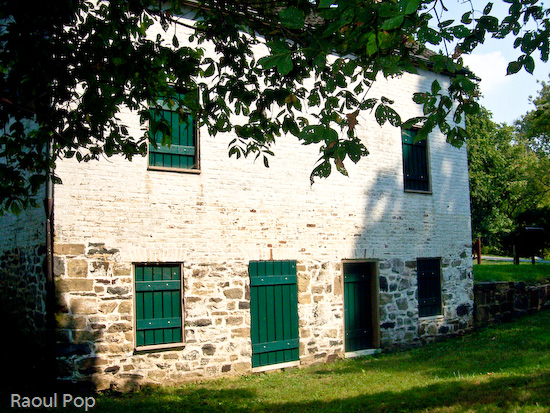
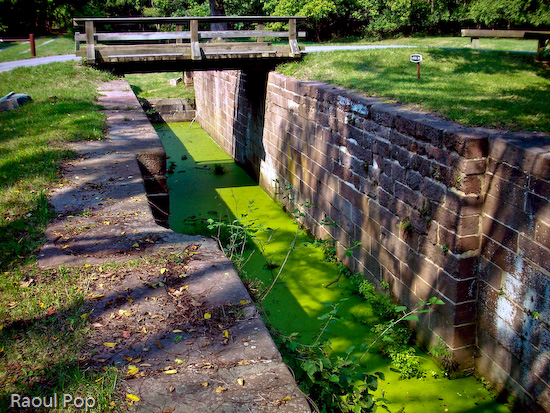
A few weeks ago, Ligia and I visited White’s Ferry and Edwards Ferry, both on the Potomac River here in Maryland. We’d been to White’s Ferry before and knew what to expect, but hadn’t yet been to Edwards Ferry, which is hidden away and harder to get to. Both are very close to the C&O (Chesapeake & Ohio) canal, but while White’s Ferry only has a decrepit, rusty bridge as a reminder of the Canal (no water, mind you), Edwards Ferry still has the gatekepeer’s house, intact, a bit of water, and part of the lockgate. It’s also a more intimate, historically preserved location than White’s Ferry.

Just in case you’re wondering, Edwards Ferry has no ferry anymore (White’s Ferry does), but it does have a public launch ramp for boats, which is still actively used. We hiked around both locations, and also along the C&O Canal tow path, and took photos.

Canoes for rent at White’s Ferry

Glimpse the Potomac

White’s Ferry in action

Potomac River at White’s Ferry

Established

Shapes in the mud

Arch

C&O Canal Towpath

Trees have faces too

Historic White’s Ferry

Meadow at White’s Ferry

Launch ramp at Edwards Ferry

At Edwards Ferry launch point

Gatekeeper’s House at Lock 25

Lock 25 on the C&O Canal

Standard