This past Thursday, Canon announced their newest DSLR, the Canon EOS Rebel XSi. This camera ups the ante for every entry-level DSLR out there and introduces a host of important new features.
In a nutshell, Canon has integrated features from its more expensive DSLRs, like the DIGIC III processing engine and better AF, it has replaced the cheap-looking grip material with soft rubber, and it has increased the resolution from 10 to 12.2 megapixels. There are a number of other significant differences between the XSi and the XTi (which I reviewed a few months ago), and I’m going to talk about them below.
Analysis
XSi now uses SD cards instead of CF cards. This was a bit of a shock to me, but there it is. I suppose with such a small camera body, it made more sense, but I prefer CF cards, they’re sturdier.
Higher resolution: 12.2 megapixels vs 10 megapixels for XTi
Soft rubber grip: no more of that cheap-looking plastic material used on the XTi
3″ LCD at 230,000 pixels
Sensor equipped with microlenses over each pixel, to reduce noise and enhance sensitivity
14-bit A/D processor means the XSI can record up to 16,384 colors per channel
DIGIC III image processor: previously only available on the 40D and 1D series cameras.
Live View now includes AF: on the XTi and 40D, you have to press a button in order to focus the camera in Live View
Better AF sensor: higher subject detection capabilities and more precise focusing with fast lenses (f/2.8 or better)
Faster frame rate: 3.5 fps vs 3 fps for XTi
Thinner, wider, taller than XTi: 5.1 x 3.8 x 2.4 in vs. 4.98 x 3.71 x 2.56 in
Different battery: LP-E5 vs. NB-2LH. Press release states 50% more shots per charge than previous battery, but specs state same approximate life. Hmm…
Highlight Tone Priority, High ISO Noise Reduction and Auto Lighting Optimizer are three features brought down from Canon’s more expensive cameras to improve image quality.
Backup battery now built in, not replaceable. The backup battery is the one that keeps camera time. It used to be a CR2016 Lithium battery, now it’s listed as a built-in battery. Perhaps this is a specs typo, someone correct me if they have more accurate information.
Offered with two kit lenses: the EF-S18-55mm f/3.5-5.6 IS and the EF-S55-250mm f/4-5.6 IS
By offering the camera with two image-stabilized kit lenses whose 35mm effective combined range goes from 28.8-400mm, and by upping the resolution from 10 to 12.2 megapixels, Canon is clearly going after its competitors. It wants to continue to dominate the DSLR market, and with such an impressive entry-level DSLR, it will likely do so.
The resolution itself is another mind-boggling upgrade. I didn’t think 12 megapixels would be offered in the Rebel or another entry-level DSLR so soon, particularly when the 40D only has 10 megapixels and the 5D (my current camera) is the reigning king at 12.8 megapixels, but here’s the XSi, and there’s no arguing with that figure. If nothing else, this means the new 5D “Mark II”, which is expected to be announced in April, will have at least 16 megapixels resolution, possibly even 18 megapixels. It’s only natural, given that the new 1Ds Mark III stands at 22 megapixels.
It’s fun to change your photographic point of view every once in a while, especially if that opportunity is available to you. Fortunately, we live in an area with fairly tall buildings, so all we need to do is to get to the roof. The world sure is different from up there!
I took my own advice a couple of days ago, spurred on by the chance to try out a new camera: the SP-560UZ from Olympus, the most powerful ultra-zoom digital camera they make. It’s got a monster 18x zoom, the equivalent of 27-486mm focal range. I’m currently reviewing it, and should be able to publish my findings sometime in the 1st or 2nd week of February, perhaps sooner. So far, I like the camera a lot.
This is one photo that perhaps best exemplifies the camera’s powerful zoom. That Bethesda skyline is 5-7 miles away. With the naked eye, you can barely see those buildings, tiny as fleas, somewhere on the horizon. But the SP-560UZ bring them that close, and with its built-in image stabilization, lets me get a photo like this one while shooting handheld at maximum focal range.
In another part of Bethesda, you can see this next building. I never noticed it was crooked before, but then again, I could never get this close to it before. I tried rotating the image to see if my horizon line was at fault — the cloud line was also crooked – but that wasn’t the case. When I line up the photo with the ground line horizontally, and with the trees vertically, the building clearly appears to be leaning to the right. I wonder if its owner knows of this.
This is another photo I couldn’t get before: buildings near Montgomery Mall were always too far away for my reach.
Then I turned and looked toward Bethesda proper, which can always be recognized by the National Naval Medical Center tower. The National Institutes of Health are across the street from it, but they’re not tall enough to show above the tree line.
Here’s Wisconsin Avenue as it passes over I-495 and I-270.
Here’s one of my favorite scenes. The photo shows NNMC, Wisconsin Avenue, the I-270 and I-495 overpasses, and the Metro Red Line, all at once. And to top it off, you can see the Metro itself rounding the corner as it climbs up from underground. That area is one of the most visually complicated transportation hubs I have ever seen. You’ve got two major interstate roads coming together in the valley below, Wisconsin Avenue bridging the gaps over the interstates (with the requisite exits onto each highway, of course), and above, the metro line, on an overpass bridge that comes up, out of the ground somewhere in the middle of the photo. And then you’ve got Tuckerman Lane and Grosvenor Lane, plus a bunch of other roads, spilling onto Wisconsin Avenue as well. It’s one big traffic spaghetti bowl, that’s what it is.
While Ligia and I were up there, two news helicopters from Channel 4 and Channel 7 flew rapidly overhead, then hovered above over I-495 at some distance away. Looks like there was some sort of accident there, but we couldn’t see anything because of the tree cover.
The North Bethesda and Rockville skyline was something I’d always wanted to catch with a good tele lens as well. The SP-560UZ made it possible. These are the buildings near the White Flint metro station. I love the architecture of those buildings, and must make time to photograph them up close at some point.
This is another view of North Bethesda that extends into Rockville. The tower in the lower left foreground belongs to Georgetown Preparatory School, which has been in existence at the same location since 1789.
This is another view of the North Bethesda skyline. That big building that fills the background is a huge condominium building, and the one with the golden windows is an office building. Every time I see those golden windows (and I’ve been seeing them for some time) I keep promising myself that I’ll get up close to photograph them, but it never happens. Perhaps I’ll manage to make time this year.
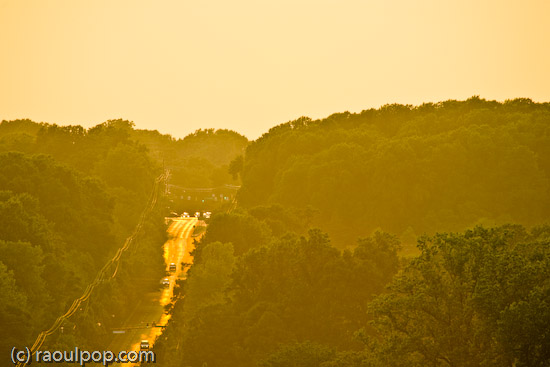
Finally, the road shown below is Tuckerman Lane, a major street that connects Rockville Pike to Old Georgetown Road and I-270 and I-495, at dusk.
You may or may not remember Tuckerman Lane from this photo I took last July.
This last photo was taken with the EF 100-400mm IS L series zoom from Canon, but to be fair, photos look a LOT better when it’s summer and you get that beautiful dusk light filling the scene than on a dreary, snow-less winter evening. Don’t judge the SP-560UZ harshly — its lens is very good given its price and intended market segment.
I keep talking about I-270 and I-495, and if you’re not from the area, you have no idea what they are. I-270 is a major local highway that cuts across Maryland from North to South and collects traffic going into and out of DC. I-495 is the beltway. You may have heard the expression “inside the beltway” with regards to Washington, DC. I-495 is that beltway, and it does just that — it surrounds DC and lets people travel around it as needed without having to deal with the major traffic delays associated with driving through DC. Of course, driving on the beltway itself it no picnic either. It’s one of the busiest highways in the US. At peak times, it’s bumper to bumper traffic, all the way…
I have owned the Kodak EasyShare v610 Dual Lens digital camera for the past year and a half, and I’ve meant to write about it for some time. This will be a nostalgic review, since the camera is no longer being made.
Last weekend, I put together an 8-minute video review, and also took some photographs of the camera. I’ll accompany those two offerings with my insights, gathered after a LOT of use in just about any weather and light conditions. At the end of the review, I’ll also post selected photos taken with the camera.
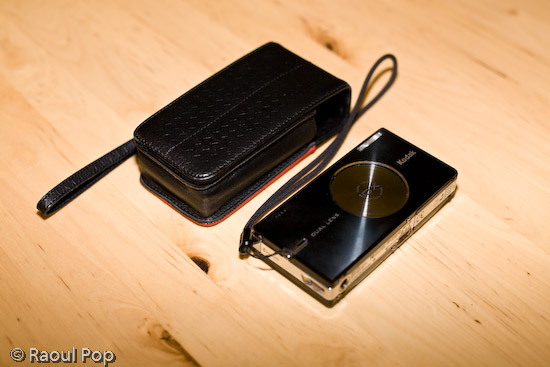
There’s what the camera looks like at first glance. I purchased a matching leather case for it, and I’m not sorry I did it. It protected the LCD screen from scratches, and it helped protect the camera itself when I threw it about from bag to bag. Back when I was in college, in the mid 90s, my parents gave me a first generation Canon Elph. It used APS film, and it was a small, beautiful and elegantly designed little camera for its time. I’m talking about this because I got a leather case for that camera as well, and it helped keep that camera running in good condition for several years. My advice to you if you get a small camera is to get a good case for it as well. Make it sturdy, so it can withstand abuse, and make it stylish, so you won’t be ashamed to be seen with it in public. Leather fits that bill quite nicely, doesn’t it?
Video review
The video I recorded is enclosed below. You can also view it here, or download it if you like. If you’ve seen some of my other video reviews, you’ll have to excuse the lower overall quality of this one. I shot it this past Sunday, informally, during a very hectic weekend. I had a limited amount of time at my disposal, I was rushed, and it shows. But I managed to get my points across, and I’m happy about that, so it is worth watching.
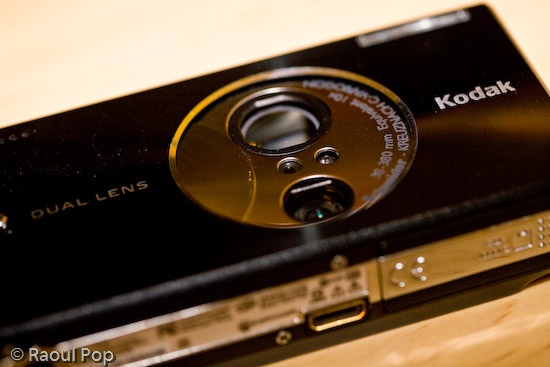
One of the striking features of the camera is its dual lens setup. Back when it came out, a 10x zoom on a camera this compact was virtually unheard of. It’s still fairly uncommon. The only way this could be accomplished, while still keeping things looking great and with no external zoom extending outwards from the camera body, was with two lenses, one for closer distances, and one for what could be called tele. The first lens — the bottom one — is for 1-5x, and the second lens — the top, larger one — is for 5-10x, as you can see below.
The two lenses together have an astounding range of 38-380 equivalent focal millimeters. The first lens goes from 38-114mm, and the second goes from 130-380mm. I have good things to say about the quality of the optics. The images were sharp when in focus, and there was little fringing and chromatic aberration. There were two drawbacks to the lenses.
One, they were fairly slow. What I mean by that is that they didn’t open up quite enough, and that tended to make the camera pretty hard to use in low light situations without a tripod. The smaller lens (1-5x) is rated from f/3.9 to f/4.4, and the large lens (5-10x) is rated to f/4.8.
Two, there was a pause when zooming out past the 5x mark. The camera’s zoom would stop when it reached the end of the focusing range of the first lens, and I would have to press the tele button again to pick up the next lens and focus further than that. Over long periods of use, that tended to be pretty annoying.
But I didn’t let these things bother me too much. After all, I got 10x zoom in a very compact package.
Controls and ease of use
What I liked most about the camera was its ease of use for basic photo taking. That proved to be both good and bad. Anything more advanced (such as long exposures, a change in ISO, or White Balance) required some menu surfing, and any custom settings were erased when the camera was turned off. Even something as simple as delayed exposures (2 or 10 seconds, for example) needed to be set for every single photo where they were needed. One couldn’t just turn on that setting and keep it on. It would reset after every exposure.
Even though I didn’t like this, I can understand the rationale for it very well. After all, this camera is a compact point and shoot meant for people who just want to pull it out and take photos, not for more serious tasks. And let me tell you, if someone that doesn’t know much about cameras picks up a Kodak v610, messes with the settings, and doesn’t know how to get it back to normal, they’ll be VERY much relieved when they find out all they have to do is turn it off, then back on.
The controls on the camera are wonderfully designed. The buttons are either metal or very hard plastic, and I am not about to scratch them to find out what they’re made of. At any rate, they’re the right shape and texture, and it’s fun to press them.
They’re intuitive, they fit well within the camera’s interface, and there aren’t too many of them, which is the right decision for a compact camera such as this.
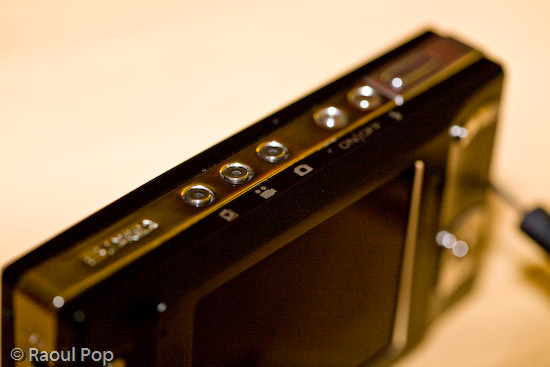
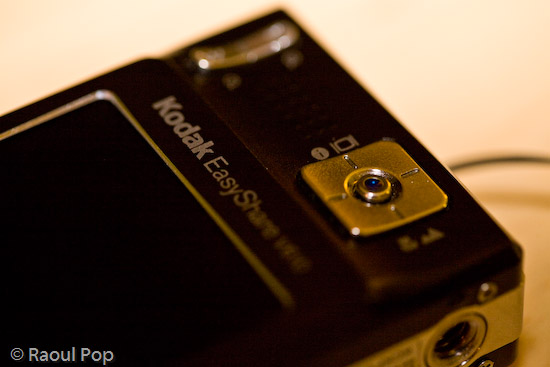
I loved the easy way to switch between normal, macro and tele mode. See the big, square button above? Turn the camera on, and you’re in normal mode, where the camera can focus from 2 feet to infinity. Take photos as would normally do. Press the bottom part of the button once, and you’re in macro mode, where the camera can focus from 2 inches to 2.3 feet. Press it again, and you’re in tele mode, where you can take photos of things very far away and not have to worry about focus. The camera focuses to infinity automatically and picks a higher aperture, which means you’ll get a larger depth of field.
The build quality of the camera was evident everywhere. The tripod mount is a great example of this. It was pre-planned and integrated into the silver metal border that lines the camera’s sides. Not only that, but the mount itself is metal, not plastic. Given the camera’s light weight and compact size, one wouldn’t think it’d need a metal tripod mount, but there it is, and I love it!
One point of contention with the camera is the USB connector, which is a custom one. I would have loved to see Kodak put a standard USB mini connector on the camera, but they didn’t. That’s probably because they wanted it to integrate with their camera stands and plug right into their photo printers, but come on, there are volumes to be said about standardization… It’s really important when it comes to good design.
Capabilities
The camera includes a movie mode which records Quicktime movies using MPEG-4 compression at 30fps. I found the quality of the movies (640×480 pixels) to be plenty for my on-the-go needs, and often used it as my primary video camera. I have a confession to make: it was also my only video camera. 🙂 Remember my video review of the Canon Rebel XTi? It was done with the Kodak v610 mounted to a tripod. Came out great, didn’t it?
With a 2GB SD card in the camera, it could record over 1,100 photos or 1 hour of video, which is more than plenty for such a compact camera. The only problem was, the camera’s battery would only last for about 125 photos. I’m not sure how many minutes of video the camera could do on a fully charged battery, so I can’t speak for that. But I did find myself frustrated by the low battery life when taking photos, and ended up purchasing a second battery. With judicious use of the zoom and LCD screen, I found I could extend the battery life to 135-150 photos, but that was still not quite enough for me, and it was pretty frustrating to be out in the city, taking photos, only to have the camera die on me.
Again, I think this is a design issue, and I wouldn’t necessarily call it a flaw. This is a small, stylish camera meant for the person who would pull it out every once in a while and take a few photos, not for someone who wants to take lots of photos. That person should opt for a bigger camera with more battery life.
One other point I wanted to mention was the sensor’s light sensitivity. It was capable of 64-800 ISO on paper. In real life, I found 400 ISO to be barely acceptable, and 800 ISO unusable. 64, 100 and 200 worked out great. If I left it on Auto ISO, it varied it between 64-200 automatically to get the optimal exposure. The camera changed the ISO settings in increments of 10 between 70-200 ISO, and I’d always get a chuckle out of seeing all sorts of ISO speeds show up in my photos’ meta-data.
Overall, I was pretty happy with the camera. I say “was” because I recently gave it to my parents. They had a more complicated digital camera, and they often couldn’t understand the settings and were frustrated because they couldn’t get the photos they wanted. The Kodak v610 will work out much better for them since it’s more compact, it’s fully automatic, and it resets its settings with every “reboot”.
The camera also has a blurry photo indicator that can be turned on. If a photo is good, a little green hand will appear. If the photo is marginally acceptable, the little hand will turn orange. And if the photo’s not good at all, the little hand will turn red. That’s easy enough for anyone to understand. I told them to re-take any photos where the little hand will turn red, and if they can’t get anything orange or green to seek more light or give up. I think they’ll finally be able to get more decent photos now.
Let me show you a few photos I took with the camera to illustrate what it could do. I can’t emphasize enough how useful that 10x zoom proved to be, and you’ll see what I mean as you look at the photos.
Sample photos
This first photo is quite appropriate for this time of the year, as it represents a group of merry carolers on a sled.
This is another macro shot, this time of colorful beads in a public market.
The wide focal range allowed me to get photos of entire valleys from mountain tops. This is a photo of a portion of the Shenandoah Valley, as seen from Skyline Drive. Here you can see the typical bluish tinge caused by UV haze. This gets exacerbated by the CCD sensors of smaller cameras. I’ve seen it on many small cameras. For example, the iPhone’s built-in camera suffers from this defect to what I consider an unacceptable degree.
The camera’s CCD sensor was fairly adept at capturing color.
These very red and vibrant fall foliage was captured last year at our local Audubon Naturalist Society in Bethesda, MD.
During one weekend morning, I decided to set up the camera on a tripod and play around with water drops on petals. I got some really nice photos out of that session. This is one of them.
There’s a WWI memorial in downtown DC, and the crowning piece is this golden statue.
I love great sunrises, and I captured many of them with the Kodak v610. This is one of those photos.
The inside courtyard of the Watergate Hotel in Washington, DC is shown below. The camera always managed to expose photos decently when confronted with situations like this: a wall in shade and the bright sky above. A LOT of cameras have problem with this kind of a setup, including my 5D, which tends to overexpose the sky.
Taken during a fierce snowstorm (we get one of those every year around here). It’s too bad the snow melts away so quickly afterwards.
The next day, snow began to melt, as expected. I rushed to get a few photos before it would all be gone. This photo was post-processed to emphasize the frozen atmosphere — wishful thinking on my part, since the temperature was above 32 degrees Fahrenheit.
We were walking along the C&O Canal this past spring, and spotted a fox walking around in the forest. It stopped to check us out as well. This is where the camera’s 10x zoom was very useful. We were able to get up close even though we were separated by a body of water.
The camera’s compact size made it a breeze to use when an opportune moment was spotted, like with this lone tulip outlined against a green wall.
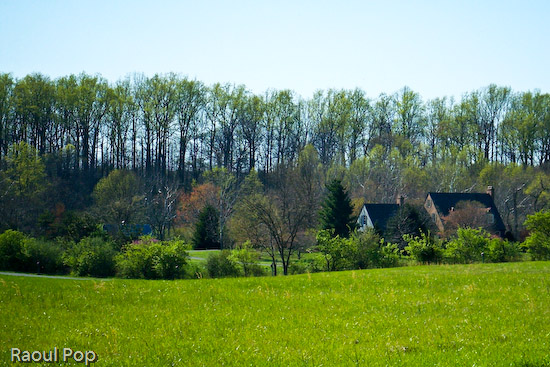
The zoom once again proved useful for getting closer to this lovely country house. In reality it was quite far from the road.
Although there’s some lens flare in this photo, which could have been avoided with a lens hood (but the camera isn’t equipped with one) I love it. This is a portion of the C&O Canal where the water has pooled and is now stationary. Since the canal is no longer maintained, this portion has turned into a swamp. While I wouldn’t wade around in it, it makes for an interesting wildlife habitat, and the afternoon light is superb.
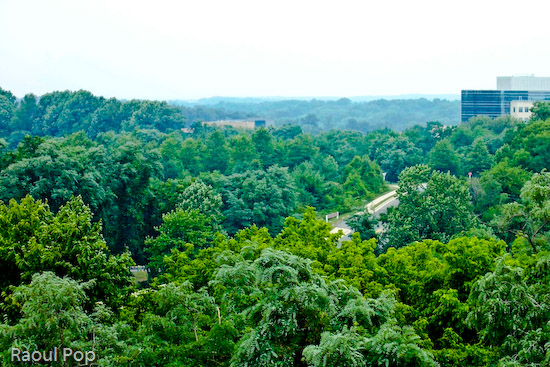
Guess where this photo was taken? It was at the top of the Tyson’s Corner Mall parking lot, looking toward DC. Summer was in full swing, and that’s the reason for the rich, deep green foliage of the trees.
This was taken more recently, right in my community. Those beautiful golden hues can be seen every fall, but I won’t tell you where. I’ll keep it a secret for now. 🙂
I leave you with another beautiful sunrise.
Summary
If you’re interested in a capable little point and shoot with a very powerful zoom for its size, try finding the Kodak v610. I checked and it’s out of stock even at Kodak’s own online store. It seems only Amazon still has a few units left. Though it’s no longer being made, if you can pick up a used one at a reasonable price and provided you understand its limitations, I think you’ll enjoy using it.
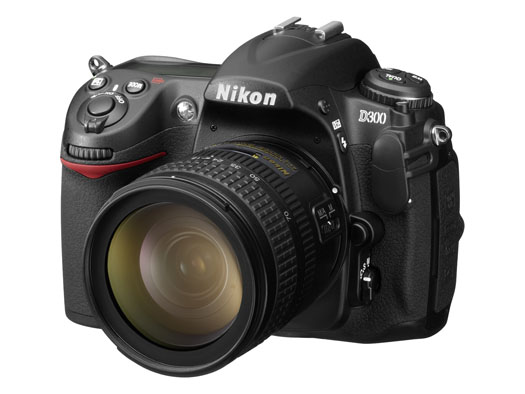
On August 23, 2007, Nikon introduced two new DSLRs to the market: the full frame D3, and the D300, an upgrade to the D200. I’m late with this bit of news — I meant to publish the post sooner, but I was out of the country and I had less access to the internet that I’d hoped. Still, since I went to the trouble of getting nice studio pics for the two cameras, I thought I’d write about it anyway, late or not.
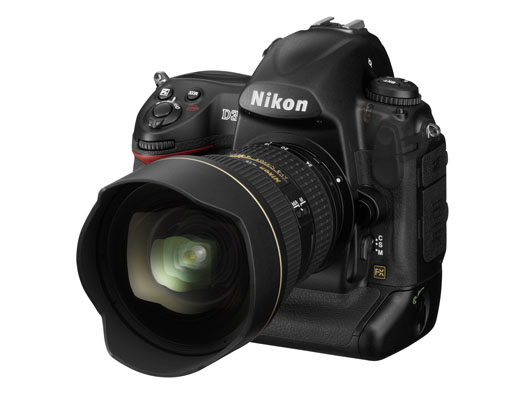
First, a few photos. There’s the D3 below, and the D300 is right after it.
These two cameras have gotten plenty of coverage already. What else is there to be said? Well, remember the big CCD vs. CMOS arguments that went on and on for years? Hmm, let’s see, who was it that argued for CCD? Why, it was Nikon, of course. What have they just done? They’ve switched to CMOS entirely for their new DSLRs.
There was another argument thrown around, also by Nikon and its supporters. Um, yes, I remember now, it had something to do with full-frame vs. cropped sensors. I’m paraphrasing here, but Nikon people were saying something along the lines of “full-frame isn’t needed for digital, it’s useless — we can accomplish everything we want with a cropped sensor.” So, what just happened? Nikon put out a full-frame DSLR.
Short of holding my brother’s D70s in my hand, changing the lens, cleaning its sensor and taking a few photos, I don’t have a lot of hands-on experience with Nikon cameras. I considered buying the D200 this past spring, but opted for the Canon 5D instead. I can tell you what my brother says about his D70s — and believe me, it’s not flattering… It turns out there was a ridiculously high rate of factory defects with that camera, particularly when it came to autofocus. His camera can’t autofocus to save its life. He’s had to use manual focus ever since he bought the camera. He’s finally going to pay to repair it, after more than one and a half years of use. He’d have sent it to Nikon for repair while the warranty was still good, but there are no official Nikon reps in Romania, which is where he lives and works.
We sat there comparing on-screen menus between his D70s and my Canon 5D. He couldn’t believe how easy it was to navigate the menus on my 5D, and to get the settings that he wanted, the first time, right away. He kept mumbling under his breath about how pathetic the D70s was, and how he could never find stuff when he was pressed for time. Heck, I tried to help him find the sensor cleaning mode and gave up after several minutes. We just couldn’t find it. We ended up putting the camera in mirror lock-up mode, pressing the shutter and cleaning the sensor that way. That’s pretty pathetic from a UI (User Interface) point of view.
On the other hand, I’ve heard some people praise Nikon’s controls. I don’t get it. Perhaps if you’ve been a Nikon guy for years, the stuff is just easier to find, but they sure don’t make it easy for someone who picks up the camera and wants to use it. Canon does make it easy, and that’s one of the reasons I like them.
There’s another thing I can say for Nikon in general. Their PR people gave me the run-around when I tried to get a D200 for review. On the other hand, Olympus and Canon were responsive and willing to send me review units. I’ve also heard of really bad customer support experiences from Nikon users.
Take these experiences for what they’re worth. They may have been isolated incidents — or not. I’m certainly willing to forget my bad experience with Nikon PR if they are interested in sending me a D300 or D3 for review. I’ll do what I usually do, which is to use it as my primary camera for one month, then write an honest, detailed review of the experience.
From a design point of view, these two new cameras look really nice. I can’t tell you how they feel in my hand, since I haven’t had the chance to hold them (yet).
I do want to point out that Nikon has more high-res photos for its cameras than Canon. That’s nice. It gives people a chance to get a closer look at them, and it’s an added convenience. You can see the rest of the photos below.
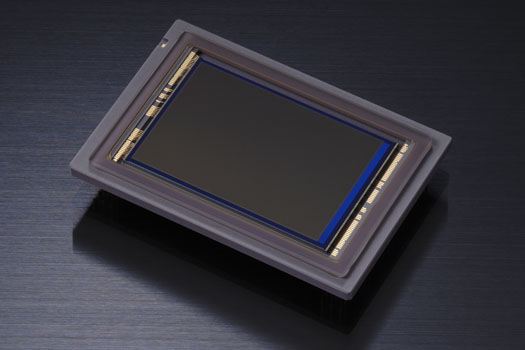
Here’s that troublesome CMOS that Nikon people used to badmouth in the past. It’s the sensor that does what a CCD cannot, which is to enable Nikon to go all the way to 6400 ISO natively on the D3 and 3200 ISO on the D300 (and even all the way up to 12,800 and 25,600 ISO in expanded mode on the D3).
Yes, ISO-wise, Nikon one-upped Canon, but they haven’t managed to get the same amount of resolution from the full-frame sensor that Canon can get. My 5D has roughly the same resolution as the D3 (12.8 vs. 12.1), while the Canon 1Ds Mark III has 21.1 megapixels — but only goes up to 1600 ISO natively. So there’s a certain give and take here that has to do with the physical limitations (at least to date) of the medium.
If you squeeze more pixels out of the same surface area, the pixel pitch decreases and you end up more prone to noise. If you keep the pixel pitch large, you can get more low-light sensitivity, but you don’t have the resolution. Nikon chose to go for low-light sensitivity with their two newest cameras, which I think is an interesting choice. Perhaps they did it to silence the Nikon critics who kept harping on their noise-prone CCD sensors. Whatever the reason, I’d love to see just how one of these two cameras does in low light with a nice fast lens like a 50mm f/1.4 or f/1.2.
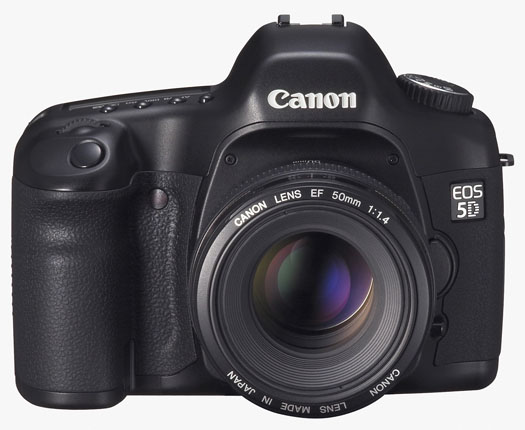
With the release of the new EOS 40D and EOS-1Ds Mark III, it’s easy to forget the camera that changed the entire market: the EOS 5D. It was the first affordable full-frame sensor DSLR ever. I bought it in April of this year, and I still don’t regret the purchase. As a matter of fact, I love my 5D!
❗ Updated 2/1/09: I’ve also written about the new 5D Mark II.
Yes, the newer models that came out have more resolution and low light sensitivity, in addition to the EOS Integrated Cleaning System, which shakes dust off the sensor. It’s annoying to have to clean my 5D’s sensor with swabs once in a while, and to get out my bulb air blower and make sure there’s nothing inside the sensor chamber, but I don’t mind it that much — except when I have to use the Heal brush to get that dust off my photos. Even then, Adobe Lightroom makes it a breeze with its wonderful Heal/Clone tool.
I went back through Canon’s PR section and dug up the 5D’s original press release. You know how we have a healthy amount of mistrust when we read press releases? Well, read through that one and tell me if anything written there turned out to be untrue.
All these new models make me wonder what Canon will do with the 5D. I don’t think the 5D will go away. It fulfills a very important role in the marketplace and it’s beloved by many photographers. But what will happen come November? Will Canon announce a second-generation 5D? I’d kind of like them to hold off on upgrading the 5D till next spring, and I recognize that I’m entirely biased when I say that.
Whenever they decide to upgrade it, here’s what I think will happen:
It will get the EOS Integrated Cleaning system
It will get Live View
The pixel count will go up, possibly to 16 megapixels, but not much beyond that. If they go up higher, the renowned low light sensitivity of the 5D will suffer. Remember, pixel pitch (the space that each pixel occupies on the sensor) has a lot to do with low light sensitivity. The more pixels you squeeze on that sensor, that harder it is to keep noise in check. The DIGIC III processor should help with this, and putting microlenses over each pixel should also help, but I don’t think the new 5D will get more than 16 megapixels. Keeping all this in mind, I’d really like the new 5D to be able to go up to 3200 ISO natively, and to 6400 ISO with expansion turned on.
The battery life will go up slightly
The body will get weatherproofing
The AF will get upgraded with the new system present on the Mark III cameras
Exposure metering will get more zones, possibly as many as the new 1Ds Mark III, or at least as many as the new 40D
Shutter durability will be increased to 300,000 cycles from 100,000 cycles
The LCD screen will be upgraded to 3 inches
The retail price will be around $3,300, just like with the previous model, and the street price will stick pretty close to that for the first few months after the launch
Meanwhile, the existing 5D cameras aren’t outdated by any measurement, and I look forward to using mine for a long time to come. It was a significant investment for me, and I’ll try to get at least 3 years from it before I upgrade.






















 Raoul Pop