Thoughts

In France, politicians still listen to the voice of reason

The New York Times is running a piece on a French teenager by the name of Aziz Ridouan. He has managed to convince the politicians to listen to him when it comes to digital music. He’s only 18 years old, and he’s already founded the Audionautes, a non-profit organization that provides legal assistance to those accused of illegally downloading music. Aziz says most politicians don’t even know what downloading is. That’s shocking, and when I say this, I doubt that only the French politicians are clueless. I think politicians the world over have no real concept of digital music, and iPods, and streaming music over computer networks, or downloading stuff from the Internet and sharing it with your friends.

Yet – and here comes the shocker – they’re making laws about this stuff! It’s no wonder the stuff they put out here in the States is so inane. They’re getting only one side of the story – from the RIAA and organizations like it, NOT from their constituents. At least in France, the land of political paradoxes, they’re willing to listen to a child, an immigrant, and a poor one at that, all rolled into one. Amazing! Kudos to Aziz for helping them get it!

Standard
A Guide To A Good Life, How To

An example of cable management

Ligia and I have recently downsized our living room desk. We used to have a big, bulky desk, and now we’ve got a secretary desk. It’s very beautiful, but it also has much less space than the previous desk, and no integrated cable management whatsoever. What to do? With about $8 of stuff from Home Depot (including plastic ties), I’ve modified the desk to allow us to manage our computer cables in a practical way. The end result and the steps are described below, with photos (click on the thumbnails to enlarge). It took about 45 minutes, but it’s worth it!

This is how our desk looks after the modifications. Notice how there are no annoying cables and wires on the floor. We can move the desk if needed, and we can easily vacuum underneath. It’s a joy!

Desk with cable management in place

So, what did I need to be able to do? First, I needed to fit the following pieces of hardware on that desk:

  • iMac G5 plus keyboard/mouse
  • Two stackable backup hard drives
  • Our PVR (we love it!)
  • The mixing board for our podcasts
  • Lamp
  • Various other paperwork and things
  • Printer (I know it sits beside the desk, but I include it since the cables still have to be managed under the desk)

First, I needed to drill a hole for the iMac cable. I debated its location for a while, but decided on the left hand side, for various reasons:

  • There’s a bookshelf behind the computer
  • There are drawers which couldn’t have opened because of the wire
  • If I put it in an easily accessible location, I can use that to route other cables up, like the one for my cellphone charger.

Here is a photo of that cable hole, which I drilled using a readily available drillbit. I stained it at its inside edge so it would match the color of the desk.

Hole drilled for power cable

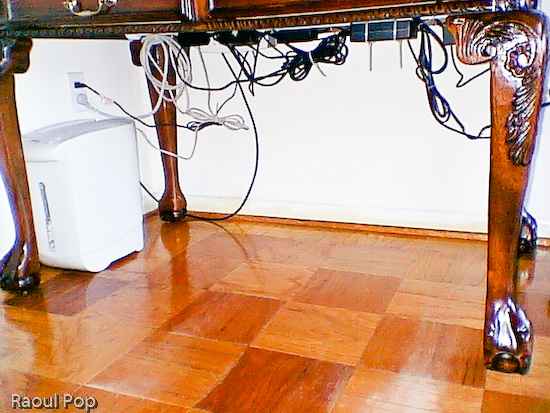
The next step was to cut a piece of white painted pipe (which I bought for something like $2) to the width of the desk, and mount it to the inner sides with two plastic pieces that cost me about $2 each. I used some wood screws I already had. Then I took some assorted cable ties which I’d bought in bulk, and secured the cables to the bar, as shown in the photo below. You can probably get a package that’ll suffice for a job like this for under $2.

Notice how I mounted the surge protector to the inner side of the desk. Again, I used wood screws that I left half-screwed. The surge protector had holes just for this purpose on its back, and it was a matter of measuring the space between them and putting the screws in the wood at the right length. It hooked right on.

I secured the cables to the pipe with the plastic ties after folding the cables nicely, so they wouldn’t dangle needlessly. Notice I left a bit of slack for those cables I’d need to pull. There are few things more annoying that setting everything up perfectly then discovering you need to move a piece but can’t because the cable’s too tight.

A couple of additional things: I also needed to put a paper shredder underneath the desk. I was able to accommodate it just fine. I also routed the coaxial cable along the wall, and to the PVR with the aid of a little cable tie that I screwed into the wall with a drywall screw.

Here’s the end result. Notice that none of those cables are trailing on the floor. I can’t stress the convenience of such a setup enough. It’s a real pleasure to work at that desk now, and it’s also very easy to keep the floor clean.

Underneath the desk with cable management in place

Standard
Thoughts

Too many passwords equals less security

Found an article on CNET News which details a survey done in Britain. It showed that there is a directly proportional relationship between the number of passwords one has to remember for work, and the number of unauthorized accesses on the company’s networks. Here’s the link to the CNET article.

Having been a director of IT twice in my career, this is a no-brainer to me. And here’s another thing I’ve found: the more inane the password rules are, the easier you’ll make it for your users to write their passwords down on a sticky note, which they’ll store either right on the screen, under their keyboard, or in the top desk drawer. If you’re going to use passwords, you need to strike the RIGHT balance between password security and real-world usability. Sadly, many companies fail in this area.

Seems the way to go is single sign-on, with added proximity devices if needed.

Standard
Thoughts

RIAA sues family that doesn't own a PC

This is funny, but in a very sad and surreal sort of way. The RIAA has now filed suit against a family that doesn’t even own a computer. (!) They maintain the family shared songs illegally online, and they even published a list of those songs. I have to wonder how they shared the songs… telepathically, perhaps? Boing Boing has the details on this.

Standard
Reviews

Caveat Emptor: TurboTax is a pain

Before I start, I should say I’ve been a user of TurboTax for several years – can’t remember exactly how many, but for more than 5 years for sure. I couldn’t imagine doing my taxes without it in the past, but after this year’s experience, I’m seriously thinking about switching to something else, just so I don’t end up banging my head on the wall out of utter frustration!

I should also mention that I waited since 4/17 to post this entry in order to cool off. I would have been much more critical if I wrote this last week…

I’ve been using the online version of TurboTax since it came out about two years ago. When I started using it this year, I noticed that it had changed a lot – the graphics were slicker, the site looked nicer, etc. That’s where the good points stopped! The rest of the changes were horrible:

  • Gone was the wonderful screen-by-screen contextual help, with audio and video walk-throughs. Instead, now I had some horrible pop-up help that didn’t help much at all and at times referred me to dig through the IRS site for some form or other such thing.
  • Gone was the easy navigation to specific pages. Now, if I wanted to access a specific screen, I had to start from the beginning of the section and go through e-v-e-r-y little page I didn’t care about, making sure I didn’t mess up my previously answered fields… Horrible, just horrible! This was the single biggest time-waster of this year’s tax season!
  • Gone was the simple, easy to use interface. Now I had a slick but clunky interface, where I had to guess how things were organized. I had this weird dichotomy of thought – on the one hand, I wanted to take a sharp pencil and run it across the screen in anguish, doodling in despair, and on the other hand, the buttons looked so nice… Ugh!
  • Did any of you notice the ridiculous wait times to get to chat live with a rep? For me, it was 50 minutes! Do I have 50 minutes to sit in front of my computer, only to wait for some tired and frazzled rep to answer my question perfunctorily? I think not.

I can’t describe the agony of doing my taxes this year. It was a nightmare. I must have wasted over 10 hours because of TurboTax ‘s horrible navigation and clunkiness! Still, I would have been willing to pull the cover over all these glaring shortcomings if only TurboTax would have been able to do its most basic function, which is… to file my taxes correctly! But no, it had to go and mess that up, too!

I chose to file my taxes electronically this year, and to send in a hand-signed form. I was supposed to get notified by TurboTax when my taxes were electronically accepted by the IRS, so I could come back online and print out the form, sign it, and mail it. Sounds simple, right? Well, they never notified me! My wife and I sat there wondering when it would happen, and come tax day (4/17), we still weren’t notified!

That afternoon, I decided to log back into my account to check the status, and I couldn’t! I kept getting this error, telling me TurboTax couldn’t retrieve my submission status. Well, gosh darn it, why did I pay for this piece of software? No matter how many times I tried, even after logging out, emptying my cache, jumping on one foot, throwing salt over my shoulder, whatever, TurboTax couldn’t retrieve my submission status, and it was getting really, really late – I mean, like 10 minutes before 5 pm late!

Finally, I started looking through the TurboTax help files to see how this error could be addressed – because, of course, TurboTax didn’t provide a link to the specific help page addressing this error next to the error message (duh!). After 10 minutes of digging around and mumbling all sorts of unwell thoughts about TurboTax , I stumbled across some number (not toll-free) I could call to check my status over the phone. When I called, I had to listen to a pre-recorded message telling me how I could check my status online… Would I be calling if I could do that?! So anyway, after navigating through a needless phone menu, I was able to get my information, and to find out that my return had been accepted by the IRS several days earlier. Peachy, or so I thought!

I logged back into my TurboTax acount to print out the special one-page form, but of course, I couldn’t print it because the stinking program couldn’t retrieve my status. Aargh! So I went to the IRS site and printed the form, then filled it in by hand – again, I couldn’t help asking myself why I paid for TurboTax if I had to fill out forms by hand (?!) – only to find out… and it gets better, folks… that it was too late. I was supposed to sign and send the form within 24 hours of the electronic acceptance by the IRS!

At this point, I think steam must have been coming out of my ears! I tell you, I was NOT thinking nice, friendly thoughts about TurboTax , and for good reason! They didn’t notify me the IRS had received my taxes! They were able to do it last year, but not this year!

In the end, I ended up having to print my entire tax forms set from TurboTax and send it into the IRS once more, hoping that they’ll accept it in paper format even though I’d sent it in electronically already… I included the special signature form, for good measure. I hope I won’t get in trouble with the IRS. If I do, I have TurboTax to thank for it!

So, there you have it, my entire, horrible, not to be repeated, experience with TurboTax , which this year, was a dreadful, “pull your hair out” piece of software. You be the judge of whether you want to use it to do your taxes. My take: tax time is stressful enough already without having to deal with buggy, hard to use software.

Standard