Reviews

Pepco fails to fix store's electrical panel after 6 months

âť— Updated 5/27/2008: It has now been a month since I wrote this post, and Pepco still HAS NOT fixed the electrical panel. This makes it 7 months, which is simply unacceptable. I am going to write to Chris Van Hollen, our Congressman, to see if he’d like to get involved in the matter.

âť— Updated 6/09/2008: We received a reply from Congressman Van Hollen on 5/28/2008, just a day after I wrote to him via email, assuring us that he would look into the matter, and putting us in touch with one of his staffers, Miti Figueredo. Today, on 6/09/2008, Pepco showed up with a team of about seven people and got the electricity working again in a matter of hours. I know this wouldn’t have happened without Congressman Van Hollen’s intervention. Congressman, we are deeply grateful and thank you from the bottom of our hearts!

Piano Place, the store where Ligia has her studio, experienced a power outage on November 2, 2007 (over 6 months ago). It was caused by a badly wired electrical panel outside the store, which caught on fire. Pepco, the local (and only) electrical company, has failed to fix that panel ever since, in spite of having the luxury of over 6 months to do it.
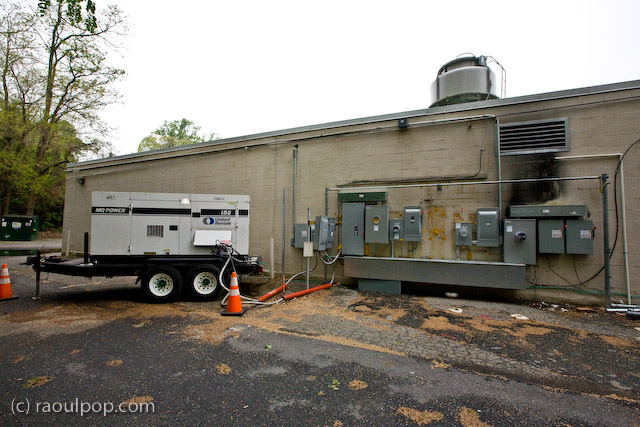
When the panel caught fire, the fire department and the police evacuated all of the stores for a day out of bureaucratic zeal, even though the fire didn’t spread inside the building. Then the store was without power for a few days until a generator was installed outside and connected to the electrical panels.

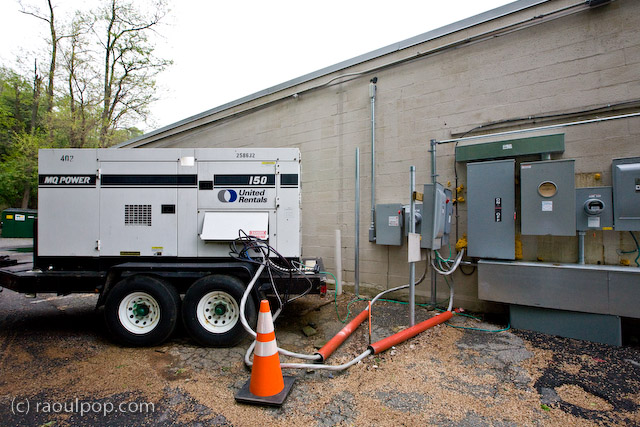
That same generator has sat outside the building since it was installed in November of last year (for over 6 months), waiting for Pepco to get off their lazy bums and fix the electrical panel. You’d think a job like this is of epic proportions, and that’s why it’s taking so long, but as you’ll be able to see from the photos, it’s something that could be done in a day or less with the proper crew.

The smoke on the wall mark the extent of the fire caused by the faulty panels. The wires that carry electricity inside the buildings weren’t damaged, because the generator is connected to them, and the store is able to feed off the generator to get part of its power. Pepco would simply need to fix the panels themselves, but they have offered up excuse after excuse during each of these six months. Appeals to their executives have not helped. The Washington Post has refused to get involved by publishing news of this complete failure in customer service.

Meanwhile, the store is paying $15,000 each month to rent the generator (with fuel charges extra), and still is not up to full power. It has had no air conditioning (only lights) all winter. That means they’ve had to do with space heaters here and there, and Ligia has frozen on many an occasion inside the studio because of Pepco’s utter laziness and unresponsiveness.

Now that summer is approaching and temperatures are climbing into the 80s, the store gets stiflingly hot (understandably so) on those days, because it has no air conditioning. Who’s to blame? Pepco, that’s who!

As if all this is not enough, the store has had the generator stolen once (the entire thing!), and on a separate occasion, it has even had the fuel siphoned off from the generator.
I have to wonder when Pepco will get their act together and fix the damned electrical panel. What will it take to get them to move on this?!

I see this as the strongest possible argument for competition in the marketplace. Pepco has a monopoly on the local power market. There is no other electrical company here, so Pepco can do whatever it pleases and get away with it. There is no one to hold them responsible. The lazy hacks can get away with treating customers like this for months and months, and no one from the local governments seems to care.

I find this outrageous, and I’m fed up with it. So the next time I hear one of Pepco’s hypocritical ads that say “We’re connected to you by more than power lines”, I’ll have to ask what they’re connected with: laziness, lies, inefficiency, procrastination, lack of customer service, monopoly, irresponsibility?

And when I see one of their trucks, I’ll know what sort of people drive them: the sort that would have people freeze in the middle of winter and bake in the summer heat rather than do their jobs.

Standard
Reviews

TurboTax better this year, but still needs work

TurboTaxJust got done with my taxes. Yes! Being a long-time user of TurboTax, I’m naturally concerned with how it fares each year. I’ve been using the online version ever since it came out, and let me tell you, it’s much, much better than it was in 2006, when I had this to say about it. With that in mind, here’s what I think of it right now.

TurboTax has really improved for the 2007 tax year, but it still needs work. While it’s easy to prepare the federal tax return, and to navigate to specific sections when you need to look things up (which was a big complaint of mine in the past), you’re pretty much on your own when it comes to the error check. The messages given for the errors are almost cryptic, there are no links that explain what those fields are, and more importantly, there’s no way to go directly to those fields on the pages without exiting the error check, which defeats its purpose.

This year, I noticed that random fields were carried over from past years, unseen in the online return as I progressed through it. They showed up when I printed it, but there were nowhere to be found in the online forms.

What’s more, the error check discovered that required fields weren’t filled in when the return was prepared, but those fields simply don’t appear on the online forms, so there’s no way to fill them out until you get to the error check.

The state tax return portion of TurboTax still needs serious work. There is absolutely no guidance (field explanations, help files) when you get there. You’re completely on your own, and that sucks. It makes me wonder why I’m paying for that portion of the program. I’d actually be willing to pay more for it if TurboTax offered me real, tangible help there.

Other than the points I outlined above, I found TurboTax to be helpful and easier to use this year. I also saw that it packs more value through the addition of the two downloadable applications (QuickBooks Simple Start and Audit Support). I plan to give those a try when I get a chance, and if I have anything worthwhile to say about that experience, I’ll write about it here.

Standard
Thoughts

Thankful

This is a bit after Thanksgiving, but it’s pertinent.

It was just last summer (in 2006) that I got frustrated with my photography, and decreed that I must improve. Even though I’d been taking photos since 1994, and I had a feel for what looked good, I had no idea what I was doing with the camera. I had no idea of the concepts of photography. I had no idea how to compose a photograph, and how to think about light. In a little more than a year, I’ve gotten pretty far. Now, I look at photos that I took just last summer and I cringe…

I’ve learned so much, and I still have a lot to learn.

I’m thankful for the opportunity to learn about photography. It’s a wonderful occupation, and it relaxes me. I can see the world differently now. I’m a bit guilty of always thinking of photo ops, but I appreciate what I see a lot more nowadays.

I’m also thankful that I was able to afford a wonderful DSLR. I’m very happy with my Canon 5D. Its capabilities allow me to be very flexible and to exploit lighting situations that are simply unattainable with other, less expensive cameras. As I learned more and more about photography last year, I realized that some of the things I wanted to do just couldn’t be done without a DSLR. At that time, I thought the 5D was incredibly expensive. After all, when you’ve been paying $100-400 for your cameras, $2,800 is a big jump in price! Am I sorry I bought it now? No. It’s a great camera.

Here are a couple of photos I took during Thanksgiving dinner with close friends of ours. The wind howled outside and chilled me to the bones as soon as I stepped onto the balcony, but how could I resist such a beautiful dusk?

Thanksgiving sky

Thanksgiving dusk

By the way, I launched a new site last night. It features my photography and only my photography. It’s called, appropriately enough, Raoul Pop Photography.

Standard
Reviews

Upgraded to Leopard

Mac OS X LeopardAlmost two weeks ago, on 11/16/07, I upgraded to Leopard, the new version of Mac OS X. In spite of some negative experiences I’d read about, my upgrade went smoothly and I didn’t lose any data. All of my applications worked afterwards. A couple of them, like 3D Home Architect, required Leopard updates to make them stable again. My version of EyeTV needed to have its most recent upgrade re-applied.

There were a couple of hiccups that I wanted to mention. One occurred during the upgrade process itself, and the other afterwards.

  1. I started the upgrade process and booted from the DVD. Went through the various steps, but when it came time for the Leopard installer to find our iMac’s boot disk, it couldn’t see it. I waited for about 5 minutes, then I clicked the Back button a couple of times, went through those screens again, and after I waited for about 2 minutes, it finally saw the boot disk and allowed me to go on to the next step. I have a feeling this might not have been a hiccup, but that the installer was busy calculating the free disk space on the drive. I thought I’d mention this just case some of you have the same problem.
  2. After the upgrade completed, I configured Time Machine to back up to one of my external drives, and it started the initial backup. It kept going through the evening and overnight, then it crashed in the morning, and the iMac required a hard reboot. In other words, everything was frozen and I had to power it off manually. After I started it back up and restarted Time Machine, it finished the initial backup and it picked things up exactly at the point where it crashed. In other words, it didn’t start backing up the entire drive once more, which I thought was a nice touch.

One thing I did before starting to upgrade was to disconnect ALL peripherals. I figured there was no reason to complicate the upgrade process by having extra USB and Firewire drives, printers and other gadgets connected during that time. When the upgrade process completed, I re-connected them, and found, to my delight, that a new driver for my printer had been packaged with the OS. I didn’t have to run HP’s crummy, old drivers from 2005. Very nice!

I’m very happy with Leopard since we installed it. Our iMac runs a little faster now, thanks to the better memory management and pre-fetching features in Leopard. I love Time Machine and the Remote Desktop features included with the new iChat. These two features were my reasons to upgrade to Leopard, and I’m very glad to see that Apple delivered the goods.

Another feature I love is Spaces. I love being able to separate my applications so easily, and I love being able to assign them to different screens. I know that when I start up a certain app, it’ll run in a certain space and won’t clutter up my primary space. That’s awesome.

One thing I didn’t like about the previous version of OS X (Tiger), was the fact that when I used a key shortcut to access my home folder (Command + Shift + H) or the apps folder (Command + Shift + A), it would commandeer any existing open window and go to that location. I wanted to keep the existing location and open a new window, but Tiger wouldn’t let me do it. The same thing still happens in Leopard, and what’s more, when I use Spaces and I’m in screen 2, for example, pressing a key shortcut to access the apps folder will open it up in Screen 1, defeating the purpose of using separate screens. This is one piece of interaction that should be changed.

Mac OS X Leopard Guided Tour I’m otherwise a very happy customer, and I think Leopard is a worthwhile upgrade from Tiger. The new features are awesome.

If you’re thinking about upgrading, I would highly recommend watching the guided tour so you know what to expect. If you can’t watch the video, the booklet included with the Leopard DVD disc is another great resource.

More information

Standard
How To

Do not allow websites to resize your browser window

Websites that resize my browser’s window or maximize it are completely annoying. When someone does that to me, no matter how interesting their content may be, I go somewhere else instantly. Fortunately, there’s a way to block anyone from messing with my browser windows or tabs in Firefox. Here’s how to do it:

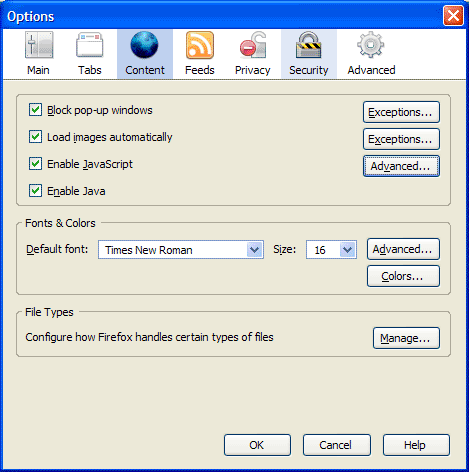
First, go to Tools >> Options, then click on the Content icon in that dialog box. It should look like this:

Firefox content options

Now click on the Advanced button next to the “Enable JavaScript” checkbox. You’ll get the following dialog box:

Firefox advanced javascript settings

Make sure to uncheck the following options:

  • Move or resize existing windows
  • Raise or lower windows

Click on the OK button twice to save the changes, and then you’re done. This will disallow any website to adjust the size of your browser window. It’s a great way to make sure your browsing experience stays yours.

Standard